
1. Overview
The Hilitand DC Boost Converter Adjustable Power Module (Model: Hilitand7nivuemc48) is a versatile power supply designed for various applications requiring precise voltage and current control. This module features a clear LCD display for real-time monitoring of input/output voltage, current, power, capacity, and time. It incorporates multiple software mechanisms for protection, ensuring safe and reliable operation.
Key features include:
- Multiple software mechanisms with adjustable thresholds for enhanced safety.
- LCD display showing input/output voltage, output current, output power, output capacity, and output time.
- Constructed from durable ABS material for longevity.
- Thick heat sink for efficient heat dissipation, maintaining optimal performance.
- Automatic shutdown of output if working parameters exceed set thresholds.
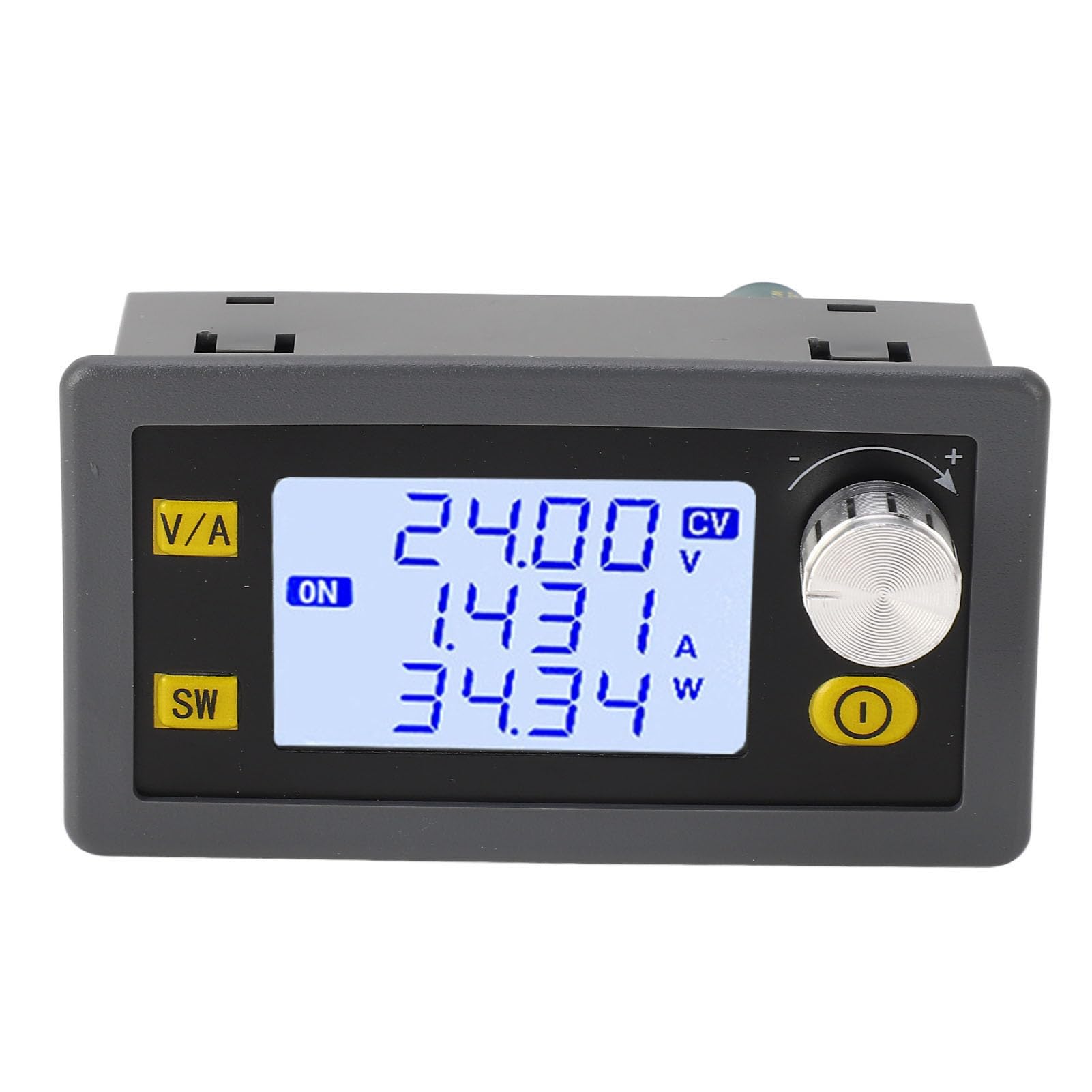
Figure 1: Hilitand DC Boost Converter Adjustable Power Module.
2. Safety Information
Please read and understand all safety instructions before operating this device. Failure to follow these instructions may result in electric shock, fire, or serious injury.
- Electrical Safety: Ensure all connections are secure and correctly polarized before applying power. Do not exceed the specified input and output voltage/current limits.
- Ventilation: Ensure adequate ventilation around the module to prevent overheating. The integrated heat sink requires proper airflow.
- Environment: Operate the device in a dry environment, away from moisture, dust, and corrosive substances.
- Handling: Avoid touching exposed electrical components when the device is powered on.
- Children: Keep the device out of reach of children.
- Disassembly: Do not attempt to disassemble or modify the module. Unauthorized modifications may void the warranty and pose safety risks.
3. Setup
3.1. Component Identification

Figure 2: Front view of the module with display details.
Refer to Figure 2 for a visual guide to the module's display and controls. The LCD shows various parameters, and the buttons allow for configuration.
3.2. Assembly (if applicable)
If your module came with a protective casing, follow these steps for assembly:
- Carefully remove any protective films from the acrylic casing parts.
- Align the main circuit board with the bottom casing piece.
- Secure the board using the provided standoffs and screws.
- Place the top casing piece, ensuring all buttons and display align correctly.
- Fasten the top piece with the remaining screws.
Video 1: Assembly and basic operation demonstration of a similar power module. This video shows the physical assembly of the module into its acrylic casing and initial power-on procedures.
3.3. Electrical Connections
Connect the input power source and output load to the designated terminals. Observe polarity carefully.
- Input Terminals (VIN+ / VIN-): Connect your DC input power source (5-30V) to these terminals. Ensure correct positive (+) and negative (-) connections.
- Output Terminals (OUT+ / OUT-): Connect your load to these terminals. Ensure correct positive (+) and negative (-) connections.

Figure 3: Top-down angled view showing the input and output terminals for electrical connections.
4. Operation
4.1. Power On/Off
After making all connections, apply power to the input terminals. The LCD display will illuminate, showing current parameters.
- To turn the output ON or OFF, press the dedicated Power Key (often labeled with a circle and vertical line icon).
4.2. Display Modes
The module features various display modes to monitor different parameters. Use the SW button to cycle through these modes:
- Output Voltage (F0): Displays the current output voltage.
- Input Voltage (F1): Displays the current input voltage.
- Alternating Display (F2): Alternates between displaying output and input voltage.
- USB Output Voltage (USB): Displays USB output voltage and allows turning USB output ON/OFF (if applicable).
- Power (W): Displays the current output power in Watts.
- Capacity (Ah): Displays the accumulated output capacity in Ampere-hours.
- Energy (Wh): Displays the accumulated output energy in Watt-hours.
- Time (h): Displays the accumulated operation time in hours.
Figure 4: Detailed view of the LCD display showing various parameters and their labels.
4.3. Setting Output Voltage and Current
To adjust the output voltage and current, use the V/A button and the rotary encoder knob.
- Enter Setting Mode: Short press the V/A button to enter the voltage/current setting interface.
- Select Parameter: Rotate the encoder knob to select the digit you wish to change (e.g., units, tens, decimals).
- Adjust Value: Press the encoder knob to confirm the selected digit, then rotate to adjust the value.
- Switch between Voltage/Current: Short press the V/A button again to switch between setting voltage and current.
- Exit Setting Mode: Long press the V/A button to save changes and exit the setting interface.
Video 2: Demonstration of setting voltage and current on a similar Buck-Boost converter. This video illustrates how to navigate the settings and adjust output parameters.
4.4. Protection Settings
The module includes several protection features to safeguard the device and connected equipment. To access and adjust these settings:
- Enter Protection Settings: Long press the SW button to enter the protection settings interface.
- Navigate Settings: Use the rotary encoder knob to scroll through different protection parameters (e.g., LVP, OVP, OCP, OPP, OHP, OAP, OEP).
- Adjust Thresholds: Short press the encoder knob to select a parameter, then rotate to adjust its threshold value. Press again to confirm.
- Exit Protection Settings: Long press the SW button to save changes and exit.
Available protection settings:
- LVP (Input Undervoltage Protection): Default 4.7V. Adjustable from 4.7-30V.
- OVP (Output Overvoltage Protection): Default 32V. Adjustable from 0-32V.
- OCP (Output Overcurrent Protection): Default 4.2A. Adjustable from 0-4.2A.
- OPP (Output Overpower Protection): Default 36W. Adjustable from 0-51W.
- OHP (Over Temperature Protection): Default 95℃.
- OAP (Over Capacity Protection): Default Off. Adjustable from 0-9999AH.
- OEP (Super Energy Protection): Default Off. Adjustable from 0-9999WH.
5. Maintenance
Proper maintenance ensures the longevity and reliable operation of your Hilitand DC Boost Converter.
- Cleaning: Use a soft, dry cloth to wipe the exterior of the module. Do not use liquid cleaners or solvents. Ensure the device is powered off and disconnected before cleaning.
- Ventilation: Periodically check that the heat sink and ventilation slots are free from dust and debris to maintain efficient cooling.
- Storage: When not in use for extended periods, store the module in a cool, dry place, away from direct sunlight and extreme temperatures.
- Connections: Regularly inspect all electrical connections for tightness and signs of wear or corrosion.
6. Troubleshooting
If you encounter issues with your DC Boost Converter, refer to the following common problems and solutions:
| Problem | Possible Cause | Solution |
|---|---|---|
| No display/No power output | Incorrect input voltage; Loose connections; Power key off. | Check input voltage (5-30V); Verify all connections are secure; Press the Power Key to turn output ON. |
| Output voltage unstable | Input power source unstable; Load too high; Faulty connections. | Ensure stable input power; Reduce load; Recheck connections. |
| Overheating | Insufficient ventilation; Excessive load; High ambient temperature. | Ensure proper airflow around the heat sink; Reduce load; Operate in a cooler environment. |
| Protection activated (e.g., OVP, OCP) | Output parameters exceeded set thresholds. | Check load and output settings; Adjust protection thresholds if necessary (refer to Section 4.4). |
If the problem persists after attempting these solutions, contact customer support.
7. Specifications
Technical specifications for the Hilitand DC Boost Converter Adjustable Power Module (Model: Hilitand7nivuemc48):
| Parameter | Value |
|---|---|
| Model | XY SK35H |
| Material | ABS |
| Input Voltage | 5-30V |
| Output Voltage | 0.6-30V |
| Output Current | 0-4.0A |
| Voltage Accuracy | ±0.5% + 1 Word |
| Output Power | 35W (Heat Dissipation) / 50W (Air Cooled Heat Dissipation) |
| Current Accuracy | ±0.5% + 3 Words |
| Voltage Resolution | 0.01V |
| Current Resolution | 0.001A |
| Conversion Efficiency | Approx. 88% |
| Soft Start | Yes |
| Input Anti-Reverse Connection | Yes |
| Output Backflow Prevention | Yes |
| Item Weight | 90 g |
| Parcel Dimensions | 10.3 x 6.2 x 5.2 cm |

Figure 5: Dimensions of the Hilitand DC Boost Converter module.
8. Warranty & Support
This Hilitand product is covered by a standard manufacturer's warranty. For specific warranty terms and conditions, please refer to the documentation included with your purchase or contact Hilitand customer support.
For technical assistance, troubleshooting, or any inquiries regarding your product, please visit the official Hilitand website or contact their customer service department. Keep your purchase receipt and model number (Hilitand7nivuemc48) handy when seeking support.