
1. Introduction
This manual provides detailed instructions for the XXK 4-Zone 2.4G Wireless RF Remote Control, Model RC02RF. This remote is designed for effective control and regulation of CCT LED strip lights, offering advanced radio frequency technology for reliable operation.
Please read this manual thoroughly before using the product to ensure proper function and to prevent damage.
2. Product Overview
The XXK RC02RF remote control utilizes 2.4G wireless RF technology, providing a control distance of up to 99 feet (30 meters) with 360-degree coverage, allowing control even through walls. It features a sensitive color adjustment touch wheel and button design for intuitive control of brightness and color temperature.

Image 2.1: XXK RC02RF 4-Zone 2.4G Wireless RF Remote Control. This image shows the white remote control with its touch color wheel and various buttons, resting on its packaging.
2.1 Remote Control Layout and Functions

Image 2.2: Detailed diagram of the XXK RC02RF remote control, highlighting each button and its function, along with physical dimensions.
- Master ON/OFF: Powers the connected lights on or off.
- Color Ring: Touch-sensitive wheel for adjusting color temperature (2700K-6500K) and saturation.
- Brightness +/-: Adjusts the light brightness from 1% to 99%.
- Color Temp/Saturation +/-: Fine-tunes color temperature or saturation.
- Dynamic Modes (M): Cycles through pre-programmed dynamic lighting effects.
- White Light: Activates pure white light mode.
- Speed +/-: Adjusts the speed of dynamic lighting modes.
- Zone ON/OFF (1-4): Individual buttons to turn on/off or select specific lighting zones.
- Zone Link/Unlink (-): Used for pairing the remote with controllers.
3. Setup and Pairing
The RC02RF remote control requires 2x AAA batteries (not included). Ensure batteries are inserted with correct polarity before use.
3.1 Battery Installation

Image 3.1: View of the XXK RC02RF remote control, showing the battery compartment on the back, which requires two AAA batteries.
- Locate the battery compartment on the back of the remote control.
- Slide open the battery cover.
- Insert two AAA batteries, ensuring correct polarity (+/-).
- Close the battery cover securely.
3.2 Pairing with LED Controller
The remote control must be paired with a compatible LED controller (e.g., WB5, LM053, LM052) to function. Follow these steps for successful pairing:

Image 3.2: Step-by-step visual guide for linking the XXK remote control to an LED controller and strip light.
- Power Cycle: Turn off the LED controller and wait for at least 10 seconds.
- Power On: Turn the LED controller back on.
- Initiate Pairing: Within 3 seconds of powering on the controller, quickly press the 'ON' button of any desired 'Zone' (1, 2, 3, or 4) on the RC02RF remote control three times.
- Confirmation: The connected LED strip light will blink slowly three times, indicating successful pairing and grouping.
To unlink a zone, repeat the same process, but press the 'OFF' button of the desired zone three times within 3 seconds of powering on the controller. The light will blink quickly three times to confirm unlinking.
4. Operating Instructions
Once paired, the RC02RF remote control allows for comprehensive management of your CCT LED strip lights.
4.1 Zone Control
The remote supports 4-zone group control, allowing you to manage different lighting areas independently or simultaneously.

Image 4.1: Illustration demonstrating the 4-zone group control capability of the remote, showing different lighting zones in a room.
- Press the 'ON' button for a specific zone (1-4) to select and control that zone.
- Press the 'OFF' button for a specific zone to turn off lights in that zone.
- To control all zones simultaneously, ensure no specific zone is selected, or press the Master ON/OFF button.
4.2 Brightness Adjustment
Use the 'Brightness +' and 'Brightness -' buttons to adjust the light intensity. The brightness can be set from 1% (dimmest) to 99% (brightest).
4.3 Color Temperature Adjustment
The color ring allows for precise adjustment of the color temperature. Touch the desired point on the color ring to select a color temperature between 2700K (warm white) and 6500K (cool white). The 'Color Temp/Saturation +/-' buttons can be used for fine-tuning.
4.4 Dynamic Modes
Press the 'M' button to cycle through various pre-programmed dynamic lighting modes. Use the 'Speed +' and 'Speed -' buttons to adjust the speed of these dynamic effects.
5. Compatibility
The XXK RC02RF remote control is compatible with a range of XXK LED strip light controllers, including:
- WB5 WIFI Controller
- LM053 Bluetooth Mesh Controller
- LM052 Zigbee Controller
These controllers support various LED strip types, including RGB, RGBW, CCT, RGBCCT, and Dimmer functions.
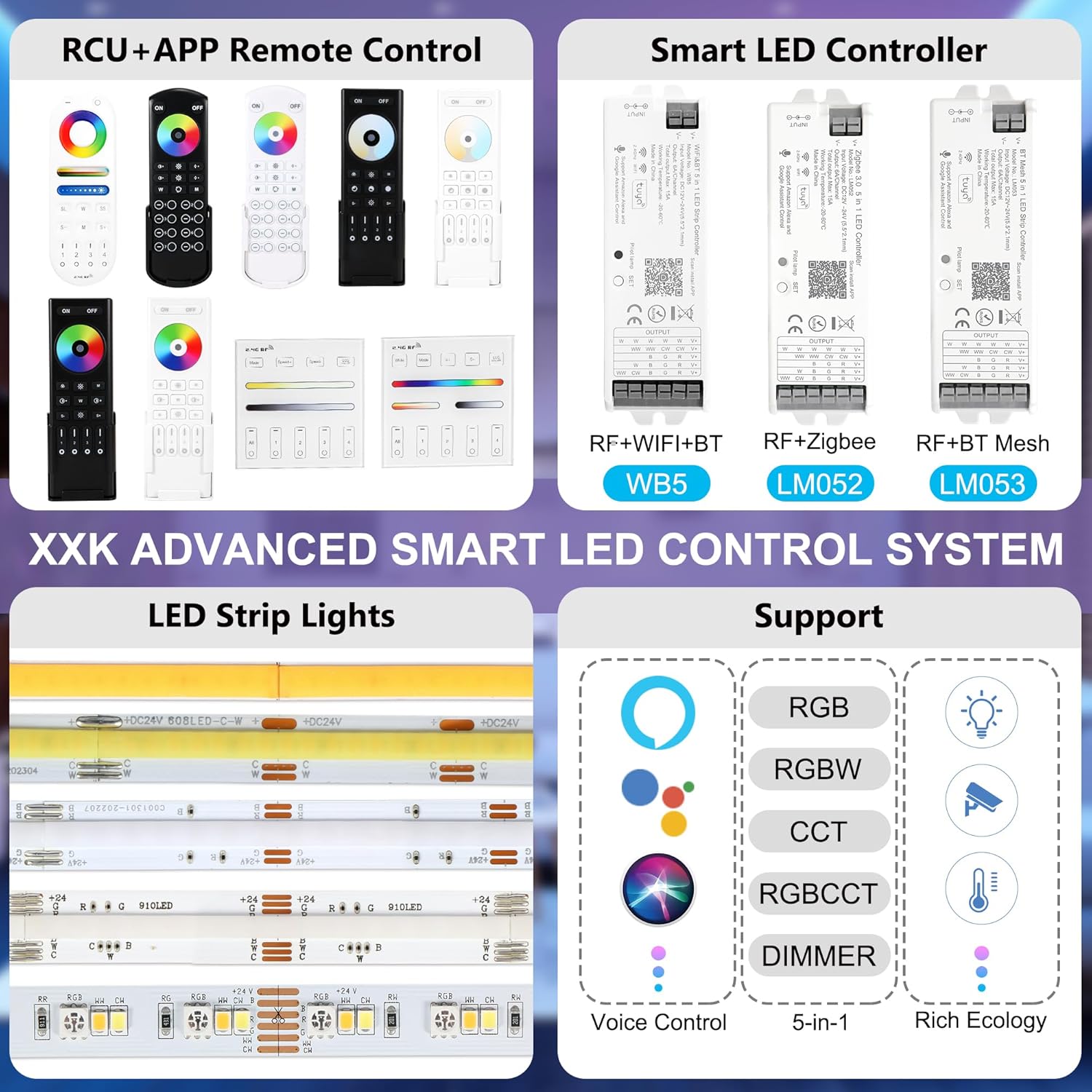
Image 5.1: Overview of the XXK Advanced Smart LED Control System, illustrating compatibility with various controllers and LED strip types.

Image 5.2: Diagram showing the XXK Lights Smart Control System, including the RC02RF remote, other remote models, and compatible LED controllers and strip lights.
6. Specifications
| Feature | Specification |
|---|---|
| Brand | XXK |
| Model Number | RC02RF |
| Part Number | RC02RF |
| Control Type | 2.4G Wireless RF |
| Control Distance | Up to 99 ft (30 meters) |
| Control Zones | 4-Zone Group Control |
| Color Temperature Adjustment | 2700K - 6500K |
| Brightness Adjustment | 1% - 99% |
| Power Source | 2 x AAA Batteries (not included) |
| Item Weight | 3.2 ounces |
| Product Dimensions | 1 x 1 x 0.5 inches |
| Special Feature | Ergonomic design |
| Compatible Devices | Various XXK lighting controllers (WB5, LM053, LM052) |
7. Troubleshooting
If you encounter issues with your XXK RC02RF remote control, please refer to the following common solutions:
- Remote Not Responding:
- Check if the batteries are correctly inserted and have sufficient charge. Replace batteries if necessary.
- Ensure the remote is within the effective control range (up to 99ft) of the paired controller.
- Pairing Failure:
- Ensure you are following the pairing steps precisely, especially the timing (pressing the 'ON' button three times within 3 seconds of controller power-on).
- Verify that the LED controller is powered on and functioning correctly.
- Try unlinking any previously paired remote from the controller before attempting to pair a new one.
- Lights Flickering or Unresponsive:
- Perform a power cycle on the LED controller: unplug it for 30 seconds, then plug it back in. This can resolve temporary glitches.
- Check for any strong electromagnetic interference near the controller or remote.
- Incorrect Color or Brightness:
- Ensure the remote is paired to the correct zone.
- Recalibrate by unlinking and re-pairing the remote with the controller.
8. Maintenance and Care
- Keep the remote control dry. Moisture can damage internal circuits.
- Avoid exposing the remote to extreme temperatures.
- Clean the remote with a soft, dry cloth. Do not use harsh chemicals or abrasive cleaners.
- If not using the remote for an extended period, remove the batteries to prevent leakage.
9. Warranty and Support
For warranty information or technical support, please refer to the product packaging or contact the seller directly through your purchase platform. You may also visit the official XXK store for additional resources and contact details:

