
1. Introduction
This manual provides essential instructions for the safe and effective use of your URGENEX 2000mAh 7.4V Li-ion battery pack and accompanying USB charger. Please read this manual thoroughly before operating the product to ensure proper function and longevity.
2. Product Overview
The URGENEX 2000mAh 7.4V Li-ion battery is designed for various remote control (RC) applications, including helicopters, cars, trucks, and boats. It offers high capacity and a reliable power source for extended operation.
Package Contents:
- 2 x URGENEX 2000mAh 7.4V Li-ion Batteries with JST Plug
- 1 x 1-to-2 USB Charger
- 1 x User Manual (this document)
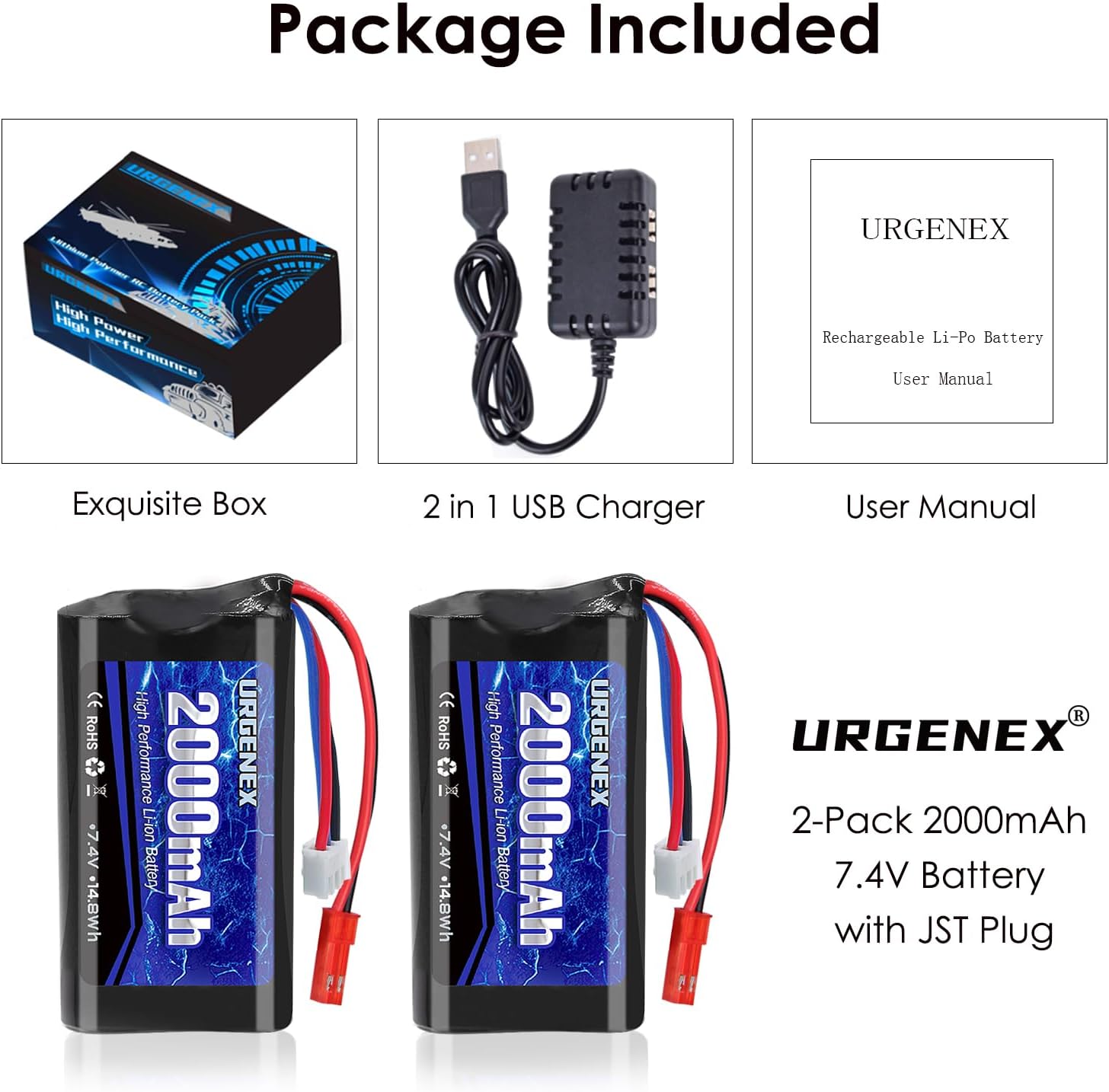
Image: The package includes two URGENEX 2000mAh 7.4V Li-ion batteries, a 1-to-2 USB charger, and a user manual, all contained within an exquisite box.
Key Features:
- High Capacity: 2000mAh for extended run times.
- Voltage: 7.4V (2S configuration).
- Discharge Rate: 15C for consistent power delivery.
- Connector Type: JST Plug.
- Balancing Connector: JST-XH for balanced charging.
- Cable: 18AWG Silicone Cable for durability.
- Long Cycle Life: Designed for at least 300 charge cycles.
- No Memory Effect: Allows charging at any time without full discharge.

Image: A graphic highlighting the battery's key features: 15C high discharge rate, 2000mAh high capacity, 7.4V performance, and the inclusion of two batteries and one charger.

Image: Close-up view of the URGENEX Li-ion battery, showing the red JST plug, the white JST-XH balancing connector, and the 18AWG silicone cables.
3. Specifications
Battery Specifications:
- Model: 18650
- Capacity: 2000mAh
- Voltage: 7.4V
- Discharge Rate: 15C
- Connector: JST Plug
- Balancing Connector: JST-XH
- Dimensions: 70 x 37 x 19 mm (2.75 x 1.45 x 0.74 inches)
- Weight: 100 g (3.52 oz) per unit
- Battery Cell Composition: Lithium Ion
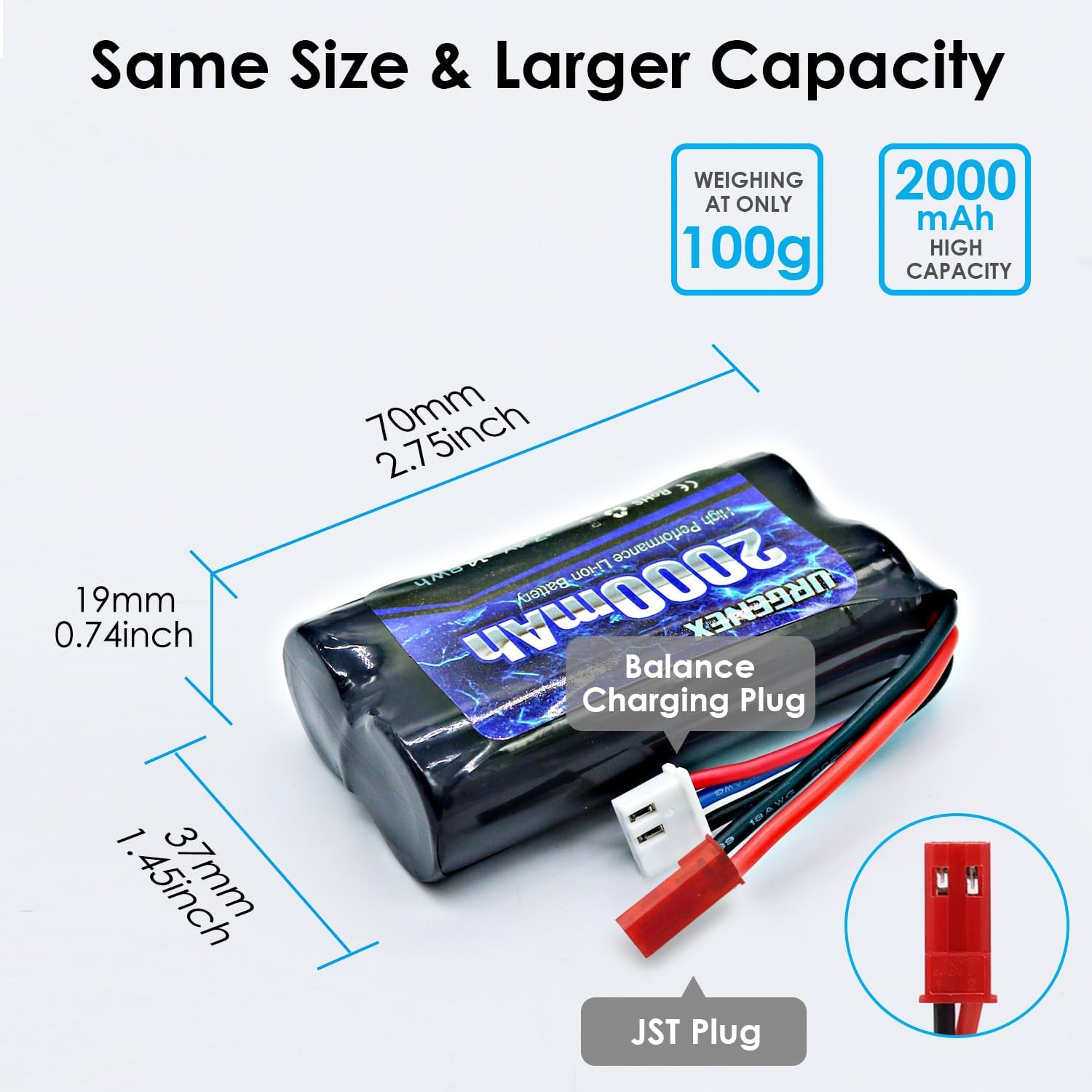
Image: A diagram illustrating the dimensions of the URGENEX 2000mAh battery: 70mm (2.75 inches) length, 37mm (1.45 inches) width, and 19mm (0.74 inches) height, also showing the JST plug and balance charging plug.
Charger Specifications:
- Input: DC 5V 2A
- Output: DC 7.4V 1000mA x 2
- Cable Length: 56cm (approximately 2ft)
- Compatibility: Designed for 7.4V LiPo Batteries with XH-3Pin Plug
- Safety Features: Overload protection, overvoltage protection, overcharge protection

Image: A graphic detailing the specifications of the URGENEX USB charger, including input, output, cable length, and safety features.
4. Setup: Charging Instructions
Follow these steps to safely charge your URGENEX Li-ion batteries:
- Connect the USB charger to a compatible power source (e.g., a computer USB port, power bank, or wall adapter with DC 5V 2A output).
- When the charger is powered on without any battery connected, the red indicator light will be solid.
- Connect the JST-XH balancing connector of the battery to one of the charging ports on the USB charger. Ensure the connection is secure and correctly oriented.
- During charging, the charger's indicator light for that port will show a solid red light and a flashing green light.
- Once the battery is fully charged, the indicator light will turn solid green.
- Disconnect the battery from the charger immediately after it is fully charged. Do not leave batteries unattended while charging.
- The charger supports charging two batteries simultaneously, with each output port operating independently.

Image: The URGENEX USB charger connected to two batteries, illustrating how to charge them using a laptop USB port or a wall adapter.
Charger Indicator Light Status:
| Status | Indicator Light |
|---|---|
| Charger powered on, no battery connected | Solid Red |
| Battery charging in progress | Solid Red, Flashing Green |
| Battery is fully Charged | Solid Green (Unplug promptly) |

Image: A table visually representing the LED indicator states of the URGENEX charger for different charging conditions.
5. Operating Instructions
The URGENEX 2000mAh 7.4V Li-ion battery is designed for use in various RC models. Ensure the battery's voltage, dimensions, and plug type match the requirements of your RC device before connection.
- After charging, carefully connect the JST plug of the battery to the corresponding port on your RC helicopter, car, truck, or boat.
- Ensure the connection is firm to prevent power interruptions during operation.
- Always check the battery compartment size of your RC vehicle to confirm the battery fits properly.
- Avoid over-discharging the battery. Stop using the RC device when you notice a significant drop in performance or speed.
Compatibility:
This battery is compatible with a wide range of RC models. Please verify your device's specifications against the battery's parameters (7.4V, JST Plug, dimensions) for proper fit and function.
| RC Car Models | Compatibility | Transmitter Models | Compatibility |
|---|---|---|---|
| HQ957 | ✓ | TX16S | ✓ |
| HQ948 | ✓ | T16 pro | ✓ |
| HQ848 | ✓ | T12 pro | ✓ |
| MJX F45 | ✓ | T8SG | ✓ |
| MJX T23 | ✓ | FrSky Horus X10 | ✗ |
| Horse 9118 | ✓ | Radiolink T8FB | ✗ |

Image: A compatibility chart showing various RC car and transmitter models that are compatible or incompatible with the URGENEX battery.
6. Maintenance and Storage
- Charging: Always use the provided URGENEX charger or a compatible Li-ion charger. Do not overcharge or over-discharge the battery.
- Storage: Store batteries in a cool, dry place away from direct sunlight and extreme temperatures. For long-term storage, charge the battery to approximately 50% of its capacity.
- Temperature: Avoid exposing batteries to temperatures below 0°C (32°F) or above 60°C (140°F).
- Physical Damage: Do not puncture, drop, or disassemble the battery. If the battery appears damaged, swollen, or leaking, discontinue use immediately and dispose of it properly.
- Cleaning: Keep battery terminals clean and free from dirt or corrosion.
7. Troubleshooting
Battery Not Charging:
- Check Connections: Ensure the USB charger is securely plugged into a power source and the battery's balancing connector is firmly attached to the charger.
- Verify Power Source: Confirm the USB power source (laptop, power bank, wall adapter) is functioning correctly and provides DC 5V 2A output.
- Inspect Battery: Check the battery for any visible damage, swelling, or leaks. Do not attempt to charge a damaged battery.
- Charger Indicator: Refer to the "Charger Indicator Light Status" table in Section 4 to understand the charger's current state. If the indicator lights do not behave as expected, the charger or battery may be faulty.
- Try Another Port/Battery: If charging multiple batteries, try a different charging port or a different battery to isolate the issue.
Short Run Time:
- Full Charge: Ensure the battery is fully charged before use (solid green indicator on charger).
- Battery Age/Cycles: Li-ion batteries degrade over time and with charge cycles. After approximately 300 cycles, performance may decrease.
- Environmental Factors: Extreme cold temperatures can reduce battery performance.
- Vehicle Load: High-demand RC applications or heavy vehicles will naturally consume power faster.
8. Safety Information
Lithium-ion batteries can be hazardous if not handled properly. Please observe the following safety precautions:
- Charging Safety:
- Always charge batteries on a non-flammable surface and away from flammable materials.
- Never leave charging batteries unattended.
- Use only the specified charger.
- Do not charge batteries that are swollen, leaking, or damaged.
- Handling and Storage:
- Do not short-circuit the battery terminals.
- Keep batteries away from children and pets.
- Do not expose batteries to water or moisture.
- Avoid physical shock or vibration.
- If the battery becomes hot during use or charging, discontinue use immediately.
- Disposal:
- Dispose of batteries according to local regulations. Do not dispose of them in household waste.
- Never incinerate batteries.
9. Warranty and Customer Support
URGENEX offers a one-year warranty for this product, covering manufacturing defects from the date of purchase. Additionally, we provide lifelong customer service to assist you with any questions or issues you may encounter.
For warranty claims, technical support, or any other inquiries, please contact URGENEX customer service through the retailer's platform or the official URGENEX website.