
1. Introduction
Welcome to the MOLGRIA SKYLOONG GK87 Mechanical Gaming Keyboard. This advanced keyboard features a unique Jellyfish theme with ASA profile PBT pudding keycaps, hot-swappable red machinery switches, and versatile triple-mode connectivity. Designed for both gaming and productivity, it includes three programmable knobs and an LCD display for enhanced control and information at your fingertips.

Image: The MOLGRIA SKYLOONG GK87 Jellyfish Gaming Keyboard, showcasing its unique design and RGB backlighting.
2. Package Contents
Please ensure all items are present in your package:
- MOLGRIA SKYLOONG GK87 Mechanical Gaming Keyboard
- Keycap Puller
- Keycap & Switch Puller
- 11x Complement Red Machinery Switches (Gateron)
- Key Stabilizers
- Supplement Keys & Split Spacebar
- USB to Type-C Cable
- 2.4G Wireless Receiver

Image: A visual representation of all items included in the MOLGRIA SKYLOONG GK87 keyboard package.
3. Setup
3.1. Connectivity Modes
The GK87 keyboard supports three connection modes: Wired (USB Type-C), Bluetooth, and 2.4G Wireless.
- Wired Mode: Connect the keyboard directly to your computer using the provided USB to Type-C cable. The keyboard will automatically switch to wired mode.
- 2.4G Wireless Mode: Locate the 2.4G receiver (dongle) stored in the keyboard's side slot. Plug the receiver into an available USB port on your computer. The keyboard will attempt to pair automatically.
- Bluetooth Mode: The keyboard supports up to three Bluetooth devices. Use the LCD screen and knobs to select BT1, BT2, or BT3 mode and initiate pairing with your device.

Image: Side view of the keyboard showing the USB-C port, USB-A port, and the storage slot for the 2.4G wireless receiver.
3.2. Ergonomic Adjustment
The keyboard features adjustable feet on the underside to customize the typing angle for improved comfort and ergonomics.
Video: This video demonstrates the various connectivity options (wired, 2.4G, Bluetooth) and physical features of the Skyloong GK87 Pro keyboard, including the adjustable feet.
4. Operating Instructions
4.1. Basic Key Functions
The GK87 features a standard QWERTY layout with additional function keys and a dedicated navigation cluster. All keys are designed for comfortable and responsive typing.
4.2. RGB Backlighting
The keyboard offers multiple RGB lighting modes. The side transparent pudding PBT keycaps are double-shot, allowing the RGB light to shine through for a vibrant visual effect. Use the dedicated function keys or the LCD display settings to cycle through different lighting effects, adjust brightness, and change speed.
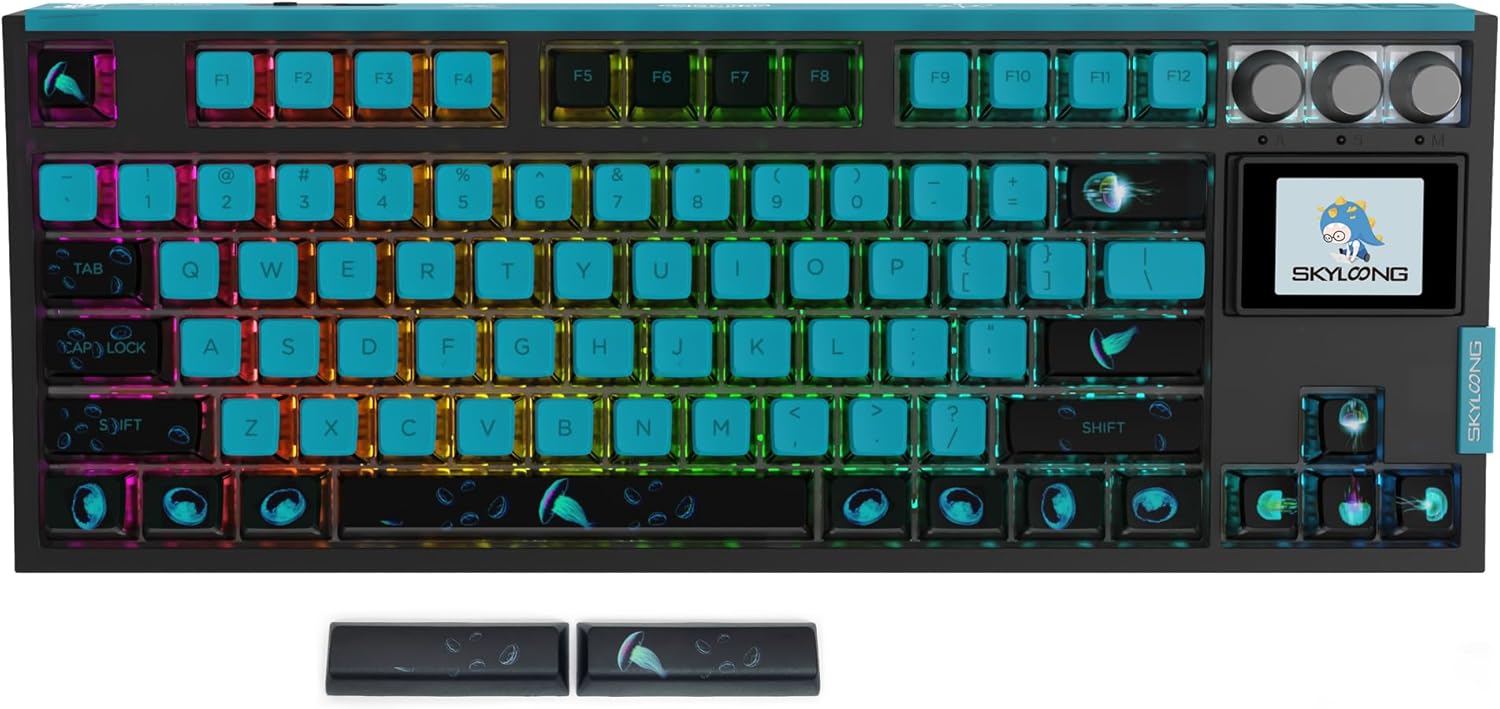
Image: The MOLGRIA SKYLOONG GK87 keyboard with its vibrant RGB backlighting illuminating the Jellyfish-themed pudding keycaps.
Video: This video demonstrates how to adjust RGB lighting effects, colors, brightness, and speed using the knobs and function keys on a similar mechanical keyboard (RedThunder K95).
4.3. LCD Display and Knobs
The keyboard features an LCD display and three multi-function knobs. The display provides real-time information such as time, date, battery percentage, and connection mode. The knobs can be used to:
- Adjust volume (outer right knob).
- Navigate through settings on the LCD display (inner right knob).
- Control media playback (leftmost buttons).

Image: A close-up of the MOLGRIA SKYLOONG GK87's LCD screen and control knobs, showing the display with the SKYLOONG logo.
Video: This video demonstrates how to change the language settings on the keyboard's LCD screen using function keys and the navigation knob.
5. Customization
5.1. Hot-Swappable Switches
The GK87 features hot-swappable switches, allowing you to easily change the mechanical switches without soldering. Use the provided keycap and switch puller to remove existing switches and install new ones to customize your typing experience.

Image: A close-up of the keyboard with several keycaps and switches removed, revealing the hot-swappable sockets.
Video: This video demonstrates the process of removing and replacing keycaps and switches on a mechanical keyboard, highlighting the hot-swappable feature.
5.2. Programmable Keys and Knobs
The keyboard is programmable for both Windows and Mac OS. The special knobs can be defined for specific uses, and almost all keys can be assigned custom functions for work or entertainment. Refer to the official software/driver for detailed programming instructions.

Image: An illustration showing how the programmable knobs on the GK87 keyboard can be customized for various functions using the Skyloong driver software.
6. Maintenance
To ensure the longevity and optimal performance of your GK87 keyboard, follow these maintenance guidelines:
- Cleaning: Regularly clean the keycaps and keyboard surface with a soft, dry cloth. For deeper cleaning, remove keycaps using the provided puller and use compressed air to clear debris from between switches.
- Storage: Store the keyboard in a cool, dry place away from direct sunlight and extreme temperatures.
- Avoid Spills: Keep liquids away from the keyboard to prevent damage to internal components.
7. Troubleshooting
If you encounter issues with your GK87 keyboard, please refer to the following common solutions:
- Keyboard not responding: Ensure the keyboard is properly connected (wired, 2.4G receiver, or Bluetooth paired). Check the power switch on the back of the keyboard.
- Bluetooth connectivity issues: Ensure your device's Bluetooth is enabled and the keyboard is in the correct pairing mode (BT1, BT2, or BT3). Try re-pairing the device.
- 2.4G Wireless issues: Ensure the 2.4G receiver is securely plugged into a USB port. Try a different USB port.
- RGB lighting not working: Check the keyboard's settings via the LCD display and knobs to ensure RGB is enabled and configured correctly.
- Keys not registering: If individual keys are not working, try removing and re-inserting the switch for that key. If the issue persists, replace the switch with one of the complementary switches provided.
8. Specifications
| Feature | Detail |
|---|---|
| Brand | MOLGRIA |
| Model | GK87 |
| Connectivity Technology | USB-C Wired, Bluetooth, 2.4G Wireless |
| Keyboard Description | Gaming Mechanical Keyboard |
| Special Feature | RGB Backlit, Hot Swappable Switches, LCD Display, Programmable Knobs |
| Compatible Devices | MAC, PC, Smartphone, Tablet PC |
| Keyboard Backlighting Color Support | RGB |
| Material | Polybutylene Terephthalate (PBT Keycaps) |
| Item Weight | 3.34 pounds |
| Package Dimensions | 16.02 x 7.48 x 1.93 inches |
| Batteries | 1 Lithium Polymer battery required (included) |
9. Warranty and Support
For detailed warranty information and customer support, please refer to the official MOLGRIA product page or contact MOLGRIA customer service directly. Keep your purchase receipt for warranty claims.