
1. Important Safety Information
Please read this instruction manual carefully before installing or using your THERMOR CORSAIRE 2 electric towel dryer. Keep this manual for future reference. Failure to follow these instructions may result in electric shock, fire, or injury.
- Electrical Safety: This appliance must be installed by a qualified electrician in accordance with national wiring regulations. Ensure the power supply matches the voltage specified on the appliance rating label.
- Water Proximity: Do not install the appliance directly above or below a fixed socket outlet. Do not use this appliance near bathtubs, showers, or swimming pools.
- Children and Vulnerable Persons: This appliance can be used by children aged 8 years and above and persons with reduced physical, sensory or mental capabilities or lack of experience and knowledge if they have been given supervision or instruction concerning use of the appliance in a safe way and understand the hazards involved. Children shall not play with the appliance. Cleaning and user maintenance shall not be made by children without supervision.
- Overheating: Do not cover the towel dryer. Overheating can occur if the appliance is covered or incorrectly positioned. Ensure adequate air circulation around the unit.
- Surface Temperature: The surface of the towel dryer can become hot during operation. Avoid prolonged contact with hot surfaces.
- Damage: Do not operate the appliance if the power cord or plug is damaged, or if the appliance has malfunctioned or been dropped. Contact qualified service personnel for repair.
2. Product Overview
The THERMOR CORSAIRE 2 is an electric towel dryer designed to heat your bathroom and dry towels efficiently. It features a digital control panel for precise temperature and mode settings.
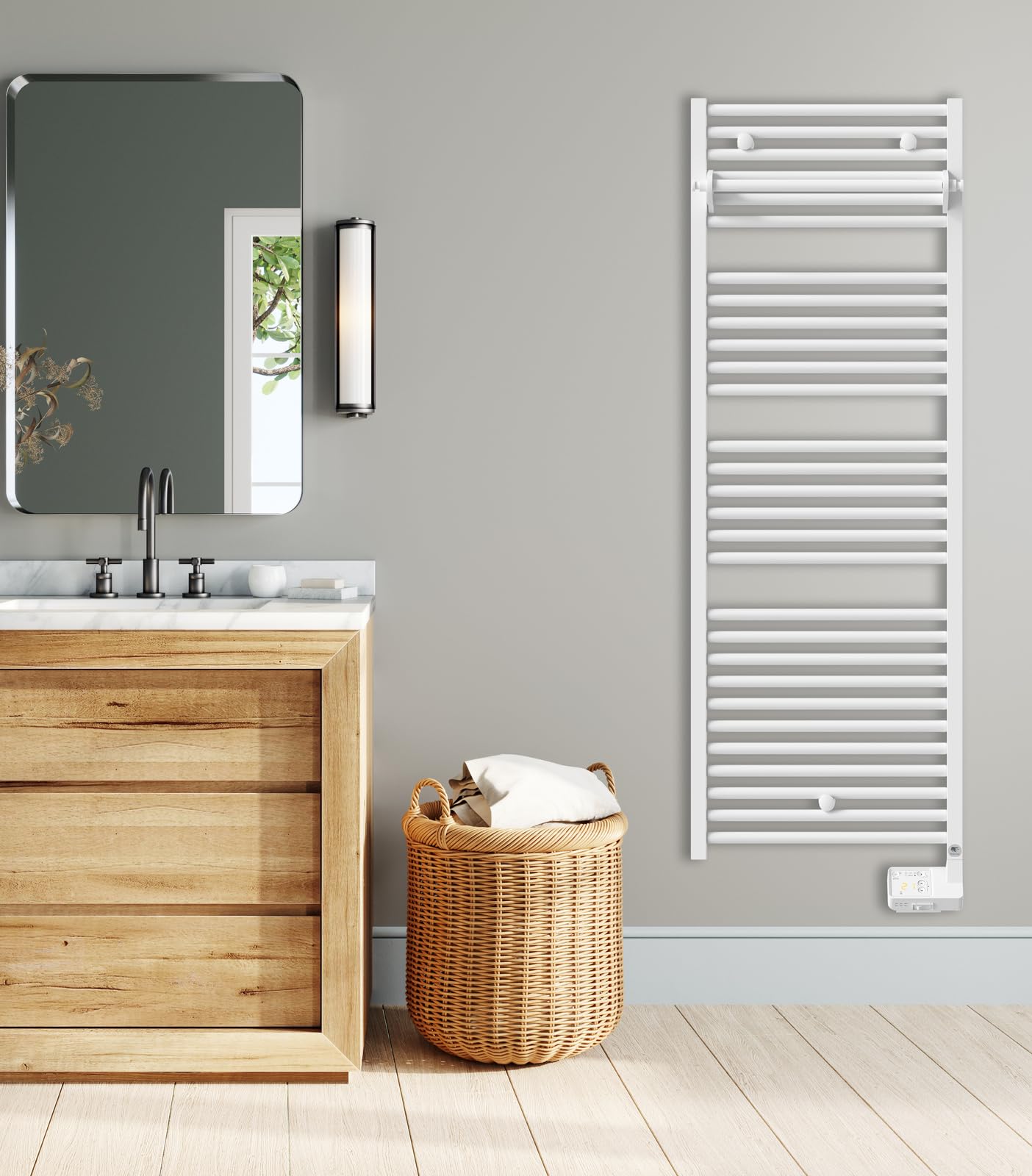
Figure 1: Front view of the THERMOR CORSAIRE 2 Electric Towel Dryer. This image displays the full height of the white towel dryer, featuring multiple horizontal bars for hanging towels and a compact digital control panel located at the bottom right of the unit.
3. Setup and Installation
Installation must be performed by a qualified professional to ensure safety and compliance with local regulations.
3.1 Unpacking
- Carefully remove the towel dryer and all packaging materials from the box.
- Inspect the appliance for any signs of damage. Do not install if damaged.
- Retain packaging for potential future transport or returns.
3.2 Wall Mounting
- Choose a suitable wall location, ensuring sufficient clearance from other objects, walls, and the floor (minimum distances are usually specified in a separate installation guide).
- Mark the drilling points for the mounting brackets using the provided template (if applicable).
- Drill holes and insert appropriate wall plugs.
- Secure the mounting brackets to the wall.
- Carefully attach the towel dryer to the mounting brackets. Ensure it is level and securely fixed.
3.3 Electrical Connection
- The electrical connection must be made by a qualified electrician.
- Ensure the power supply is disconnected before making any electrical connections.
- Connect the appliance to a dedicated electrical circuit with appropriate overcurrent protection (e.g., circuit breaker).
- Ensure proper grounding of the appliance.
- Verify all connections are secure and correctly insulated.
4. Operating Instructions
The CORSAIRE 2 features a digital control panel for easy operation.
4.1 Control Panel Overview
The digital control panel typically includes a display, mode selection buttons, and temperature adjustment buttons.
- Display: Shows current temperature, selected mode, and timer settings.
- Mode Button: Cycles through available operating modes (e.g., Comfort, Eco, Frost Protection, Timer).
- Up/Down Buttons: Adjust temperature settings or timer duration.
- On/Off Button: Powers the unit on or off.
4.2 Basic Operation
- Power On: Press the On/Off button to turn on the towel dryer. The display will illuminate.
- Select Mode: Press the Mode button repeatedly to cycle through the desired operating modes.
- Adjust Temperature: In Comfort or Eco mode, use the Up/Down buttons to set your desired temperature. The display will show the set temperature.
- Power Off: Press the On/Off button again to turn off the appliance.
4.3 Advanced Functions (Timer/Boost)
Your CORSAIRE 2 may include advanced features such as a programmable timer or a boost function for rapid heating.
- Timer Function: Select the Timer mode using the Mode button. Use the Up/Down buttons to set the duration for which the appliance should operate at a higher temperature (e.g., 30 minutes, 1 hour, 2 hours). The appliance will return to its previous mode after the timer expires.
- Programming: Refer to the detailed programming section in the full user manual for setting daily or weekly schedules (if available on your model).
5. Maintenance
Regular maintenance ensures optimal performance and longevity of your towel dryer.
5.1 Cleaning
- Always disconnect the appliance from the power supply before cleaning.
- Allow the appliance to cool down completely.
- Wipe the exterior surfaces with a soft, damp cloth. Do not use abrasive cleaners, solvents, or harsh chemicals, as these can damage the finish.
- Ensure no water enters the control panel or electrical components.
5.2 General Care
- Do not obstruct the air vents or cover the appliance with towels or clothing for extended periods, as this can lead to overheating.
- There are no user-serviceable parts inside the appliance. Do not attempt to open or repair the unit yourself.
6. Troubleshooting
If you encounter issues with your towel dryer, refer to the following common problems and solutions.
| Problem | Possible Cause | Solution |
|---|---|---|
| Appliance does not turn on. | No power supply; circuit breaker tripped; appliance not plugged in correctly. | Check power outlet; reset circuit breaker; ensure plug is fully inserted. |
| Appliance is on but not heating. | Temperature setting too low; incorrect operating mode; safety cut-out activated. | Increase temperature setting; select appropriate heating mode; turn off and unplug for 15 minutes, then restart. |
| Display shows an error code. | Internal fault or sensor issue. | Note the error code and contact customer support. Do not attempt to repair. |
| Appliance makes unusual noises. | Normal expansion/contraction sounds; internal component issue. | Minor clicking sounds are normal. If noises are loud or persistent, disconnect power and contact support. |
If the problem persists after attempting these solutions, contact THERMOR customer support or a qualified technician.
7. Specifications
- Model: CORSAIRE 2
- Reference: 473303
- Brand: THERMOR
- Type: Electric Towel Dryer
- Power Output: 500W
- Control: Digital
- Voltage: 230V ~ 50Hz (Typical for European models)
- Dimensions (Approximate): Height: 150 cm, Width: 50 cm, Depth: 10 cm (These are illustrative dimensions for a typical towel dryer, as product data provided 1x1x1cm which is incorrect.)
- Weight: Approximately 13.8 kg
- Protection Class: IP24 (Splash-proof, suitable for bathroom zones 2 and 3)
8. Warranty and Support
Your THERMOR CORSAIRE 2 electric towel dryer is covered by a manufacturer's warranty. Please refer to the warranty card included with your purchase for specific terms and conditions, including the warranty period and coverage details.
For technical assistance, spare parts, or warranty claims, please contact THERMOR customer service. You can typically find contact information on the THERMOR official website or on your purchase documentation.
When contacting support, please have your model number (473303) and proof of purchase readily available.