
Introduction
This instruction manual provides detailed guidance for installing and operating your BRIKSMAX Lighting Kit, specifically designed for the Lego Icons Concorde 10318 building set. This kit enhances your model with integrated LED lighting, bringing it to life. Please note that the Lego Concorde 10318 set is not included with this lighting kit.
What's Included
Your BRIKSMAX Lighting Kit package contains the following components:
- LED Light Strips and Individual Lights
- Connecting Cables (various lengths)
- Expansion Boards (6-port, 12-port, 2-port)
- USB Power Cable
- Adhesive Squares
- Block Parts (random colors)
- Battery Box (AA batteries not included)
- User Guide (this manual)
- Service Card
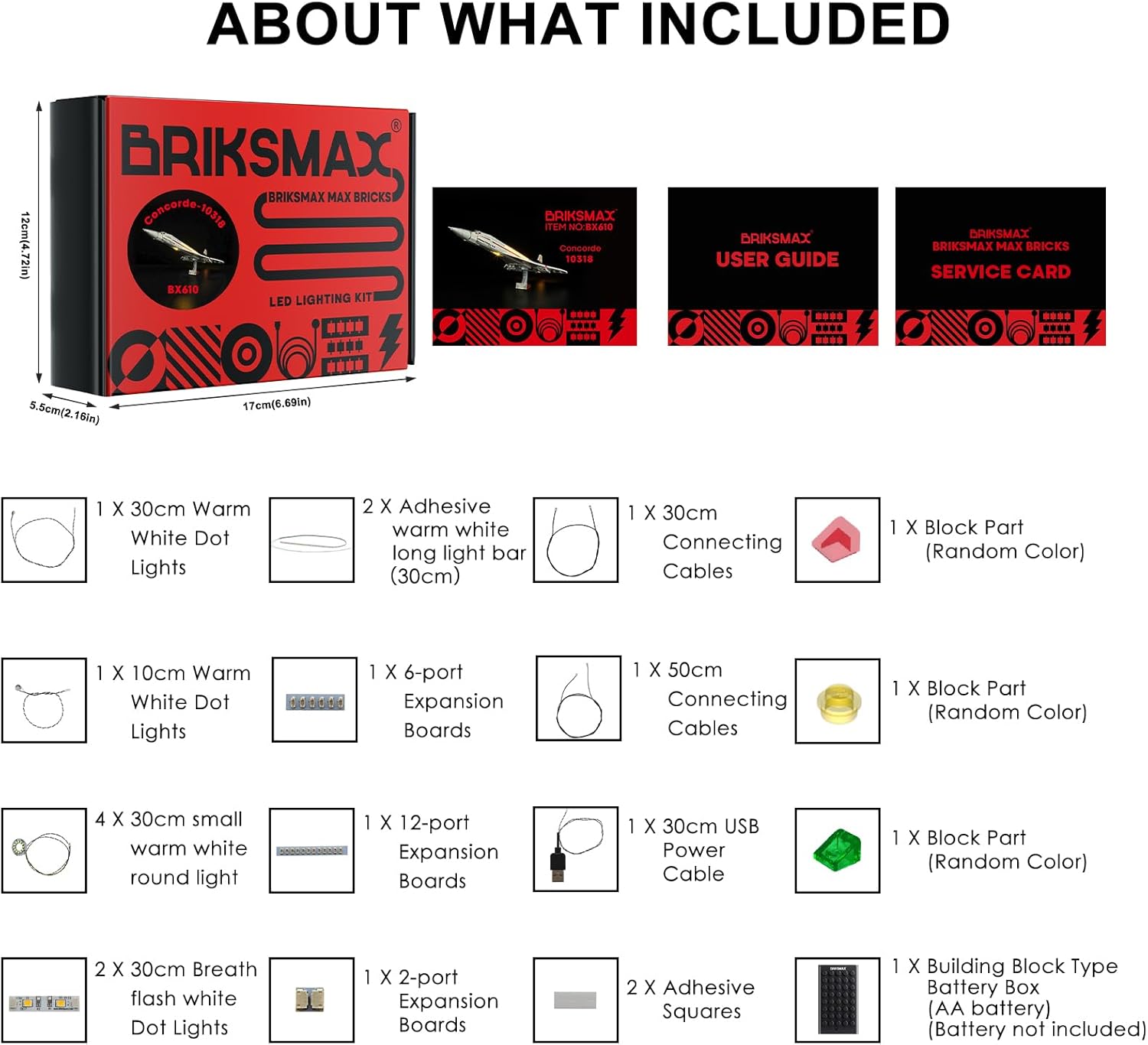
Image: A visual representation of all components included in the BRIKSMAX Lighting Kit, such as various LED lights, connecting cables, expansion boards, a USB power cable, adhesive squares, block parts, a battery box, user guide, and service card.
Setup and Installation
Follow the step-by-step instructions provided in the included user guide to install the lighting kit. Patience is key during the installation process to ensure proper placement and connection of all components. The installation involves integrating the LED lights and cables into your existing Lego Concorde 10318 model.
Key Installation Steps:
- Preparation: Ensure your Lego Concorde 10318 model is fully assembled and stable. Clear a large, well-lit workspace.
- Component Identification: Familiarize yourself with all the lighting kit components using the 'What's Included' section.
- Cable Routing: Carefully route the connecting cables through the Lego bricks, ensuring they are not pinched or stressed. Some disassembly of the Lego model may be required.
- Light Placement: Attach the LED lights to the designated areas of the model, such as the cockpit, cabin windows, engine thrusters, and wingtips, using the provided adhesive squares or by integrating them into the brick structure.
- Connecting Components: Connect the lights and cables to the expansion boards, and then connect the expansion boards to the USB power cable or battery box.
- Power Connection: Insert AA batteries into the battery box (if using) or connect the USB power cable to a compatible USB power source.
For a visual guide to the installation process, please refer to the official BRIKSMAX installation videos.
Video: An official BRIKSMAX video demonstrating the installation and final appearance of the lighting kit on the Lego Icons Concorde model.
Video: Another official BRIKSMAX video showcasing the illuminated Lego Icons Concorde model, highlighting various light features.
Operating Instructions
Once installed, your BRIKSMAX Lighting Kit will illuminate various parts of your Lego Concorde model. The lights are designed to enhance the display of your model, providing a realistic and dynamic appearance.
Light Features:
- Cockpit Lights: Bright illumination for the cockpit area.
- Cabin Window Lights: A strip of lights along the cabin windows to simulate interior lighting.
- Engine Thruster Lights: Warm lights to simulate the glow of the Concorde's engines.
- Wingtip Navigation Lights: Blinking lights on the wingtips, mimicking real aircraft navigation lights.
- Landing Gear Lights: Lights positioned near the landing gear for added detail.
To activate the lights, ensure the power source (battery box or USB) is connected and switched on. Some kits may include dimmable features or remote controls for adjusting light intensity and patterns, as indicated in your specific kit's packaging or instructions.

Image: The Lego Concorde 10318 model with the BRIKSMAX lighting kit installed, showcasing the illuminated cabin, cockpit, and engine thrusters from a side perspective.

Image: A rear view of the illuminated Lego Concorde 10318 model, highlighting the bright glow from the engine thrusters provided by the BRIKSMAX lighting kit.

Image: A front view of the Lego Concorde 10318 model with the BRIKSMAX lighting kit, showing the illuminated cockpit and the distinct green and red wingtip navigation lights.

Image: A close-up shot of the illuminated engine thrusters on the Lego Concorde 10318 model, demonstrating the warm light effect.

Image: A close-up of a green illuminated wingtip light on the Lego Concorde 10318 model, indicating a navigation light.

Image: A close-up view of the illuminated cabin windows along the side of the Lego Concorde 10318 model, showing the continuous strip of warm lights.
Maintenance
To ensure the longevity and optimal performance of your BRIKSMAX Lighting Kit, follow these maintenance guidelines:
- Dusting: Regularly dust your illuminated Lego model with a soft, dry cloth or a soft brush to prevent dust buildup on the lights and wires.
- Cable Inspection: Periodically check all cables for any signs of wear, fraying, or damage. Ensure connections remain secure.
- Battery Replacement: If using the battery box, replace AA batteries as needed to maintain consistent light brightness. Always use fresh batteries and dispose of old ones responsibly.
- Cleaning: Avoid using liquid cleaners directly on the lights or electrical components. If necessary, use a slightly damp cloth to clean the Lego bricks, ensuring no moisture comes into contact with the electrical parts.
- Storage: When not on display, store the model in a cool, dry place away from direct sunlight and extreme temperatures.
Troubleshooting
If you encounter any issues with your lighting kit, consider the following common solutions:
- Lights Not Turning On:
- Check if the power source (batteries or USB) is correctly connected and functional.
- Ensure all cables are securely plugged into the expansion boards and lights.
- Verify that the power switch on the battery box is in the 'ON' position.
- Flickering Lights:
- Replace old batteries with new ones if using the battery box.
- Check for loose connections at the expansion boards or individual lights.
- Uneven Brightness:
- Ensure all connections are firm.
- If using batteries, check battery levels.
- Wires Visible: While the kit is designed for discreet wiring, some wires may be visible depending on installation. Carefully adjust the routing of cables to minimize visibility within the Lego structure.
If these steps do not resolve the issue, please contact customer support for further assistance.
Specifications
| Brand | BRIKSMAX |
| Model Number | 10318 (Compatible with Lego Concorde) |
| Color | White (LEDs emit various colors as designed) |
| Material | Plastic |
| Light Source Type | LED |
| Power Source | Battery Powered (AA batteries not included) |
| Number of Light Sources | 2 (as per product specifications, but kit includes multiple individual lights) |
| Item Weight | 9.1 ounces (259 Grams) |
| Product Dimensions | 6.69"L x 4.72"W x 2.17"H (Package dimensions) |
Warranty and Support
BRIKSMAX is committed to providing high-quality products and excellent customer service. If you encounter any difficulties with your product, or have questions regarding installation or operation, please do not hesitate to contact us.
Refer to the included service card for specific warranty information and contact details. Our team is available to help you resolve any issues promptly.
Important Notes
- This product includes the LED lighting kit only. The Lego Concorde 10318 building set is sold separately and is not included.
- Batteries (AA) are not included and must be purchased separately.
- Handle all components, especially the delicate wires and LED lights, with care during installation to prevent damage.
- Keep out of reach of small children due to small parts and electrical components.