
YoupO tantingtin
User Manual
YoupO Washing Machine PCB Board
Product Overview
This manual provides essential information for the installation, operation, maintenance, and troubleshooting of the YoupO Washing Machine PCB Board. This replacement part is designed for specific Samsung washing machine models to restore or improve functionality.
Compatible Models: WA11V9, WA12V9, WA15P9
Part Numbers: DC41-00078C, DC92-00202A/B, DC92-00607A/D, DC92-00818A
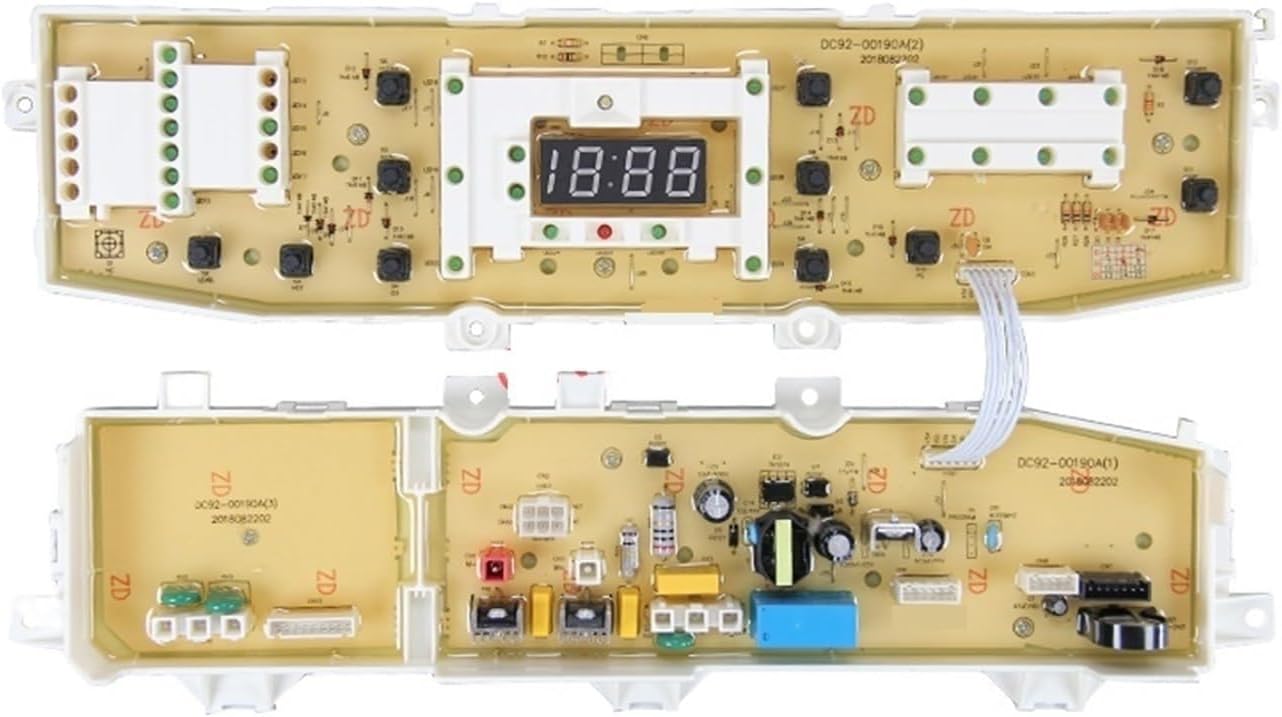
Image: Front and back view of the YoupO Washing Machine PCB Board. The board features various electronic components, connectors, and a digital display.
Safety Information
Always disconnect power to the washing machine before attempting any installation or maintenance. Electrical work should only be performed by qualified personnel. Wear appropriate personal protective equipment (PPE) such as insulated gloves and safety glasses.
Do not attempt to repair or modify the PCB board yourself if you are not experienced with electronics. Improper handling can lead to electric shock, damage to the appliance, or personal injury.
Setup and Installation
This PCB board is a replacement part and requires installation into a compatible washing machine. Professional installation is recommended.
Pre-Installation Steps:
- Disconnect Power: Ensure the washing machine is unplugged from the main power supply.
- Access the Control Panel: Refer to your washing machine's specific service manual for instructions on how to safely access the main control board compartment. This typically involves removing screws and clips from the top or rear panel.
- Document Connections: Before disconnecting the old PCB, take clear photos or make diagrams of all wire connections to ensure correct reassembly. Note the orientation of all connectors.
Installation Steps:
- Remove Old PCB: Carefully disconnect all wires and mounting screws holding the old PCB in place.
- Install New PCB: Position the new YoupO PCB board in the same location as the old one. Secure it with the original mounting screws.
- Reconnect Wires: Using your documented connections, carefully reattach all wires and connectors to the new PCB. Ensure all connections are firm and correctly oriented.
- Secure Control Panel: Reassemble the washing machine's control panel and any other parts removed during access.
- Test Functionality: Plug the washing machine back into the power supply and perform a test cycle to ensure proper operation.
Operating Instructions
This PCB board is a component of your washing machine's control system. Its operation is integrated with the washing machine's existing user interface (buttons, knobs, display). Once installed, the washing machine should function as designed by its original manufacturer.
Refer to your washing machine's original user manual for specific operating instructions, cycle selections, and feature usage.
Maintenance
The YoupO PCB board itself requires no routine user maintenance. To ensure its longevity and proper function, adhere to the following general guidelines for your washing machine:
- Keep the washing machine's control panel clean and dry. Avoid spilling liquids on it.
- Ensure proper ventilation around the washing machine to prevent overheating of internal components.
- Regularly check power cords and connections for any signs of wear or damage.
- If the washing machine is stored in a cold environment, allow it to reach room temperature before operation to prevent condensation on electronic components.
Troubleshooting
If your washing machine does not function correctly after installing the new PCB board, consider the following troubleshooting steps:
- No Power/Display Off: Ensure the washing machine is properly plugged into a working electrical outlet. Check the circuit breaker. Verify all power connections to the PCB board are secure.
- Incorrect Functionality: Double-check all wire connections to the PCB board against your documentation. Ensure no wires are loose or connected to the wrong terminal.
- Specific Connector Issue: Some connectors may require a specific orientation. If the board is not functioning, try reversing the connection of certain sockets.

Image: YoupO Washing Machine PCB Board highlighting two specific sockets with red arrows. If the board does not function, try plugging these two sockets in opposite directions.
If the issue persists after these steps, it is recommended to consult a qualified appliance technician or contact the manufacturer of your washing machine.
Specifications
| Attribute | Detail |
|---|---|
| Product Type | Washing Machine PCB Board |
| Brand | YoupO |
| Compatible Voltage | 220V |
| Compatible Washing Machine Models | WA11V9, WA12V9, WA15P9 (Samsung) |
| Compatible Part Numbers | DC41-00078C, DC92-00202A/B, DC92-00607A/D, DC92-00818A |
| Item Model Number | tantingtin |
| Package Dimensions | 1.18 x 0.79 x 0.39 inches |
| Item Weight | 1.76 ounces |
| Assembly Required | No (for the PCB itself, but installation into appliance is required) |
| Number of Pieces | 1 |
Warranty and Support
For warranty information regarding this replacement part, please refer to the terms and conditions provided by the seller or retailer at the time of purchase. As this is a replacement component, its warranty may be covered by the original appliance manufacturer's policy or the seller's specific return/replacement policy.
For technical support or further assistance with installation or troubleshooting, please contact the seller or a certified appliance repair technician.
Ask a question about this manual
Ask about setup, troubleshooting, compatibility, parts, safety, or missing instructions. Manuals+ will review the question and use this page’s manual context to help answer it.