
Introduction
Thank you for choosing the Auskang Portable Charger. This slim 5000mAh power bank is designed for convenient on-the-go charging of your iPhone devices. Featuring a built-in Lightning cable, it eliminates the need for carrying extra cords. This manual provides essential information for the safe and efficient use of your device.
Product Features
- Built-in Lightning Cable: Integrated cable for direct charging of compatible iPhone models (14, 13, 12, 11, X, 8, 7 Series). Note: Not compatible with iPhone 15 Series or Android phones.
- Ultra-Slim Design: Measures approximately 4.96 x 2.63 x 0.26 inches and weighs 4.6 oz, allowing it to fit easily into pockets, wallets, or small bags.
- 5000mAh Capacity: Provides sufficient power for daily use, offering approximately 1.2 charges for an iPhone 14, 0.4 charges for an iPad 2021, and 9.5 charges for AirPods Pro.
- LED Indicators: Four LED lights display the remaining battery capacity (0%, 30%, 60%, 100%).
- Portable and Travel-Friendly: Airline-approved for carry-on luggage, ideal for travel, commuting, or outdoor activities.

Image: The Auskang Portable Charger in blue, showcasing its slim profile and built-in Lightning cable.

Image: A visual guide illustrating the compatibility of the charger with iPhone 6 to 14 series, iPad 2018-2021/mini1-5, and AirPods, along with approximate charge capacities.
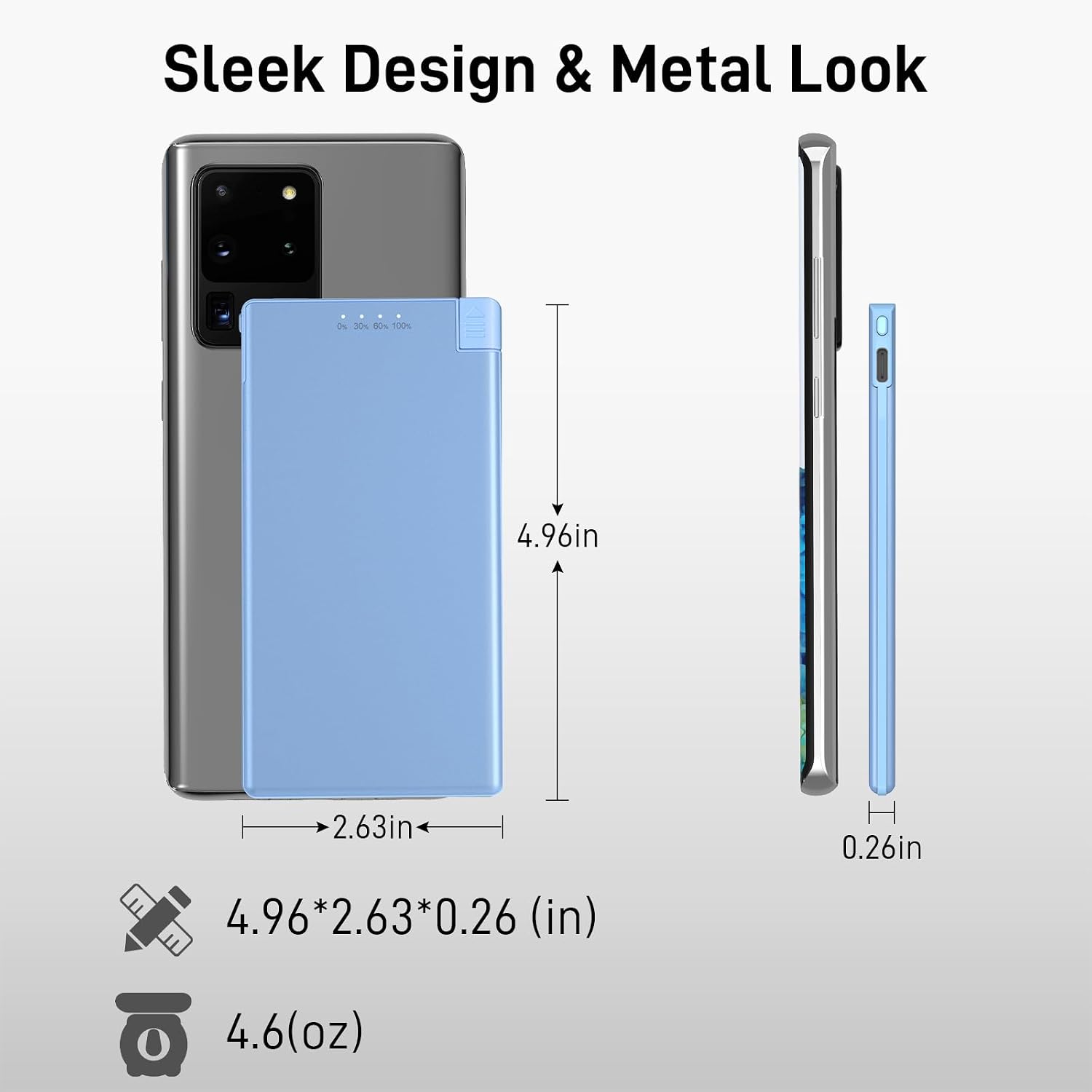
Image: Detailed dimensions (4.96*2.63*0.26 inches) and weight (4.6 oz) of the portable charger, highlighting its sleek design.
Setup
Charging the Power Bank
- Locate the USB-C input port on the side of the power bank.
- Connect the provided USB-C charging cable to the power bank's input port.
- Plug the other end of the USB-C cable into a compatible USB power adapter (not included) and connect it to a power source.
- The LED indicators will illuminate to show the charging progress. All four LEDs will be solid when fully charged.

Image: The portable charger connected to a charging cable, indicating it is being recharged.
Operating Instructions
Charging Your Device
- Ensure the power bank is sufficiently charged by checking the LED indicators.
- Gently pull out the built-in Lightning cable from its slot on the power bank.
- Connect the Lightning connector to your compatible iPhone device.
- Your device should begin charging automatically. The power bank's LED indicators will show its remaining charge.
- Once charging is complete, disconnect the Lightning cable from your device and carefully reinsert it into its designated slot on the power bank.

Image: A user charging their iPhone using the integrated Lightning cable of the Auskang portable charger.
Video: An official product video from ASK-Tech demonstrating the multi-color portable charger with its built-in cable, showing its compact size and ease of use.
Maintenance
- Store the power bank in a cool, dry place away from direct sunlight and extreme temperatures.
- Avoid dropping or subjecting the device to strong impacts.
- Clean the exterior with a soft, dry cloth. Do not use harsh chemicals or abrasive materials.
- Charge the power bank at least once every three months to maintain battery health if not in regular use.
Troubleshooting
- Device not charging: Ensure the power bank is charged. Check that the Lightning cable is securely connected to both the power bank and your device.
- Slow charging: Verify that your device is compatible with the power bank's output. Ensure the power bank itself is fully charged.
- LED indicators not working: Press the power button to activate the indicators. If they still do not light up, the power bank may be fully discharged or require service.
Specifications
| Model Number | WT-H362 |
| Battery Capacity | 5000 Milliamp Hours |
| Connector Type | Lightning (Built-in) |
| Product Dimensions | 4.94 x 2.6 x 0.27 inches |
| Item Weight | 4.1 ounces |
| Special Feature | Slim Design |
| Manufacturer | Shenzhen LDTEK Technology Co., Ltd |
Warranty Information
Auskang products are manufactured to high-quality standards. For specific warranty details and terms, please refer to the warranty card included with your purchase or visit the official Auskang website. Keep your proof of purchase for any warranty claims.
Customer Support
If you encounter any issues or have questions regarding your Auskang Portable Charger, please contact our customer support team. Contact information can typically be found on the product packaging or our official website.