
1. Product Overview
The Loomie Wine Bar Cabinet is a versatile and stylish furniture piece designed to enhance your living space. It functions as a wine bar, coffee cabinet, kitchen sideboard, or freestanding liquor cabinet, offering extensive storage and an integrated LED lighting system to create various ambiances.

Image: The Loomie Wine Bar Cabinet, showcasing its elegant design and functionality in a typical home environment, complete with bottles, glasses, and a coffee machine on top.
2. Key Features
- Ample Storage Space: Features two wine racks (3 bottles each), three rows of glass holders, a 16-grid wine rack, and two side cabinets with doors, providing extensive storage for wine, tableware, and personal items. The spacious top surface can accommodate a coffee maker or microwave.
- Versatile & Multipurpose Design: Adaptable for various uses including a dining sideboard, coffee bar, storage cabinet, TV stand, or entryway console, seamlessly fitting into different home settings.
- Built-in Colorful RGB LED Lights: Enhance ambiance with adjustable LED strip lights. Control brightness and color via control buttons on the strip, a remote control, or a smartphone application.
- Premium Materials: Constructed from high-quality chipboard and MDF, ensuring structural stability and durability. Designed to support a weight load capacity of up to 150 pounds.
- Easy Assembly: Comes with a clear installation guide and labeled components for a straightforward assembly process.
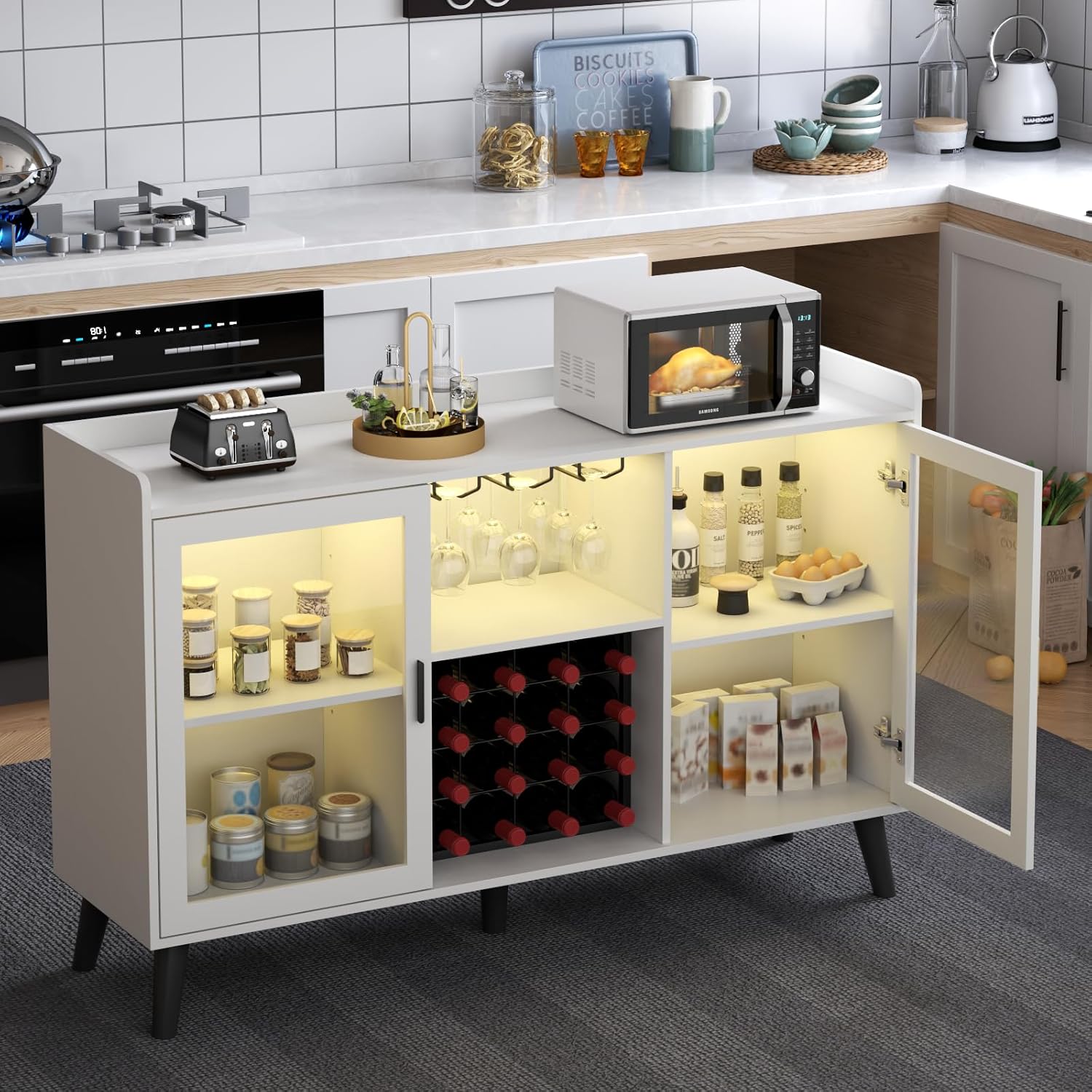
Image: A visual breakdown of the cabinet's storage capabilities, highlighting the top storage area, glass holder, wine racks, 16-grid wine rack, and storage shelves.
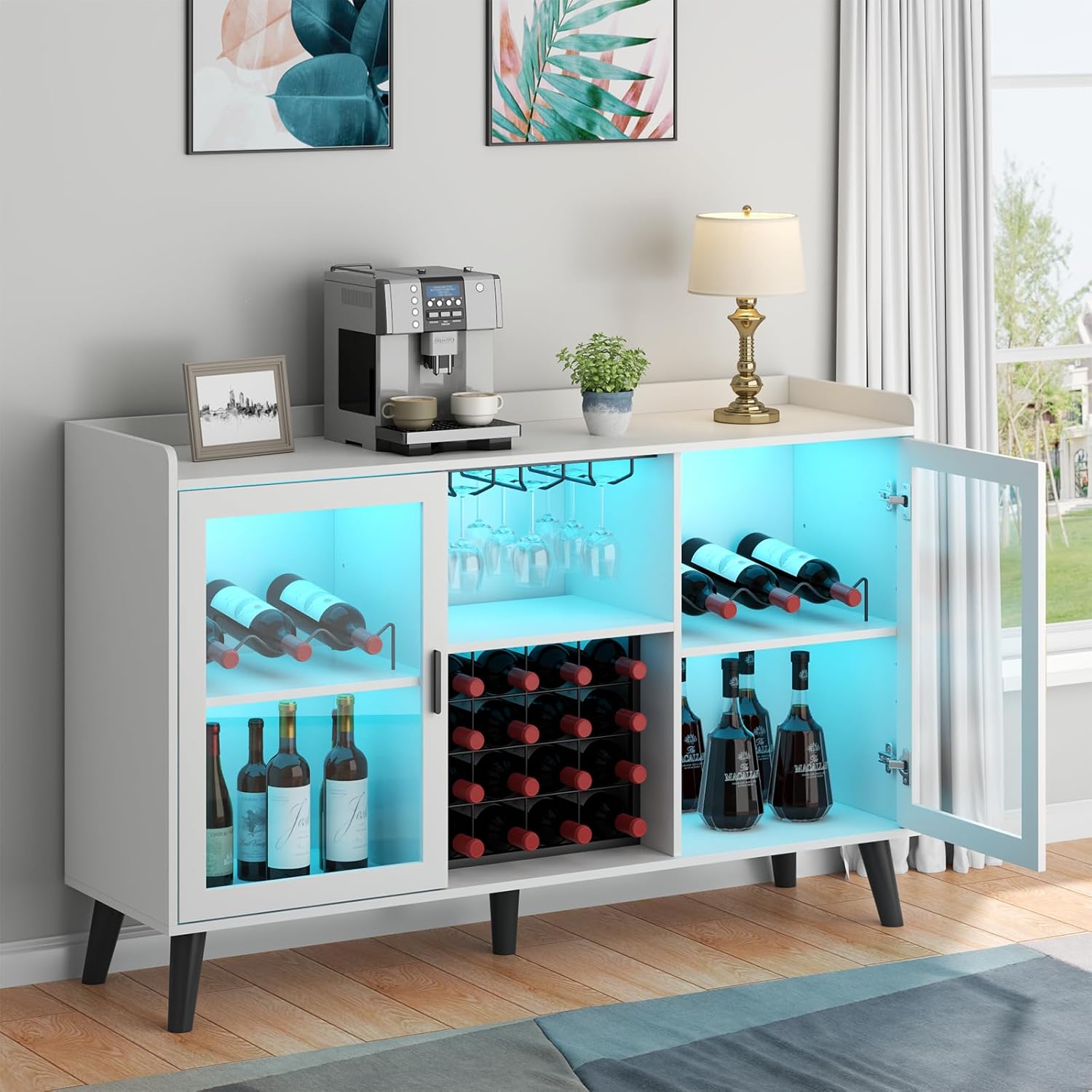
Image: The wine cabinet illuminated by built-in RGB LED lights, demonstrating various color settings and the control options available.
3. Setup and Assembly
The Loomie Wine Bar Cabinet is designed for easy assembly. All necessary components are labeled, and a detailed installation guide is included to streamline the process. It is recommended to assemble the cabinet on a soft, clean surface to prevent scratches.
3.1 Unpacking and Preparation
- Carefully unpack all components and hardware from the packaging.
- Verify that all parts listed in the instruction manual are present and undamaged.
- Lay out all components on a clean, flat, and soft surface to avoid damage during assembly.
3.2 Assembly Steps
Follow the step-by-step instructions provided in the included assembly manual. Each component is labeled to match the diagrams, ensuring a smooth build. Pay close attention to the orientation of panels and the secure fastening of all screws and connectors.
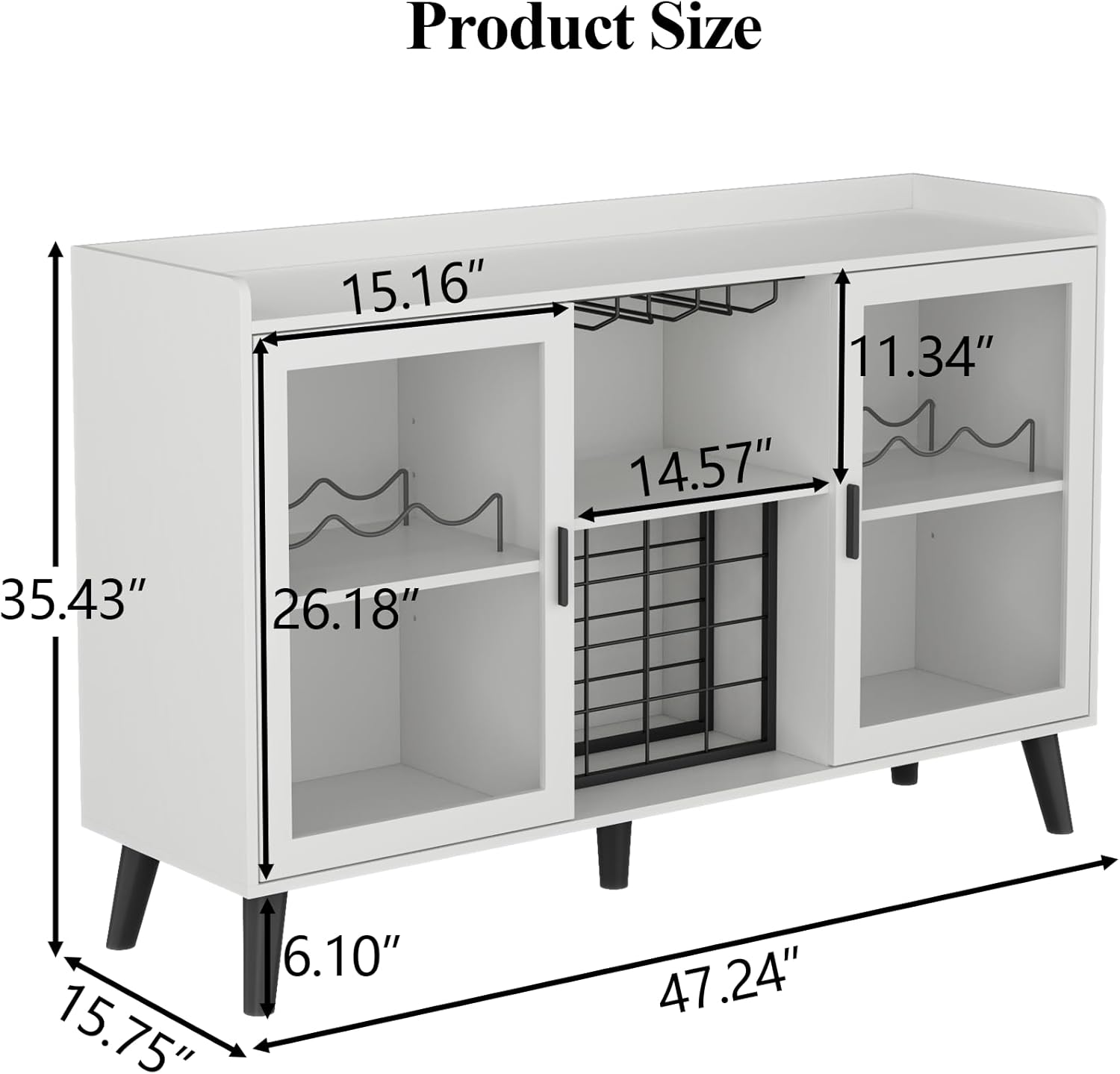
Image: A detailed diagram showing the dimensions of the Loomie Wine Bar Cabinet, crucial for planning placement and understanding component sizes during assembly.
3.3 Installation Type Options
The cabinet offers flexibility in its internal configuration, allowing you to install the wine rack and glass holder according to your specific needs, whether as a dedicated wine cabinet or a general storage cabinet.
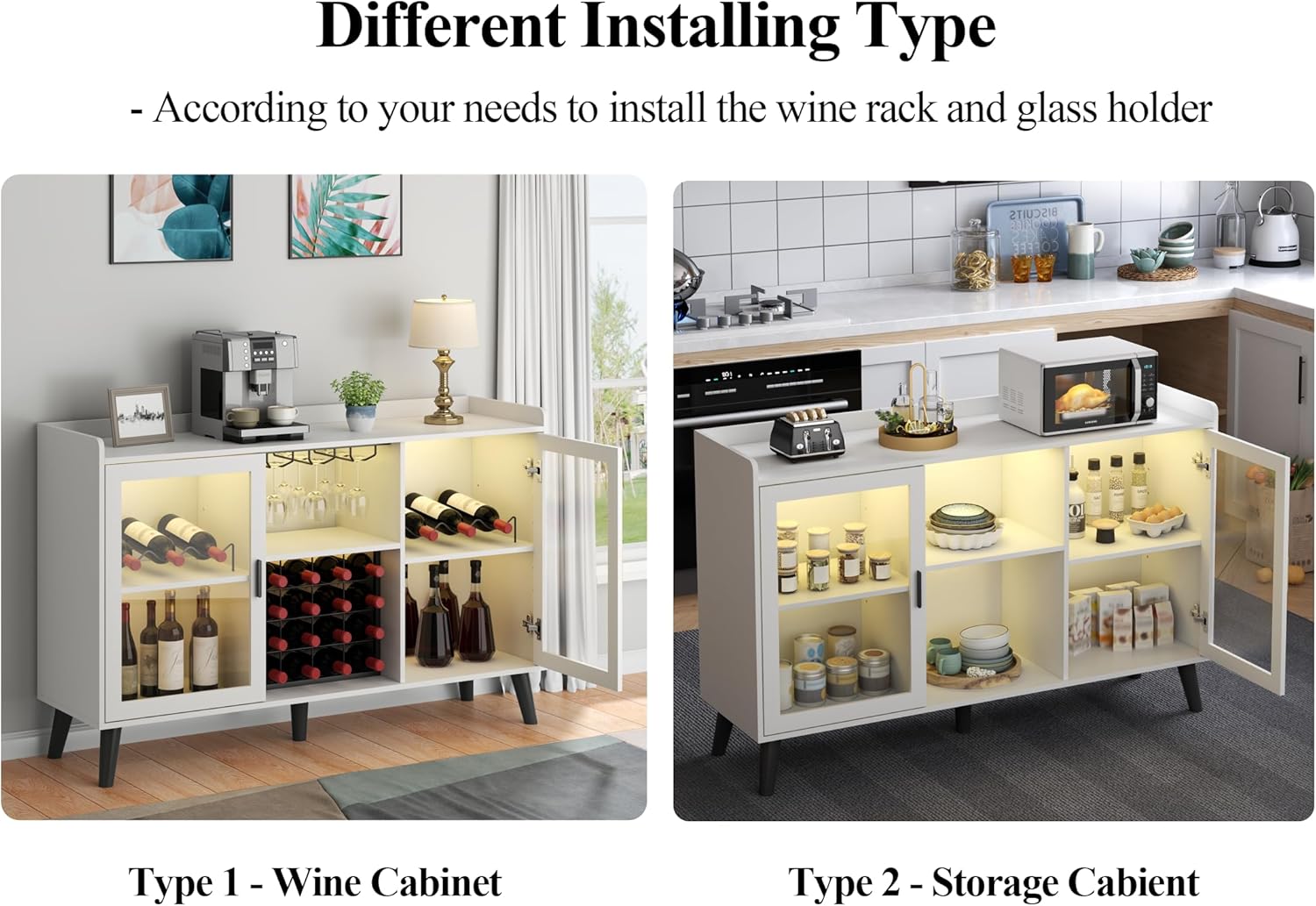
Image: Illustration demonstrating two possible configurations: Type 1 as a Wine Cabinet with prominent wine storage, and Type 2 as a Storage Cabinet with more general shelving.
4. Operating Instructions
4.1 LED Light Operation
The integrated LED strip lights can be controlled in multiple ways:
- Control Buttons: Use the physical buttons located on the LED strip itself to cycle through colors and adjust brightness.
- Remote Control: Utilize the provided remote control for convenient adjustment of light settings from a distance.
- Smartphone App: Download the compatible smartphone application (refer to the LED light manual for app details) to control the lights, including custom color settings and dynamic modes.
Ensure the LED light power adapter is securely connected to a power outlet.
Image: The wine cabinet with its LED lights displaying various colors, alongside illustrations of the remote control and smartphone app interface for light management.
4.2 General Usage
- Place items evenly across shelves to maintain balance and stability.
- Ensure wine bottles are securely placed in the wine racks to prevent rolling.
- Do not exceed the maximum weight capacity of 150 pounds for the entire unit.
5. Maintenance
Proper care and maintenance will ensure the longevity and appearance of your Loomie Wine Bar Cabinet.
- Cleaning: Wipe surfaces with a soft, damp cloth. Avoid harsh chemicals or abrasive cleaners, which can damage the finish.
- Spills: Clean up spills immediately to prevent staining or damage to the wood and MDF components.
- Dusting: Regularly dust the cabinet with a dry, soft cloth to prevent buildup.
- Hardware Check: Periodically check all screws and fittings to ensure they remain tight. Tighten if necessary to maintain structural integrity.
- Avoid Direct Sunlight: Prolonged exposure to direct sunlight can cause fading or discoloration of the cabinet's finish.
6. Troubleshooting
If you encounter any issues with your Loomie Wine Bar Cabinet, refer to the following common troubleshooting tips:
- LED Lights Not Working:
- Ensure the power adapter is securely plugged into both the LED strip and a working electrical outlet.
- Check if the power outlet is functional by plugging in another device.
- Verify that the remote control battery is not depleted, if applicable.
- If using the app, ensure Bluetooth/Wi-Fi connection is active and the app is correctly paired with the lights.
- Cabinet Feels Unstable/Wobbly:
- Recheck all assembly screws and ensure they are tightened securely.
- Ensure the cabinet is placed on a flat, level surface. Adjust the leveling feet if present.
- Distribute contents evenly to maintain balance.
- Doors Not Aligning Properly:
- Check the hinge attachments to ensure they are correctly installed and tightened.
- Some hinges allow for minor adjustments; refer to the assembly manual for specific instructions on hinge alignment.
7. Specifications
| Attribute | Detail |
|---|---|
| Brand | Loomie |
| Model Number | G713 |
| Colour | White |
| Product Dimensions (L x W x H) | 40.01 x 119.99 x 89.99 cm (15.75"D x 47.24"W x 35.43"H) |
| Item Weight | 35.55 kg (78.37 lbs) |
| Maximum Weight Capacity | 150 Pounds (approx. 68 kg) |
| Special Features | Illuminated (LED), Freestanding |
| Recommended Uses | Home Bar, Coffee Maker Stand, Tableware Storage, Wine Bottle Storage |
| Material | High-quality Chipboard and MDF |
Image: An overhead view with precise measurements of the cabinet's length, width, and height, along with internal compartment dimensions.
8. Warranty and Support
For information regarding warranty coverage, product support, or to purchase replacement parts, please refer to the documentation included with your purchase or contact Loomie customer service directly. Contact details are typically found on the product packaging or the manufacturer's official website.
When contacting support, please have your product model number (G713) and purchase date readily available.