
1. Introduction
Thank you for choosing the SUNSHINE SS-309WD 8-Port USB Smart Charger with Wireless Charging. This device is designed to provide efficient and safe charging for multiple electronic devices simultaneously, featuring both wired USB ports and a wireless charging pad. Please read this manual carefully before use to ensure proper operation and to maximize the lifespan of your product.
2. Product Features
- 8 USB Charging Ports: Allows simultaneous charging of multiple phones and tablets.
- Intelligent Wireless Charging: Supports all phones equipped with wireless charging capabilities, offering up to 10W stable and fast charging.
- LED Digital Display: Provides real-time charging status and output information.
- Multi-Protection System: Incorporates safeguards against short circuit, overcurrent, overcharge, overvoltage, undervoltage, and overload.
- High-Temperature Flame Retardant Material: Constructed from ABS+PC material for enhanced safety and durability.
- Broadband Voltage Universal: Supports 100-240V wide voltage, suitable for global use without regional restrictions.
- USB Current Automatic Recognition: Intelligent shunt technology automatically identifies connected devices and distributes optimal output current.
- Non-Slip Base: Ensures stability on various surfaces.
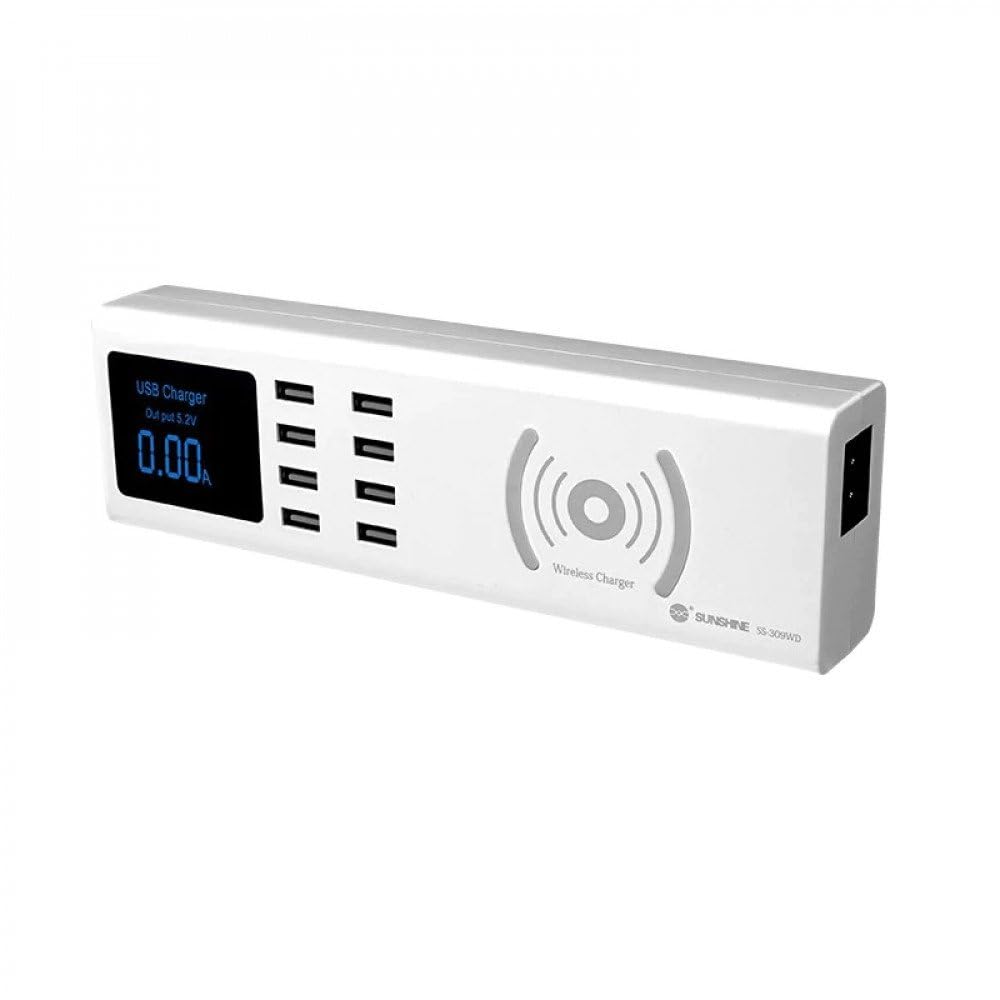
Image: The SUNSHINE SS-309WD charger demonstrating 10W wireless charging capability with a smartphone.

Image: Detailed view highlighting the wireless charging seat, USB sockets, and LCD display with their functions.
3. Setup
- Unpack: Carefully remove the charger from its packaging.
- Placement: Place the charger on a stable, flat surface, ensuring adequate ventilation. The non-slip base will help secure it.
- Power Connection: Connect the provided power cable to the charger's power input port and then plug it into a standard 100-240V AC wall outlet. The LED digital display will illuminate, indicating the charger is powered on.
4. Operating Instructions
4.1 Using USB Charging Ports
- Connect your device's USB charging cable to any of the 8 available USB ports on the charger.
- Connect the other end of the cable to your device.
- The charger will automatically detect your device and deliver the optimal charging current. The LED display will show the current output for the connected ports.

Image: The charger intelligently recognizing and delivering appropriate current (e.g., 2.4A for a tablet, 1.0A for an iPhone).
4.2 Using Wireless Charging
- Ensure your device supports wireless charging (Qi standard).
- Place your wireless charging compatible device directly onto the wireless charging pad located on top of the charger.
- Ensure the device is centered on the pad for optimal charging. The LED display may indicate wireless charging activity, and your device will show a charging indicator.

Image: A smartphone being wirelessly charged on the device, illustrating the multi-protection and safe charging capabilities.
5. Maintenance
- Cleaning: Disconnect the charger from the power outlet before cleaning. Use a soft, dry cloth to wipe the surface. Do not use liquid cleaners or aerosols.
- Storage: Store the charger in a cool, dry place when not in use.
- Avoid Damage: Do not drop, disassemble, or expose the charger to extreme temperatures or moisture.
6. Troubleshooting
- Charger not powering on: Ensure the power cable is securely connected to both the charger and the wall outlet. Verify the wall outlet is functional.
- Device not charging via USB: Check if the USB cable is properly connected to both the charger and the device. Try a different USB port or cable. Ensure the device itself is not fully charged or has a charging issue.
- Device not charging wirelessly: Ensure your device supports wireless charging and is placed correctly on the charging pad. Remove any thick cases or metallic objects between the device and the pad.
- Slow charging: Ensure you are using a high-quality charging cable. Some devices may charge slower if multiple devices are connected simultaneously, or if the device's battery management system limits input.
7. Specifications
| Feature | Specification |
|---|---|
| Model | SS-309WD |
| Brand | SUNSHINE |
| Input Voltage | AC 100-240V |
| Output Voltage (USB) | 5 Volts (Intelligent Recognition) |
| Wireless Charging Output | Up to 10W |
| Number of USB Ports | 8 |
| Main Power Connector Type | 3 pin |
| Compatible Devices | Cellular Phones, Tablets, and other USB-powered devices |
| Mounting Type | Tabletop Mount |
| Material | ABS+PC (High-temperature flame retardant) |
| Dimensions (Approx.) | 220mm (L) x 68mm (W) x 38mm (H) |

Image: Product dimensions for the SUNSHINE SS-309WD charger.
8. Warranty and Support
This product comes with a standard manufacturer's warranty. For specific warranty details, please refer to the documentation provided at the time of purchase or contact your retailer. For technical support or inquiries, please reach out to the product manufacturer or your point of purchase.