
1. Important Safety Instructions
Please read and understand all safety instructions before using this appliance. Failure to follow these instructions may result in electric shock, fire, or serious injury.
- Electrical Safety: Always plug the humidifier into a grounded electrical outlet. Do not operate with a damaged cord or plug. Do not immerse the unit in water or other liquids.
- Hot Steam Warning: This humidifier produces warm steam. Keep hands and face away from the steam outlet during operation. Ensure the unit is placed on a heat-resistant, stable surface, away from walls and furniture.
- Water Usage: Use only clean, cool tap water. Do not add essential oils, medications, or other additives to the water tank, as this may damage the unit or pose a health risk.
- Placement: Place the humidifier out of reach of children and pets. Do not place on carpets or absorbent surfaces. Ensure adequate ventilation around the unit.
- Maintenance: Unplug the humidifier before cleaning or refilling. Regular cleaning is essential to prevent mineral buildup and maintain performance.
- Supervision: Do not leave the humidifier unattended, especially when children are present.
2. Product Overview
The Elektra SEL-8075 is an electrode warm steam humidifier designed to efficiently add moisture to the air, improving humidity levels for enhanced comfort. It features a 4-liter capacity, adjustable mist levels, and an automatic shut-off function for safety.
Components Identification

- A. Steam Outlet: Where warm steam is released.
- B. Mist Control Knob: Used to adjust the steam output level.
- C. Water Tank: The main reservoir for water (4-liter capacity).
- D. Power Indicator Light: Illuminates when the unit is operating.
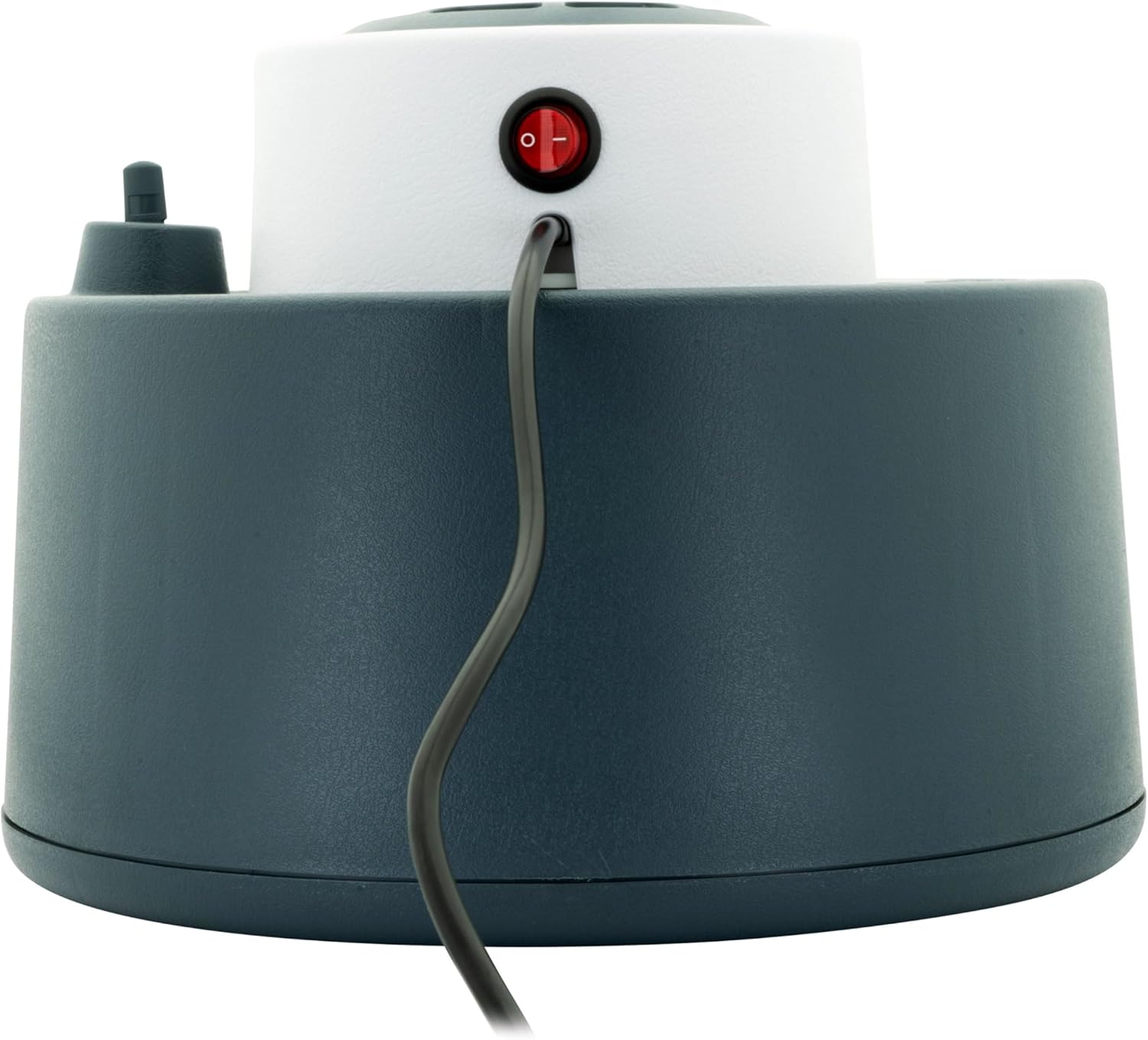
- E. Power Switch: Located at the back of the unit to turn it on/off.
- F. Electrode Assembly: Internal components responsible for heating water to produce steam.


3. Setup
- Unpack: Carefully remove the humidifier from its packaging. Retain packaging for future storage or transport.
- Placement: Place the humidifier on a firm, flat, water-resistant surface at least 12 inches (30 cm) away from walls and furniture. Ensure it is not placed directly under electrical outlets or near heat sources.
- Fill Water Tank:
- Ensure the unit is unplugged.
- Remove the top section of the humidifier to access the water tank.
- Fill the tank with clean, cool tap water up to the MAX fill line. Do not overfill.
- Replace the top section securely onto the base.
- Connect Power: Plug the power cord into a standard electrical outlet.
4. Operation
- Power On: Flip the power switch located at the back of the unit to the 'ON' position. The power indicator light will illuminate.
- Adjust Mist Output: Turn the mist control knob on the top of the unit to select your desired steam output level (Low, Medium, or High). Steam will begin to emit from the steam outlet within a few minutes.
- Automatic Shut-off: The humidifier is equipped with an automatic shut-off feature. When the water level in the tank becomes too low, the unit will automatically turn off, and the power indicator light may change color or turn off. This is a safety feature to prevent damage to the unit.
- Refilling: When the unit automatically shuts off due to low water, unplug the humidifier, allow it to cool for a few minutes, then refill the water tank as described in the 'Setup' section.
- Power Off: To turn off the humidifier, flip the power switch to the 'OFF' position and unplug the unit from the electrical outlet.
5. Maintenance
Regular cleaning is crucial for optimal performance and hygiene. Always unplug the humidifier and allow it to cool completely before cleaning.
Daily Maintenance
- Empty any remaining water from the tank and base.
- Rinse the water tank and base with fresh water.
- Wipe all surfaces dry with a clean cloth.
Weekly Descaling (Mineral Buildup Removal)
Mineral deposits from tap water can accumulate and affect performance. Descale the unit weekly or more often if using hard water.
- Unplug the humidifier and remove the top section.
- Pour 1 cup (240ml) of undiluted white vinegar into the water tank and base, ensuring it covers the electrode assembly.
- Let it soak for 20-30 minutes. For heavy buildup, soak longer.
- Use a soft brush or cloth to gently scrub away mineral deposits from the electrode assembly and inside the tank.
- Empty the vinegar solution and rinse the tank and base thoroughly with fresh water until the vinegar smell is gone.
- Wipe all surfaces dry before reassembling.
Storage
If the humidifier will not be used for an extended period:
- Perform a thorough cleaning and descaling.
- Ensure all parts are completely dry.
- Store the unit in its original packaging in a cool, dry place.
6. Troubleshooting
If you experience issues with your humidifier, refer to the following common problems and solutions:
| Problem | Possible Cause | Solution |
|---|---|---|
| No steam output | Unit not plugged in or power switch off Water tank empty Mineral buildup on electrodes | Ensure unit is plugged in and power switch is ON Refill water tank Clean electrode assembly as per maintenance instructions |
| Low steam output | Mist control knob set too low Mineral buildup | Adjust mist control knob to a higher setting Clean electrode assembly |
| Water leaking from unit | Water tank not seated correctly Unit overfilled | Ensure top section is securely placed on the base Do not fill water above the MAX line |
| Unusual noise | Mineral buildup Unit not on a flat surface | Clean electrode assembly Place unit on a stable, flat surface |
7. Specifications
- Model Number: SEL-8075
- Capacity: 4 Liters
- Type: Electrode Warm Steam Humidifier
- Special Feature: Adjustable Humidity Control, Automatic Shut-off
- Product Dimensions: 27.5D x 28W x 24.5H centimetres
- Item Weight: 1.48 Kilograms
- Manufacturer: Elektra
8. Warranty and Support
Elektra products are manufactured to high-quality standards. For information regarding warranty coverage, please refer to the warranty card included with your purchase or contact Elektra customer support. Keep your proof of purchase for any warranty claims.
For technical assistance, spare parts, or customer service inquiries, please visit the official Elektra website or contact their customer support line. Contact details can typically be found in the product packaging or on the brand's official website.