
Introduction
Thank you for choosing the ACEGMET Golf Rangefinder. This device is designed to provide fast and accurate distance measurements, enhancing your golf game with advanced features like slope compensation and pin lock vibration. This manual will guide you through the setup, operation, and maintenance of your rangefinder to ensure optimal performance and longevity.

Image: The ACEGMET Golf Rangefinder, a compact and ergonomic device designed for precise distance measurement on the golf course.
Package Contents
Please verify that all items are present in your package:
- 1 x ACEGMET Golf Rangefinder
- 1 x Carrying Pouch
- 1 x USB Data Cable
- 1 x Hand Strap
- 1 x Lens Cloth
- 1 x User Manual (this document)
Key Features
- Precision Measurement: Delivers pinpoint accuracy for club selection.
- Adjustable Slope Mode: Calculates elevation changes; can be switched off for tournament legality.
- Pin Lock Vibration: Emits a short vibration when a consistent distance reading for the flag is confirmed.
- 6X Magnification: Provides clear optics for enhanced targeting.
- Rechargeable Battery: Features a 1000mAh lithium battery with USB charging, offering over 30 hours of playtime (approx. 8000 tests).
- Compact and Portable: Lightweight, pocket-sized design for easy transport.
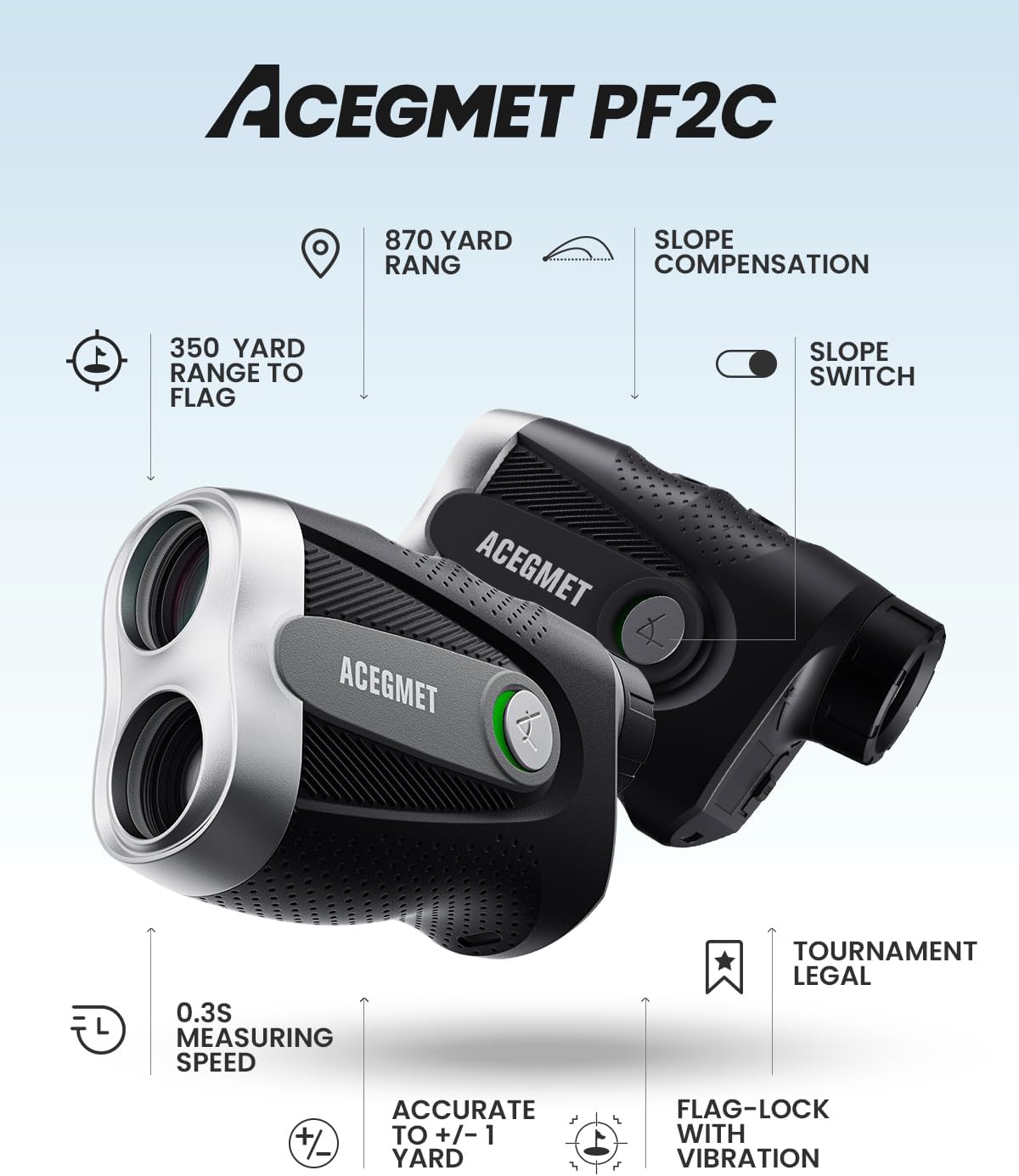
Image: A visual summary of the ACEGMET PF2C rangefinder's key features, including 870-yard range, slope compensation, 0.3s measuring speed, +/-1 yard accuracy, flag-lock with vibration, and tournament legality.
Setup
1. Charging the Device
Before first use, fully charge your rangefinder. Connect the provided USB data cable to the charging port on the device and plug the other end into a standard USB power source (e.g., computer, wall adapter). The battery indicator will show charging status and turn solid when fully charged. A full charge provides approximately 30 hours of continuous use.

Image: The ACEGMET rangefinder connected to a USB charging cable, illustrating its rechargeable lithium battery and the included carrying case.
2. Powering On/Off
Press the power button (usually marked with a circle or 'M' for mode) once to power on the device. The display will activate. To power off, press and hold the power button, or the device may automatically shut down after a period of inactivity to conserve battery.
Operating Modes
The ACEGMET Golf Rangefinder offers six versatile measurement modes. Use the 'M' (Mode) button to cycle through them.
- Mode 1 - Distance Measurement:
Provides direct line-of-sight distance to any target. The slope switch allows you to enable or disable slope compensation, making it legal for tournament play when off.

Image: A user demonstrating the external slope switch on the ACEGMET rangefinder, showing how it adjusts distances for uphill or downhill shots and can be turned off for tournament play.
- Mode 2 - Golf Flagpole Mode (Pin Lock Vibration):
Designed for easily acquiring the flagstick. When a consistent distance reading for the flag is confirmed, the device will emit a short vibration, ensuring you've locked onto the correct target and not background objects.

Image: The rangefinder's display showing "176.5 Y" with a flag icon, indicating the Pin-Grab™ Tech provides quick and stable distances within 0.3 seconds.

Image: A golfer using the ACEGMET rangefinder, with an overlay showing its range (5-870 yards), range to flag (5-350 yards), and accuracy (+/- 1 yard).
- Mode 3 - Two-Point Height Measurement Mode:
Allows you to measure the height of an object by taking two separate measurements to its top and bottom points.
- Mode 4 - Auto Height:
Measures the height from the rangefinder's position to the object.
- Mode 5 - Auto Level (Horizontal):
Measures the horizontal distance from the rangefinder's position to the object.
- Mode 6 - Speed Measuring Mode:
Measures the speed of moving objects.
Maintenance
- Cleaning the Lens: Use the provided lens cloth to gently wipe the objective and eyepiece lenses. Avoid using abrasive materials or harsh chemicals that could damage the coatings.
- Battery Care: Recharge the device regularly, especially if it will not be used for an extended period. Store in a cool, dry place.
- Storage: Always store the rangefinder in its carrying pouch when not in use to protect it from dust, dirt, and physical damage.
- Water Resistance: The device has an IP54 rating, meaning it is resistant to splashing water. Do not submerge the device in water.
Troubleshooting
If you encounter issues with your ACEGMET Golf Rangefinder, please refer to the following common solutions:
- Device not powering on: Ensure the battery is fully charged. Connect to a USB power source and allow it to charge for at least 30 minutes before attempting to power on again.
- Inaccurate readings:
- Ensure the lenses are clean and free from smudges or debris.
- Verify you are in the correct measurement mode for your target (e.g., Flagpole Mode for flags).
- Ensure your target is within the specified measurement range (4-870 yards).
- Check for obstructions between the rangefinder and the target.
- No vibration in Flagpole Mode: Ensure you have a clear line of sight to the flag and are steadily aiming. The vibration occurs only when a consistent flag reading is confirmed.
- Display issues: If the display is dim or flickering, the battery may be low. Recharge the device.
If problems persist, please contact ACEGMET customer support for further assistance.
Specifications
| Specification | Value |
|---|---|
| Brand | ACEGMET |
| Model Name | PF2C-G |
| Magnification | 6X |
| Field of View | 7° |
| Objective Lens Diameter | 23mm |
| Measurement Distance Range | 4-870 Yards |
| Distance Measuring Accuracy | +/- 0.5 Yard |
| Diopter | +/- 5.0 D |
| Laser Wavelength | 905 nm |
| Power Source | 1000mAh Lithium Battery |
| Charging Port | USB |
| Water Resistance Level | IP54 (Water Resistant) |
| Item Weight | 0.5 Grams |
| Material | Plastic |
| Color | Gray |
Warranty
The ACEGMET Golf Rangefinder (Model PF2C-G) comes with an 18-month warranty from the date of purchase. This warranty covers manufacturing defects and issues arising from normal use. Please retain your proof of purchase for warranty claims. For detailed warranty terms and conditions, refer to the official ACEGMET website or contact customer support.
Support
For any questions, technical support, or warranty inquiries, please contact ACEGMET customer service through their official website or the contact information provided with your product packaging. Our dedicated support team is ready to assist you.