
HP EliteDesk 800 G5
HP EliteDesk 800 G5 Mini PC User Manual
Model: EliteDesk 800 G5
1. Introduction
This manual provides comprehensive instructions for the setup, operation, and maintenance of your HP EliteDesk 800 G5 Mini PC. Please read this manual thoroughly before using the device to ensure proper functionality and longevity.
The HP EliteDesk 800 G5 is a compact and powerful business PC, featuring an Intel Hexa-Core i5-9500T processor, 16GB DDR4 RAM, and a 256GB NVMe SSD, running Windows 11 Pro 64-bit. It is designed for efficient performance in a small form factor.

Figure 1.1: Front view of the HP EliteDesk 800 G5 Mini PC.
2. What's in the Box
Upon unboxing your HP EliteDesk 800 G5 Mini PC, please verify that all the following components are included:
- HP EliteDesk 800 G5 Mini PC Unit
- Power Cord / AC Adapter
- Keyboard
- Mouse
If any items are missing or damaged, please contact your vendor or HP support.
3. Setup Guide
Follow these steps to set up your HP EliteDesk 800 G5 Mini PC:
- Unpack the PC: Carefully remove the Mini PC and all accessories from the packaging.
- Connect Peripherals:
- Connect the keyboard and mouse to the available USB ports (USB-A 3.1 Gen 1 or Gen 2) on the front or rear of the PC.
- Connect your monitor(s) to the DisplayPort outputs on the rear of the PC. This model supports up to two DisplayPort connections.
- If using external speakers or headphones, connect them to the audio jack on the front panel.
- Connect to Power: Connect the power cord to the power connector on the rear of the PC, then plug the other end into a wall outlet or surge protector.
- Network Connection:
- For a wired connection, connect an Ethernet cable from your router or network switch to the RJ-45 port on the rear of the PC.
- For wireless connection, ensure the external antenna (if provided) is connected to the external antenna connector on the rear. The PC supports WiFi 6.
- Power On: Press the power button located on the front panel of the PC.
- Initial Setup: Follow the on-screen instructions to complete the Windows 11 Pro setup, including language, region, network settings, and user account creation.

Figure 3.1: Rear view of the HP EliteDesk 800 G5 Mini PC, highlighting the DisplayPort (2), USB 3.1 Ports (4), RJ-45 Ethernet port, External Antenna Connector, and Power Connector.
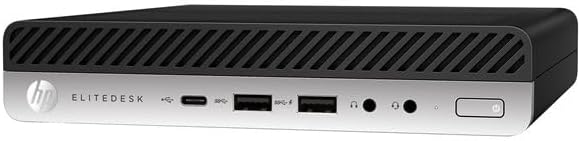
Figure 3.2: Front view of the HP EliteDesk 800 G5 Mini PC, showing the headphone jack, USB-A 3.1 Gen 1 (charging), USB-A 3.1 Gen 2, USB 3.1 Type-C Gen 2, and power button.
4. Operating Instructions
4.1 Power Management
- Turning On: Press the power button on the front panel.
- Shutting Down: Click the Start button in Windows, then select Power > Shut down.
- Restarting: Click the Start button in Windows, then select Power > Restart.
- Sleep Mode: Click the Start button in Windows, then select Power > Sleep.
4.2 Connecting Devices
The HP EliteDesk 800 G5 Mini PC offers various ports for connecting external devices:
- USB Ports: Use the USB-A and USB-C ports for connecting external storage, printers, webcams, and other USB devices.
- Display Ports: Connect monitors using the DisplayPort outputs for high-resolution video.
- Audio Jack: For headphones or external speakers.
- Ethernet (RJ-45): For stable wired network connectivity.
- Wireless (WiFi 6 & Bluetooth 5.1): For wireless network access and connecting Bluetooth peripherals like headsets or mice.
4.3 Operating System
Your Mini PC comes pre-installed with Windows 11 Pro 64-bit. Ensure you keep the operating system updated for optimal performance and security. Windows Update can be accessed via Settings > Windows Update.
5. Maintenance
Regular maintenance helps ensure the longevity and performance of your HP EliteDesk 800 G5 Mini PC.
- Cleaning:
- Use a soft, lint-free cloth to wipe the exterior of the PC.
- For dust accumulation in vents, use compressed air. Ensure the PC is powered off and unplugged before cleaning.
- Avoid using liquid cleaners directly on the PC.
- Software Updates: Regularly check for and install updates for Windows 11 and device drivers. This improves security, stability, and performance.
- Data Backup: Periodically back up important data to an external drive or cloud storage to prevent data loss.
- Ventilation: Ensure the PC is placed in a well-ventilated area. Do not block the air vents to prevent overheating.
6. Troubleshooting
This section provides solutions to common issues you might encounter.
| Problem | Possible Cause | Solution |
|---|---|---|
| PC does not power on. | No power supply; loose connections. | Ensure power cord is securely connected to both the PC and the power outlet. Test the outlet with another device. |
| No display on monitor. | Monitor not connected; incorrect input source; faulty cable. | Check DisplayPort cable connections. Ensure monitor is powered on and set to the correct input source. Try a different cable or monitor if possible. |
| Keyboard/Mouse not responding. | Loose USB connection; driver issue. | Reconnect the keyboard/mouse to a different USB port. Restart the PC. For wireless devices, check batteries and pairing. |
| No internet connection. | Loose Ethernet cable; Wi-Fi disabled; router issue. | For wired: Check Ethernet cable connection to PC and router. For Wi-Fi: Ensure Wi-Fi is enabled in Windows settings. Restart your router/modem. |
| System is slow or unresponsive. | Too many applications running; low disk space; malware. | Close unnecessary applications. Check disk space and free up if needed. Run a full system scan with antivirus software. Consider updating drivers. |
If the problem persists after attempting these solutions, please refer to the Warranty and Support section for further assistance.
7. Technical Specifications
| Feature | Detail |
|---|---|
| Model | HP EliteDesk 800 G5 Mini PC |
| Processor | Intel Hexa-Core i5-9500T (2.2 GHz base, up to 3.7 GHz with Turbo Boost, 9 MB cache, 6 cores) |
| RAM | 16GB DDR4 SDRAM |
| Storage | 256GB NVMe SSD (Solid State Drive) |
| Operating System | Windows 11 Pro 64-bit |
| Graphics | Intel HD Graphics / Intel UHD Graphics |
| Wireless Connectivity | WiFi 6 (802.11ax), Bluetooth 5.1 |
| Front Ports | 1x Headphone, 1x USB-A 3.1 Gen 1 (charging), 1x USB-A 3.1 Gen 2, 1x USB 3.1 Type-C Gen 2 |
| Rear Ports | 1x External Antenna Connector, 1x RJ-45 (Ethernet), 2x DisplayPort 1.2, 2x USB-A 3.1 Gen 1, 2x USB-A 3.1 Gen 2 |
| Max Screen Resolution | 3840 x 2160 pixels |
| Dimensions (LxWxH) | 7.1 x 1.3 x 7 inches |
| Item Weight | 3.56 pounds |
8. Warranty and Support
This HP EliteDesk 800 G5 Mini PC is a renewed product and comes with a 90-Day Warranty from the date of purchase. This warranty covers functional defects and hardware failures under normal use conditions.
For technical support, warranty claims, or further assistance, please contact your vendor or refer to the official HP support website. Keep your purchase receipt and product serial number readily available when contacting support.
For general HP support, you may visit: HP Official Support
Ask a question about this manual
Ask about setup, troubleshooting, compatibility, parts, safety, or missing instructions. Manuals+ will review the question and use this page’s manual context to help answer it.