
1. Introduction
This manual provides detailed instructions for the installation, operation, and maintenance of the DEWIN G2R 63A 2P Automatic Transfer Switch (ATS). This device is designed to automatically switch between two power sources, ensuring continuous power supply to your load.
The DEWIN G2R 63A 2P ATS features a compact structure, small size, and supports 35mm DIN rail installation, making it suitable for household distribution boxes. It offers extremely fast switching speed, resolving power outage issues efficiently.
2. Safety Information
WARNING: Electrical shock hazard. Installation and maintenance should only be performed by qualified personnel.
- Always disconnect power before installing or servicing the ATS.
- Ensure all wiring connections are secure and comply with local electrical codes.
- Do not operate the device if it is damaged or appears to be malfunctioning.
- The operating environment temperature range is -5°C to +40°C.
- The installation altitude must be below 2000 meters.
- The enclosure protection class of the ATS is IP30.
3. Product Overview
3.1 Key Features
- High Performance: Electromagnetically driven for extremely fast switching, less than 50ms conversion time.
- High Quality: Flame-retardant shell for resistance to extreme environments, strong adaptability, and reliable operation.
- Automatic Transfer: Designed with common power supply, backup power supply, load power-on indicator, and clear switch status.
- Arc Extinction System: Internal arc extinction system for rapid cooling and arc suppression.
- Easy to Use: Modular structure, same-side wire entry for convenient wiring, compact size, supports 35mm DIN rail installation.
3.2 Product Components and Dimensions
The DEWIN G2R 63A 2P ATS is a compact unit designed for efficient power management.

Figure 1: Front view of the DEWIN G2R 63A 2P Automatic Transfer Switch.

Figure 2: Dimensions of the DEWIN G2R 63A 2P Automatic Transfer Switch. The device measures approximately 45mm wide, 70mm high, and 105mm deep, with a 35mm DIN rail mounting width.
3.3 Panel Analysis
Understanding the control panel is crucial for proper operation.

Figure 3: Panel analysis showing common power supply indicator light (I), standby power indicator light (II), common power hand/automatic switch, commonly used power supply closing mechanical indication, operating handle, backup power closing mechanical indication, and load power indicator light.
3.4 Specifications
| Specification | Value |
|---|---|
| Operating Mode | ON-ON |
| Rated Current | 63 A |
| Operating Voltage | 220 Volts |
| Contact Type | Normally Open |
| Connector Type | Crimping |
| Switch Type | Automatic Transfer Switch |
| Terminal Type | Screw |
| Material | Polycarbonate and Copper |
| Circuit Type | 2-pole common circuit and auxiliary compatible |
| Mounting Type | DIN Rail Mount |
| Actuator Type | Electromagnet |
| Number of Positions | 2 |
| Upper Rated Temperature | 40 Degrees Celsius |
| Control Device Type | Mechanical Button |
| Control Method | Touch |
| Connectivity Protocol | DIN |
| Power | 13.86 Watts |
| Compatible Devices | Household electrical appliances, electronic equipment, 220V AC powered devices |
| International Protection Rating | IP30 |
| Compliant Specification | CCC, IEC 60669-2-1:2002 |
| Item Weight | 380 Grams |
4. Setup and Installation
4.1 Mounting
The ATS is designed for 35mm DIN rail mounting. Ensure the DIN rail is securely fastened within your distribution box or electrical panel.

Figure 4: The image illustrates the 35mm DIN rail installation method and the robust terminals for wiring.
4.2 Wiring Diagram
Proper wiring is essential for safe and correct operation. Refer to the diagram below for connecting the common power (I), backup power (II), and load output.
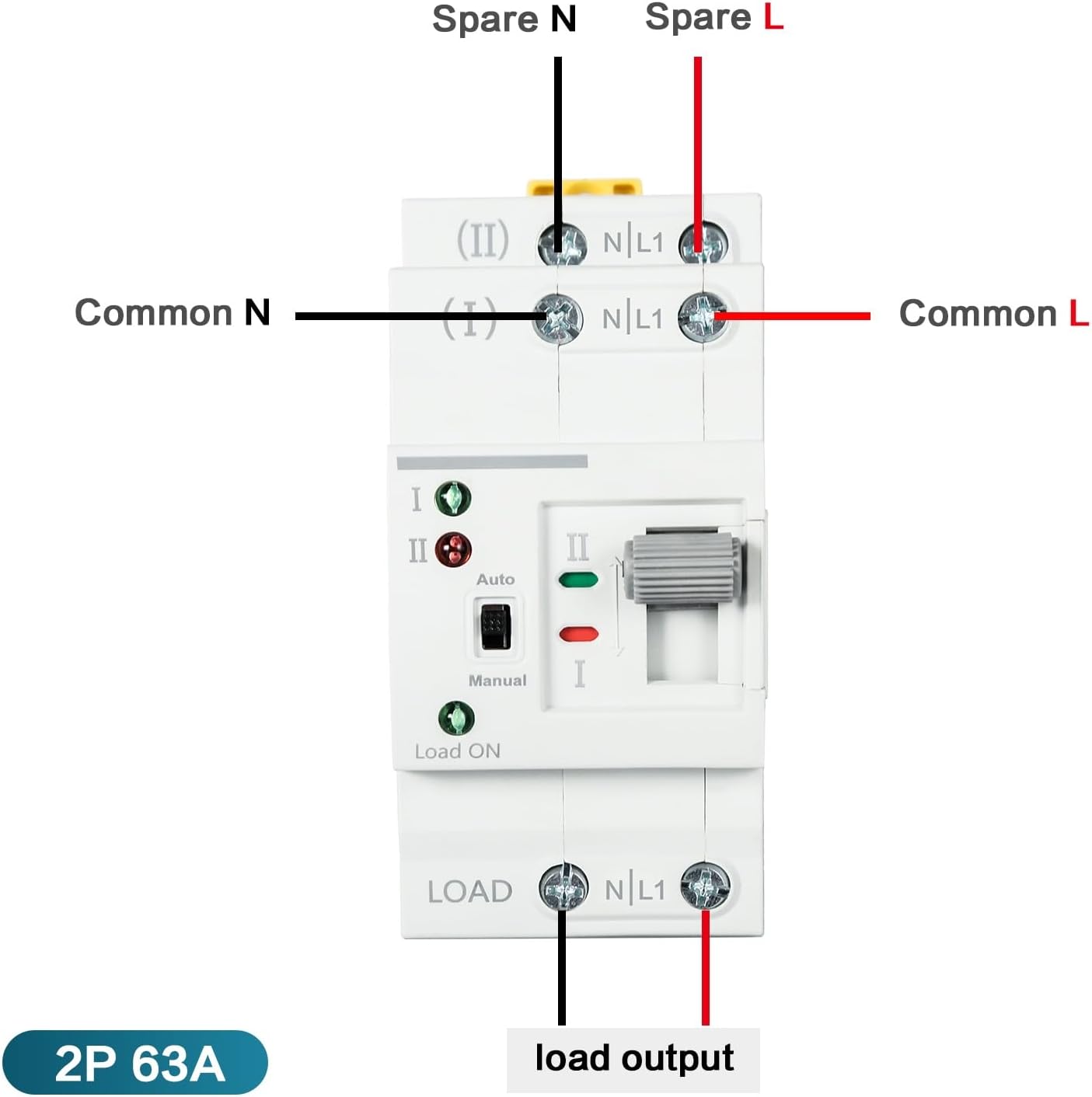
Figure 5: Wiring diagram showing connections for Common N, Common L, Spare N, Spare L, and Load Output. Ensure the input power supply is connected in the correct phase sequence.
5. Operating Instructions
The DEWIN G2R 63A 2P ATS supports both automatic and manual operation modes.
5.1 Automatic Mode
In automatic mode, the switch will detect the presence of the common power supply (I) and the backup power supply (II). If the common power fails, the switch will automatically transfer the load to the backup power supply. When common power is restored, it will switch back.
- Set the 'Auto/Manual' switch to 'Auto'.
- The indicator lights (I and II) will show which power source is active.
- The 'Load ON' indicator will illuminate when power is supplied to the load.
5.2 Manual Mode
To manually switch between power sources:
- Set the 'Auto/Manual' switch to 'Manual'.
- Use the operating handle to physically switch between position I (Common Power) and position II (Backup Power).
- Ensure the desired power source is selected and the corresponding indicator light is on.
6. Maintenance
The DEWIN G2R 63A 2P ATS is designed for reliable operation with minimal maintenance. However, periodic checks are recommended:
- Visual Inspection: Regularly inspect the device for any signs of physical damage, loose connections, or overheating.
- Cleaning: Keep the device free from dust and debris. Use a dry, soft cloth for cleaning. Do not use liquids or abrasive cleaners.
- Terminal Check: Periodically verify that all terminal screws are tight to prevent arcing and ensure good electrical contact.
Always disconnect power before performing any maintenance.
7. Troubleshooting
If you encounter issues with your ATS, consider the following common problems and solutions:
- No Power to Load:
- Check if both common and backup power sources are active.
- Verify the 'Load ON' indicator is illuminated.
- Ensure the ATS is in 'Auto' mode or manually switched to an active power source. - Failure to Transfer Automatically:
- Confirm the 'Auto/Manual' switch is set to 'Auto'.
- Check the status of both power sources using their respective indicator lights.
- If the issue persists, consult a qualified electrician. - Overheating or Unusual Noises:
- Immediately disconnect power.
- This could indicate a serious electrical fault. Do not attempt to repair it yourself. Contact a qualified electrician.
8. Warranty and Support
For warranty information and technical support, please refer to the product packaging or contact your retailer. Keep your purchase receipt as proof of purchase.