1. Product Overview
The DEWIN G2R 63A Automatic Dual Power Transfer Switch (ATS) is designed to ensure continuous power supply by automatically switching between a common power source and a backup power source. This device is suitable for AC 50-60Hz systems with a rated current of 6A-63A. Its compact and modular design allows for easy installation in household distribution boxes on a 35mm DIN rail.

Image 1.1: DEWIN G2R 63A Automatic Dual Power Transfer Switch highlighting fast switching and DIN rail compatibility.
Key features include:
- High Performance: Driven by an excitation solenoid for extremely fast switching, effectively resolving power outage issues.
- High Quality Construction: Features a flame-retardant shell, providing durability and reliability in various environments.
- Clear Indication: Equipped with indicator lights for common power, backup power, and load power, providing clear status updates.
- Arc Extinguishing System: Internal arc extinguishing system cools and extinguishes arcs quickly, enhancing safety.
- User-Friendly Design: Modular structure with convenient wiring on the same side, compact size, and 35mm DIN rail installation support.
2. Safety Information and Working Requirements
Please read all safety instructions before installation and operation to prevent injury or damage to the device.
2.1 General Safety Precautions
- Installation and maintenance should only be performed by qualified personnel.
- Ensure all power sources are disconnected before installation or wiring.
- Verify correct wiring according to the provided diagrams to avoid electrical hazards.
- The device is designed for specific voltage and current ratings. Do not exceed these limits.
- Do not use this product in solar or photovoltaic applications.
- The operating voltage must be maintained within a range of plus or minus 10% of the rated voltage.
2.2 Working Environment Requirements
- Operating Temperature: -5 °C to +40 °C.
- Storage Temperature: -25 °C to +55 °C (can reach +70 °C for short periods).
- Installation Altitude: Below 2000 meters.
- Humidity: At ambient temperatures above +40 °C, higher relative humidity requires adequate measures to prevent condensation due to temperature fluctuations.
- Protection Class: ATS case is IP30.
- Note: The height of this product is 57mm. When purchasing a junction box, pay attention to the height of the junction box and its cover.
3. Product Components and Panel Analysis
The DEWIN G2R 63A ATS features a clear panel layout for easy monitoring and operation.

Image 3.1: Detailed panel analysis of the ATS.
Panel Elements:
- Common Power Supply Indicator Light (I): Illuminates when the common power is active.
- Standby Power Indicator Light (II): Illuminates when the standby power is active.
- Common Power Hand/Automatic Switch: Allows selection between automatic and manual operation modes.
- Load Power Indicator Light (Load ON): Indicates that power is being supplied to the load.
- Commonly Used Power Supply Closing Mechanical Indication (Green): Shows the common power supply is connected.
- Operating Handle: Used for manual switching between power sources.
- Backup Power Closing Mechanical Indication (Red): Shows the backup power supply is connected.

Image 3.2: Product details highlighting mounting, material, and indicators.
Additional Features:
- Dual Mounting System: Supports both DIN rail and screw mounting for flexible installation.
- Flame Retardant Housing: Made from high-quality PC + copper material, offering corrosion resistance, wear resistance, and no discoloration.
- Terminals: Rust-proof wiring terminals for convenient and secure connections.
4. Specifications
Detailed technical specifications for the DEWIN G2R 63A Automatic Dual Power Transfer Switch.

Image 4.1: Product specifications table.
| Specification | Value |
|---|---|
| Model | G2R-63 2P/4P |
| Material | PC + Copper |
| Rated Operating Current (Ie) | 63 A |
| Rated Insulation Voltage (Ui) | 690 V |
| Rated Operating Voltage (Ue) | 220 V AC |
| Nominal Frequency | 50 / 60 Hz |
| Number of Poles | 2P / 4P |
| Rated Short-Circuit Current (Iq) | 50 kA |
| Rated Impulse Withstand Voltage | 8 kV |
| Contactor Switching Time | < 50 ms |
| Operation Transition Time | < 50 ms |
| Return Conversion Time | < 50 ms |
| Blackout Time | < 50 ms |
| Conversion Time | < 50 ms |
| Mechanical Life | 8000 cycles |
| Electrical Life | 1500 cycles |
| Usage Category | AC-31B |
4.1 Dimensions

Image 4.2: Product dimensions.
- 2P (2-pole) Dimensions: 105 mm (Length) x 50 mm (Width) x 70 mm (Height)
- 4P (4-pole) Dimensions: 105 mm (Length) x 82.5 mm (Width) x 70 mm (Height)
- Screw Tightening Torque: 2.5 Nm
- Terminal Width: 7.4 mm
5. Installation
Follow these instructions carefully for proper installation of the DEWIN G2R 63A ATS.
5.1 Mounting
The ATS supports 35mm DIN rail installation. Ensure the mounting location is stable and within the specified environmental conditions.
Image 5.1: Dual mounting system for the ATS.
5.2 Wiring Instructions
The device features convenient wiring terminals. Ensure all connections are secure and follow local electrical codes.
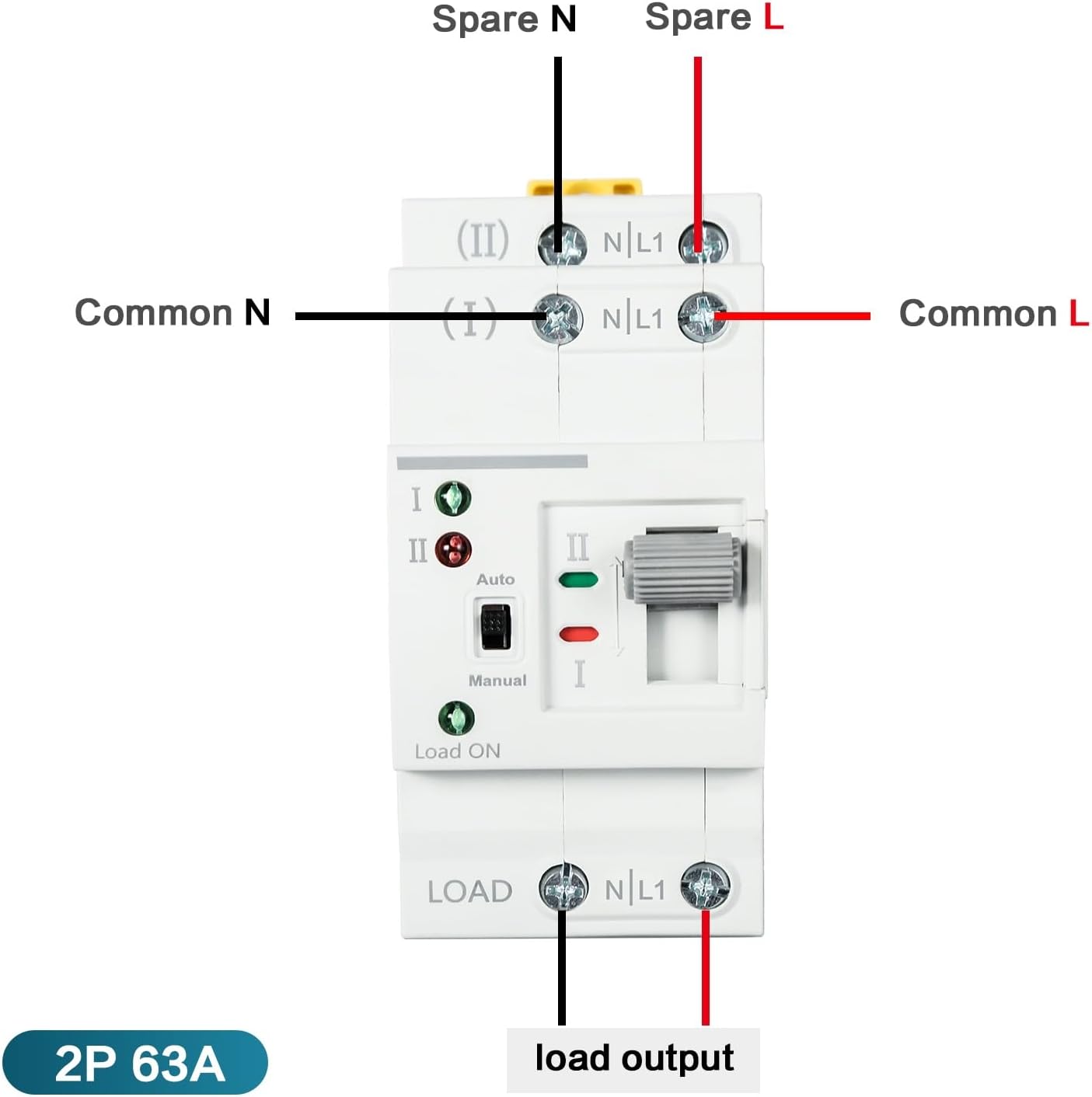
Image 5.2: Wiring diagram for 2P model.

Image 5.3: Comprehensive wiring diagrams for 2P and 4P models.
Important Note:
- The input power supply must be connected in the correct phase sequence.
- Select the appropriate model (2P or 4P) based on your actual operating voltage (e.g., 220V for 2P).
- Before use, select the required mode to ensure stable voltage in your home; otherwise, the ATS may not convert correctly.
6. Operating Instructions
The DEWIN G2R 63A ATS can operate in both automatic and manual modes.
6.1 Automatic Mode
In automatic mode, the switch will detect the presence of the common power supply (Source I) and the backup power supply (Source II). If the common power supply fails or experiences abnormal voltage (undervoltage or overvoltage), the switch will automatically transfer the load to the backup power supply. When the common power supply returns to normal, the switch will automatically revert the load to the common power supply.
- Set the 'Hand/Auto' switch to 'Auto'.
- The indicator lights will show the active power source.
- Note: The manual operating handle cannot be pushed in automatic mode.
6.2 Manual Mode
In manual mode, you can use the operating handle to switch between power sources. This mode is typically used for testing or specific maintenance scenarios.
- Set the 'Hand/Auto' switch to 'Manual'.
- Use the operating handle to physically switch between Source I and Source II.
- Ensure the load is capable of handling a brief power interruption during manual switching.
7. Maintenance
The DEWIN G2R 63A ATS is designed for minimal maintenance. However, periodic checks are recommended to ensure optimal performance and safety.
- Visual Inspection: Regularly inspect the device for any signs of physical damage, loose connections, or discoloration.
- Terminal Check: Ensure all wiring terminals are tight and free from corrosion.
- Functionality Test: Periodically test the automatic transfer function by simulating a power outage (if safe to do so) to ensure it switches correctly.
- Cleaning: Keep the device clean and free from dust and debris. Use a dry, soft cloth for cleaning. Do not use liquid cleaners.
- Professional Inspection: For complex issues or if you are unsure about any aspect of maintenance, consult a qualified electrician.
8. Troubleshooting
If you encounter issues with your DEWIN G2R 63A ATS, refer to the following troubleshooting guide.
| Problem | Possible Cause | Solution |
|---|---|---|
| Device does not switch automatically. | 1. Switch is in manual mode. 2. Power source voltage is outside the acceptable range. 3. Wiring error. | 1. Set the 'Hand/Auto' switch to 'Auto'. 2. Check input voltages for both sources. Ensure they are within +/- 10% of 220V. 3. Verify all wiring connections according to the diagram. |
| Indicator lights are off. | 1. No power to the device. 2. Faulty indicator light. | 1. Check power supply to both sources. Ensure circuit breakers are on. 2. If power is present and other functions work, the indicator light may need service. |
| Device switches frequently or erratically. | 1. Unstable power supply. 2. Loose connections. | 1. Check the stability of both common and backup power sources. 2. Tighten all wiring connections. |
| Burning smell or smoke. | Overload or internal fault. | Immediately disconnect all power to the device. Do not attempt to operate. Contact a qualified electrician for inspection and repair. |
If the problem persists after following these steps, contact customer support or a qualified electrician.
9. Warranty and Support
For warranty information and technical support, please refer to the documentation provided with your purchase or visit the official DEWIN website. Keep your purchase receipt as proof of purchase for warranty claims.
Contact Information:
- For general inquiries or technical assistance, please contact DEWIN customer service.
- Online resources and FAQs may be available on the DEWIN brand store or product support pages.