
Sunoony CD-35
Sunoony CD-35 Portable CD Player User Manual
Model: CD-35 | Brand: Sunoony
Introduction
Thank you for choosing the Sunoony CD-35 Portable CD Player. This device offers a versatile audio experience, combining traditional CD playback with modern connectivity options like Bluetooth, FM transmission, AUX, and USB support. Designed for portability and ease of use, it features anti-skip protection, a rechargeable battery, and a clear LCD display. This manual provides detailed instructions to help you get the most out of your new CD player.

The Sunoony CD-35 Portable CD Player offers multiple playback options for an enhanced audio experience.
What's Included
Please check the package contents to ensure all items are present:
- 1 x Portable CD Player
- 1 x Type-C Charging Cable
- 1 x User Manual
- 1 x Earphones
- 1 x Storage Bag
- 1 x AUX Cable

The complete package includes the CD player, charging cable, earphones, storage bag, AUX cable, and user manual.
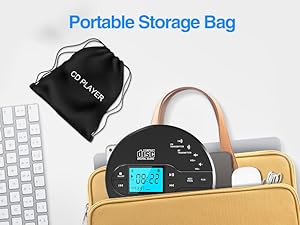
A portable storage bag is included for convenient and safe transport of your CD player.
Key Features
- Portable CD Player with Bluetooth 5.1: Supports two-way wireless connection, functioning as a signal transmitter to Bluetooth speakers/headphones or as a receiver amplifier for phones/iPads/laptops. Note: When using as a Bluetooth transmitter, ensure the connected Bluetooth device is not already connected to another device. The Bluetooth transmitter function does not support connection to car systems.

The CD player features Bluetooth 5.1 for versatile wireless connections, acting as both a transmitter and receiver.

Use the CD player to transmit audio to Bluetooth earphones, headphones, or speakers.

The device can also receive Bluetooth audio from your phone, iPad, or laptop.
- FM Transmitter & AUX Plug In: Equipped with an FM transmitter (87.5-108 MHz) to play music from CDs through your car radio. Also supports 3.5mm AUX cable connection for in-car music enjoyment.

Connect to your car stereo via FM transmission or the included AUX cable.

Easily tune your car radio to the same FM frequency as the CD player for seamless audio.

The included AUX cable allows direct connection to car stereos or external speakers.
- Anti-Skip and Rechargeable CD Player: Built-in 2000 mAh rechargeable battery provides up to 15 hours of playback after a 4-hour charge. Advanced anti-skip technology offers up to 35 seconds of anti-slip protection for CDs and 90 seconds for MP3s.

Advanced anti-skip technology ensures smooth playback even during movement.

Features 90s MP3 anti-skip and 35s CD buffering, ideal for bumpy roads or workouts.

Equipped with a high-capacity 2000mAh rechargeable battery for extended playback.

The device charges via a Type-C cable, offering 6-9 hours of use after a full charge.
- Stereo Speakers, Repeat Function and PROG: Features dual stereo speakers for direct listening without earbuds. Includes a headphone jack for private listening. Offers Repeat Function and PROG function for specified content repetition, ideal for language learners and audiobooks.

Built-in dual speakers provide high-quality stereo sound for various playback modes.

A headphone jack allows for private listening anywhere.

Supports various repeat playback and programming functions, ideal for language learning and audiobooks.
- Wide Compatibility: Supports CD, USB, and AUX audio playback modes. Compatible with disc formats such as CD, MP3, CD-R, and CD-RW. (Note: TF card port is NOT supportable).
- LCD Display and Sleep Timer: Features a large backlit LCD display for clear viewing in low-light conditions. The sleep timer function allows you to set auto-off times between 10-90 minutes, perfect for listening before sleep.

The large backlit LCD display and sleep timer function enhance user convenience.
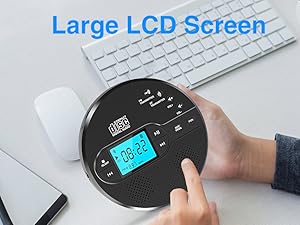
The large LCD screen provides clear information during operation.
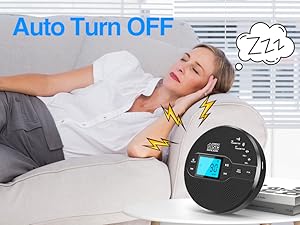
Set the sleep timer to automatically turn off the device after a set period.
Setup
1. Charging the Device
Before first use, fully charge the CD player using the provided Type-C to USB charging cable. Connect the Type-C end to the player and the USB-A end to a compatible USB power adapter (not included), power bank, car charger, or computer USB port. The battery indicator on the LCD display will show charging status.
2. Inserting a CD
- Gently slide the OPEN switch to open the CD compartment lid.
- Carefully place the CD onto the spindle with the label side facing up.
- Press down gently on the center of the CD until it clicks into place.
- Close the CD compartment lid firmly until it clicks shut.
3. Power On/Off
To power on the device, press and hold the POWER button. To power off, press and hold the POWER button again.
Operating Instructions
1. CD Playback
- Play/Pause: Press the PLAY/PAUSE button to start or pause playback.
- Skip Tracks: Press the NEXT button to skip to the next track. Press the PREVIOUS button to go to the beginning of the current track, or press it again to go to the previous track.
- Stop: Press the STOP button to stop playback.
- Repeat Function: Press the REP/PROG button repeatedly to cycle through repeat modes: Repeat One (repeats current track), Repeat All (repeats all tracks), Intro (plays first 10 seconds of each track), Random Play.
- PROG Function: In stop mode, press REP/PROG to program tracks for playback.
2. Bluetooth Mode
The CD player supports Bluetooth 5.1 for both transmitting and receiving audio.
- Bluetooth Transmitter: Connect the CD player to Bluetooth headphones or speakers. Press the BT TRANSMITTER button to activate pairing mode. The Bluetooth icon on the LCD will flash. Search for the CD player on your Bluetooth audio device and connect.
- Bluetooth Receiver: Connect your phone, iPad, or laptop to the CD player. Press the BT RECEIVER button to activate pairing mode. The Bluetooth icon on the LCD will flash. Search for the CD player on your source device and connect.
Important Note: The Bluetooth transmitter function does NOT support connection to car Bluetooth systems.
3. FM Transmitter
To play CD audio through your car's FM radio:
- In CD/USB mode, press the FM TRANSMITTER button.
- Use the PREVIOUS or NEXT buttons to select an FM frequency between 87.5-108 MHz.
- Tune your car radio to the same selected FM frequency.
4. AUX Connection
Connect the provided 3.5mm AUX cable from the CD player's AUX output to your car stereo's AUX input or external speakers for direct wired audio playback.
5. USB Playback
Insert a USB flash drive into the USB port on the CD player. The device will automatically detect and play compatible audio files (e.g., MP3) from the USB drive.

Play your favorite music by simply plugging in a USB flash drive.
6. Sleep Timer
To set the sleep timer:
- Press the SLEEP button.
- Each press will cycle through available sleep times (e.g., 10, 20, 30, 40, 90 minutes) or turn the function off.
- The device will automatically power off after the selected time has elapsed.
Maintenance
- Cleaning: Use a soft, dry cloth to clean the exterior of the CD player. For the lens, use a specialized CD lens cleaner.
- Battery Care: To prolong battery life, avoid fully discharging the battery frequently. Charge the device regularly, even if not in use for extended periods.
- Storage: When not in use, store the CD player in the provided storage bag to protect it from dust and scratches. Keep it in a cool, dry place away from direct sunlight and extreme temperatures.
Troubleshooting
| Problem | Possible Cause | Solution |
|---|---|---|
| Device does not power on. | Low battery; Power button not pressed correctly. | Charge the device fully; Press and hold the POWER button for a few seconds. |
| CD skipping or not playing. | Dirty or scratched CD; Excessive vibration; Incorrect disc format. | Clean the CD; Ensure stable surface or use anti-skip feature; Check disc format compatibility. |
| Bluetooth connection issues. | Device not in pairing mode; Already connected to another device; Out of range. | Ensure device is in correct BT mode (transmitter/receiver) and pairing; Disconnect from other devices; Move closer to the player. |
| Poor FM transmission quality. | Interference; Incorrect frequency. | Try a different FM frequency; Move away from sources of interference. |
Specifications
| Feature | Detail |
|---|---|
| Product Dimensions | 5.75 x 1.32 x 5.75 inches |
| Item Weight | 1.08 pounds |
| Item Model Number | CD-35 |
| Batteries | 1 Lithium Ion batteries required (included) |
| Date First Available | September 19, 2023 |
| Manufacturer | Sunoony |
| Country of Origin | China |
| Color | Black |
| Connectivity Technology | Bluetooth |
| Special Features | CD-R/RW Compatible, Lightweight, Battery Level Indicator, Rechargeable, Anti-Skip Protection |
Warranty and Support
Your Sunoony CD-35 Portable CD Player comes with a worry-free 12-month warranty. We are committed to providing the best quality and user-friendly items and services.
Our promise to you includes:
- 30-Day Money Back Guarantee
- 12-Month Replacement Warranty
- Lifetime Support
- 24/7 Professional After-Sales Customer Service Team
For any questions or assistance, please contact our professional after-sales customer service team. We are dedicated to ensuring the best customer experience and continuously optimize our products based on your suggestions.
Ask a question about this manual
Ask about setup, troubleshooting, compatibility, parts, safety, or missing instructions. Manuals+ will review the question and use this page’s manual context to help answer it.