
Introduction
This manual provides comprehensive instructions for the safe and effective use of your akucvor JS-M2-700B 3-Wheel Folding Mobility Scooter. Please read this manual thoroughly before operating the scooter to ensure proper setup, operation, and maintenance. Retain this manual for future reference.
Safety Information
Your safety is paramount. Always adhere to the following safety guidelines:
- Always operate the scooter on stable, level surfaces. Avoid steep inclines or uneven terrain that could compromise stability.
- Ensure the battery is fully charged before each use to prevent unexpected power loss.
- Do not exceed the maximum weight capacity of 300 lbs.
- Familiarize yourself with all controls, including speed settings and brakes, before operating the scooter in public areas.
- Always use caution when turning, especially at higher speeds, due to the 3-wheel design.
- Avoid operating the scooter in adverse weather conditions, such as heavy rain or snow.
- Regularly inspect tires, brakes, and all moving parts for wear or damage.
- Keep hands and feet clear of moving parts during operation.
- Consult a healthcare professional if you have any medical conditions that might affect your ability to operate a mobility scooter safely.
Product Overview
The akucvor JS-M2-700B is a lightweight, foldable 3-wheel mobility scooter designed for adults, offering portability and ease of use. It features a comfortable seat, adjustable handlebar, and a removable battery for convenient charging.

Image 1: The akucvor JS-M2-700B 3-Wheel Folding Mobility Scooter, showcasing its overall design with seat, backrest, and rear basket.
Key features include:
- Foldable & Lightweight: Weighs approximately 61 lbs (including battery) and folds compactly for transport.
- Comfortable Design: Features a spacious, softly padded seat and backrest, along with an adjustable handlebar.
- Adjustable Speed: Three speed levels for various environments (up to 17 mph forward, 6 mph reverse).
- Removable Battery: Allows for convenient off-board charging.
- Stability: Designed with a small turning radius (30-36 inches max) for indoor maneuverability and dual drum brakes for safety.
Setup
1. Unfolding the Scooter
The scooter is designed for quick and easy unfolding. Follow these steps:
- Place the folded scooter on a flat, stable surface.
- Gently pull the handlebar upwards until the main frame locks into place.
- Ensure all locking mechanisms are securely engaged before proceeding.

Image 2: Illustration of the scooter's 2-second quick fold mechanism, showing the transition from folded to unfolded state.
2. Adjusting the Handlebar
Adjust the handlebar height and angle to your comfort:
- Locate the handlebar adjustment lever or knob.
- Loosen the mechanism and adjust the handlebar to your desired height and angle.
- Securely tighten the adjustment mechanism to prevent movement during operation.

Image 3: Detailed view showing the adjustable handlebar for driver comfort and the removable battery compartment.
3. Battery Installation
The scooter uses a removable battery. Install it as follows:
- Ensure the scooter is powered off.
- Locate the battery compartment, typically under the seat.
- Slide the charged battery into the compartment until it clicks into place.
- Ensure the battery is securely locked to prevent dislodgement during use.
Operating Instructions
1. Powering On/Off
To power on the scooter, press the designated power button. To power off, press and hold the power button until the display turns off.
2. Adjusting Speed
The scooter offers three speed levels:
- Level 1: Approximately 5 mph (ideal for indoor or crowded areas).
- Level 2: Approximately 10 mph.
- Level 3: Approximately 17 mph (for open outdoor spaces).
Reverse speeds are approximately 2, 3, and 6 mph respectively. Use the speed control switch or buttons on the handlebar to select your desired speed level.
3. Braking
The scooter is equipped with sensitive rear dual drum brakes and an electric brake system. To slow down or stop, gently engage the brake levers on the handlebar. Apply brakes smoothly to avoid sudden stops.
4. Maneuverability
The scooter features a tight turning radius of 30-36 inches, making it suitable for indoor use and navigating tight spaces. Always exercise caution when turning.

Image 4: Visual representation of the scooter's sharp turning radius, demonstrating its capability for indoor navigation.
Maintenance
1. Battery Charging
The removable battery can be charged separately from the scooter. Connect the charger to the battery and a standard power outlet. The charging indicator will show when the battery is fully charged. Avoid overcharging.

Image 5: Comparison of lithium battery performance (20 miles range, 1000 cycles) versus lead-acid batteries.
2. General Care and Cleaning
- Wipe down the scooter with a damp cloth regularly. Avoid using harsh chemicals or abrasive cleaners.
- Keep the scooter dry. If it gets wet, dry it thoroughly to prevent corrosion.
- Periodically check tire pressure and inflate as needed to ensure optimal performance and safety.
- Inspect all bolts and fasteners for tightness. Tighten any loose components.
Troubleshooting
This section addresses common issues you might encounter with your mobility scooter.
- Scooter does not power on:
- Ensure the battery is fully charged and correctly installed.
- Check all electrical connections for looseness.
- Reduced range or power:
- The battery may need charging or replacement if it's old.
- Check tire pressure; underinflated tires can reduce efficiency.
- Unusual noises during operation:
- Inspect for loose parts or obstructions in the wheels or motor area.
- Contact customer support if the noise persists.
For issues not covered here, please contact akucvor customer support.
Specifications
Detailed specifications for the akucvor JS-M2-700B mobility scooter:
| Feature | Specification |
|---|---|
| Model Number | JS-M2-700B |
| Product Dimensions (Unfolded) | 21.26"D x 41.34"W x 32.68"H |
| Item Weight | 61.73 Pounds (including battery) |
| Weight Capacity | Up to 300 lbs |
| Motor Power | 700W (Dual hub motors) |
| Max Speed (Forward) | 17 mph (Level 3) |
| Max Speed (Reverse) | 6 mph |
| Battery Type | Removable Lithium Battery |
| Range per Charge | Up to 20 miles |
| Turning Radius | 30-36 inches (max) |
| Brake System | Rear Dual Drum Brake, Electric Brake |
| Tire Size | 10-inch air-filled tires |
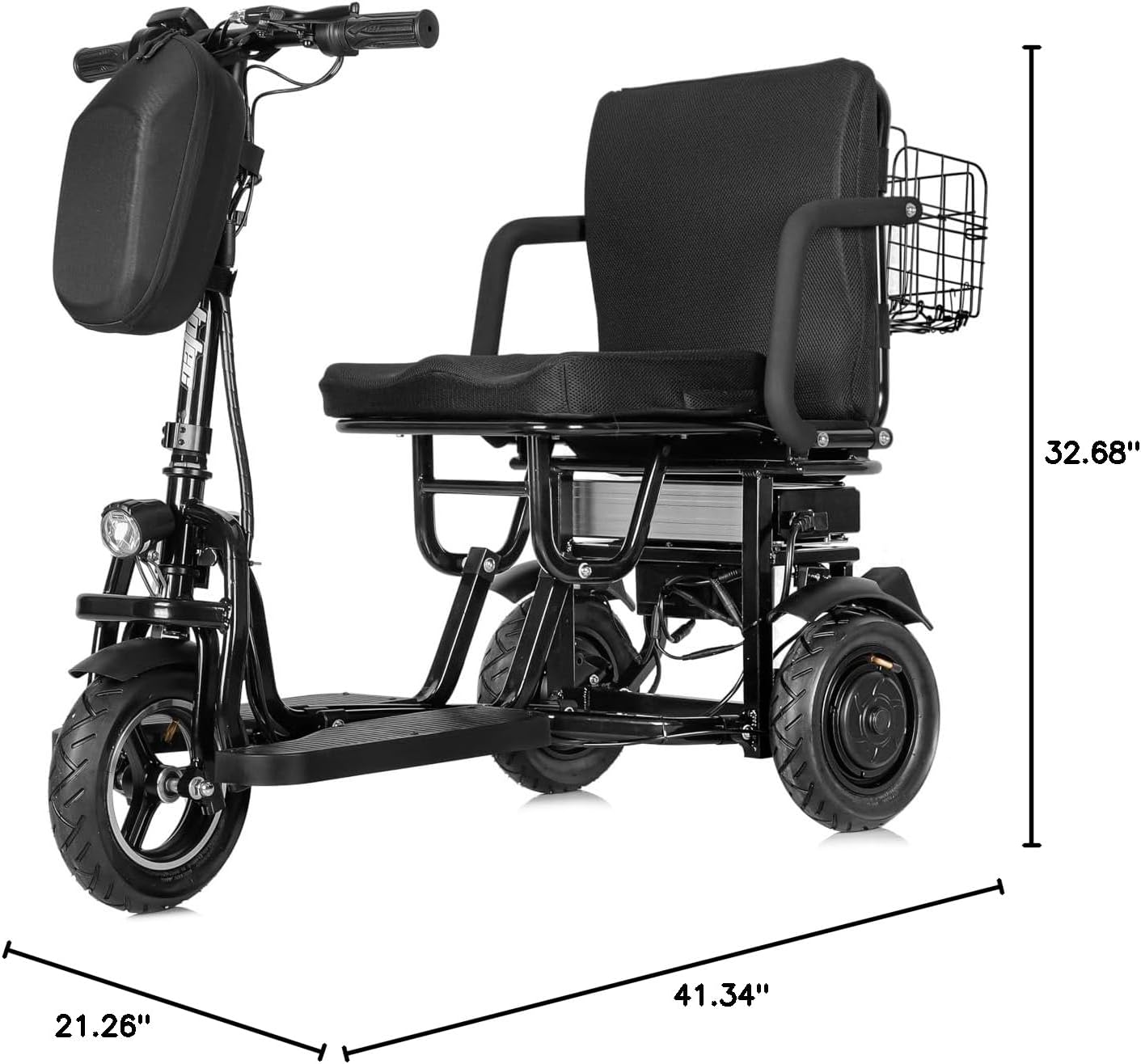
Image 6: Diagram illustrating the key dimensions (depth, width, height) of the akucvor JS-M2-700B mobility scooter.
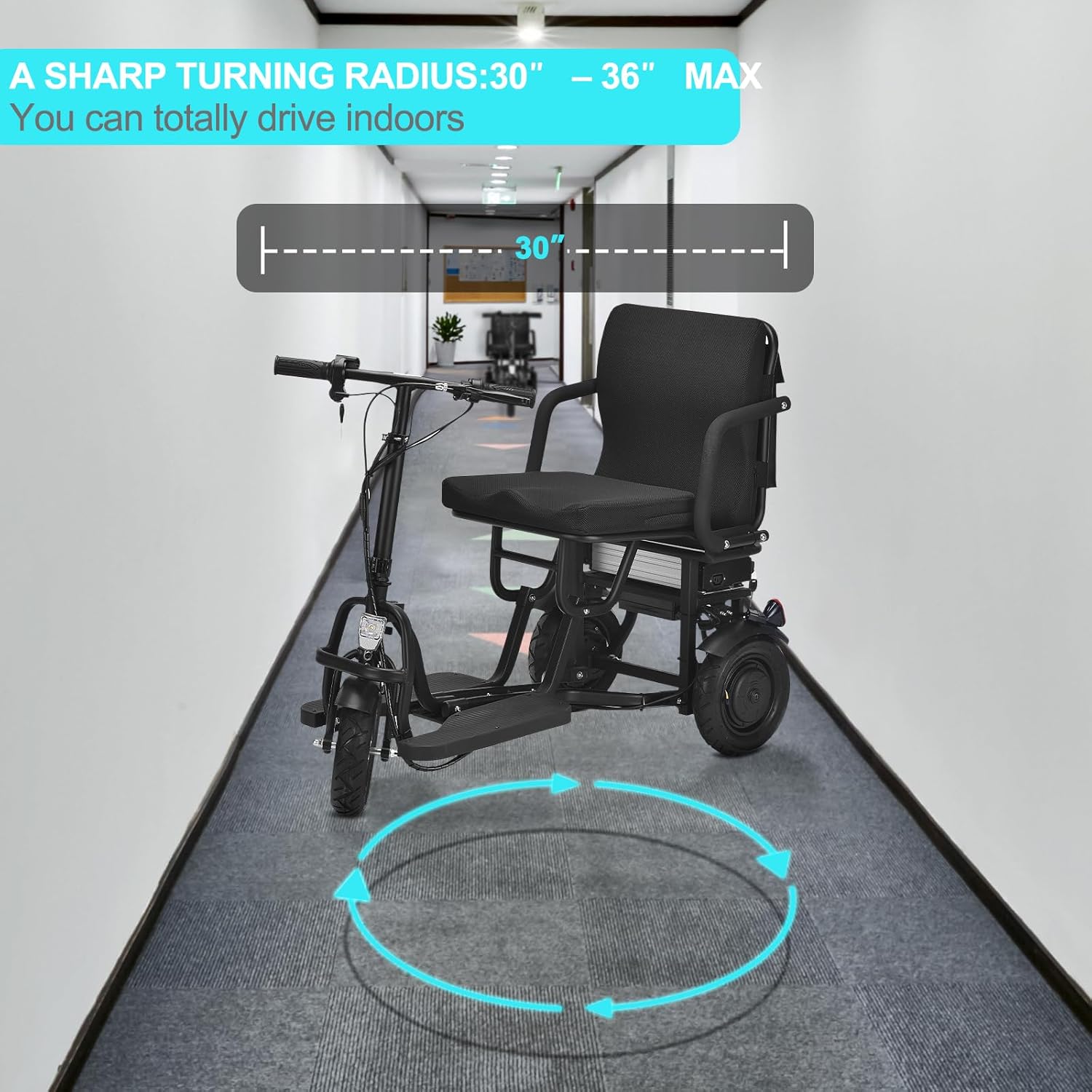
Image 7: Depiction of the scooter's 700W dual motor system, demonstrating its ability to climb inclines with a 300 lbs load capacity.
Warranty and Support
For warranty information or technical support, please contact akucvor customer service. Refer to your purchase documentation for specific warranty terms and contact details. Keep your proof of purchase for any warranty claims.
You can visit the akucvor Store on Amazon for additional product information and support resources.