
1. Introduction
This manual provides essential information for the safe and effective use of your Dexpt replacement charger, designed specifically for APOSEN Cordless Vacuum Cleaners. Please read this manual thoroughly before use to ensure optimal performance and safety.

Image 1.1: The Dexpt replacement charger, featuring a black power adapter block and a long black cord with a round tip connector.
2. Product Compatibility
This charger is compatible with various APOSEN Cordless Vacuum Cleaner models. Please verify your vacuum's model number and charging port specifications before use.
Compatible Models:
- APOSEN Cordless Vacuum Cleaner H250
- APOSEN Cordless Vacuum Cleaner H120
- APOSEN Cordless Vacuum Cleaner H251
- APOSEN Cordless Vacuum Cleaner H150
- APOSEN Cordless Vacuum Cleaner H21
- APOSEN Cordless Vacuum Cleaner H21S
Compatible Part Numbers:
- SK02G-2650050U
- CZH013265050USWH
- CZH01326S050USWH
Important: Only for amperage equal to or less than 0.8A.
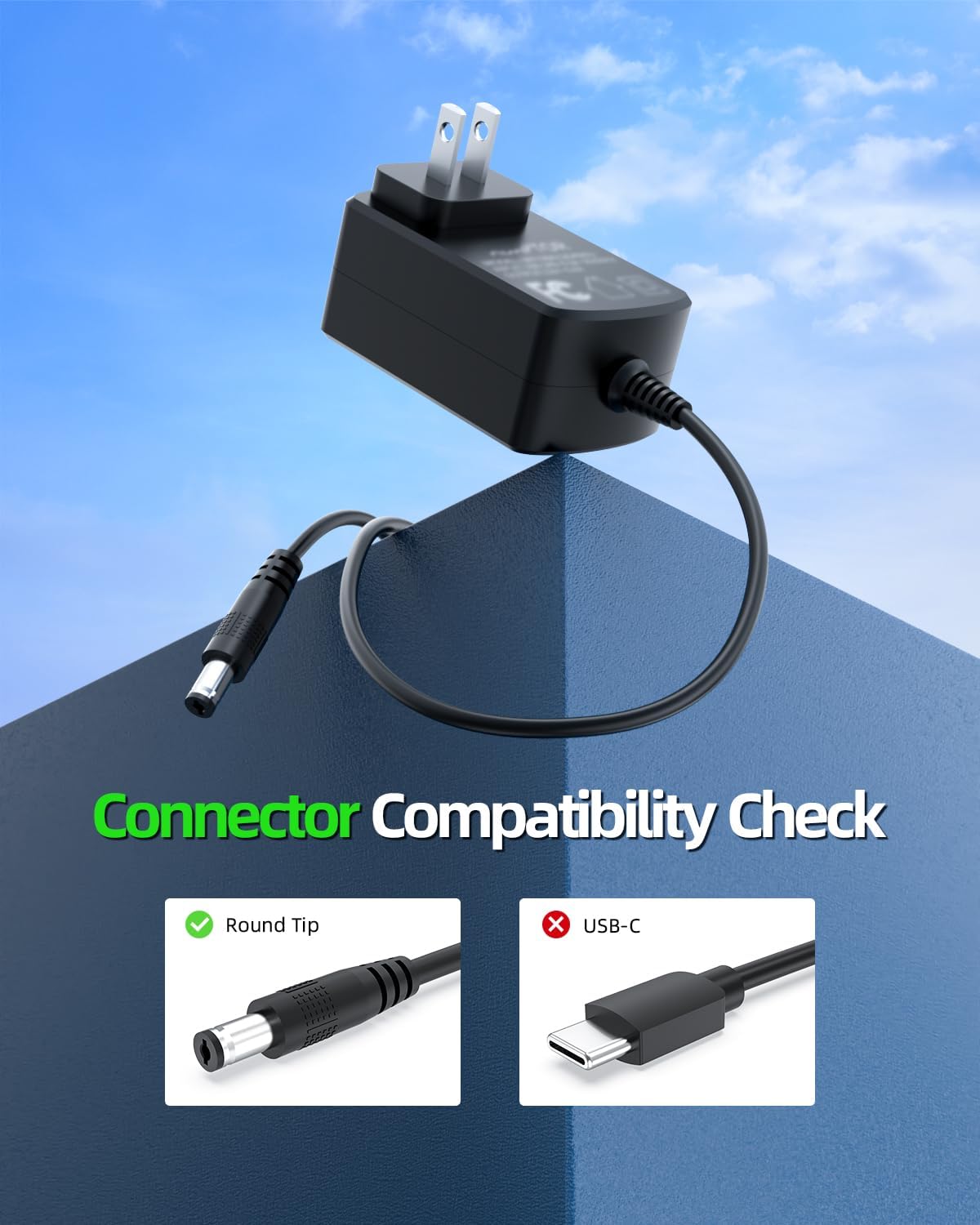
Image 2.1: Visual guide for connector compatibility, showing a round tip connector as compatible and a USB-C connector as incompatible.

Image 2.2: Three steps for compatibility check: 1. Have device ready. 2. Check charging port matching. 3. Check power information (Volts, Amps) on your device. Input: 27V=0.8A is shown as compatible.
3. Setup and Operating Instructions
Follow these steps to properly set up and operate your charger:
- Verify Compatibility: Before connecting, ensure your APOSEN vacuum cleaner model and its power requirements (27V 0.8A or less) match the charger's specifications. Check the charging port type to confirm it is a round tip connector.
- Connect to Vacuum: Insert the round tip connector of the charger firmly into the charging port of your APOSEN cordless vacuum cleaner.
- Connect to Power Outlet: Plug the charger's AC adapter into a standard 100-240V wall outlet.
- Charging Indication: Your vacuum cleaner should indicate that it is charging (e.g., an indicator light). Refer to your vacuum cleaner's manual for specific charging light behaviors.
- Disconnect After Charging: Once the vacuum is fully charged, unplug the charger from the wall outlet first, then disconnect it from the vacuum cleaner.

Image 3.1: An APOSEN cordless vacuum cleaner is shown plugged into a wall outlet using the Dexpt charger, illustrating high charging efficiency.
4. Safety Features
The Dexpt charger is designed with multiple safety protections to ensure the safety of both the device and the user:
- Short Circuit Protection: Prevents damage from electrical shorts.
- Overcurrent Protection: Safeguards against excessive current flow.
- Overvoltage Protection: Protects the device from voltage spikes.
- Overheating Protection: Prevents the charger from reaching unsafe temperatures.

Image 4.1: A diagram illustrating the internal chip and its superior safety features, including protections against short circuit, overcurrent, overvoltage, and overheating.
5. Specifications
| Feature | Detail |
|---|---|
| Model Number | TP04-270080U |
| Input Voltage | 100-240V |
| Output Voltage | 27V |
| Output Amperage | 0.8A |
| Connector Type | 2-Pin Round Tip |
| Color | Black |
| Item Weight | 4.2 ounces |
| Package Dimensions | 4.61 x 2.68 x 1.85 inches |
| Special Feature | Short Circuit Protection |

Image 5.1: The compact design of the charger, held in a hand, highlighting its portable nature with dimensions: length 2.87 inches, width 1.73 inches, height 1.18 inches.
6. Troubleshooting
If you encounter issues with your charger, please refer to the following common problems and solutions:
- Charger Not Working:
- Ensure the charger is securely plugged into both the vacuum and the wall outlet.
- Check if the wall outlet is functional by plugging in another device.
- Verify that your vacuum model and its power requirements are compatible with this charger (refer to Section 2).
- Slow Charging:
- Ensure the charger is connected directly to a wall outlet, not a power strip or extension cord.
- Confirm that the vacuum's battery is not severely depleted, which can sometimes affect initial charging speed.
- Overheating:
- Unplug the charger immediately.
- Ensure the charger is used in a well-ventilated area and not covered.
- If overheating persists, discontinue use and contact customer support.
If the problem persists after attempting these solutions, please contact customer support for further assistance.
7. Warranty and Support
Your Dexpt charger comes with comprehensive support and warranty coverage:
- 30-Day Refund Policy: Within 30 days of purchase, we offer a no-questions-asked refund.
- 365-Day Replacement Policy: Enjoy a 365-day replacement guarantee by the manufacturer for any quality issues.
- 24h Long-Life Technical Support: Our technical support team is available to assist you with any product-related inquiries.
For warranty claims or technical assistance, please refer to the contact information provided with your purchase or visit the official Dexpt store on Amazon.

Image 7.1: An illustration depicting exceptional support service, highlighting the 365-day replacement policy, 30-day refund policy, and 24-hour technical support.