
1. Introduction
Thank you for choosing the INXNI W10 Cordless Wet Dry Vacuum Cleaner. This all-in-one device is designed to simplify your cleaning routine by combining vacuuming, mopping, and self-cleaning functions. It is suitable for various hard floor types and carpets, effectively handling wet and dry debris, dust, and pet hair. Please read this manual thoroughly before operation to ensure safe and optimal performance of your appliance.
2. Safety Information
WARNING: Read all safety warnings and all instructions before using this appliance. Failure to follow the warnings and instructions may result in electric shock, fire, and/or serious injury.
- This appliance is for household use only. Do not use outdoors or on wet surfaces outside of intended cleaning.
- Do not allow children to operate the vacuum cleaner. Close supervision is necessary when used near children.
- Use only with the provided power adapter. Using an incorrect adapter may result in damage or fire.
- Do not immerse the appliance in water or other liquids.
- Keep hair, loose clothing, fingers, and all parts of body away from openings and moving parts.
- Do not pick up flammable or combustible liquids, such as gasoline, or use in areas where they may be present.
- Do not pick up anything that is burning or smoking, such as cigarettes, matches, or hot ashes.
- Always turn off the appliance before making any adjustments, changing accessories, or storing.
- Ensure the dirty water tank is properly installed before use to prevent water leakage.
- To replace or clean the brush roller, rotate the release button 90 degrees counterclockwise and pull it outward. Avoid grasping the entire roller to prevent injury from touching the machine's metal parts.
3. Package Contents
Please check the package contents to ensure all items are present and in good condition:
- INXNI W10 Cordless Wet Dry Vacuum Cleaner Unit
- Charging Dock
- Adapter
- Bristle Roller Brush (pre-installed or separate)
- HEPA Filters (one pre-installed, one spare)
- Cleaning Brush
4. Product Overview
Familiarize yourself with the components of your INXNI W10 vacuum cleaner:

Figure 4.1: INXNI W10 Cordless Wet Dry Vacuum Cleaner with Charging Dock and Accessories.
- Main Unit: Contains the motor, battery, and dirty water tank.
- Handle: Ergonomic handle with control buttons for power, mode selection, and self-cleaning.
- Clean Water Tank (750ml): Located on the upper part of the main unit, for holding clean water or cleaning solution.
- Dirty Water Tank (720ml): Located on the lower part of the main unit, for collecting dirty water and debris. Features solid-liquid separation.
- Brush Roller: Located at the base, responsible for scrubbing and collecting debris.
- LED Display: Provides real-time information on cleaning modes, battery life, and runtime.
- Charging Dock: Base for charging and self-cleaning.
5. Setup
5.1 Assembly
- Insert the handle into the main unit until it clicks securely into place.
- Place the charging dock on a flat, stable surface near a power outlet.
5.2 Initial Charging
Before first use, fully charge the vacuum cleaner.
- Connect the adapter to the charging dock and plug it into a power outlet.
- Place the vacuum cleaner onto the charging dock. The LED display will indicate charging status.
- A full charge takes approximately 5 hours. The battery indicator will show full when charging is complete.

Figure 5.1: The INXNI W10 on its all-in-one charging and storage dock.
5.3 Filling the Clean Water Tank
- Remove the clean water tank from the main unit.
- Open the tank cap and fill with clean tap water. For enhanced cleaning, a small amount of non-foaming, low-sudsing cleaning solution designed for wet vacuums can be added (refer to solution manufacturer's instructions).
- Close the cap securely and reattach the tank to the main unit.
6. Operating Instructions
6.1 Power On/Off and Mode Selection

Figure 6.1: Control buttons for Mode Selection, ON/OFF, and Self-cleaning.
- Press the ON/OFF button to start or stop the vacuum cleaner.
- Press the Mode Selection button to cycle through available cleaning modes:
- Dry Mode: Suction-only operation with no water dispersion, ideal for dry spills or vacuuming.
- Max Mode: Provides powerful suction and abundant water flow for heavy-duty cleaning and stubborn messes.
- Eco Mode: Offers minimal suction and limited water flow for light cleaning and extended battery life. Operates at a low noise level of 66dBA.

Figure 6.2: The LED display provides real-time information on selected cleaning modes and battery status.
6.2 Cleaning Performance
- Powerful Suction: The W10 features 16000PA suction power, ensuring effective removal of both dry and wet waste, leaving floors dry and streak-free in seconds.
- Versatile Surface Cleaning: The 0.039-inch washable brush head is designed to safely scrub hardwood, marble, and ceramic tiles. It also efficiently removes debris and pet hair from carpets.
- Edge-to-Edge Cleaning: Roller brushes are positioned just 0.24 inches from baseboards, ensuring effective cleaning in corners and along edges with minimal blind spots.
- Self-Propelled Design: The vacuum cleaner features a self-propelled mechanism, making it lightweight and effortless to maneuver across floors.
- Long-lasting Cleaning: Equipped with a 750ml clean water tank, 720ml dirty water tank, and a 4000mAh battery, the W10 can clean over 2000 sq.ft per charge (tested by INXNI lab), minimizing interruptions.

Figure 6.3: Visual representation of the 16000PA high suction power.

Figure 6.4: The INXNI W10 is suitable for cleaning pet areas, bathrooms, kitchens, and living rooms.
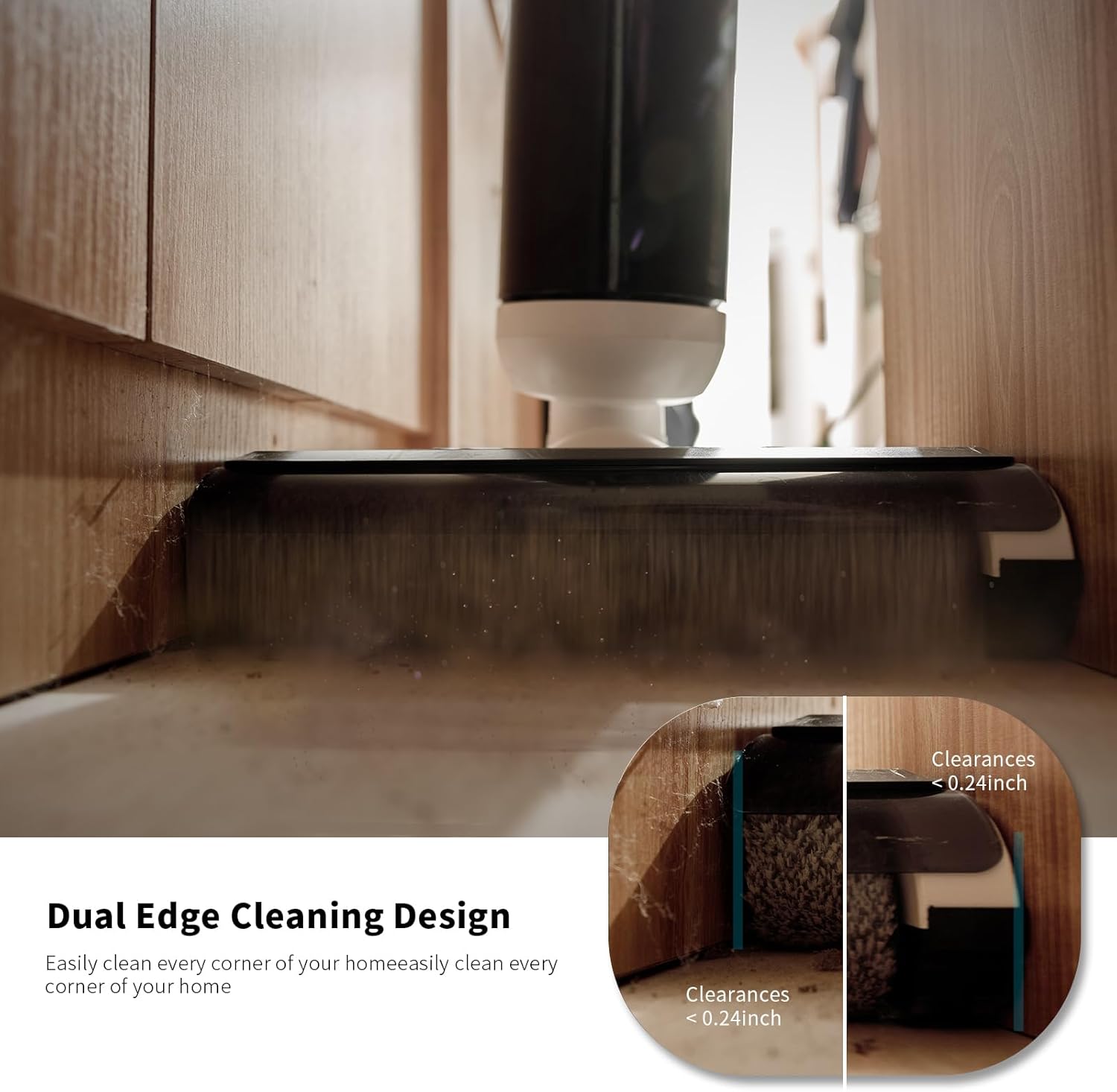
Figure 6.5: The dual edge cleaning design allows for thorough cleaning close to walls and furniture.

Figure 6.6: The self-propelled design simplifies floor cleaning.

Figure 6.7: Water tank capacities and estimated cleaning coverage per charge.
7. Maintenance
7.1 Emptying and Cleaning the Dirty Water Tank
It is recommended to empty and clean the dirty water tank after each use.
- Remove the dirty water tank from the main unit.
- Open the tank and dispose of the dirty water and separated solid debris.
- Rinse the tank thoroughly with clean water.
- Allow the tank to air dry completely before reattaching it to the unit.
7.2 One-Key Self-Cleaning Function
The self-cleaning function cleans the brush roller and internal tubing automatically.
- Ensure the clean water tank has sufficient water.
- Place the vacuum cleaner on the charging dock.
- Press the Self-cleaning button on the handle. The vacuum will begin a self-cleaning cycle.
- Once the cycle is complete, empty and clean the dirty water tank.

Figure 7.1: The one-touch self-cleaning feature ensures the brush is clean and odor-free.
7.3 Cleaning/Replacing HEPA Filter
The HEPA filter should be cleaned regularly and replaced every 3-6 months, depending on usage.
- Remove the dirty water tank. The HEPA filter is located inside or near the tank compartment.
- Gently tap the filter to remove loose dust. You may rinse it under running water if heavily soiled, but ensure it is completely dry before reinstallation.
- Replace the filter if it is damaged or excessively dirty.
8. Troubleshooting
If you encounter issues with your INXNI W10, refer to the following common problems and solutions:

Figure 8.1: The vacuum provides voice prompts for common issues.
| Problem | Possible Cause | Solution |
|---|---|---|
| Vacuum does not turn on. | Low battery. | Charge the vacuum cleaner fully. |
| No water dispensing / Poor cleaning performance. | Clean water tank empty or improperly installed. | Refill clean water tank; ensure it is securely in place. |
| Dirty water tank full indicator / Voice prompt: "The dirty water tank is full, please clean it." | Dirty water tank is full. | Empty and clean the dirty water tank. |
| Self-cleaning not working / Voice prompt: "Please return to the base for self-cleaning." | Vacuum not on charging dock or insufficient water. | Ensure vacuum is correctly placed on the charging dock and clean water tank is filled. |
| Reduced suction. | Clogged brush roller or dirty HEPA filter. | Clean the brush roller and HEPA filter. Replace filter if necessary. |
| Unusual noise. | Obstruction in brush roller or air ducts. | Check and remove any obstructions from the brush roller and air pathways. |
If the problem persists after trying these solutions, please contact customer support.
9. Specifications
| Feature | Specification |
|---|---|
| Brand | INXNI |
| Model Name | W10-2 (W10 cordless wet dry mop vacuum) |
| Special Features | 3-in-1: Vacuuming, Mopping, Washing; 66 dB Low Noise; 8.82 lb Lightweight & Cordless; Up to 40-Minute Runtime |
| Filter Type | HEPA Filter |
| Included Components | Adapter, Bristle Roller Brush, Charging Dock, Cleaning Brush, HEPA Filters |
| Cordless | Yes |
| Clean Water Tank Capacity | 0.75 Liters |
| Dirty Water Tank Capacity | 0.72 Liters |
| Wattage | 200 watts |
| Charging Time | 5 Hours |
| Maximum Suction | 16000 Pa (1.2E+2 Millimeters) |
| Recommended Uses | Ceramic Tiles, Hardwood, Marble, Carpets |
| Form Factor | Upright |
| Color | White |
| Product Dimensions (L x W x H) | 10.83"L x 10.24"W x 43.31"H |
| Battery Description | 4000mAh Lithium Ion (included) |
| Noise Level | 66 dB (in ECO mode) |
| Battery Life | Up to 40 minutes |
| Item Weight | 8.82 pounds |
| UPC | 658358879368, 658358879351 |
10. Warranty and Support
INXNI provides dedicated customer support for its products. For any inquiries, technical assistance, or warranty claims, please contact our customer service team.
Customer Service Email: support@inxni.shop
Please have your model number (W10 cordless wet dry mop vacuum) and purchase information ready when contacting support.