
1. Introduction
This user manual provides comprehensive instructions for the Generic Openstage 15T Digital Telephone (Lava), model HCPLT103. It covers essential information regarding product features, setup, operation, maintenance, and troubleshooting to ensure optimal performance and longevity of your device. The Openstage 15T is designed for efficient communication in various office environments, compatible with HiPath telephone systems and available for TDM, HFA, or SIP environments.
2. Product Overview
The Openstage 15T Digital Telephone is a robust communication device featuring a clear LCD display and intuitive controls. Below are its key features and visual representations.
Key Features:
- 3 menu keys for easy navigation.
- 8 free programmable keys for customized functions.
- 2 fixed function keys for common operations.
- Volume keys (Loudspeaker/+/-) for audio control.
- LCD 2 line graphic display for clear information display.
- Full duplex, hands-free telephone with integrated microphone and speaker.
Product Images:
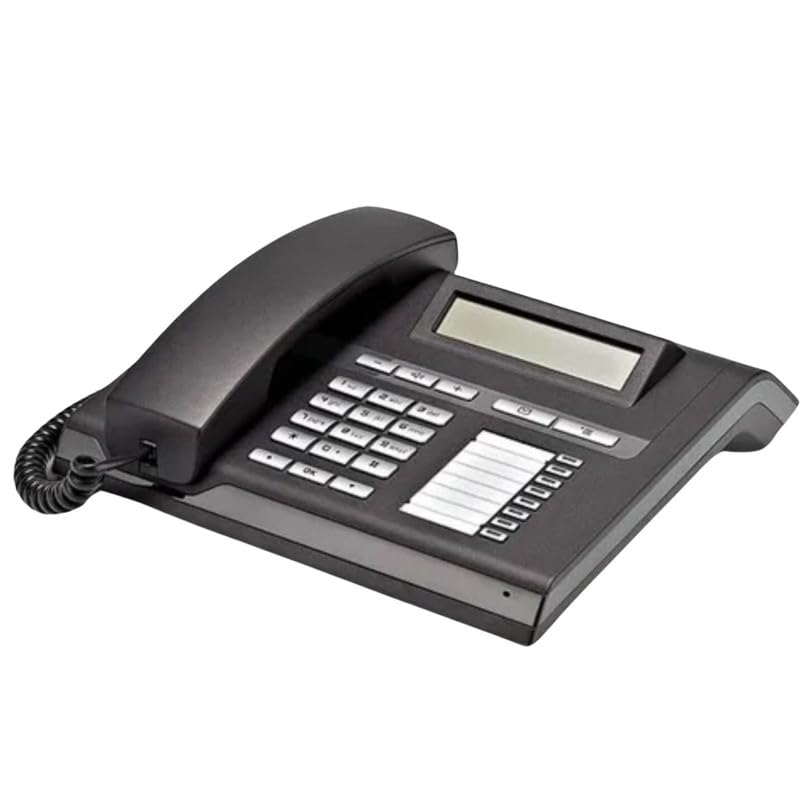
Figure 2.1: Front-angled view of the Openstage 15T Digital Telephone, showcasing its keypad, display, and handset.
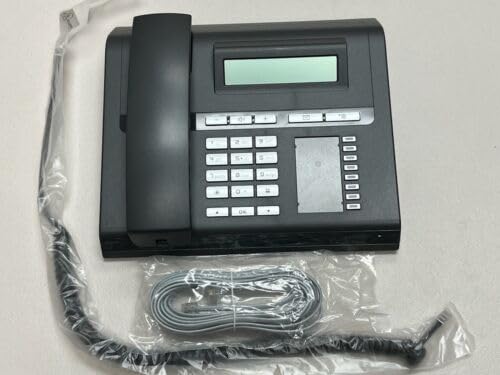
Figure 2.2: Top-down view of the Openstage 15T Digital Telephone, showing the phone alongside its coiled handset cord and a straight line cord, still in their protective packaging.
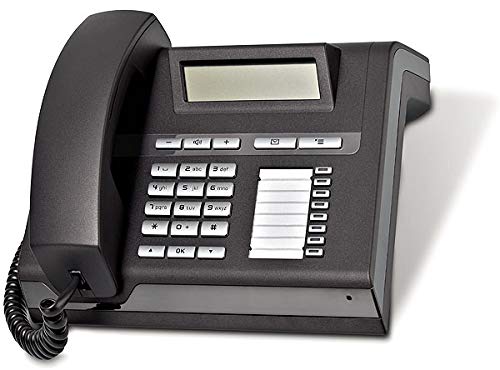
Figure 2.3: Side-angled view of the Openstage 15T Digital Telephone, highlighting the ergonomic design of the handset and the layout of the function keys next to the display.
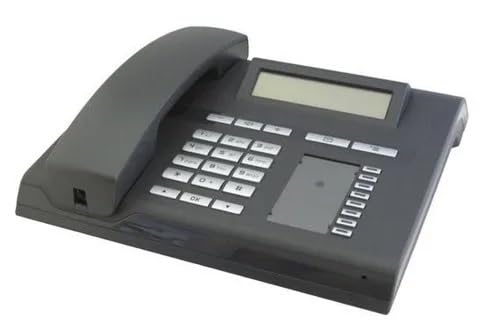
Figure 2.4: Another side-angled perspective of the Openstage 15T Digital Telephone, providing a clear view of the numeric keypad and the blank area for programmable key labels.
3. Setup
Follow these steps to set up your Openstage 15T Digital Telephone:
- Unpack the Device: Carefully remove the telephone and all accessories from the packaging. Ensure all components listed in "What's in the Box" (Telephone) are present.
- Connect the Handset: Plug one end of the coiled handset cord into the handset and the other end into the designated port on the telephone base.
- Connect to the Network: Connect the telephone line cord from the telephone's line port to your PSTN landline network wall jack. The Openstage 15T is designed to operate within a HiPath 4000 environment as a TDM telephone and is compatible with HiPath telephone systems for TDM, HFA, or SIP environments.
- Power Connection: The phone is battery powered. Ensure the battery is correctly inserted and charged if applicable.
- Placement: Place the telephone on a stable, flat surface or mount it on a wall using the integrated wall mount feature.
4. Operating Instructions
This section outlines the basic operation of your Openstage 15T Digital Telephone.
Making and Receiving Calls:
- To Make a Call: Lift the handset or press the speakerphone button. Dial the desired number using the numeric keypad.
- To Receive a Call: Lift the handset or press the speakerphone button when the phone rings.
- Ending a Call: Replace the handset or press the speakerphone button again.
Using Function Keys:
- Menu Keys: Use the 3 dedicated menu keys to navigate through the phone's settings and options displayed on the LCD.
- Programmable Keys: The 8 free programmable keys can be configured for speed dialing, feature access, or other custom functions as per your system's configuration. Consult your system administrator for programming details.
- Fixed Function Keys: Utilize the 2 fixed function keys for pre-assigned common actions (e.g., Mute, Redial). Refer to the key labels for their specific functions.
- Volume Keys: Adjust the loudspeaker volume or handset volume during a call using the dedicated Volume keys (+/-).
LCD Display:
The 2-line graphic LCD display shows caller ID, call duration, menu options, and system messages. Navigate menus using the menu keys and the numeric keypad for input.
5. Maintenance
Proper maintenance ensures the longevity and optimal performance of your telephone.
- Cleaning: Use a soft, dry, lint-free cloth to clean the phone's surface and display. For stubborn marks, slightly dampen the cloth with water. Avoid using harsh chemicals, abrasive cleaners, or solvents.
- Environment: Keep the telephone away from direct sunlight, excessive heat, humidity, and dust. Do not expose it to liquids.
- Cords: Periodically check all cords for damage or fraying. Replace damaged cords immediately.
6. Troubleshooting
If you encounter issues with your Openstage 15T Digital Telephone, refer to the following common problems and solutions:
| Problem | Possible Cause | Solution |
|---|---|---|
| No dial tone. | Telephone line not connected or faulty. | Ensure the telephone line cord is securely connected to both the phone and the wall jack. Test with another phone if possible. |
| Display is blank. | No power or display settings. | Check battery power. If applicable, ensure the phone is receiving power. Adjust display contrast/brightness via menu settings. |
| Cannot hear caller / Caller cannot hear me. | Volume too low, mute activated, or faulty connection. | Adjust volume using the volume keys. Check if the mute function is active. Ensure handset and line cords are properly connected. |
| Keys are unresponsive. | Temporary software glitch or physical damage. | Disconnect the phone from the line for a few minutes, then reconnect. If the problem persists, contact customer support. |
If the problem persists after trying these solutions, please contact your service provider or the manufacturer's support for further assistance.
7. Specifications
| Feature | Detail |
|---|---|
| Brand | Generic |
| Model | HCPLT103 |
| Product Dimensions | 25.4 x 25.4 x 25.4 cm |
| Compatible Devices | PSTN Landline Networks |
| Mounting Hardware | Telephone |
| Number of items | 1 |
| Display Technology | LCD |
| Display Type | With Display |
| Power Source | Battery Powered |
| Material | Plastic |
| Mounting Type | Wall Mount |
| Country of Origin | India |
| Colour | Black |
8. Warranty and Support
This product is manufactured by Third Party. For specific warranty information, please refer to the documentation included with your purchase or contact the manufacturer directly. Extended warranty plans may be available for purchase separately.
For technical support or service inquiries, please contact the seller or manufacturer. Keep your purchase receipt and product model number (HCPLT103) handy when seeking support.