
1. Introduction
This manual provides essential instructions for the safe and efficient operation, maintenance, and troubleshooting of your BREVELTION 50QT Commercial Dough Mixer Machine, Model ATL170089. Please read this manual thoroughly before operating the machine to ensure proper usage and to prevent damage or injury.

Figure 1: BREVELTION 50QT Commercial Dough Mixer Machine.
2. Important Safety Instructions
Always follow basic safety precautions when using electrical appliances to reduce the risk of fire, electric shock, and injury to persons.
- Read all instructions before operating the mixer.
- Ensure the power supply matches the voltage specified on the machine's rating label (110V).
- Do not operate the mixer with a damaged cord or plug, or after the appliance malfunctions or has been damaged in any manner.
- Keep hands, hair, clothing, and utensils away from moving parts during operation to prevent injury.
- The machine is equipped with a safety cover. The mixer will automatically power off if the safety cover is opened during operation. Do not attempt to bypass this safety feature.
- Never insert hands or objects into the mixing bowl while the machine is running.
- Unplug the mixer from the outlet when not in use, before putting on or taking off parts, and before cleaning.
- This appliance is intended for commercial use only.
- Do not immerse the motor unit in water or other liquids.
- Use only attachments recommended or sold by the manufacturer.

Figure 2: The safety cover prevents operation when open.
3. Product Overview and Components
The BREVELTION 50QT Commercial Dough Mixer is designed for efficient dough preparation in commercial settings. Key components include:
- Stainless Steel Mixing Bowl: 50-liter capacity, food-grade 304 stainless steel.
- Spiral Mixer Head: Designed for effective dough kneading.
- Safety Cover: A protective grid that ensures safe operation by automatically stopping the machine if opened.
- Control Panel: Features Power, Fast, Slow, and Stop buttons for operation.
- Motor: 2200W motor with gearbox speed changing mechanism for reliable performance.

Figure 3: Key components of the dough mixer.

Figure 4: Close-up of the control panel.

Figure 5: Internal view of the copper motor and gearbox.
4. Specifications
| Feature | Detail |
|---|---|
| Product Name | Electric Dough Mixer |
| Model Number | ATL170089 |
| Rated Capacity | 50 Liters / 50 Quarts |
| Rated Voltage | 110V~50Hz |
| Rated Power | 2200W |
| Net Weight | Approx. 143.7 kg (317 lbs) |
| Product Dimensions (D x W x H) | 30.3" x 30.3" x 35.4" |
| Agitator Speed (Low) | 120 r/min |
| Bowl Rotating Speed (Low) | 6 r/min |
| Agitator Speed (High) | 240 r/min |
| Bowl Rotating Speed (High) | 13 r/min |
| Material | Food-grade 304 Stainless Steel |

Figure 6: Product dimensions and key specifications.
5. Setup and Installation
- Unpacking: Carefully remove the mixer from its packaging. Inspect for any shipping damage. Report any damage to the carrier immediately.
- Placement: Place the mixer on a stable, level, and sturdy surface capable of supporting its weight (approx. 143.7 kg / 317 lbs). Ensure adequate clearance around the machine for ventilation and operation.
- Power Connection: Connect the power cord to a grounded electrical outlet that matches the specified voltage (110V). Ensure the outlet is easily accessible for quick disconnection if needed.
- Initial Cleaning: Before first use, clean all parts that will come into contact with food. Refer to the "Maintenance and Cleaning" section for detailed instructions.
6. Operating Instructions
This mixer features dual speed and dual action for efficient dough mixing.
6.1. Preparing for Mixing
- Ensure the mixer is unplugged before adding ingredients.
- Add your ingredients into the stainless steel mixing bowl. Do not exceed the 50-liter capacity.
- Close the safety cover securely. The machine will not operate if the cover is open.
6.2. Mixing Process
- Plug the mixer into the power outlet.
- Press the Power button to turn on the machine. The power indicator will illuminate.
- Select the desired speed:
- Press Slow for a slower mixing speed (Agitator: 120 r/min, Bowl: 6 r/min). This is suitable for initial mixing or softer doughs.
- Press Fast for a higher mixing speed (Agitator: 240 r/min, Bowl: 13 r/min). This is suitable for more intensive kneading.
- During operation, both the spiral mixer head and the mixing bowl rotate simultaneously (dual action) to ensure thorough and uniform mixing.
- Monitor the dough consistency. If necessary, stop the machine by pressing the Stop (Emergency Stop) button, adjust ingredients, and restart.
- To stop the machine at any time, press the Stop (Emergency Stop) button.
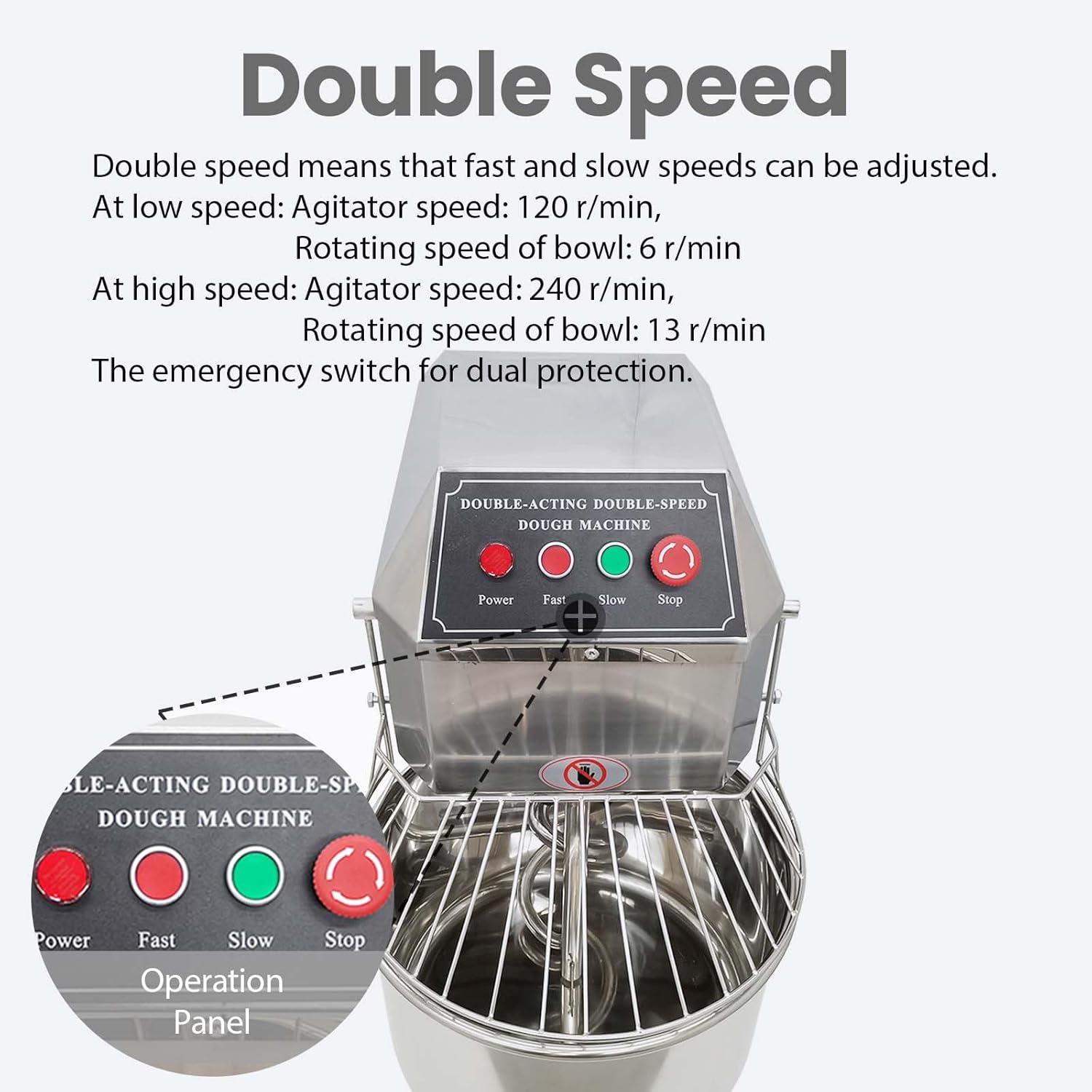
Figure 7: Explanation of dual speed functionality.

Figure 8: Illustration of the dual action mixing mechanism.
6.3. After Mixing
- Once mixing is complete, press the Stop button and unplug the machine.
- Carefully open the safety cover.
- Remove the dough from the mixing bowl.
- Proceed to the "Maintenance and Cleaning" section.
7. Maintenance and Cleaning
Regular cleaning and maintenance will extend the life of your dough mixer and ensure hygienic operation.
7.1. Daily Cleaning
- Disconnect Power: Always unplug the machine before cleaning.
- Remove Residue: Use a dough scraper or spatula to remove any remaining dough from the mixing bowl and spiral mixer head.
- Wash Components: Clean the stainless steel mixing bowl and spiral mixer head with warm, soapy water. Rinse thoroughly.
- Wipe Exterior: Wipe down the exterior surfaces of the machine with a damp cloth. Do not use abrasive cleaners or immerse the main unit in water.
- Dry Thoroughly: Ensure all parts are completely dry before reassembling or storing the machine.
7.2. Periodic Maintenance
- Inspect the power cord and plug for any signs of damage.
- Check for any loose screws or components and tighten if necessary.
- Ensure the safety cover mechanism is functioning correctly.
8. Troubleshooting
If you encounter issues with your dough mixer, refer to the following table for common problems and solutions.
| Problem | Possible Cause | Solution |
|---|---|---|
| Machine does not start. |
|
|
| Motor runs, but mixer head/bowl does not move. |
|
|
| Unusual noise during operation. |
|
|
| Dough is not mixing uniformly. |
|
|
9. Customer Support
For further assistance, technical support, or inquiries regarding your BREVELTION 50QT Commercial Dough Mixer, please contact our customer support team.
You may also consider purchasing extended protection plans for your appliance:
- 3-Year Protection Plan
- 4-Year Protection Plan
- Complete Protect Plan (monthly subscription)
Refer to your purchase documentation for specific contact details and warranty information.