
1. Product Overview
This instruction manual provides essential information for the safe and effective use of your PREMIER ADAPTER CZJUTAI JT-DC045V0600 LED Transformer. This Class 2 power supply adapter is designed for low voltage LED devices, providing a constant power source in a steady-on mode.

Image 1.1: Overview of the PREMIER ADAPTER CZJUTAI JT-DC045V0600 LED Transformer.
The transformer is suitable for various 4.5V 0.6A low voltage LED applications, including holiday decoration lights, Christmas trees, LED string lights, lawn lamps, curtain lights, fairy lights, and rope lights. It features a US 2-pin plug and is rated IP44 for indoor and outdoor use.
2. What's in the Box
- 1x 4.5V 2.7W LED Power Supply with Screw Socket (Constant ON)
3. Specifications
Before connecting, verify that the voltage, current, wattage, and connector type of this transformer match your device's requirements.
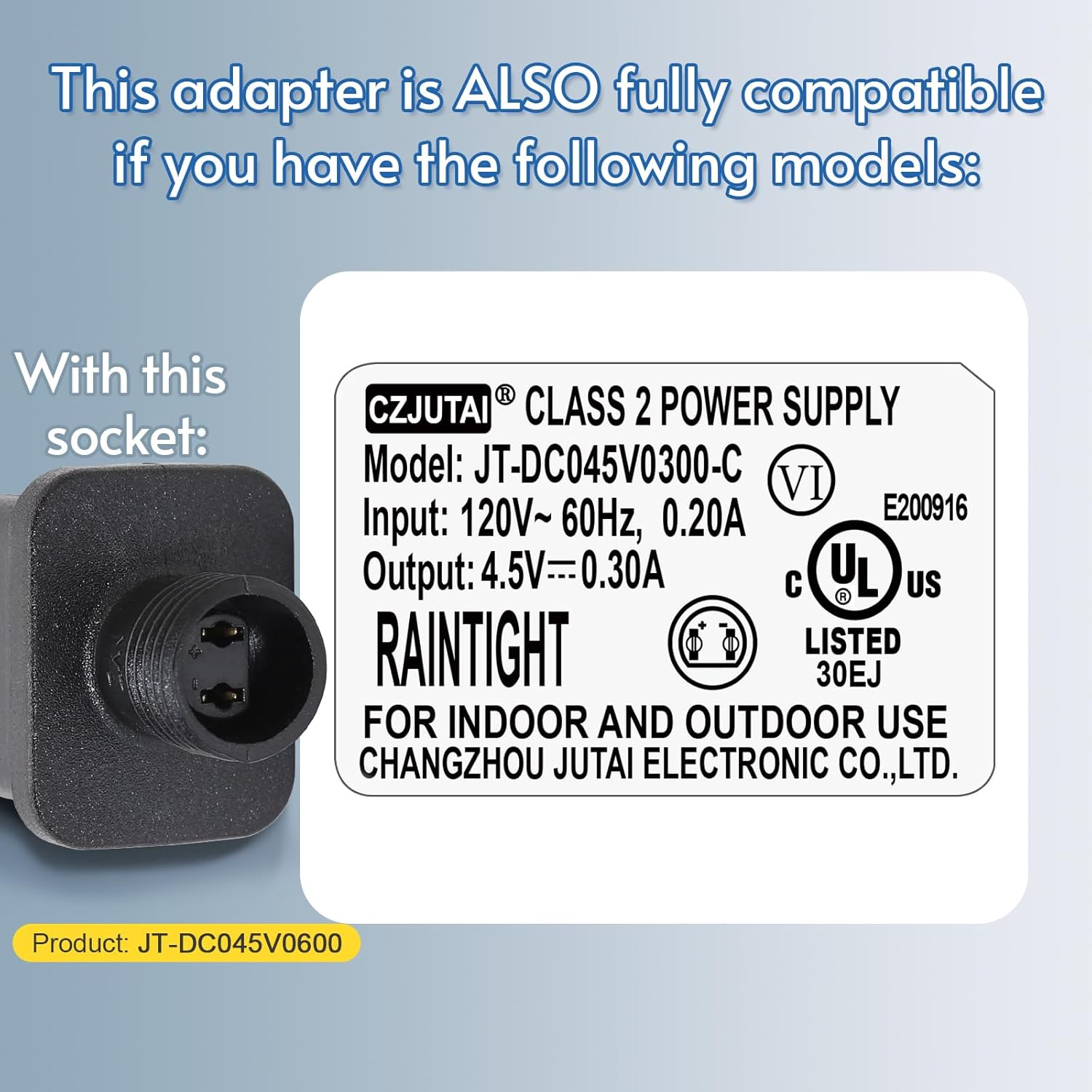
Image 3.1: Product dimensions and key electrical specifications.
| Specification | Value |
|---|---|
| Model Number | CZJUTAI JT-DC045V0600-C IP44 4.5V2.7W |
| Input Voltage | 120V AC, 50/60Hz, 0.20A |
| Output Voltage | 4.5V DC |
| Output Current | 0.6A |
| Rated Wattage | 2.7W |
| Protection Rating | IP44 (Raintight) |
| Plug Type | US 2-Pin |
| Connector Type | Screw Socket (2-hole, 17mm diameter) |
| Operating Mode | Steady-ON |
| Dimensions (approx.) | 9.3 cm (3.66 in) length, 6.3 cm (2.48 in) height, 1.5 cm (0.59 in) width |
| Weight | 1.13 ounces |
| Compatible Devices | Christmas String Lights, Copper Wire Light, Curtain Light, Lawn Lamp, Projector Light |
This adapter is also compatible with devices requiring model JT-DC045V0300-C (4.5V 0.3A) as amperage is not forced.
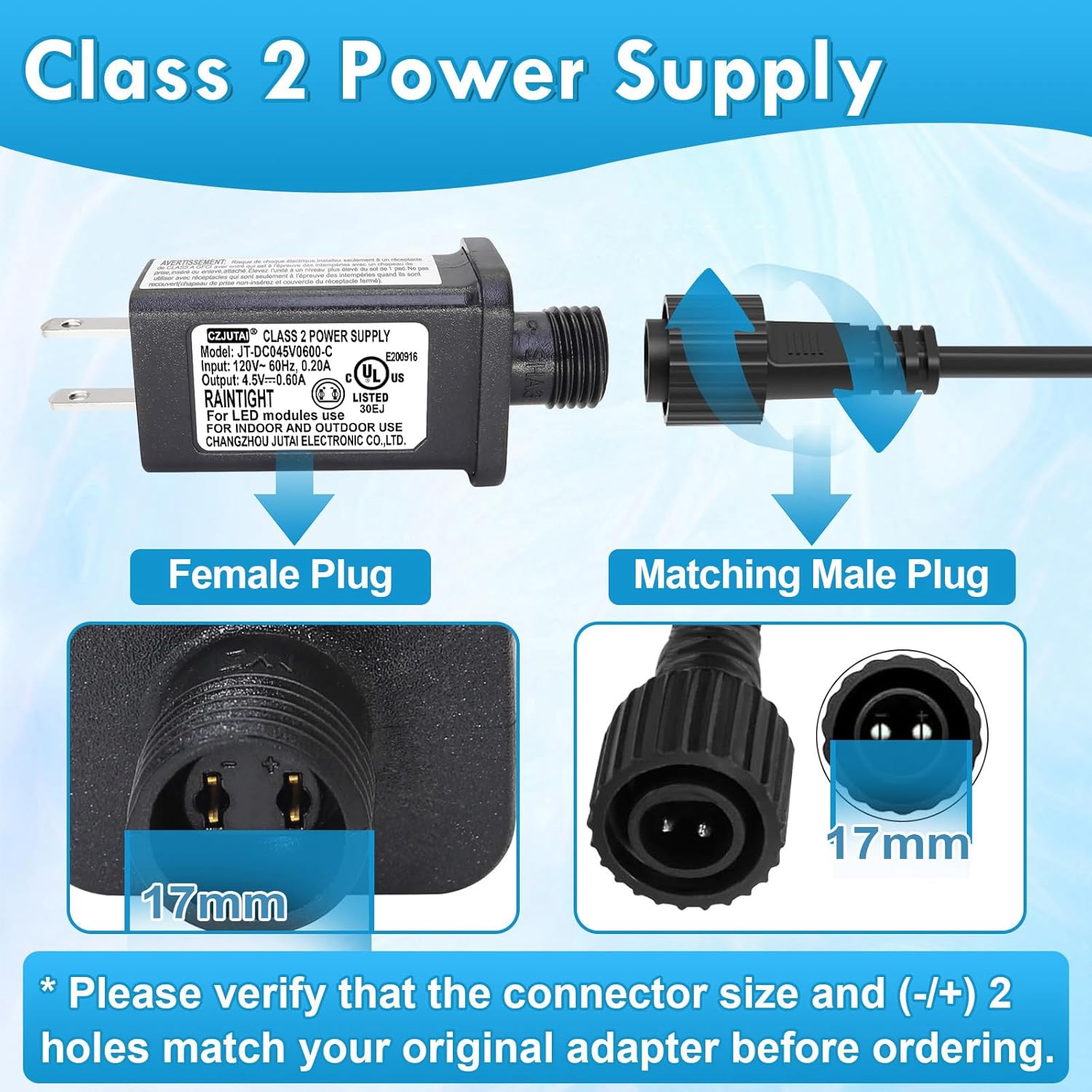
Image 3.2: Information on compatible models and the screw socket type.
4. Safety Information
This transformer conforms to UL/UKCA/CE Standards, ensuring safety and quality. It incorporates multiple protection features to safeguard your devices and ensure stable operation.
- Overpower Protection: Prevents damage from excessive power draw.
- Short Circuit Protection: Automatically shuts off in case of a short circuit.
- Overcurrent Protection: Protects against current exceeding safe limits.
- Overvoltage Protection: Shields devices from voltage spikes.
Always ensure the transformer is used within its specified voltage and current ratings. Do not attempt to open or modify the transformer. Disconnect power before making any connections or disconnections.

Image 4.1: Visual representation of the transformer's safety protection features.
5. Setup
- Verify Compatibility: Before connecting, ensure your LED device requires 4.5V DC input and has a compatible 2-hole screw socket connector (17mm diameter).
- Connect Device: Align the female plug of the transformer with the male plug of your LED device. Twist the screw collar to secure the connection firmly.
- Plug into Power: Insert the transformer's US 2-pin plug into a standard 120V AC wall outlet.
Ensure all connections are secure before applying power. The IP44 rating indicates suitability for outdoor use, but avoid submerging the unit in water.

Image 5.1: Illustration of connecting the transformer to a compatible device.
6. Operating Instructions
This transformer operates in a steady-on mode only. Once connected to a compatible LED device and plugged into a power outlet, it will provide a continuous 4.5V DC power supply, illuminating your lights constantly.
- No flashing or blinking modes are supported by this transformer.
- Ensure the total wattage of connected LED devices does not exceed 2.7W.

Image 6.1: Examples of typical applications for the LED transformer.
7. Maintenance
- Cleaning: Disconnect the transformer from the power outlet before cleaning. Wipe the exterior with a dry, soft cloth. Do not use liquid cleaners or immerse in water.
- Storage: When not in use, store the transformer in a cool, dry place away from direct sunlight and moisture.
- Inspection: Periodically inspect the transformer and its cables for any signs of damage, such as cracks, fraying, or discoloration. If damage is observed, discontinue use immediately.
8. Troubleshooting
- No Power Output:
- Ensure the transformer is securely plugged into a working wall outlet.
- Check that the connection between the transformer and your LED device is firm and correctly aligned.
- Verify that your LED device is functioning correctly with another power source, if possible.
- Confirm that the voltage, current, and wattage requirements of your device match the transformer's specifications.
- Lights are Dim or Flickering:
- This may indicate an overloaded circuit. Ensure the total wattage of connected devices does not exceed 2.7W.
- Check for loose connections.
- Transformer is Hot:
- A slight warmth is normal during operation. However, if the transformer becomes excessively hot, immediately unplug it and check for overloading or a short circuit in the connected device.
If troubleshooting steps do not resolve the issue, discontinue use and contact customer support.
9. Warranty and Support
This PREMIER ADAPTER product comes with a 3-year hassle-free replacement warranty. If you encounter any issues or require assistance, please contact PREMIER ADAPTER customer support through your purchase platform or the contact information provided with your product.
For further inquiries, please refer to the contact details provided by your retailer.