
1. Introduction
The YUNZII C68 is a unique 65% layout wireless mechanical keyboard featuring an adorable cat-inspired design crafted from premium silicone material. This keyboard offers versatile connectivity options, excellent typing feel, and extensive customization capabilities, making it suitable for various uses including home, office, and casual gaming.
Key features include hot-swappable switches, triple-mode connectivity (Bluetooth, 2.4G Wireless, Wired Type-C), vibrant RGB backlighting, ergonomic design, and full programmability via dedicated software.
2. Package Contents
Upon unboxing your YUNZII C68 keyboard, please ensure all the following items are present:
- YUNZII C68 Wireless Mechanical Keyboard
- USB-C Cable
- Switch and Keycap Puller
- Additional Switches (Milk Switch)
- Extra Keycaps (Strawberry/Cat themed)
- Cat-shaped Mouse Pad
- Warranty Card
- Instruction Manual

3. Product Overview
The YUNZII C68 keyboard is designed with both aesthetics and functionality in mind. Its robust construction and thoughtful features enhance the user experience.
3.1 Design and Components
- Detachable Kitty Head: The prominent cat head on top of the keyboard is detachable, allowing for future customization with different designs.
- MOA Profile Keycaps: The keycaps are made of durable PBT material with an MOA profile, providing a larger touch surface for comfortable typing.
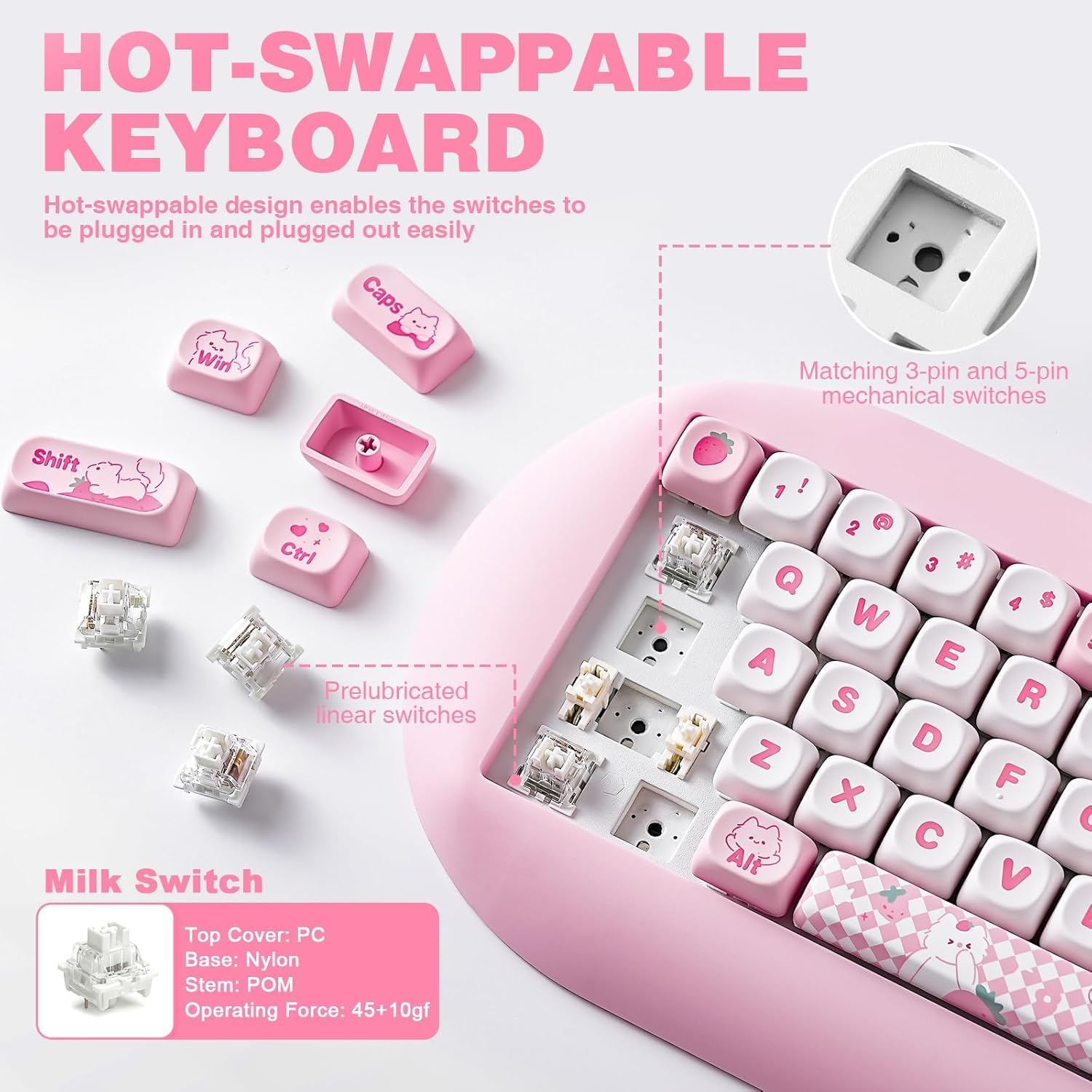
- Custom Switches: Equipped with Milk Switches (linear), designed for a smooth and quiet typing experience. The keyboard's hot-swappable PCB supports both 3-pin and 5-pin mechanical switches for easy replacement without soldering.
- Solid Silicone Base: The keyboard features a solid silicone base that contributes to its ergonomic design, reduces typing fatigue, and provides a comfortable typing angle.
- Internal Structure: Multiple layers of sound-absorbing fillings, pre-lubed switches, stabilizers, and a steel plate work together to eliminate typing noise and improve the overall typing experience.
- 2.4G Dongle Slot: The 2.4GHz wireless receiver dongle is conveniently stored within one of the magnetic 'kitty paw' feet at the bottom of the keyboard.
4. Setup
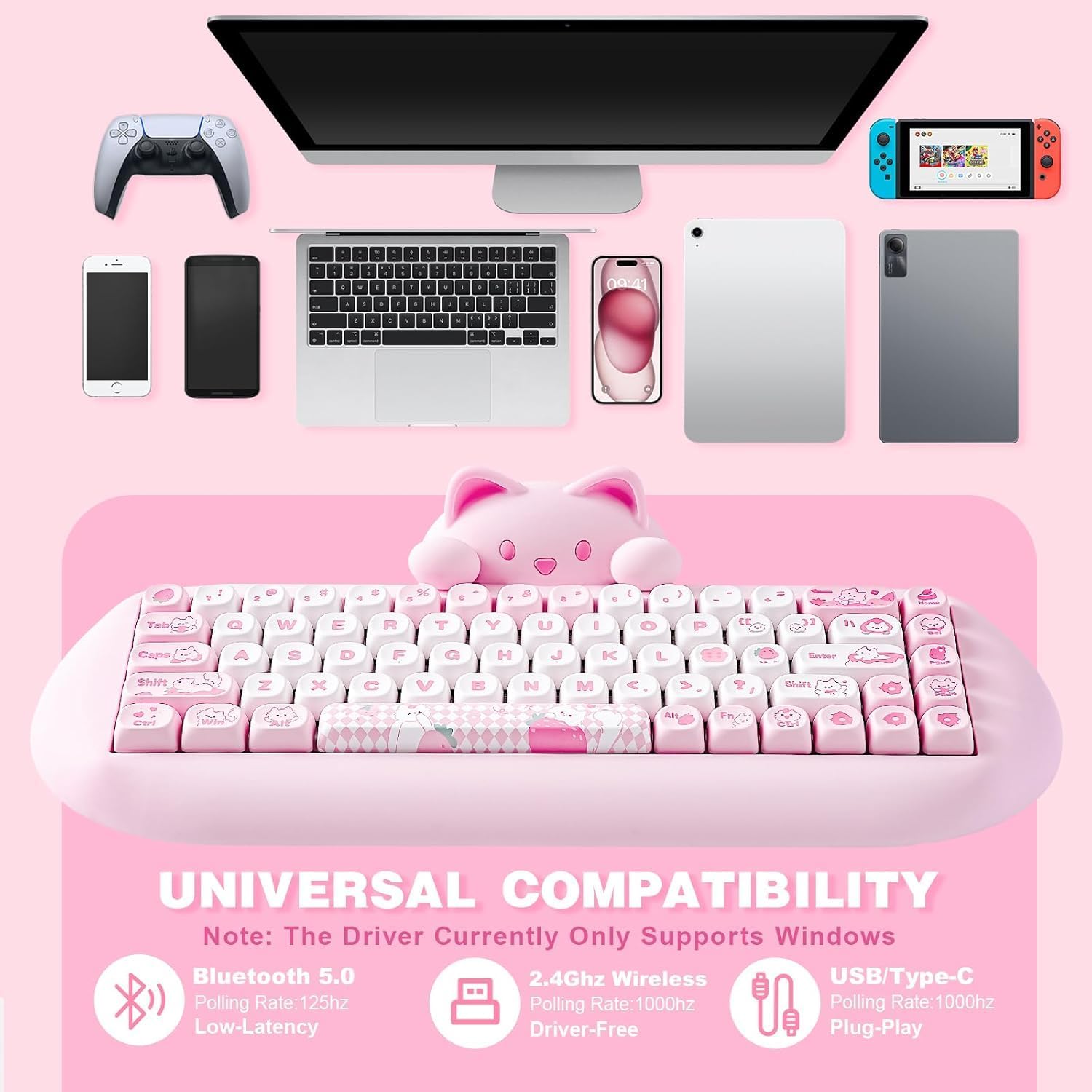
The YUNZII C68 keyboard offers three versatile connection modes: Wired, 2.4G Wireless, and Bluetooth. It is compatible with Mac, Windows, iOS, and Android devices.
4.1 Connection Modes
- Wired (USB Type-C): For a stable, plug-and-play connection with 1000Hz polling rate. Simply switch the keyboard to USB mode and connect the provided USB-C cable to your device.
- 2.4G Wireless: Offers a driver-free connection with a 1000Hz polling rate. Retrieve the 2.4G dongle from its storage slot in the keyboard's magnetic foot. Switch the keyboard to 2.4G mode, short press Fn+R, and the blue light will flash slowly. Long press Fn+R until the blue light flashes fast, then plug the dongle into your device.
- Bluetooth 5.0: For wireless convenience with a 125Hz polling rate. Switch the keyboard to Bluetooth mode, short press Fn+Z/X/C, and the blue light will flash slowly. Long press Fn+Z/X/C until the blue light flashes fast, then select 'YUNZII C68' on your device's Bluetooth settings to pair.

5. Operating Instructions
The YUNZII C68 keyboard features a full N-Key Rollover (NKRO) for accurate input and a vibrant RGB backlight with multiple effects.
5.1 RGB Backlight Control
The keyboard supports 18 RGB modes and 8 backlight colors. The south-facing LEDs provide enhanced illumination.
- Change RGB Effect: Press Fn + Home
- Change RGB Color: Press Fn + Insert
- Turn On/Off RGB: Press Fn + Backspace
- Brightness Up: Press Fn + Page Up
- Brightness Down: Press Fn + Page Down
- Blinking Speed Up: Press Fn + [
- Blinking Speed Down: Press Fn + ]
5.2 Battery Management
The keyboard is equipped with a 4000 mAh rechargeable battery, offering up to 72 hours of typing with RGB off and approximately 30 hours with RGB on.
- Check Battery Capacity: Press Fn + Tab


6. Customization
The YUNZII C68 is a highly customizable mechanical keyboard, allowing users to personalize their typing experience.
6.1 Hot-Swappable Design
The hot-swappable PCB allows for easy replacement of 3-pin or 5-pin mechanical switches without the need for soldering. This enables users to experiment with different switch types to find their preferred typing feel and sound.

6.2 Software Programmability
With the dedicated Windows software, users can unlock full programmability for their YUNZII C68 keyboard. This includes:
- Customizing unlimited RGB options and lighting effects.
- Assigning macro keys for complex commands.
- Remapping keys to suit individual preferences and workflows.
7. Maintenance
Proper maintenance ensures the longevity and optimal performance of your YUNZII C68 keyboard.
- Cleaning: The silky silicone gaming keyboard, along with the oil-sprayed process, makes it easy to clean. Use a soft, lint-free cloth, slightly dampened with water or a mild cleaning solution, to wipe down the surface. For keycaps, a small brush or compressed air can remove dust and debris.
- Switch and Keycap Replacement: Utilize the provided switch and keycap puller for safe removal and installation. When replacing switches, ensure proper alignment to avoid bending pins.
- Storage: When not in use for extended periods, store the keyboard in a dry, dust-free environment.
8. Troubleshooting
If you encounter any issues with your YUNZII C68 keyboard, please refer to the following common troubleshooting steps:
- Keyboard Not Responding: Ensure the keyboard is charged. Check the connection mode switch (Wired, 2.4G, Bluetooth) is set correctly. For wired mode, try a different USB port or cable. For wireless modes, ensure the dongle is properly inserted (2.4G) or Bluetooth is paired correctly.
- RGB Lights Not Working: Press Fn+Backspace to ensure RGB is not turned off. Check brightness levels using Fn+Page Up/Down. Ensure the keyboard is sufficiently charged.
- Connectivity Issues: For 2.4G wireless, try re-pairing by long pressing Fn+R. For Bluetooth, try unpairing and re-pairing the device. Ensure no other wireless devices are causing interference.
- Keys Not Registering: If specific keys are not working, try removing and re-inserting the keycap and switch using the provided tools. Ensure the switch pins are not bent.
If problems persist after attempting these steps, please contact YUNZII customer support for further assistance.
9. Specifications
| Feature | Detail |
|---|---|
| Product Dimensions | 14.96 x 7.09 x 3.15 inches (14.9"L x 7"W x 3.1"H) |
| Item Weight | 3.52 pounds |
| Item Model Number | C68 |
| Connectivity Technology | Bluetooth 5.0, 2.4GHz Wireless, Type-C Wired |
| Compatible Devices | IOS, Windows, Mac, Android |
| Keyboard Description | Mechanical |
| Special Features | Backlit, Ergonomic, 3 Modes, Customizable Display Keys, Hot-Swappable |
| Color | Pink |
| Number of Keys | 68 |
| Material | Silicone |
| Battery | 4000 mAh (1 AAA battery required, included) |
| Date First Available | September 18, 2023 |
10. Warranty and Support
Your YUNZII C68 Wireless Mechanical Keyboard comes with a Warranty Card included in the package. Please refer to this card for specific warranty terms and conditions.
For any product inquiries, technical support, or warranty claims, please visit the official YUNZII Store or contact their customer service through the details provided on the warranty card or their website.
YUNZII Store: https://www.amazon.com/stores/YUNZIIMECHANICALKEYBOARD/page/151F77A4-554F-4590-B2D9-F02936220157