
SWEBO TC18
SWEBO TC18 5th Gen Mini View Camera System
User Manual
Model: TC18 | Brand: SWEBO
Introduction
The SWEBO TC18 5th Gen Mini View Camera System is an advanced photographic tool designed to enhance versatility and creativity for professional photographers. This system functions as a tilt-shift and swing adapter, enabling traditional view camera movements with a wide range of modern DSLRs, mirrorless cameras, and digital backs. Its modular design and precision controls allow for fine adjustments, expanding the creative possibilities of your existing lenses.
Key enhancements in the 5th Generation include modular combination for tool-free assembly, quick switching between horizontal and vertical shooting, a quick wrench for lens plate fixation, and a high-precision focusing knob with a micrometer scale.
What's in the Box
Upon unboxing your SWEBO TC18 5th Gen Mini View Camera System, please verify that all components are present:
- SWEBO TC18 5th Gen Mini View Camera System (Main Unit)
- Copal 0 Lens Panel
- M39 Lens Panel
- User Manual (this document)
If any items are missing or damaged, please contact SWEBO customer support immediately.
Setup
The TC18 5th Gen is designed for intuitive and tool-free assembly. Follow these steps to set up your system:
1. Modular Combination
The system's modular design allows for various configurations. Components can be added or replaced by hand without tools. Ensure all modules are securely connected before use.

Image: The SWEBO TC18 5th Gen Mini View Camera System in its assembled state, showcasing its modular components and precision controls.
2. Attaching Lens Panels
The TC18 system includes Copal #0 and M39 lens panels. To attach a lens panel, align it with the front standard and use the quick wrench mechanism for fixation. This eliminates the need for screw adjustments, providing a secure and rapid attachment.

Image: Rear view of the TC18 system, illustrating the attachment point for lens panels. The quick wrench mechanism ensures secure and tool-free fixation.
3. Mounting Your Camera
The TC18 5th Gen is compatible with various DSLRs, mirrorless cameras, and digital backs. Attach your camera body to the rear standard of the TC18 system. Ensure a firm connection to prevent movement during operation.

Image: A mirrorless camera mounted on the SWEBO TC18 system, demonstrating the integration of the camera body with the view camera adapter.
4. Tripod Mounting
The TC18 features an Arca-Swiss standard structure for direct tripod head connection. Additionally, it includes 5 1/4 inch screw holes for compatibility with other quick-release plates. Securely mount the system to a sturdy tripod before use.
Operating Instructions
The SWEBO TC18 allows for precise control over perspective and focus. Familiarize yourself with the following movements:
1. Focusing Knob with Micrometer Scale
The focusing knob provides precise focus adjustments with a micrometer-style scale, offering a precision of 0.04mm, upgradeable to 0.01mm. Rotate the knob for fine focus control. The folding crank prevents damage to the knob's knurled contour.

Image: Detailed view of the focusing knob on the TC18, highlighting its micrometer scale for precise adjustments.
2. Quick Switch Between Horizontal and Vertical Shooting
The camera body can be quickly locked into position to switch between horizontal (landscape) and vertical (portrait) shooting orientations without requiring screw adjustments. This feature streamlines workflow for various compositions.
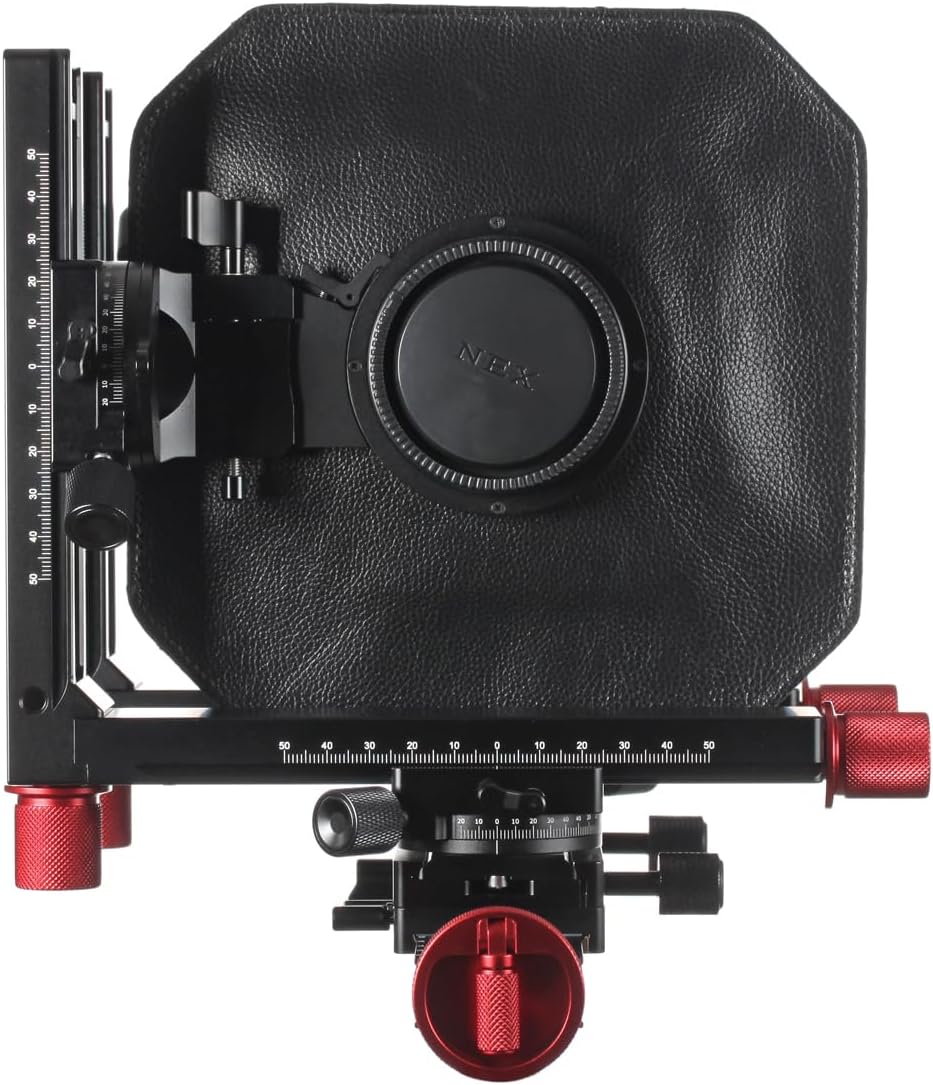
Image: The SWEBO TC18 system configured for vertical (portrait) shooting, demonstrating its quick orientation switch capability.
3. Tilt-Shift and Swing Movements
The TC18 enables traditional view camera movements:
- Tilt: Adjusts the angle of the lens plane relative to the film/sensor plane, allowing for selective focus and extended depth of field (Scheimpflug principle).
- Shift: Moves the lens parallel to the film/sensor plane, useful for perspective control (e.g., correcting converging verticals in architecture) and increasing file size by stitching multiple shifted images.
- Swing: Rotates the lens plane horizontally relative to the film/sensor plane, similar to tilt but on the horizontal axis.
These movements allow you to:
- Create selective optical unsharpness.
- Use more of the image circle of your lenses.
- Focus closer and enlarge your subject without extension rings.
- Experiment with other system lenses and medium format lenses.

Image: The SWEBO TC18 system with its bellows extended, illustrating the range of movements possible for tilt, shift, and swing adjustments.
Maintenance
Proper maintenance ensures the longevity and optimal performance of your SWEBO TC18 system:
- Cleaning: Use a soft, lint-free cloth to wipe down the exterior of the system. For stubborn dirt, a slightly damp cloth can be used, followed by a dry cloth. Avoid abrasive cleaners or solvents.
- Bellows Care: Handle the bellows gently. Avoid pinching or creasing them excessively, as this can lead to light leaks. Keep them free from dust and debris.
- Moving Parts: The precision mechanisms are designed for smooth operation. Do not force any movements. If any part feels stiff, do not attempt to lubricate it yourself; contact customer support.
- Storage: Store the TC18 system in a clean, dry environment, away from extreme temperatures and humidity. Use a protective case when transporting.
Troubleshooting
This section addresses common issues you might encounter with your SWEBO TC18 system. If you experience a problem not listed here, or if the suggested solution does not resolve the issue, please contact SWEBO customer support.
Issue: Difficulty with movements (tilt, shift, swing)
Possible Cause: Locking mechanisms are engaged or debris is obstructing movement.
Solution: Ensure all locking knobs and levers are disengaged before attempting to adjust movements. Inspect the rails and moving parts for any foreign objects and carefully remove them if found.
Issue: Light leaks in images
Possible Cause: Damaged bellows or improper attachment of components.
Solution: Carefully inspect the bellows for any tears, holes, or creases. Check that the lens panel and camera body are securely attached to the front and rear standards, respectively. Re-attach components if necessary. If bellows are damaged, contact support for replacement.
Issue: Focusing knob feels stiff or imprecise
Possible Cause: Dust accumulation or internal mechanism issue.
Solution: Gently clean around the focusing knob and its track with a soft brush. Do not attempt to disassemble or lubricate the mechanism. If the issue persists, it may indicate an internal problem requiring professional service. Contact SWEBO customer support.
Specifications
| Brand | SWEBO |
| Model Name | TC18 |
| Compatibility | Various DSLRs, Mirrorless Cameras, Digital Backs (specific mount depends on variant, e.g., EOS R) |
| Focusing Precision | 0.04mm (upgradeable to 0.01mm) |
| Lens Panels Included | Copal 0 Lens Panel, M39 Lens Panel |
| Tripod Mount | Arca-Swiss standard, 5 x 1/4 inch screw holes |
| Color | Black |
| Special Features | Modular Combination, Quick Switch Horizontal/Vertical, Quick Wrench Lens Plate Fixation, Micrometer Scale Focusing Knob |
Warranty and Support
SWEBO products are manufactured to high quality standards. For information regarding warranty coverage, please refer to the warranty card included with your product or visit the official SWEBO website.
For technical support, troubleshooting assistance, or inquiries about additional lens panels and accessories, please contact SWEBO customer service. Contact details can typically be found on the official SWEBO website or on your purchase documentation.
Official SWEBO Website: www.swebo.com (Note: This is a placeholder URL. Please refer to your product packaging or official documentation for the correct website.)
Ask a question about this manual
Ask about setup, troubleshooting, compatibility, parts, safety, or missing instructions. Manuals+ will review the question and use this page’s manual context to help answer it.