
Introduction
This manual provides comprehensive instructions for the assembly, operation, maintenance, and troubleshooting of your FJTJBSI 6-Drawer Dresser with Power Outlets. Please read this manual thoroughly before assembly and use to ensure proper function and safety.

Image: The FJTJBSI white 6-drawer dresser, featuring a clean design with black handles and a top surface equipped with power outlets, suitable for charging devices.
Safety Information
Adhering to these safety guidelines is crucial for preventing injury and damage to the product.
- Anti-Tip Kit: Always install the included anti-tip kit to prevent the dresser from tipping over, especially in households with children or pets. This significantly reduces the risk of serious injury.
- Weight Capacity: Do not exceed the maximum weight capacity for drawers (30 pounds per drawer) and the tabletop (250 pounds). Overloading can compromise stability and structural integrity.
- Power Outlets: Use the integrated power outlets only for devices within their specified voltage and current ratings (2 AC outlets 120V/12A, 2 USB ports 5V/2A, 1 Type C port 5V/2A). Avoid plugging in high-power appliances that may exceed the strip's capacity.
- Placement: Place the dresser on a level, stable surface. Uneven surfaces can lead to instability and potential tipping.
- Assembly: Ensure all parts are correctly assembled and fasteners are tightened securely before use. Refer to the assembly instructions carefully.

Image: A detailed view highlighting key features of the dresser, including the anti-tip device for safety, metal handles, smooth sliding rails for drawers, and the integrated charging outlets with specifications.
Package Contents
Before beginning assembly, verify that all components listed below are present and undamaged. If any parts are missing or damaged, please contact FJTJBSI customer service.
| Component | Quantity | Description |
|---|---|---|
| Dresser Panels | Various | Side panels, top panel, bottom panel, back panel, drawer fronts, drawer sides, drawer bottoms. |
| Hardware Kit | 1 Set | Screws, dowels, cam locks, cam bolts, drawer slides, handles, anti-tip kit. |
| Power Outlet Unit | 1 | Integrated unit with 2 AC outlets, 2 USB ports, and 1 Type C port. |
| Instruction Manual | 1 | Detailed assembly guide. |
Assembly Instructions
Assembly typically requires two adults and basic tools (e.g., screwdriver, hammer). Follow the numbered steps provided in the included instruction manual for detailed diagrams and part identification. The process is designed for ease of completion.
- Prepare Workspace: Clear a spacious area and lay out all components on a soft, clean surface to prevent scratches.
- Assemble Frame: Connect the side panels, top, and bottom panels using the provided hardware. Ensure all connections are secure.
- Install Drawer Slides: Attach the drawer slides to the inner sides of the dresser frame according to the manual's diagrams.
- Assemble Drawers: Construct each of the six drawers by attaching the front, back, and side panels, then sliding the bottom panel into place. Attach the metal handles to the drawer fronts.
- Insert Drawers: Carefully slide the assembled drawers onto the installed drawer slides.
- Install Power Outlet Unit: Integrate the power outlet unit into the designated recess on the top panel of the dresser. Ensure it is firmly seated and the power cord is accessible.
- Attach Anti-Tip Kit: Securely fasten the anti-tip kit to the back of the dresser and to a wall stud, following the specific instructions provided with the kit. This step is critical for safety.
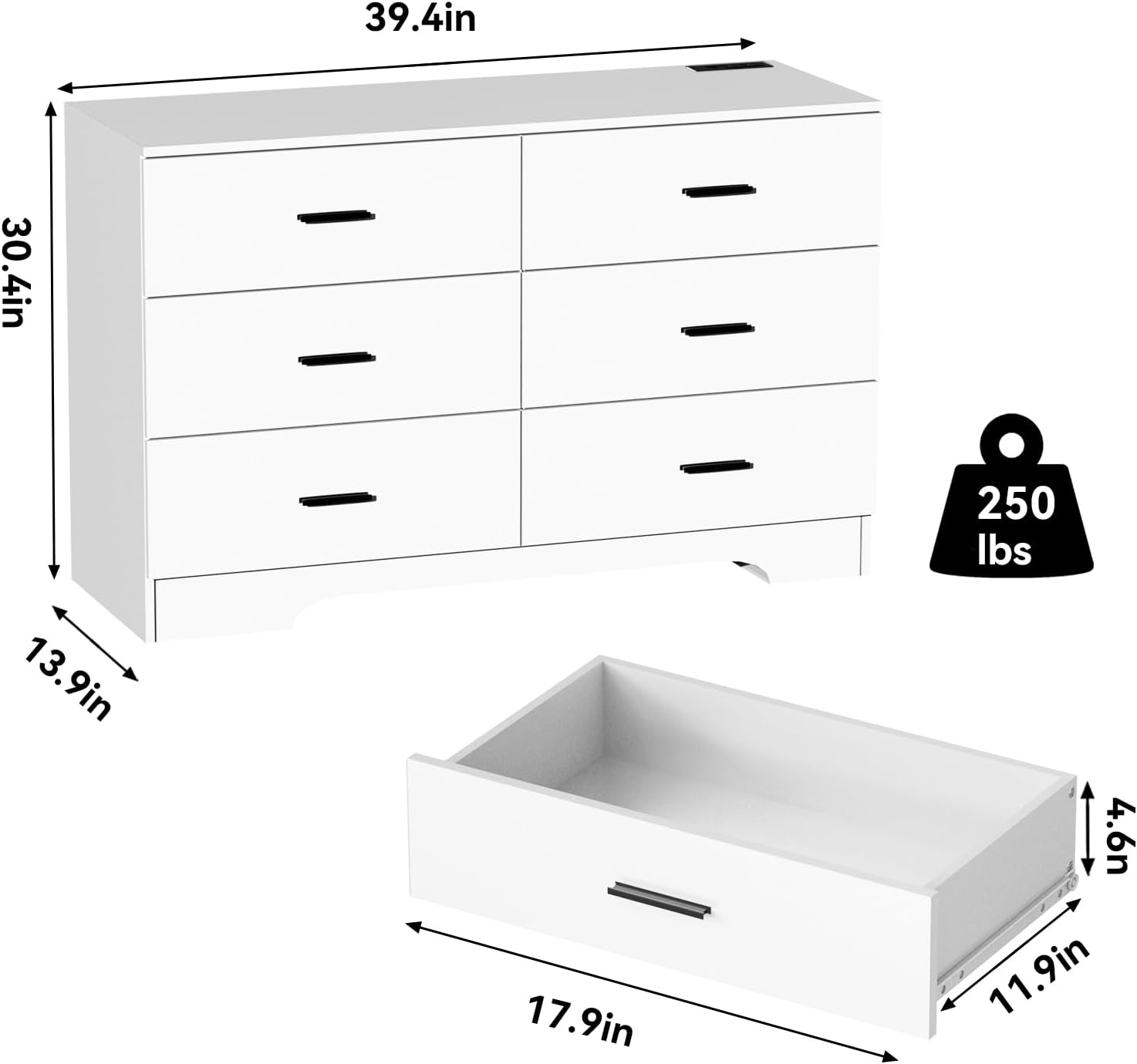
Image: A diagram illustrating the overall dimensions of the dresser (39.4 inches wide, 30.4 inches high, 13.9 inches deep) and the internal dimensions of a drawer (17.9 inches long, 11.9 inches wide, 4.6 inches deep), along with the 250 lbs tabletop weight capacity.
Operating Instructions
The FJTJBSI dresser is designed for convenient storage and device charging.
- Drawer Use: Gently pull and push drawers to open and close. Avoid forcing them. The smooth sliding rails ensure quiet operation.
- Power Outlets: Plug the dresser's power cord into a standard wall outlet. The integrated power strip provides 2 AC outlets, 2 USB ports, and 1 Type C port for charging electronic devices such as phones, tablets, and lamps.
- Device Charging: Connect your devices to the appropriate USB, Type C, or AC outlets. Ensure devices are compatible with the provided voltage and current.

Image: A close-up view of the recessed power strip on the dresser's top surface, showing its configuration with two 120V/12A AC outlets, two 5V/2A USB ports, and one 5V/2A Type C port, with devices connected for charging.
Maintenance
Proper care will extend the life and appearance of your dresser.
- Cleaning: Wipe the dresser surfaces with a dry, soft cloth. For stubborn marks, a slightly damp cloth followed immediately by a dry cloth can be used. Avoid abrasive cleaners or harsh chemicals.
- Spills: Immediately wipe up any spills to prevent damage to the wood finish.
- Drawer Slides: Periodically check drawer slides for smooth operation. If they become stiff, a small amount of silicone lubricant can be applied.
- Fasteners: Periodically check all screws and fasteners to ensure they remain tight. Retighten as necessary to maintain structural integrity.
Troubleshooting
This section addresses common issues you might encounter.
| Problem | Possible Cause | Solution |
|---|---|---|
| Dresser wobbles/unstable | Uneven floor; loose fasteners; anti-tip kit not installed or improperly installed. | Ensure dresser is on a level surface. Check and tighten all assembly fasteners. Install or re-secure the anti-tip kit to a wall stud. |
| Drawers stick or don't slide smoothly | Drawer slides misaligned; debris in slides; overloaded drawer. | Remove drawer and inspect slides for alignment or obstructions. Clean slides. Reduce weight in the drawer. |
| Power outlets not working | Dresser not plugged in; wall outlet not working; overloaded power strip; faulty device. | Ensure the dresser's power cord is securely plugged into a functional wall outlet. Test the wall outlet with another device. Unplug some devices if overloaded. Test your device with another power source. |
Specifications
- Brand: FJTJBSI
- Model Number: 001
- Product Dimensions: 13.9"D x 39.4"W x 30.4"H
- Color: White
- Material: Wood
- Number of Drawers: 6
- Drawer Type: Storage
- Tabletop Weight Capacity: Up to 250 pounds
- Drawer Weight Capacity: Up to 30 pounds per drawer
- Power Outlets: 2 AC Outlets (120V/12A), 2 USB Ports (5V/2A), 1 Type C Port (5V/2A)
- Assembly Required: Yes
- Item Weight: 66.8 pounds
- Care Instructions: Wipe with Dry Cloth
Customer Support
If you encounter any problems or have questions regarding your FJTJBSI dresser, please contact the FJTJBSI service team. We are committed to providing assistance and ensuring your satisfaction.
For further assistance, please visit the FJTJBSI Store on Amazon.
Product Videos
No official product videos from the seller were found to be relevant for inclusion in this instruction manual.