1. Introduction
The Tyrry DC-10 is a versatile 4-in-1 tool designed for precision and efficiency in various home improvement and construction tasks. It integrates a laser level, a drill dust collector, a wall bracket, and an electronic vacuum suction cup into a single device. This manual provides detailed instructions for safe and effective use, maintenance, and troubleshooting.

Image: The Tyrry DC-10 4-in-1 Laser Level, showcasing its integrated design with the laser line visible and the dust collector attachment.
2. Package Contents
Verify that all components are present in the package:
- Tyrry DC-10 Main Unit (Laser Level, Vacuum Suction Cup, Dust Collector base)
- Wall Mounting Bracket (with 1/4" mounting threads)
- USB-C Charging Cable
- Instruction Manual

Image: A detailed diagram illustrating all parts of the Tyrry DC-10, including the main unit, dust box, power monitoring, air pressure monitoring, air suction key, laser level switch, stop button, horizontal bubbles, drill hole, and electronic vacuum suction cups.
3. Setup and Charging
3.1 Initial Charge
Before first use, fully charge the integrated 1800mAh lithium-ion battery. Connect the provided USB-C charging cable to the device and a suitable USB power source. The battery indicator lights will show charging progress. A full charge provides up to 10 hours of continuous vacuum suction operation.
3.2 Attaching the Dust Collector or Wall Bracket
The Tyrry DC-10 features interchangeable heads. To attach the drill dust collector or the wall mounting bracket:
- Ensure the device is powered off.
- Align the desired attachment (dust collector or wall bracket) with the top slot of the main unit.
- Gently push until it clicks securely into place.
- To remove, press the release button (if applicable) and slide the attachment off.
4. Operating Instructions
4.1 Electronic Vacuum Suction Cup
The electronic vacuum suction cup allows the device to adhere to various smooth, non-porous surfaces without the need for nails or adhesives. It supports a maximum load capacity of 5KG (11lb).
- Ensure the suction cup surface is clean and free of debris.
- Place the device firmly against the desired wall surface.
- Press the 'Air Suction Key' (usually marked with an 'A' or similar icon) to activate the vacuum. The device will begin to draw air, creating suction.
- Monitor the 'Air Pressure Monitoring' indicator lights. More green lights indicate stronger adhesion.
- For rough concrete walls, double-click the right-side power button to activate a stronger suction mode. Note that significant gaps in the wall may prevent secure adhesion.
- To release the suction, press the 'STOP' button.

Image: The Tyrry DC-10 demonstrating its ability to adhere to diverse surfaces including marble, glass, tile, concrete, steel, and wood, highlighting its strong self-adhesion.
4.2 Laser Level Function
The integrated laser level projects a clear line for precise alignment. It features two bubble vials for accurate vertical and horizontal leveling.
- Ensure the device is securely attached to the wall using the vacuum suction cup.
- Press the 'Laser Level Switch' (often combined with the 'Air Suction Key' or a separate button) to activate the laser line.
- Adjust the device's position until the bubbles in both the horizontal and vertical vials are centered for accurate leveling.
- The laser line can be used for various applications, including horizontal, vertical, and even slanted alignments.

Image: Demonstrates the Tyrry DC-10 laser level being used for various applications, including vertical and horizontal alignment for picture hanging, and a slanted line for decorative purposes.
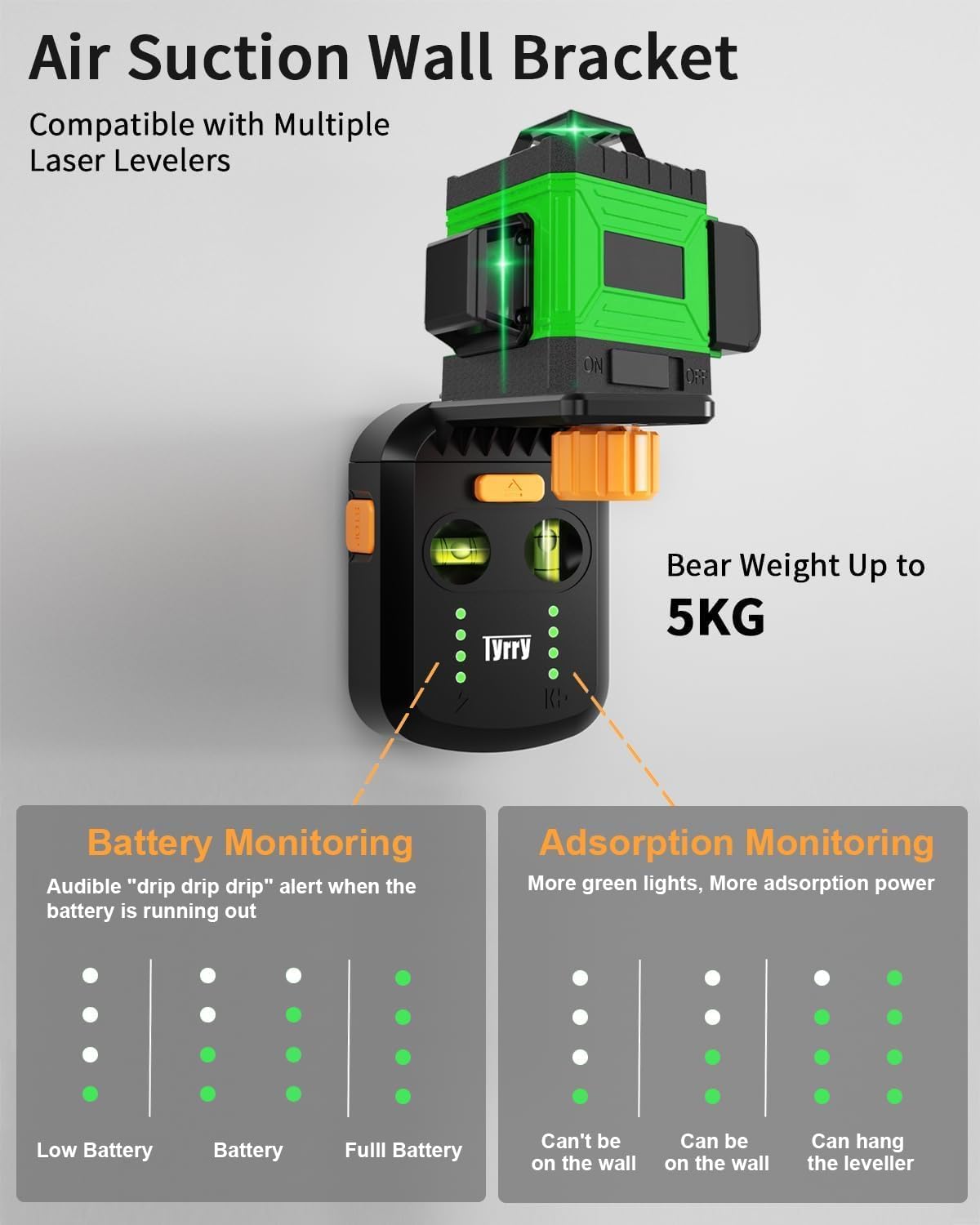
Image: A close-up view of the Tyrry DC-10, highlighting the two integrated bubble vials that assist in achieving precise horizontal and vertical laser alignment.
4.3 Drill Dust Collector
The dust collector efficiently captures debris during drilling, promoting a cleaner and healthier workspace.
- Ensure the dust collector attachment is securely in place.
- Position the device on the wall with the drill hole aligned to your marking.
- Activate the vacuum suction to secure the device to the wall.
- Insert your drill bit (up to 13mm or 1/2-inch diameter) through the designated drill hole.
- Proceed with drilling. The dust will be collected in the transparent dust collection box.
- After drilling, release the suction and empty the dust collection box.

Image: The Tyrry DC-10 with the drill dust collector attachment, actively collecting dust as a drill bit penetrates a wall, illustrating its dust-free operation.
4.4 Universal Wall Mounting Bracket
The wall mounting bracket features standard 1/4" mounting threads, making it compatible with various tools such as other laser levels, rangefinders, cameras, or projectors.
- Attach the wall mounting bracket to the main unit.
- Secure the main unit to the wall using the electronic vacuum suction cup.
- Screw your compatible tool onto the 1/4" mounting thread of the bracket.
- Ensure the suction is stable before mounting any equipment.

Image: The Tyrry DC-10 acting as a wall bracket, securely holding another laser level via its 1/4-inch mounting thread, demonstrating its universal compatibility.
4.5 Indicator Lights and Warnings
The device is equipped with indicator lights for battery and suction status, along with an audible warning system.
- Battery Monitoring: Lights on the left side indicate battery charge level. A single light indicates low battery, while four lights indicate a full charge. An audible 'drip drip drip' alert will sound when the battery is running out.
- Adsorption Monitoring: Lights on the right side indicate suction strength. Fewer lights mean insufficient suction for wall adhesion, while more lights indicate strong, secure adhesion. An audible warning will sound if suction becomes insufficient, preventing accidental drops.

Image: A visual guide to the Tyrry DC-10's indicator lights, detailing how they display battery status (low, normal, full) and adsorption strength (cannot adhere, can adhere, can hang the leveler).
5. Maintenance
5.1 Cleaning
- Regularly wipe the device with a soft, dry cloth.
- Clean the suction cup surface after each use to ensure optimal adhesion.
- Empty the dust collection box frequently, especially after drilling. To remove the dust box, press the designated button and slide it off.
- Do not use abrasive cleaners or solvents.
5.2 Battery Care
- Charge the battery regularly, even if the device is not in frequent use, to maintain battery health.
- Avoid fully discharging the battery before recharging.
- Store the device in a cool, dry place when not in use.
6. Troubleshooting
- Device not turning on: Ensure the battery is charged. Connect to a power source and try again.
- Weak or no suction:
- Check if the suction cup surface is clean and free of dust or debris.
- Ensure the wall surface is smooth and non-porous. Rough or textured surfaces may not allow for sufficient vacuum seal.
- Verify battery charge. Low battery can affect suction power.
- Check for any damage to the suction cup seal.
- Laser line is inaccurate:
- Ensure the device is perfectly level by checking the bubble vials.
- Confirm the device is securely adhered to the wall and not shifting.
- If persistent inaccuracy is observed, compare with a known accurate level.
- Dust collector not effective:
- Ensure the dust collection box is properly attached and not full.
- Check for any blockages in the dust collection path.
- Battery drains quickly: Continuous use of the vacuum suction, especially on slightly porous surfaces where the motor works harder to maintain suction, can reduce battery life. Ensure the device is fully charged before extended use.
7. Specifications
| Feature | Specification |
|---|---|
| Brand | Tyrry |
| Model Number | DC10-US |
| Material | Metal or Acrylonitrile Butadiene Styrene (ABS) |
| Product Dimensions | 8"L x 2"W |
| Item Weight | 1.12 pounds |
| Battery Type | 1800 mAh Lithium Ion (rechargeable) |
| Operating Time (Vacuum) | Up to 10 hours |
| Laser Wavelength | 500-690nm |
| Laser Power | <1mw (Class 2 Laser) |
| Laser Line Accuracy | ±2mm/1m (±1/13-Inch at 3.28 ft) |
| Max Suction Force | 55000pa |
| Max Load Capacity | 5KG (11lb) |
| Max Drill Diameter | 13mm (1/2-Inch) |
8. Warranty and Support
The Tyrry DC-10 comes with a 3-year warranty. For technical support, warranty claims, or any inquiries, please refer to the contact information provided with your purchase documentation or visit the official Tyrry website.
Important Safety Information: An exposure to the beam of a Class 2 laser is considered safe for a maximum of 0.25 seconds. Eyelid reflexes will normally provide adequate protection. Exposure to a laser beam for an extended time may be hazardous to your eyes. Do not operate the laser around children or allow children to operate the laser.