
AIYIMA A07MAX
AIYIMA A07 MAX Amplifier User Manual
Model: A07MAX | Brand: AIYIMA
Introduction
The AIYIMA A07 MAX is a versatile 2-channel stereo amplifier designed for home audio systems. It features a Class D power amplifier with a TPA3255 chip, capable of delivering up to 300W per channel in stereo mode or 600W in bridgeable mono mode. Its compact design makes it suitable for various applications, easily setting up your bookshelf/desktop/home theater. The AIYIMA A07 Max is engineered to provide clear and spacious sound quality for passive speakers.
Key Features
- Dual-Mode Operation: Switchable between 300W+300W stereo amplifier mode and 600W bridgeable mono amplifier mode.
- High Power Output: Delivers up to 600 Watts (300W x 2 at 4 ohm) in stereo, or 600W in mono mode, suitable for 2-8Ω speakers.
- Enhanced Heat Dissipation: Features a solid design with side and bottom vents to maximize heat dissipation and extend device lifespan.
- Premium Audio Components: Utilizes TI TPA3255 Class D amplifier chip, NE5532 Op-amp chip, Japanese, ELNA, and German WIMA capacitors, and an IT Power management chip for high-fidelity sound.
- Exceptional Performance: Achieves a Signal-to-Noise Ratio (SNR) of up to 110dB, ensuring clarity and low distortion.
- 3.5mm Line Output: Allows connection to another A07 MAX unit or active device for building a high-power dual-channel system.
- Included Power Adapter: Comes with a DC36V 6A power adapter for immediate use.
Package Contents
Upon opening the package, verify that all items are present and in good condition:
- AIYIMA A07 MAX Amplifier Unit
- DC36V 6A Power Adapter
Product Overview

Figure 1: Front view of the AIYIMA A07 MAX amplifier, showing the volume knob and mode indicators.

Figure 2: Overview of the amplifier's front panel with volume control and indicators, and the rear panel with input/output connections.
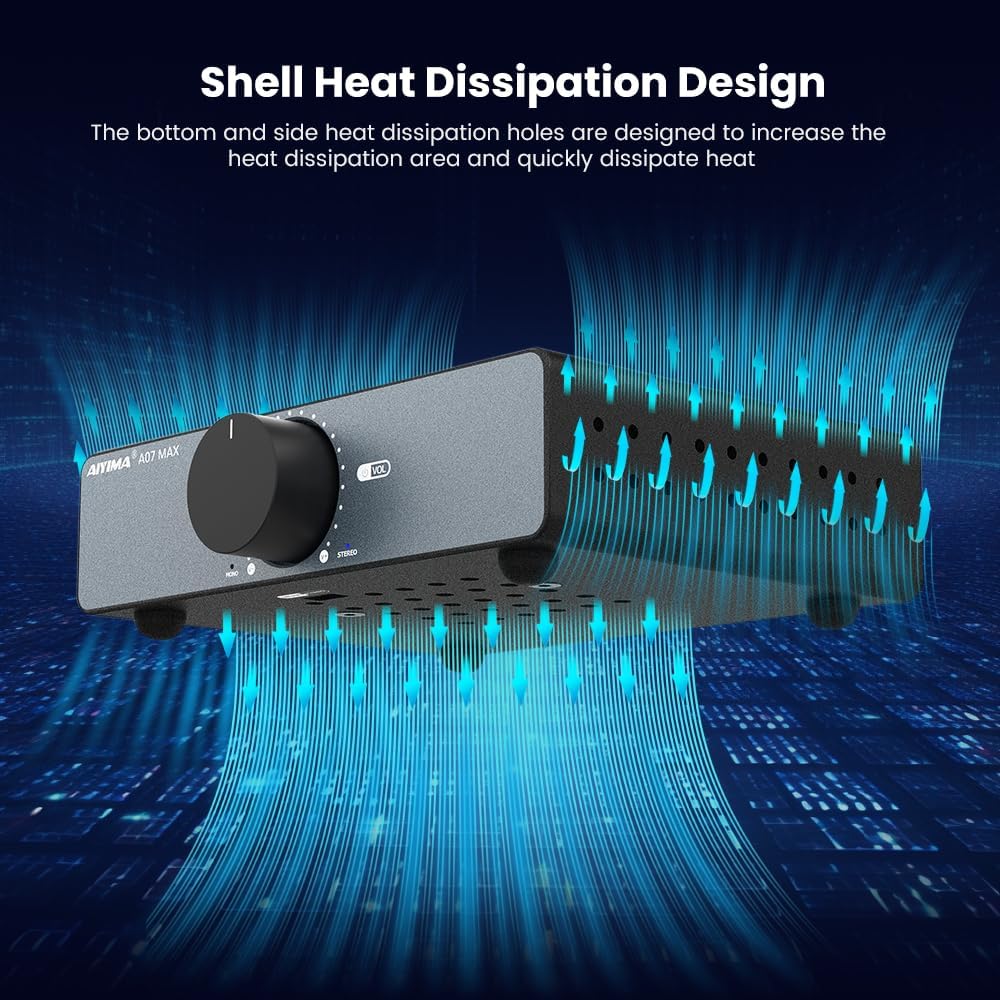
Figure 3: Illustration of the amplifier's shell heat dissipation design, highlighting the side and bottom vents.

Figure 4: View of the bottom of the amplifier, showing the recessed Mono/Stereo mode switch.

Figure 5: Close-up of the amplifier's internal components, including WIMA capacitors, Rubycon capacitors, TI power management chip, and phase mode inductance.
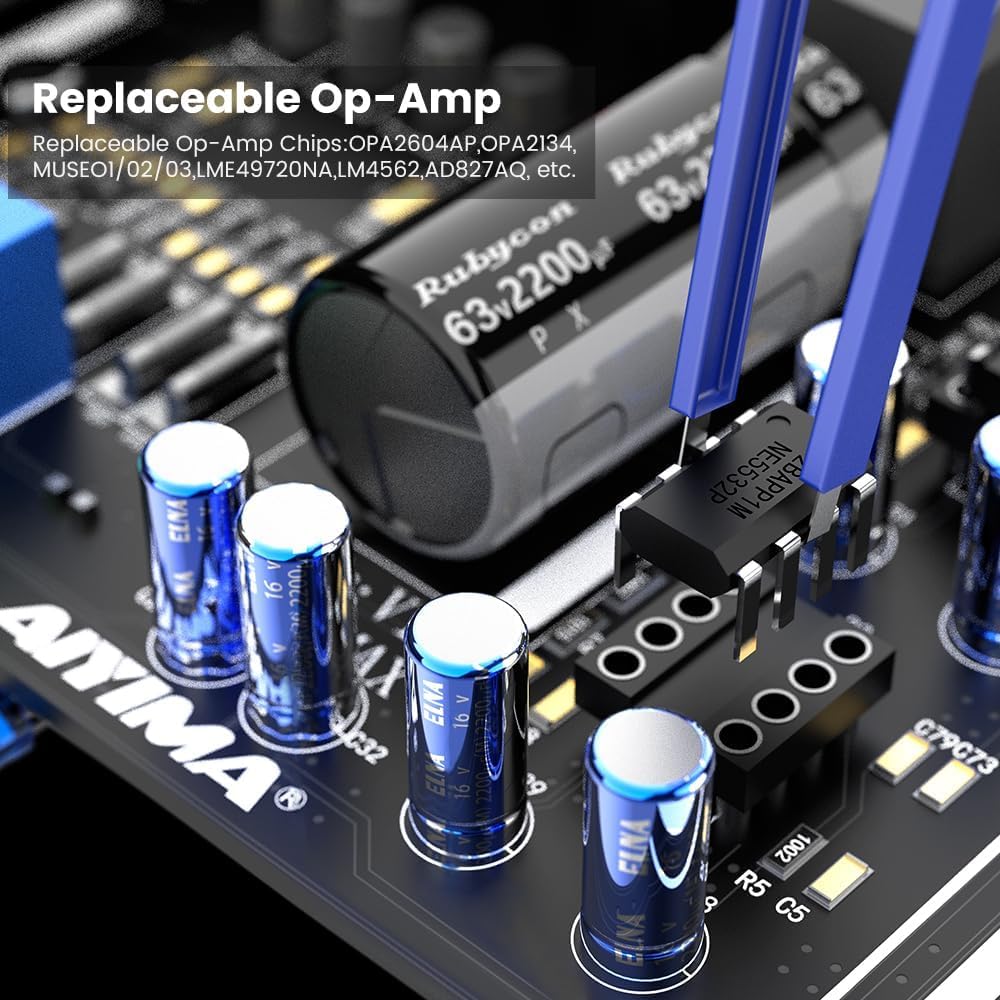
Figure 6: Detail showing the replaceable Op-Amp on the amplifier's circuit board, indicating compatibility with various DIP8 dual op-amps.
Setup
1. Connecting Speakers
The A07 MAX supports passive bookshelf speakers with an impedance of 2-8Ω. Use high-quality speaker cables for optimal performance.
- Connect the positive (+) terminal of your speaker to the positive (+) speaker output terminal on the A07 MAX.
- Connect the negative (-) terminal of your speaker to the negative (-) speaker output terminal on the A07 MAX.
- Ensure all connections are secure to prevent short circuits.
2. Audio Input Connection
Connect your audio source (e.g., phone, tablet, laptop, PC, DVD, MP3 player, TV) to the RCA input jacks on the rear of the A07 MAX using an RCA cable.
3. Power Connection
Connect the provided DC36V 6A power adapter to the DC input port (interface size: 5.5*2.5MM) on the rear of the amplifier, then plug the adapter into a wall outlet.
4. Stereo/Mono Mode Selection
The A07 MAX features a switch on the bottom of the unit to select between Stereo (BTL) and Mono (PBTL) modes. This allows for flexible usage scenarios, including bridging two A07 MAX units for a powerful mono setup.

Figure 7: Diagram illustrating the correct connection method for two A07 MAX units in mono mode, connected to a pre-amplifier/DAC.
For mono mode, connect the speaker to the binding posts labeled "+ Mono Mode -" and use the "L" (left) RCA input for the audio signal. If using two A07 MAX units for a stereo mono-block setup, connect the left channel output from your pre-amp to the "L" input of one A07 MAX (set to mono) and the right channel output to the "L" input of the second A07 MAX (also set to mono).
Setup Demonstration Videos
Video 1: AIYIMA A07 MAX Connecting Scenes Video. This video demonstrates various connection scenarios for the amplifier.
Video 2: AIYIMA A07 MAX Bridge mono Amp Upgraded Video. This video provides a detailed guide on setting up the amplifier in bridge mono mode.
Video 3: AIYIMA T9 DAC Amp Use for A07 MAX Bridge Mono/Stereo Amp. This video shows how to integrate the A07 MAX with an AIYIMA T9 DAC for bridge mono or stereo amplification.
Operating Instructions
1. Power On/Off and Volume Control
The large knob on the front panel serves as both the power switch and the volume control. Rotate clockwise to turn on the unit and increase volume. Rotate counter-clockwise to decrease volume and turn off the unit.
2. Mode Indicators
Two blue LEDs on the front panel indicate the current operating mode:
- Stereo Mode Indicator: Illuminates when the amplifier is set to stereo mode.
- Mono Mode Indicator: Illuminates when the amplifier is set to mono mode.
3. Using the 3.5mm AUX Line Output
The 3.5mm AUX line output on the rear panel provides a pass-through from the RCA inputs. This output is not controlled by the A07 MAX's volume knob and can be used to connect to another active device, such as a powered subwoofer or another amplifier for a multi-amplifier setup.
4. Op-Amp Replacement (Advanced Users)
The A07 MAX allows for the replacement of its Op-Amps (Operational Amplifiers) for users who wish to customize the sound signature. The unit is compatible with DIP8 dual op-amps such as OPA2604AP, OPA2134, MUSE01/02/03, LME49720NA, LM4562, AD827AQ, etc. Refer to Figure 6 for the location of the replaceable Op-Amp.
Caution: Op-Amp replacement should only be performed by users familiar with electronic components and proper handling procedures. Incorrect installation can damage the unit and void the warranty.
Maintenance
1. Cleaning
To maintain the appearance and functionality of your amplifier, regularly wipe the exterior with a soft, dry cloth. Avoid using harsh chemicals or abrasive cleaners, as these can damage the finish.
2. Heat Dissipation
The A07 MAX is designed with efficient heat dissipation through its side and bottom vents. Ensure that these vents are not obstructed when placing the amplifier. Adequate airflow is crucial for optimal performance and longevity of the device.
Troubleshooting
| Problem | Possible Cause | Solution |
|---|---|---|
| No audio output |
|
|
| Distorted sound |
|
|
| Unit feels hot |
|
|
Specifications
| Feature | Detail |
|---|---|
| Brand | AIYIMA |
| Model Number | A07MAX |
| Number of Channels | 2 |
| Output Power (Stereo) | 300W*2 (at 4 ohm) |
| Output Power (Mono) | 600W (bridgeable) |
| Voltage | 48 Volts (DC) - Note: Comes with 36V 6A adapter. Max 48V supported. |
| Specification Met | Tpa3255 |
| Item Dimensions (L x W x H) | 6.02 x 3.94 x 1.57 inches |
| Item Weight | 2.2 pounds |
| Material | Plastic (Chassis is typically metal, but specification lists plastic) |
| Manufacturer | YIMA TECH |
| Mounting Type | Passive Speaker |
| Date First Available | September 16, 2023 |

Figure 8: Detailed power output specifications for the A07 MAX under various supply power and speaker impedance conditions in both BTL Stereo and PBTL Mono modes.

Figure 9: Frequency response graph of the AIYIMA A07 MAX amplifier, indicating its audio performance across different frequencies.

Figure 10: Signal-to-Noise Ratio (SNR) graph of the AIYIMA A07 MAX amplifier, demonstrating its low noise performance.
Warranty and Support
AIYIMA products, including the A07 MAX amplifier, typically come with a 2-year warranty. For warranty claims, technical support, or any inquiries regarding your product, please contact AIYIMA customer service through their official channels or the seller "Yima Top" on Amazon.
For more information about AIYIMA Audio Company, you can watch the following video:
Video 4: About AIYIMA Audio Company. This video provides an overview of the AIYIMA brand and its commitment to audio products.
Related Documents - A07MAX
 |
AIYIMA A07 PRO Bluetooth 5.2 Amplifier User Manual User manual for the AIYIMA A07 PRO amplifier, detailing its specifications, front and rear panel descriptions, and frequently asked questions. This HiFi Class D amplifier supports Bluetooth 5.2 and has a 2.0/2.1 channel output. |
 |
AIYIMA A07 2.0-Channel Power Amplifier User Manual User manual for the AIYIMA A07 2.0-Channel Power Amplifier, detailing its features, specifications, connections, and operating instructions. |
 |
AIYIMA A07 2.0-Channel Power Amplifier User Manual User manual for the AIYIMA A07 2.0-Channel Power Amplifier, detailing front and rear panel introductions, connection steps, technical parameters, and important usage notes for optimal performance. |
 |
AIYIMA D05 Bluetooth 5.0 Digital Amplifier User Manual | AIYIMA AUDIO AIYIMA D05 Bluetooth 5.0 Digital Amplifier User Manual: Get detailed instructions on setup, operation, specifications, and troubleshooting for your AIYIMA D05 2.0/2.1 channel stereo HiFi amplifier. Covers front/rear panel layout, remote functions, PC-USB connectivity, sound settings, and FAQs. |
 |
AIYIMA A08 PRO Bluetooth 5.0 2.0/2.1 Channel Amplifier User Manual User manual for the AIYIMA A08 PRO amplifier, featuring Bluetooth 5.0, 2.0/2.1 channel output, 300W power, and VU meter. Includes specifications, operation steps, and troubleshooting. |
 |
AIYIMA A08 Bluetooth 5.0 2.0 Channel Power Amplifier User Manual User manual for the AIYIMA A08, a 2.0 channel Bluetooth 5.0 power amplifier featuring TPA3255 technology, Qualcomm QCC3034 chip, and high-fidelity sound. Includes setup, specifications, and troubleshooting. |
Ask a question about this manual
Ask about setup, troubleshooting, compatibility, parts, safety, or missing instructions. Manuals+ will review the question and use this page’s manual context to help answer it.