1. Safety Information
WARNING:
Always ensure the table is level to prevent tipping. Read and follow assembly instructions carefully. Do not overload the table or drawers beyond their weight limits. Keep electrical components dry and away from heat sources. Unplug charging station when not in use.
2. Product Overview
The Seventable Nightstand is designed to provide convenient storage and charging capabilities for your bedroom or living space. It features a sturdy frame, fabric drawers, an integrated charging station, and customizable LED lighting.

Image: Front view of the Seventable Nightstand, showcasing its design with LED lighting and a device charging on top.
2.1 Key Features
- Integrated Charging Station: Equipped with 2 AC outlets and 2 USB ports, allowing simultaneous charging of multiple electronic devices. Features a 6.5 ft long power supply cord for flexible placement.
- Customizable LED Lighting: Includes an LED light strip with 20 RGB colors, 21 dynamic modes, 8 speed modes, and 8 brightness settings, controllable via an included remote.
- Spacious Fabric Drawers: Three breathable and dustproof fabric drawers (11.2"D x 13.9"W x 4.3"H each) provide ample storage for various items, helping to maintain a clutter-free environment.
- Durable Construction: Constructed from high-quality engineered wood and metal, ensuring stability and longevity. The tabletop supports up to 55 lbs, and each drawer supports up to 11 lbs.
- Adjustable Feet: Four adjustable feet are included to ensure stability on uneven floors and prevent scratching.
3. Package Contents
Please verify that all components are present before beginning assembly. If any parts are missing or damaged, please contact customer support.
- Nightstand Frame Components (Engineered Wood Panels, Metal Frame)
- 3 x Fabric Drawers
- Power Strip with 2 AC Outlets and 2 USB Ports (pre-installed or separate)
- LED Light Strip
- LED Light Remote Control
- Assembly Hardware (Screws, Bolts, etc.)
- Installation Tool (Screwdriver)
- Assembly Guide
- 4 x Adjustable Feet
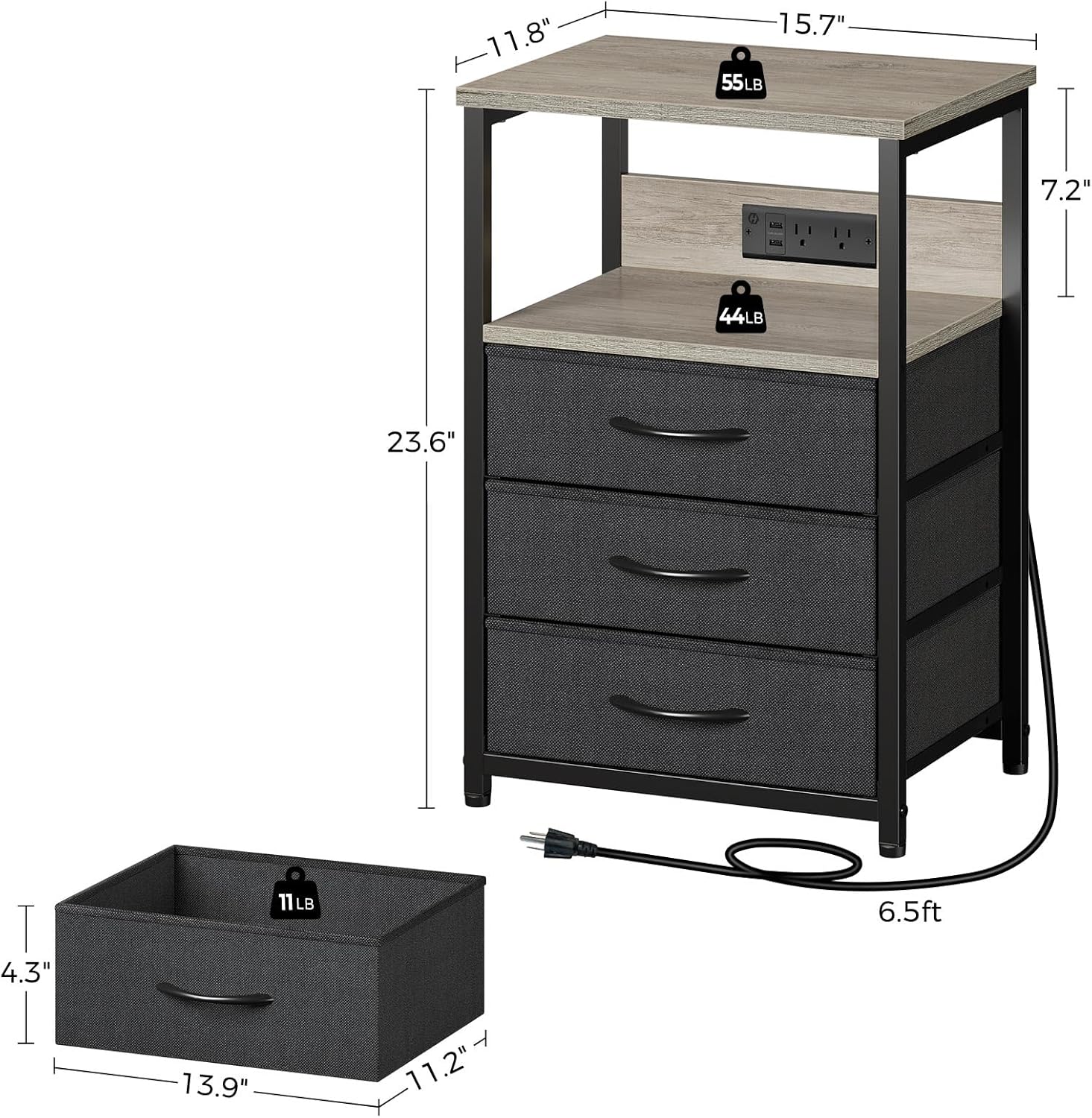
Image: Diagram showing the nightstand's dimensions and the individual components, including the fabric drawer and power cord length.
4. Setup and Assembly
Assembly of the Seventable Nightstand is designed to be straightforward and typically takes 10-15 minutes. Please follow the clear and detailed instructions provided in the included Assembly Guide.
- Prepare Workspace: Clear a spacious area and lay out all components on a soft, clean surface to prevent scratches.
- Follow Assembly Guide: Refer to the step-by-step instructions and diagrams in the Assembly Guide. Ensure all screws and connectors are securely fastened.
- Install Power Strip: The power strip can be installed on either the front or back side of the nightstand, as per your preference. Ensure the power cord is routed safely.
- Attach LED Light Strip: Peel the adhesive backing from the LED light strip and attach it to the underside of the top shelf or desired location within the open cubby. Ensure the strip is connected to a USB port on the power strip.
- Insert Fabric Drawers: Once the frame is assembled, unfold and insert the fabric drawers into their respective slots.
- Adjust Feet: Use the adjustable feet at the bottom of the nightstand to level the unit on uneven surfaces and protect your flooring.

Image: Detailed view of the integrated charging station with 2 AC outlets and 2 USB ports, showing a phone and smartwatch charging.
5. Operating Instructions
5.1 Using the Charging Station
The nightstand features a built-in power strip for convenient charging of your electronic devices.
- Plug the nightstand's main power cord into a standard wall outlet.
- Connect your devices to the 2 AC outlets (120V/12A) or the 2 USB ports (5V/3A).
- Note that one USB port is typically used to power the LED light strip, leaving one USB port available for other devices.
- Always unplug the nightstand from the wall outlet when not in use or during electrical storms.
5.2 Controlling the LED Light
The LED light strip is controlled by the included remote control.

Image: Nightstand illuminated with blue LED light, showing the remote control for color and mode selection.
- Power On/Off: Press the power button on the remote to turn the LED lights on or off.
- Color Selection: Use the color buttons on the remote to choose from 20 RGB static colors.
- Dynamic Modes: Select from 21 dynamic modes (e.g., flash, fade, strobe) to create different lighting effects.
- Speed Adjustment: Increase or decrease the speed of dynamic modes using the speed control buttons.
- Brightness Adjustment: Adjust the brightness of the lights using the brightness control buttons (8 settings available).
- Ensure the remote control has a working battery and is pointed generally towards the nightstand for optimal signal reception.
6. Maintenance
Regular maintenance will help prolong the life and appearance of your nightstand.
- Cleaning: Wipe the engineered wood and metal surfaces with a soft, damp cloth. Avoid harsh chemicals or abrasive cleaners. For fabric drawers, spot clean with a mild detergent and allow to air dry.
- Dusting: Regularly dust all surfaces to prevent buildup.
- Electrical Components: Keep the charging station and LED light strip dry. Do not immerse in water.
- Fasteners: Periodically check all screws and connections to ensure they remain tight. Retighten if necessary.
7. Troubleshooting
If you encounter any issues with your Seventable Nightstand, please refer to the following common problems and solutions:
| Problem | Possible Cause | Solution |
|---|---|---|
| LED lights do not turn on. | Nightstand not plugged in; LED strip not connected to USB; Remote battery dead; Remote signal obstructed. | Ensure the nightstand is plugged into a live outlet. Verify the LED strip is securely plugged into a USB port. Replace remote battery. Ensure no obstructions between remote and LED receiver. |
| LED lights reset to default mode. | Temporary signal interference or power fluctuation. | Simply use the remote control to select your desired color and mode again. |
| Charging station not working. | Nightstand not plugged in; Device not properly connected; Outlet/USB port malfunction. | Check if the nightstand's power cord is securely plugged into a working wall outlet. Ensure devices are properly connected to the outlets/USB ports. Try a different outlet or USB port. |
| Nightstand is wobbly. | Uneven floor; Loose assembly screws. | Adjust the four leveling feet at the bottom of the nightstand until it is stable. Check and tighten all assembly screws. |
8. Specifications
| Feature | Detail |
|---|---|
| Brand | Seventable |
| Model Name | hq-bzh014 |
| Model Number | hq-bzh014-03 |
| Product Dimensions (D x W x H) | 11.8"D x 15.7"W x 23.6"H |
| Maximum Tabletop Weight Capacity | 55 Pounds (approx. 25 kg) |
| Maximum Drawer Weight Capacity (each) | 11 Pounds (approx. 5 kg) |
| Color | Greige |
| Material | Engineered Wood, Metal Frame, Fabric Drawers |
| Number of Drawers | 3 |
| AC Outlets | 2 (120V/12A) |
| USB Ports | 2 (5V/3A) |
| Power Cord Length | 6.5 ft |
| LED Light Features | 20 RGB Colors, 21 Dynamic Modes, 8 Speed Modes, 8 Brightness Settings |
| UPC | 810142982702 |
9. Warranty and Support
While specific warranty details are not provided in this manual, Seventable is committed to customer satisfaction. For any questions, concerns, or assistance with your product, please contact Seventable customer support through the retailer's platform or the official Seventable website.
Please have your model number (hq-bzh014-03) and purchase information ready when contacting support.