
1. Introduction and Overview
This document provides essential instructions for the use and maintenance of your new Generic replacement infrared (IR) remote control. This remote is designed to be compatible with a range of Pioneer CD Compact Disc Player models. Please note that as a replacement unit, it may not offer all the advanced functions present on your original equipment remote control.
Before use, please verify that the button layout on this remote matches your operational expectations for your specific Pioneer CD player model. No programming or configuration is required; simply insert batteries and begin use.
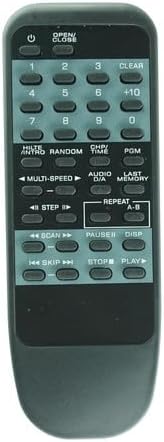
Figure 1: Front view of the remote control, displaying all functional buttons.
2. Setup: Battery Installation
The remote control requires two (2) AAA batteries for operation. Batteries are not included with this product.
- Locate the battery compartment on the back of the remote control.
- Press down on the latch and slide the battery cover downwards to open it.
- Insert two (2) AAA batteries, ensuring the positive (+) and negative (-) terminals align correctly with the markings inside the compartment.
- Slide the battery cover back into place until it clicks securely.
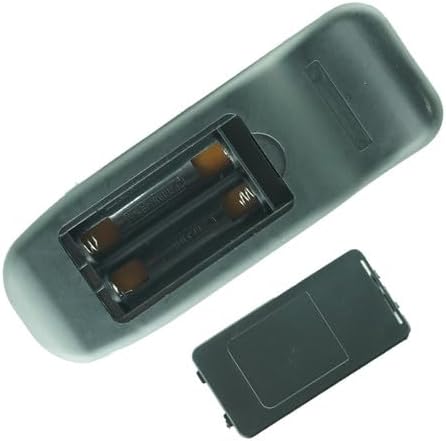
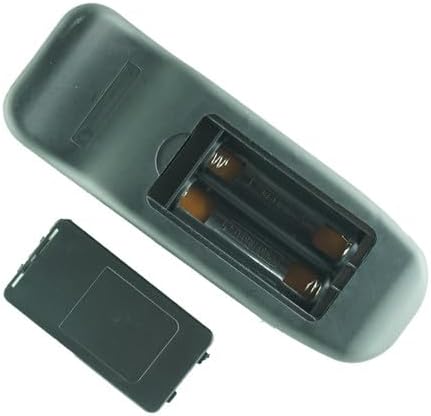
Figure 2: Battery compartment with cover removed (left) and with batteries inserted (right).
3. Operating Instructions
Once batteries are installed, the remote control is ready for immediate use with compatible Pioneer CD Compact Disc Players. Point the remote directly at the infrared receiver on your CD player.
Basic Functions:
- POWER (⏻): Turns the CD player on or off.
- OPEN/CLOSE: Opens or closes the disc tray/carousel.
- NUMBER BUTTONS (0-9, +10): Directly select track numbers. Use +10 for tracks above 9.
- PLAY (▶): Starts disc playback.
- PAUSE (⏸): Pauses playback. Press again to resume.
- STOP (⏹): Stops disc playback.
- SKIP (⏭︎, ⏮︎): Skips to the next or previous track.
- SCAN (⏩, ⏪): Fast forwards or fast reverses through the current track.
Advanced Functions:
The remote includes buttons for various advanced features. The availability and specific functionality of these features depend on your Pioneer CD player model. Refer to your CD player's original manual for detailed information on these functions.
- CLEAR: Clears programmed tracks or other settings.
- PGM (Program): Initiates or confirms programmed playback sequences.
- LAST MEMORY: Recalls the last played track or settings.
- REPEAT (A-B): Repeats a track, disc, or a specific section (A-B).
- RANDOM: Plays tracks in a random order.
- INTRO: Plays the beginning of each track.
- MULTI-SPEED: Adjusts playback speed.
- STEP: Advances or reverses playback by a small increment.
- AUDIO D/A: May control digital-to-analog converter settings.
- CH/TIME: Displays channel or time information.
- DISP (Display): Changes display modes on the CD player.
4. Compatibility
This remote control is a replacement unit designed for use with the following Pioneer CD Compact Disc Player models:
- PD-F1005
- PD-F1006
- PD-F507
- PD-F100
- PD-M455
- PD-M551
- PD-M552
- PD-M59
- PD-M601
- PD-M602
- PD-M640
- PD-M6403
- PD-M550
It is crucial to confirm that the button layout and functions on this replacement remote align with your specific Pioneer CD player model's requirements. While designed for broad compatibility, some specific functions may not be supported by all listed models or may require different button presses than the original remote.
5. Maintenance
To ensure the longevity and proper functioning of your remote control, follow these simple maintenance guidelines:
- Cleaning: Wipe the remote control with a soft, dry cloth. Do not use liquid cleaners, abrasive pads, or chemical solvents.
- Storage: Store the remote in a cool, dry place away from direct sunlight and extreme temperatures.
- Battery Replacement: If the remote becomes unresponsive or its range decreases, replace both AAA batteries. If the remote will not be used for an extended period, remove the batteries to prevent leakage.
- Avoid Drops: Protect the remote from physical impact, as drops can damage internal components.
6. Troubleshooting
If you encounter issues with your remote control, please refer to the following common solutions:
- Remote Not Responding:
- Ensure the batteries are correctly inserted with the proper polarity (+/-).
- Replace old batteries with fresh AAA batteries.
- Check for any obstructions between the remote control and the CD player's IR receiver.
- Ensure you are within the effective operating range and pointing the remote directly at the CD player.
- Certain Functions Do Not Work:
- As a replacement remote, some advanced or specific functions of your original CD player may not be supported. Refer to your CD player's original manual for specific function compatibility.
- Verify that your CD player model is listed in the compatibility section of this manual.
7. Specifications
| Product Type | Replacement Infrared (IR) Remote Control |
| Brand | Generic |
| Power Source | 2 x AAA Batteries (not included) |
| Color | Black |
| Compatible Devices | Pioneer CD Compact Disc Players (various models) |
| Special Feature | Replacement item; may not work with all functions as original. |
8. Warranty and Support
Specific warranty information for this Generic replacement remote control is not provided in this manual. For any warranty claims, technical support, or further assistance, please contact the seller or retailer from whom you purchased this product.