1. Introduction
Thank you for choosing the citicr Portable Power Bank. This device is designed to provide convenient and efficient charging for your electronic devices on the go. Please read this manual carefully before use to ensure proper operation and to maximize the lifespan of your product.
2. Product Overview
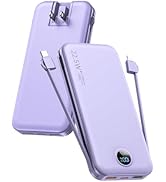
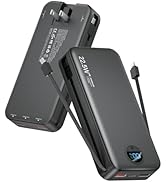
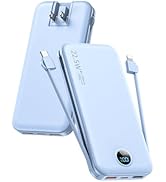
The citicr Portable Power Bank features a 12000mAh capacity, 22.5W fast charging, and integrated cables and a wall plug for ultimate portability and versatility.
- Versatile Charging Options: The power bank can be recharged in two ways: via the built-in AC wall plug (100-240V) for a full charge in approximately 5 hours, or using the Type-C (PD18W) port for a faster 4-hour charge. It supports simultaneous charging of a device while the power bank itself is recharging.
- Ultra-Portable with Built-in Cables: This power bank features an ultra-slim profile (0.78 inches thick) and is lightweight (0.5 pounds), making it suitable for portability. It has a 12,000mAh capacity, providing approximately 2-3 full charges for most smartphones. Built-in USB-C and Lightning cables are included, removing the need for additional cords.
- Fast Charging for Multiple Devices: The power bank is equipped with three fast-charging outputs: USB-A2 (22.5W), a built-in USB-C cable (22.5W), and a USB-C port (PD20W). This allows for rapid charging of multiple devices. For instance, an iPhone 13 can be charged from 0% to 50% in approximately 25 minutes.
- Compact Design with Enhanced Safety: Its compact size makes the power bank suitable for travel, including air travel. An intelligent protection system is integrated to guard against overcharging, short-circuiting, overheating, and over-discharging, contributing to device safety and optimal performance.
- Smart LED Display for Easy Monitoring: A digital LED display indicates the remaining battery level, allowing users to monitor the power bank's charge status and recharge it as needed.

3. Setup
3.1 Charging the Power Bank
Before initial use, fully charge your power bank. There are two methods for recharging:
- Via Built-in AC Wall Plug: Extend the foldable AC wall plug and insert it into a standard 100-240V wall outlet. The digital LED display will show the charging progress. A full charge takes approximately 5 hours.
- Via Type-C (PD18W) Port: Connect a compatible Type-C cable to the power bank's Type-C port and to a power adapter. This method provides a faster charge, completing in approximately 4 hours.
4. Operating Instructions
4.1 Charging Your Devices
The power bank offers multiple options to charge your devices:
- Using Built-in Cables: Extend the built-in USB-C or Lightning cable and connect it directly to your compatible device.
- Using USB-A Ports: Connect your device's charging cable to one of the two USB-A2 (22.5W) output ports on the power bank.
- Using USB-C Port: Connect your device's charging cable to the USB-C (PD20W) output port on the power bank.
The digital LED display will activate and show the remaining battery percentage when a device is connected and charging. The power bank can charge multiple devices simultaneously.


4.2 Monitoring Battery Level
Press the power button once to activate the digital LED display, which shows the current battery percentage of the power bank. This allows you to know when to recharge the unit.
4.3 Official Product Video
Video 4.1: This video demonstrates the features and usage of the citicr Fast Charging Power Bank, including its built-in cables and wall plug.
5. Safety Information
The power bank incorporates an intelligent protection system to ensure safe operation for both the device and your connected electronics. This system protects against:
- Overcharging
- Short-circuiting
- Overheating
- Over-discharging
- Overvoltage Protection
- Overcurrent Protection
- Overload Protection
- High Temperature Protection
The power bank is airline-approved for peace of mind during air travel.

6. Maintenance
To maintain optimal performance and extend the life of your power bank:
- Keep the device away from extreme temperatures, direct sunlight, and moisture.
- Avoid dropping or subjecting the device to strong impacts.
- Clean the exterior with a soft, dry cloth. Do not use harsh chemicals or abrasive materials.
- Store the power bank in a cool, dry place when not in use.
7. Troubleshooting
If you encounter issues with your power bank, please refer to the following common solutions:
- Device not charging: Ensure the power bank is sufficiently charged. Check that the charging cables are securely connected to both the power bank and your device. Try a different cable or port.
- Slow charging: Verify that your device supports fast charging and that you are using a fast-charging port (USB-A2 or USB-C PD20W). Ensure the cable is not damaged.
- Power bank not recharging: Check that the AC wall plug is fully extended and inserted into a live outlet, or that the Type-C cable and adapter are functioning correctly.
- LED display not working: Press the power button to activate the display. If it remains off, the power bank may be fully discharged or require service.
8. Specifications
| Feature | Detail |
|---|---|
| Brand | citicr |
| Model Number | AC-02D |
| Battery Capacity | 12000 Milliamp Hours |
| Output Power | 22.5W (Max) |
| Input (AC Wall Plug) | 100-240V |
| Input (USB Type-C) | PD18W |
| Output Ports | USB-A2 (22.5W), Built-in USB-C cable (22.5W), USB-C port (PD20W) |
| Built-in Cables | USB Type-C, Lightning (iOS) |
| Special Features | Built-in Wall Plug, Built-in Cables, Digital Display, Fast Charging, Safety Protection (Overcharge, Short-circuit, Overheat, Over-discharge) |
| Product Dimensions | 5.9 x 2.66 x 0.78 inches |
| Item Weight | 8 ounces |
| Battery Type | 1 Lithium Polymer battery (included) |
9. Compatibility
The citicr Portable Power Bank is compatible with a wide range of devices, including but not limited to:
- iPhone (models 7 through 16 and newer)
- iPad Pro, iPad Air, iPad mini
- Airpods / Airpods Pro
- Samsung smartphones
- Google Pixel smartphones
- Xiaomi smartphones
- Huawei smartphones
- OPPO smartphones
- Portable Speakers
- Small Fans

10. What's in the Box
Upon opening your package, you should find the following items:
- 12,000mAh Portable Power Bank × 1
- Type-C Fast Charging Cable × 1
- User Manual × 1
- CPE Pouch for storage and protection × 1
11. Warranty & Support
The citicr Portable Power Bank comes with a 24-month replacement promise. If you encounter any issues or have questions regarding your product, please contact customer support for assistance. Refer to the product packaging or official website for specific contact details.


