
Introduction
This manual provides detailed instructions for the assembly, operation, and maintenance of your AODK 32 Inch Laptop Desk. Designed for home office use, this compact computer desk features a built-in power outlet with USB and Type-C charging ports, and a versatile 3-tier reversible storage shelf. Please read this manual thoroughly before assembly and use to ensure safe and efficient operation.
Important Safety Information
For your safety and to prevent damage to the product, please adhere to the following guidelines:
- Always assemble the desk strictly according to the provided instructions.
- This desk is designed for adult use.
- The desk can support a maximum weight of 17.64 pounds (8 kg). Do not exceed this weight limit.
- Do not use the desk if it appears damaged or if it has not been assembled correctly.
- Keep the desk away from direct heat sources, open flames, and excessive moisture.
- Ensure all electrical connections are secure and follow local electrical safety standards.
Package Contents
Before beginning assembly, verify that all components are present and undamaged. All necessary assembly tools are included in the package.
| Component | Quantity |
|---|---|
| Desktop Panel with Built-in Power Outlet | 1 |
| Metal Frame Components | Various |
| 3-Tier Storage Shelf Panels | 3 |
| Assembly Hardware (Screws, Bolts, etc.) | 1 set |
| Assembly Tools (Wrench, Allen Key) | 1 set |
| Instruction Manual | 1 |
Setup and Assembly
Assembly of the AODK Laptop Desk is straightforward and can typically be completed by one person. Follow these steps carefully:
- Unpack Components: Carefully remove all parts from the packaging and lay them out on a clean, soft surface to prevent scratches. Verify all components against the package contents list.
- Assemble the Frame: Attach the metal frame components together using the provided hardware. Ensure all screws are finger-tightened initially.
- Attach Storage Shelf: Decide whether you want the 3-tier storage shelf on the left or right side of the desk. Attach the shelf panels to the designated frame side using the appropriate hardware. The shelves are reversible, allowing for flexible placement.
- Secure the Desktop: Place the desktop panel onto the assembled frame. Align the pre-drilled holes on the desktop with the frame and secure it using the remaining hardware.
- Final Tightening: Once all components are in place, fully tighten all screws and bolts with the provided tools. Do not overtighten.
- Position the Desk: Carefully move the assembled desk to its desired location. The desk foot pads will protect your flooring.

Image: The AODK Laptop Desk fully assembled, showcasing its compact design and integrated features.
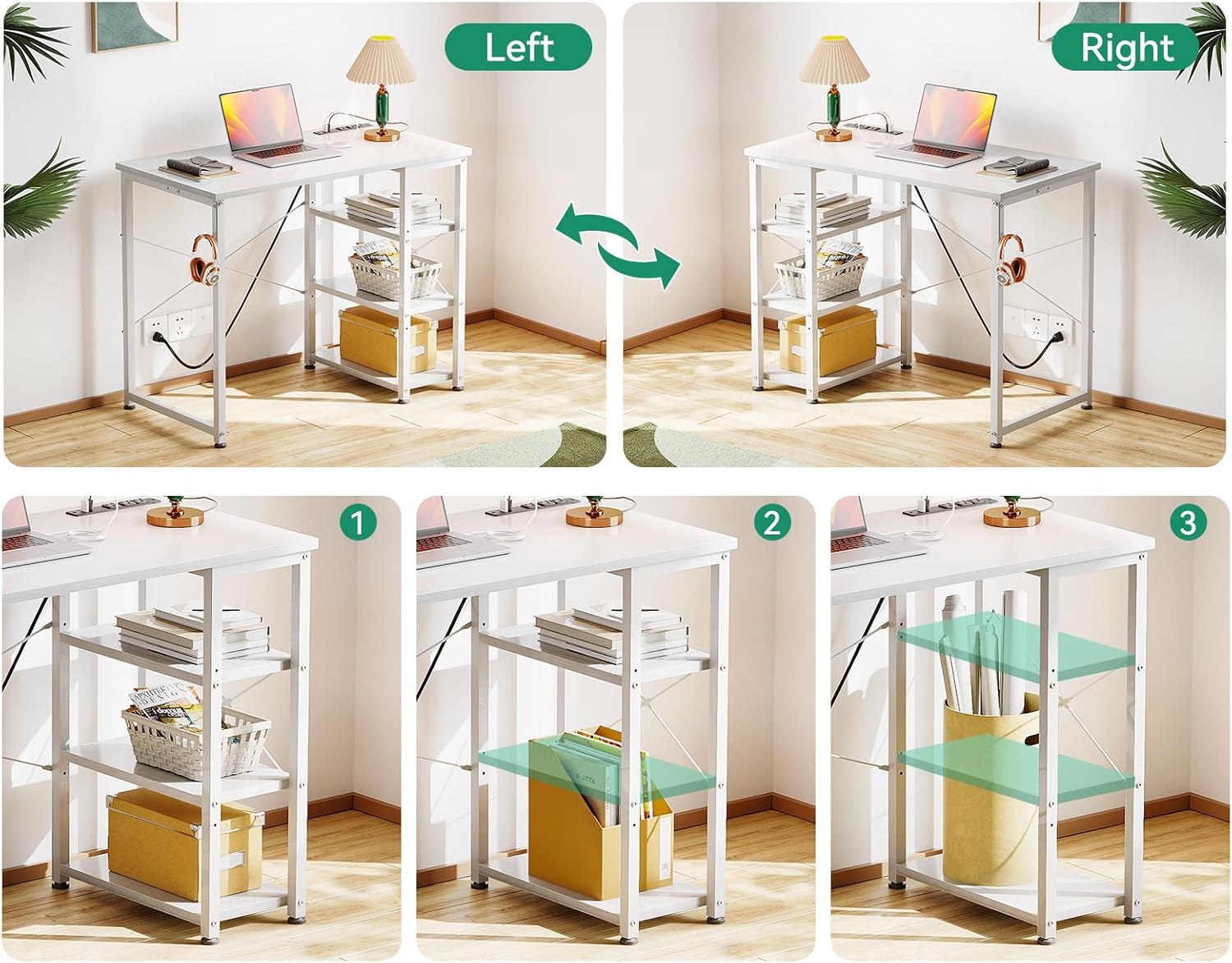
Image: Visual representation of the reversible storage shelf, demonstrating how it can be configured on either the left or right side of the desk.
Operating Instructions
Built-in Power Outlet and Charging Ports
Your AODK Laptop Desk is equipped with a convenient built-in power strip to power your electronic devices directly from your workspace. The power strip includes:
- 3 AC Outlets (125V/12A)
- 1 USB Port (5V/2A)
- 1 Type-C Port (5V/2A)
To use the power strip:
- Plug the desk's 6.6-foot power cord into a standard wall outlet.
- Insert your device's power adapter into one of the AC outlets, or connect your USB/Type-C charging cable directly to the corresponding port.
- Ensure devices are properly connected before use.

Image: A detailed view of the recessed power strip, highlighting the AC outlets, USB port, and Type-C port for convenient device charging.
Features and Usage
Compact Design
With a depth of 15.7 inches (40 cm), this desk is ideal for smaller rooms or spaces where a full-sized desk may not fit. It provides ample surface area for a laptop or notebook, making it suitable for studying or working from home.
Reversible 3-Tier Storage Shelf
The integrated 3-tier storage shelf offers additional space for books, storage boxes, and other office essentials. The shelf can be installed on either the left or right side of the desk during assembly to best suit your room layout and preferences.
Adjustable Storage Space
For larger items, such as a computer tower, the middle and top shelves of the 3-tier unit can be removed to create more vertical storage space.

Image: A diagram illustrating the overall dimensions of the desk (31.5"W x 15.7"D x 29.5"H) and the shelf dimensions.

Image: The AODK Laptop Desk configured as a vanity in a bedroom setting, demonstrating its versatile use beyond a typical office desk.
Maintenance
To ensure the longevity and appearance of your AODK Laptop Desk, follow these maintenance tips:
- Cleaning: Wipe the desk surface with a soft, damp cloth. Avoid using harsh chemicals or abrasive cleaners, which can damage the laminated finish.
- Spills: Immediately wipe up any spills to prevent water damage or staining.
- Stability Check: Periodically check all screws and bolts to ensure they remain tight. Retighten if necessary to maintain stability.
- Heat Protection: Use coasters or protective pads under hot items to prevent heat damage to the desktop.
- Weight Distribution: Distribute weight evenly across the desktop and shelves to prevent stress on the structure.
Troubleshooting
If you encounter any issues with your AODK Laptop Desk, please refer to the following common solutions:
| Problem | Possible Cause | Solution |
|---|---|---|
| Desk is wobbly/unstable | Loose screws or uneven floor. | Ensure all assembly screws are fully tightened. Adjust desk foot pads if your floor is uneven. |
| Power outlets/USB ports not working | Desk power cord not plugged in, or wall outlet issue. | Verify the desk's power cord is securely plugged into a functioning wall outlet. Test the wall outlet with another device. If the issue persists, contact customer support. |
| Missing parts during assembly | Packaging oversight. | Carefully re-check all packaging materials. If parts are genuinely missing, contact AODK customer service with your purchase details. |
Specifications
- Brand: AODK
- Model Number: B01OK1002
- Product Dimensions (D x W x H): 15.7" x 31.5" x 29.5" (40cm x 80cm x 75cm)
- Color: White
- Style: Modern
- Base Material: Metal
- Top Material Type: Engineered Wood (Laminated Finish)
- Item Weight: 14.3 Pounds (6.5 kg)
- Maximum Weight Recommendation: 17.64 Pounds (8 kg)
- Power Outlet: Built-in, 3 AC Outlets (125V/12A), 1 USB Port (5V/2A), 1 Type-C Port (5V/2A)
- Power Cord Length: 6.6 Feet
- Storage: 3-Tier Reversible Open Shelf
- Assembly Required: Yes (Tools included)
- Recommended Number of People for Assembly: 1

Image: Two AODK Laptop Desks arranged together, illustrating how multiple units can be combined for a larger workspace.
Warranty and Support
AODK is committed to providing high-quality products. For any product problems regarding assembly, damaged parts, or other issues, please contact AODK customer service directly. We are dedicated to resolving any concerns you may have.
Please refer to your purchase documentation or the AODK official website for specific warranty terms and contact information.
Contact Information: Please check the product packaging or the retailer's website for the most current customer support contact details.