
TIDRADIO TD-H8 (Green)
TIDRADIO TD-H8 Ham Radio User Manual
Model: TD-H8 (Green)
Brand: TIDRADIO
1. Introduction
This manual provides comprehensive instructions for the operation and maintenance of your TIDRADIO TD-H8 Ham Radio. The TD-H8 is a 10W high-power dual-band two-way radio designed for long-range communication, featuring APP programmability, a large 2500mAh battery, and a speaker mic. Please read this manual thoroughly before using the device to ensure proper function and safety.
2. What's in the Box
Upon unboxing your TIDRADIO TD-H8, please verify that all components listed below are present:

Figure 2.1: TIDRADIO TD-H8 Ham Radio and included accessories.
The unboxing video below provides a visual guide to the contents:
Video 2.1: (2nd Generation) TD-H8 Ham Radio Unboxing. This video demonstrates the unboxing process and shows all items included in the package.
- 1 x TIDRADIO TD-H8 Ham Radio Handheld
- 2 x 2500mAh Battery
- 1 x TD-771 Antenna
- 1 x TD-HM060 Speaker Mic
- 1 x USB-C Charger and cable
- 1 x Belt Clip
- 1 x User Manual
- 1 x Lanyard
3. Product Overview and Key Features
The TIDRADIO TD-H8 is engineered with advanced features for superior performance:

Figure 3.1: Key components and controls of the TIDRADIO TD-H8.
- 10 Watt High Power Output: Equipped with two power tubes, the TD-H8 transmits consistently at a high output power across its frequency range, offering greater communication range compared to typical 5W or 8W radios.
- Advanced High-Tech Features: Supports phone programming via Odmaster App, upgradable firmware, version switching (Ham, GMRS, Unlocked), wireless programming, connection to repeaters, FM function, VOX gain, Dual Band, Dual Watch, NOAA Weather Channel, Display Sync, 199 channels, and a 1.77-inch LCD color screen.
- Phone Programming: Simplifies programming tasks such as frequency editing, nearby repeater search and import, saving/caching/sharing radio configurations, and even socializing with other radio users via the Odmaster App. Offline programming is supported.
- Updatable Firmware: The TD-H8's firmware can be updated via TIDRADIO software, introducing new functions and improvements without needing to purchase a new radio.
- Adjustable Microphone Gain: Users can fine-tune the microphone sensitivity from 0 to 10 to optimize audio experience based on personal preferences and environmental conditions.
- 1.77-inch LCD Color Screen: Features a high-contrast, high-resolution LCD color screen for an enhanced visual experience, superior to plain screens found on many other radios.
- Version Switch: Allows switching between Ham, GMRS, and Unlocked versions. Ham Version: 144-148 MHz, 420-450 MHz. GMRS Version: 462.55000-467.72500 MHz. Unlocked Version: 136-174 MHz, 400-520 MHz.
- NOAA Weather Channel: Access NOAA weather alerts for enhanced safety.
- Built-in Flashlight: Provides illumination in dark environments.

Figure 3.2: Power output comparison of TD-H8.
Observe the power testing in the video below:
Video 3.1: TD-H8 10Watt Power Testing. This video demonstrates the actual power output of the radio.
Video 3.2: TD-H8 Power Test. Another demonstration of the radio's power output.

Figure 3.3: Multiple programming options including CPS, CHIRP, and Odmaster App.

Figure 3.4: Wireless programming via phone app.

Figure 3.5: Searching and importing nearby repeaters with one click.

Figure 3.6: Program your radio without cellular data by saving configurations in advance.

Figure 3.7: Detailed view of the TD-H8's large color screen display.

Figure 3.8: NOAA Weather Radio functionality for emergency preparedness.

Figure 3.9: The built-in flashlight provides convenience in low-light conditions.
4. Setup
4.1 Battery Installation and Charging
The TD-H8 comes with two 2500mAh Lithium Polymer batteries. Ensure batteries are fully charged before first use.

Figure 4.1: Two 2500mAh rechargeable batteries included with the radio.

Figure 4.2: Battery specifications: 120 hours standby, 24 hours working, 3 hours charge time.

Figure 4.3: The radio supports versatile Type-C charging from various sources.
- To install the battery, align the battery pack with the grooves on the back of the radio and slide it upwards until it clicks into place.
- To remove, press the release latch at the bottom of the battery and slide it downwards.
- Connect the provided USB-C cable to the radio's charging port and plug the other end into a compatible USB-C power source (wall adapter, power bank, car charger, or laptop).
- A full charge typically takes 3 hours.
4.2 Antenna and Speaker Mic Attachment
- Screw the TD-771 antenna clockwise into the antenna connector on top of the radio until it is finger-tight. Do not overtighten.
- Connect the TD-HM060 Speaker Mic to the K-port on the side of the radio.
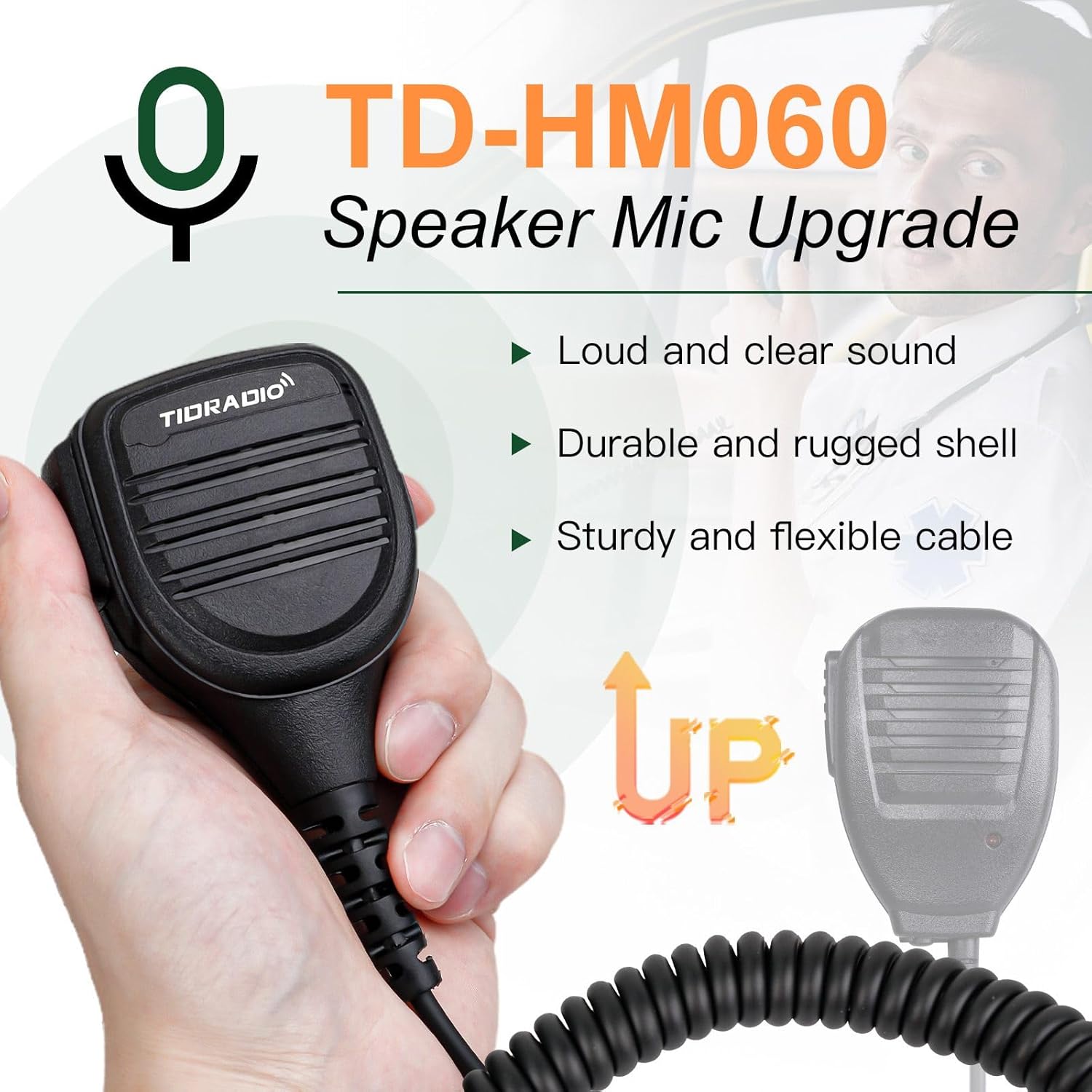
Figure 4.4: The TD-HM060 Speaker Mic provides clear audio and is durable.
5. Operating Instructions
5.1 Basic Operation
- Power On/Off: Rotate the Power/Volume knob (7 in Figure 3.1) clockwise to turn on the radio. Continue rotating to adjust volume. Rotate counter-clockwise until it clicks to turn off.
- Push-to-Talk (PTT): Press and hold the PTT button (5 in Figure 3.1) on the side of the radio to transmit. Release to receive.
- VFO/MR (Frequency Mode/Channel Mode): Press the VFO/MR button (3 in Figure 3.1) to switch between Frequency (VFO) mode and Channel (MR) mode.
- A/B (Channel Switch): Press the A/B button (1 in Figure 3.1) to switch between the upper (A) and lower (B) display channels.
- MONI/Flashlight: Press and hold the MONI/Flashlight button (4 in Figure 3.1) to monitor the current channel. Press briefly to activate the flashlight.
- ALARM: Press and hold the ALARM button (6 in Figure 3.1) to activate the alarm function.
5.2 Menu System Navigation
The TD-H8 features an intuitive menu system accessible via the MENU button. Use the up/down arrow keys to navigate and the MENU button to confirm selections. The video below provides a detailed walkthrough of the menu options:
Video 5.1: TD-H8 Menu System Display. This video guides you through the various settings and options available in the radio's menu.
Key menu functions include:
- Squelch: Adjust the squelch level to filter out background noise.
- Power Save: Configure power-saving modes to extend battery life.
- VOX Level: Adjust Voice Operated Transmit sensitivity.
- Bandwidth: Select between wide or narrow bandwidth.
- Dual Watch: Enable simultaneous monitoring of two frequencies/channels.
- CTCSS/DCS Codes: Set analog (CTCSS) or digital (DCS) squelch codes for privacy and selective calling.
- Scan Add/Mode: Add channels to the scan list and configure scan behavior.
- Language: Select the display language (English is default).
- Repeater Tone (R-TONE): Transmit a 1750Hz tone for repeater access (commonly used in Europe).
- Busy Lock: Prevents accidental transmission on an occupied channel.
- Version: Displays the current firmware version.
5.3 Programming the Radio
The TD-H8 offers multiple programming methods for convenience:
- Odmaster App (Phone Programming): This is the primary method for wireless programming.
- Download the Odmaster App from your device's app store.
- Enable Bluetooth on your phone and the radio.
- Open the Odmaster App and connect to your TD-H8.
- You can edit frequencies, search for and import nearby repeaters, save/cache/share radio configurations, and program offline.
- CHIRP / CPS Software: For traditional computer-based programming, the TD-H8 supports CHIRP and CPS software. A programming cable is included.

Figure 5.1: Wireless programming of the TD-H8 using the Odmaster App on a smartphone.
The video below highlights the special features of the TD-H8, including its wireless programming capabilities:
Video 5.2: Check What Makes TD-H8 So Special. This video showcases the unique features of the TD-H8, including its wireless programming module, 10W power output, 2500mAh battery, and large color screen display.
6. Maintenance
- Cleaning: Use a soft, damp cloth to clean the radio's exterior. Do not use harsh chemicals or solvents.
- Battery Care: Store batteries in a cool, dry place. Avoid extreme temperatures. If not using the radio for extended periods, remove the battery.
- Antenna Care: Ensure the antenna is securely attached. Avoid bending or stressing the antenna.
7. Troubleshooting
| Issue | Possible Cause | Solution |
|---|---|---|
| Radio does not power on. | Low or dead battery; incorrect battery installation. | Charge the battery; ensure battery is correctly installed. |
| Cannot transmit or receive. | Incorrect frequency/channel; antenna not attached; low power setting; Busy Lock enabled. | Verify frequency/channel; attach antenna; increase power setting; disable Busy Lock. |
| Poor audio quality. | Low signal strength; incorrect squelch setting; microphone gain too low/high. | Move to an area with better signal; adjust squelch; adjust microphone gain. |
| Programming issues with Odmaster App. | Bluetooth not connected; app version outdated; radio firmware outdated. | Ensure Bluetooth connection; update Odmaster App; update radio firmware. |
8. Specifications
Detailed technical specifications for the TIDRADIO TD-H8:
- Item Weight: 1.79 pounds
- Product Dimensions: 1.6 x 2.5 x 5 inches
- Country of Origin: China
- Item Model Number: TD-H8 (Green)
- Batteries: 2 Lithium Polymer batteries required (included)
- Display Type: LCD
- Number of Channels: 199
- Frequency Range: VHF/UHF (Ham: 144-148 MHz, 420-450 MHz; GMRS: 462.55000-467.72500 MHz; Unlocked: 136-174 MHz, 400-520 MHz)
- Talking Range Maximum: 10 Mile
- Tuner Technology: VHF/UHF
- Voltage: 7.4 Volts
- Water Resistance Level: Not Water Resistant
- FCC ID: 2AWL3-TDH8GMRS

Figure 8.1: Back of the radio displaying model and FCC ID information.
9. Warranty and Support
TIDRADIO offers a 60-day hassle-free replacement warranty for this product. For any questions, concerns, or suggestions regarding additional functions, please contact TIDRADIO customer service through Amazon. They have a professional R&D division available for support.
You can also visit the official TIDRADIO store for more information and products: TIDRADIO Store.
For the official Certificate of Compliance and User Guide PDF, please refer to the following link: User Guide (PDF).
Related Documents - TD-H8 (Green)
 |
TIDRADIO TD-H8 User Manual: Features, Operation, and Safety Guide Comprehensive user manual for the TIDRADIO TD-H8 dual-band two-way radio. Learn about its features, basic and advanced operations, installation, maintenance, and safety guidelines for optimal performance. |
 |
Two Way Radio User's Manual - Operation and Safety Guide Comprehensive user's manual for a two-way radio, covering operation, safety precautions, technical specifications, and troubleshooting. Includes FCC compliance information and a frequency chart. |
 |
TIDRADIO TD-H3 Two Way Radio User Manual & Ham Radio Guide Explore the TIDRADIO TD-H3, a versatile dual-band, dual-display two-way radio designed for professionals and hobbyists. This user manual provides comprehensive guidance on features, operation, safety, and maintenance for your ham radio. |
 |
TD-H8 Ham Radio Firmware Update Guide Instructions on how to download and upgrade the firmware for the TD-H8 Ham Radio using PC programming software and the correct connection cables. |
 |
TIDRADIO TD-H8 Firmware Upgrade Guide Instructions on how to download and upgrade the firmware for the TIDRADIO TD-H8 HAM radio using PC programming software and necessary cables. |
 |
TIDRADIO TD-H3 Two Way Radio User Manual This user manual provides comprehensive instructions for the TIDRADIO TD-H3 Two Way Radio, covering setup, operation, advanced features, and troubleshooting. It details battery information, accessory installation, radio overview, basic operations like power on/off and volume adjustment, advanced features such as scanning and FM radio, menu system navigation, and technical specifications. |
Ask a question about this manual
Ask about setup, troubleshooting, compatibility, parts, safety, or missing instructions. Manuals+ will review the question and use this page’s manual context to help answer it.