
1. Introduction
Thank you for choosing the NicetyMeter 0345 5-in-1 Wireless Weather Station. This device is designed to provide comprehensive indoor and outdoor weather data, including temperature, humidity, barometric pressure, dew point, wind chill, wind speed, wind direction, and rainfall. It also offers weather forecasting, solar power capabilities, and data storage for up to 5000 groups of historical data.
This manual provides detailed instructions for setting up, operating, and maintaining your weather station to ensure accurate and reliable performance.
2. Components Overview
The NicetyMeter 0345 weather station consists of two main units:
- Base Station (Display Console): This unit displays all collected weather data and allows for configuration. It can be placed on a tabletop or mounted on a wall.
- Outdoor Transmitter (Integrated Sensor Array): This compact unit combines an anemometer, wind vane, rain collector, thermometer, and hygrometer. It wirelessly transmits outdoor weather data to the base station.
Additional components include a power adapter for the base station and mounting hardware for the outdoor transmitter.
3. Setup
3.1 Unpacking and Inspection
Carefully unpack all components and verify that all parts are present and undamaged. Refer to the component list in your packaging for details.
3.2 Powering the Outdoor Transmitter
- Locate the battery compartment on the outdoor transmitter.
- Insert 3 AA batteries (not included) into the compartment, observing correct polarity.
- The outdoor transmitter is also equipped with an integrated solar panel for extended battery life.
3.3 Powering the Base Station
- Insert 3 AAA alkaline or Lithium batteries (not included) into the battery compartment on the back of the display console.
- Alternatively, connect the provided 6V~500mA power adapter to the base station and plug it into a wall outlet.
3.4 Mounting the Outdoor Transmitter
For accurate readings, the outdoor transmitter should be positioned in an open area, free from obstructions, and within 328 feet (100 meters) of the base station. Ensure the unit is level using the integrated level indicator.
- Choose a suitable location, such as on a pole or railing, ensuring clear exposure to wind and rain.
- Use the provided mounting hardware to securely attach the sensor array.
- Ensure the wind vane and anemometer can rotate freely and the rain collector is unobstructed.
3.5 Initial Synchronization
Once both units are powered, the base station will automatically search for and connect to the outdoor transmitter. This process may take a few minutes. Ensure both units are within range during initial setup.
4. Operating the Weather Station
4.1 Display Console Features
The display console provides a comprehensive overview of current and historical weather data. Key displayed information includes:
- Current Wind Speed & Direction
- Outdoor & Indoor Temperature/Humidity
- Barometric Pressure
- Rainfall Rate (1 hour, 24 hours, week, month, and total)
- Weather Index (Dew Point, Wind Chill, Heat Index)
- 24/48-Hour Forecasts
- Sunrise & Sunset Times
- Moon Phase
- Day/Date & Time
The console also features a dimmable backlight for comfortable viewing and an alarm function with notifications for ice and other extreme weather conditions.
4.2 Weather Alerts
You can set customizable high/low alerts for various weather parameters. When a set threshold is exceeded, the station will provide an alert.
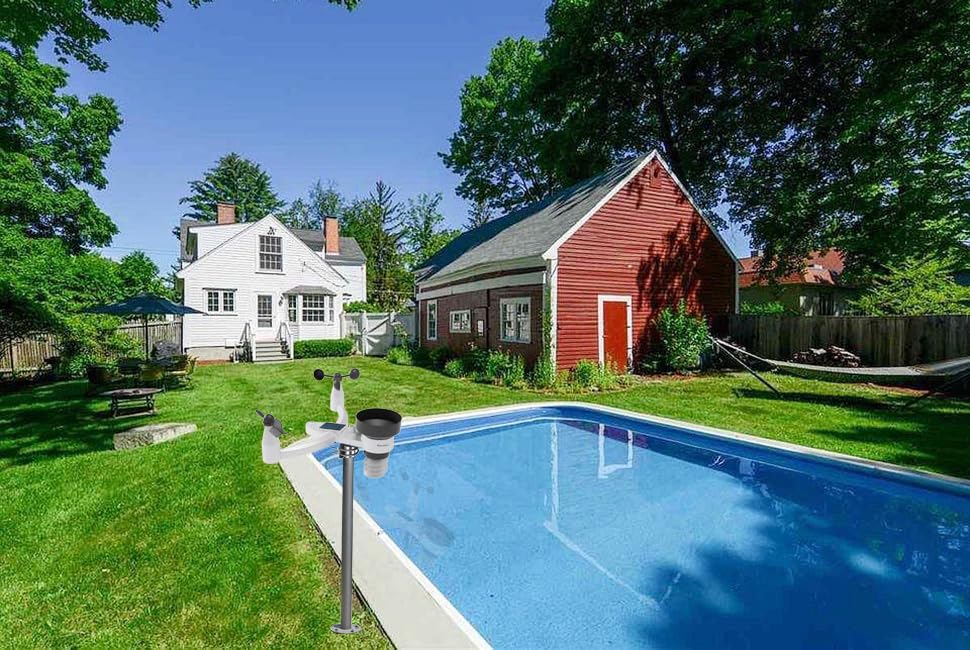
Image: The display console showing weather alert settings. This feature allows users to set abnormal weather alerts with high/low thresholds for temperature, humidity, rain rate, wind gust, and absolute pressure, including storm warnings.
4.3 Data Storage and PC Interface
The weather station can store up to 5000 groups of historical data. You can connect the base station to a computer via USB to download and view this historical data using the provided software (Windows only).

Image: The weather station's internal memory and computer interface. The base station can connect to a PC (Windows only) via USB to download and analyze up to 5000 groups of historical weather data.
4.4 Time and Calendar Display
The display console shows the current time, day of the week, and calendar. A time alarm function is also available.
5. Maintenance
5.1 Battery Replacement
- Outdoor Transmitter: Replace the 3 AA batteries approximately every 2 years, or when the low power indicator appears on the display. Even with solar power, batteries are essential for continuous operation.
- Base Station: Replace the 3 AAA batteries when the low power indicator is shown.
5.2 Cleaning
- Rain Collector: Periodically check and clean the rain collector funnel to remove leaves, insects, or debris that could obstruct accurate rainfall measurement.
- Sensors: Gently wipe the temperature and humidity sensors on the outdoor unit with a soft, damp cloth if they appear dirty. Avoid using abrasive cleaners.
- Display Console: Clean the display with a soft, lint-free cloth.
5.3 Sensor Placement Check
Regularly inspect the outdoor transmitter's mounting to ensure it remains level and free from new obstructions that could affect wind or rain readings.
6. Troubleshooting
If you encounter issues with your weather station, refer to the following common problems and solutions:
- No Display on Console: Check batteries in the base station or ensure the power adapter is securely connected.
- No Outdoor Data Displayed:
- Ensure the outdoor transmitter has fresh batteries.
- Verify the outdoor transmitter is within the 328-foot (100m) wireless range of the base station.
- Check for strong interference sources (e.g., thick walls, large metal objects, other wireless devices).
- Try re-synchronizing the units by removing batteries from both, waiting a few minutes, then reinserting batteries into the outdoor unit first, followed by the base station.
- Inaccurate Temperature/Humidity Readings: Ensure sensors are not exposed to direct sunlight or heat sources (outdoor unit) or drafts (indoor unit).
- Inaccurate Rainfall Readings: Check the rain collector for debris or blockages. Ensure the unit is level.
- Inaccurate Wind Readings: Ensure the wind vane and anemometer can rotate freely and are not obstructed.
- PC Connection Issues: Ensure the USB cable is properly connected and the correct software is installed on a Windows operating system.
7. Specifications
| Feature | Specification |
|---|---|
| Model Number | QD-FT-0345 |
| Display Size | 140 x 120 mm |
| Outdoor Transmitter Range | Up to 328 feet (100 meters) |
| Outdoor Transmitter Frequency | 433 MHz |
| Outdoor Transmitter Interval | 16 seconds |
| Data Storage | Up to 5000 groups of historical data |
| PC Connection | USB (Windows OS only) |
| Base Station Power | 3 x AAA batteries (not included) or 6V~500mA power adapter |
| Outdoor Transmitter Power | 3 x AA batteries (not included) + Solar Panel |
| Product Dimensions | 25 x 10 x 20 cm |
| Product Weight | 600 g |
| Material | Acrylonitrile Butadiene Styrene (ABS) |
| Included Components | WS-0345 (Base Station and Outdoor Transmitter) |
| Batteries Included | 1 Lithium-metal battery (for internal clock/memory, if applicable) |
| Spare Parts Availability (EU) | 3 Years |
8. Warranty and Support
8.1 Warranty Information
For specific warranty details, please refer to the warranty card included with your product or contact your retailer. Warranty terms typically cover manufacturing defects for a specified period from the date of purchase.
8.2 Customer Support
If you require further assistance or have questions not covered in this manual, please contact the retailer where you purchased the product or the manufacturer's customer support. Contact information can usually be found on the product packaging or the manufacturer's official website.