
Yuly DL006
Yuly DL006 Infrared Hunting Camera User Manual
Model: DL006
1. Introduction
This manual provides detailed instructions for the setup, operation, and maintenance of your Yuly DL006 Infrared Hunting Camera. Designed for outdoor enthusiasts and hunters, this camera is a reliable tool for capturing images and videos of wildlife in their natural habitat, as well as for home security and game trail monitoring. Please read this manual thoroughly before using the camera to ensure optimal performance and longevity.
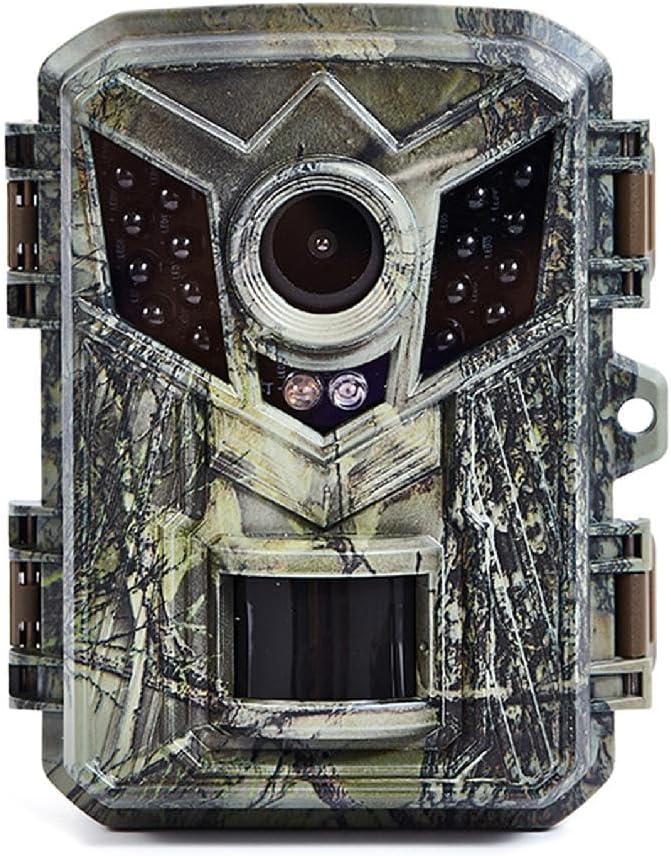
Image 1: Front view of the Yuly DL006 Infrared Hunting Camera, showcasing its camouflage design and lens array.
2. Key Features
- High-Resolution Imaging: Captures clear and high-quality pictures and videos with 1080P resolution.
- Infrared Night Vision: Equipped with a 940mm infrared lamp for a 10-meter infrared distance, enabling day and night surveillance.
- Durable and Waterproof: Constructed with quality plastic materials and an IP54 waterproof rating, suitable for various outdoor environments.
- Compact and Lightweight: Easy to carry and set up, with dimensions approximately 20x65x20mm (0.79x2.56x0.79in).
- Fast Trigger Speed: Features a rapid trigger time of 0.2-0.6 seconds to capture fast-moving subjects.
- Versatile Use: Ideal for wildlife observation, game trails, and home security monitoring.
3. Package Contents
Upon opening the package, please verify that all items are present and in good condition:
- 1x Yuly DL006 Infrared Hunting Camera
- User Manual (this document)
- Note: Additional accessories such as mounting straps, USB cables, or batteries may be included depending on the specific product bundle.
4. Product Overview
The DL006 camera features a robust, camouflage-patterned casing designed to blend into natural environments. It includes a central lens, infrared LEDs for night vision, and a PIR (Passive Infrared) motion sensor at the bottom front. The side latches secure the camera, and a mounting point is available for attachment.

Image 2: Side view of the Yuly DL006 camera, illustrating its compact size with a height of approximately 6.5cm (2.56 inches).
5. Setup
5.1. Inserting Batteries
- Open the camera casing by unlatching the side clips.
- Locate the battery compartment.
- Insert batteries (rated capacity > 1000mAh recommended) according to the polarity indicators (+/-). Ensure they are fully seated.
- Close the battery compartment securely.
5.2. Inserting TF Card
- With the camera casing open, locate the TF card slot.
- Insert a TF (Micro SD) card (up to 32GB supported) into the slot with the gold contacts facing the correct direction, usually downwards or towards the back of the camera.
- Push the card in until it clicks into place. To remove, push it again until it springs out.
5.3. Mounting the Camera
The DL006 camera is designed for easy deployment. Consider the following:
- Location: Choose a location with clear line of sight to the area you wish to monitor, free from obstructions like dense foliage that might trigger false detections.
- Height: Mount the camera at a height appropriate for the subjects you intend to capture (e.g., waist-high for deer, lower for smaller animals).
- Attachment: Use the integrated mounting point for straps or a wall mount. Ensure the camera is securely fastened to prevent movement from wind or animals.
6. Operation
6.1. Powering On/Off
Locate the power switch inside the camera casing. Switch it to the 'ON' position to power on the camera. Switch to 'OFF' to power it down.
6.2. Mode Selection
The camera features a 6-key, three-speed switch for navigating settings and modes. Refer to the internal display screen (2.0 inch TFT color display screen) for menu options. Common modes include:
- Photo Mode: Captures still images.
- Video Mode: Records video clips.
- Photo + Video Mode: Captures a still image followed by a video recording when triggered.
6.3. Photo/Video Settings
Access the camera's menu via the internal display to adjust settings such as:
- Image Size: Select from 16M, 12M, 8M, 5M, 3M, 1.3M, or 0.3M.
- Video Size: Choose between 1080FHD, 720P, WVGA, or VGA.
- Video Length: Set recording duration from 10 seconds to 3 minutes.
- Number of Consecutive Shots: Configure to take 1-3 photos per trigger event.
6.4. PIR Sensor and Triggering
The Passive Infrared (PIR) sensor detects motion and heat changes within its range, triggering the camera to record. The DL006 has a PIR sense distance of within 10 meters and a fast trigger time of 0.2-0.6 seconds.

Image 3: The DL006 camera's rapid trigger photography captures dynamic moments, such as a cheetah in pursuit, with speeds up to 0.2 seconds.
6.5. Working Mode
The camera operates in both day and night modes automatically. During the day, it captures color images and videos. At night, the infrared LEDs activate to capture black and white images and videos.
7. Specifications
Below are the detailed technical specifications for the Yuly DL006 Infrared Hunting Camera:

Image 4: Detailed product parameters for the DL006-1 model.
| Feature | Specification |
|---|---|
| Model | DL006-1 |
| Sensor | 100W pixel color CMOS |
| Pixels | 4096x3072 |
| Lens | 4MM fixed lens |
| Infrared Lamp | 940mm infrared lamp |
| LED Display Screen | 2.0 inch TFT color display screen |
| Controls | 6-key, three-speed switch |
| Storage | TF card (supports up to 32GB) |
| Image Size Options | 16M, 12M, 8M, 5M, 3M, 1.3M, 0.3M |
| Video Size Options | 1080FHD, 720P, WVGA, VGA |
| PIR Sense Distance | Within 10 meters |
| Working Mode | Day and night |
| Trigger Time | 0.2-0.6 seconds |
| Consecutive Shots | 1-3 sheets |
| Video Length | 10 seconds to 3 minutes |
| Recording Type | Photo then video recording |
| Battery | Rated capacity > 1000mAh |
| Material | Plastic |
| Waterproof Rating | IP54 |
| Recommended Uses | Game & Trail |
| Video Capture Format | AVI |
8. Maintenance
To ensure the longevity and optimal performance of your DL006 camera, follow these maintenance guidelines:
- Cleaning: Gently wipe the lens and PIR sensor with a soft, dry cloth to remove dust, dirt, or moisture. Avoid abrasive materials or harsh chemicals.
- Battery Care: Remove batteries if the camera will not be used for an extended period to prevent leakage. Use high-quality batteries for best performance.
- Storage: Store the camera in a cool, dry place away from direct sunlight and extreme temperatures when not in use.
- Waterproof Seal: Periodically check the rubber seal around the camera casing to ensure it is clean and intact, maintaining its IP54 waterproof rating.
9. Troubleshooting
If you encounter issues with your DL006 camera, refer to the following common problems and solutions:
- Camera Not Powering On:
- Ensure batteries are inserted correctly with proper polarity.
- Check if batteries have sufficient charge. Replace if necessary.
- Verify the power switch is in the 'ON' position.
- Poor Image/Video Quality:
- Clean the camera lens and infrared LEDs.
- Ensure the camera is mounted stably to prevent blur from movement.
- Check resolution settings in the camera menu.
- No Motion Detection/False Triggers:
- Ensure the PIR sensor is clean and unobstructed.
- Adjust camera placement to avoid direct sunlight or heat sources that might cause false triggers.
- Verify the PIR sensitivity settings in the camera menu.
- TF Card Error:
- Ensure the TF card is inserted correctly.
- Format the TF card using the camera's menu (this will erase all data).
- Try a different TF card (up to 32GB, Class 10 recommended).
10. Warranty and Support
Specific warranty information for the Yuly DL006 Infrared Hunting Camera is not provided in this document. For warranty details, technical support, or service inquiries, please refer to the product packaging or contact the manufacturer directly through their official website or customer service channels. Keep your purchase receipt as proof of purchase.
Ask a question about this manual
Ask about setup, troubleshooting, compatibility, parts, safety, or missing instructions. Manuals+ will review the question and use this page’s manual context to help answer it.