
Bellemave B0CJ33F5SJ
Bellemave Twin Bed Frame with Storage Headboard and Fence Rails User Manual
Model: B0CJ33F5SJ
Introduction
Thank you for choosing the Bellemave Twin Bed Frame. This low platform bed is designed with a versatile storage headboard, integrated LED lighting, and safety fence rails, making it suitable for children's rooms. This manual provides detailed instructions for assembly, safe operation, maintenance, and troubleshooting to ensure a long-lasting and satisfactory experience with your new bed frame.

Image: The Bellemave Twin Bed Frame in grey, featuring a headboard with shelves and an LED light, and low fence rails.
Setup and Assembly
Before beginning assembly, ensure all parts are present and undamaged. Refer to the included assembly instructions for a detailed step-by-step guide. It is recommended to assemble the bed frame with at least two people.
Required Tools (Not Included):
- Phillips head screwdriver
- Allen wrench (often included with hardware)
Assembly Steps Overview:
- Unpack and Identify Parts: Carefully unpack all components and lay them out. Verify against the parts list provided in your assembly manual. Each part is numbered for easy identification.
- Assemble Headboard: Begin by attaching the headboard panels and shelves. Secure the LED light strip into its designated slot.
- Construct Side Rails: Attach the side rails to the headboard and footboard. Ensure all connections are tight and secure.
- Install Slat Support System: Place and secure the wooden slats across the bed frame. These slats provide direct support for your mattress, eliminating the need for a box spring.
- Attach Guardrails: Secure the fence rails to the sides of the bed frame. Note that one side features a small opening for easy access.
- Final Inspection: Double-check all screws and bolts to ensure they are fully tightened.

Image: An illustration showing various numbered parts and a step-by-step diagram for assembling the bed frame.
Operating Instructions
LED Night Light:
The bed frame includes an integrated LED night light in the headboard. To operate, locate the power switch, typically positioned discreetly on the headboard or its wiring. Turn the switch ON to activate the soft light, and OFF when not needed. The LED light provides gentle illumination without disturbing sleep, useful for nighttime navigation.
Storage Headboard:
The headboard features multiple shelves designed for convenient storage and display. These shelves are ideal for placing books, small toys, a clock, or other personal items. Ensure items placed on the shelves are stable and do not obstruct the LED light.

Image: A close-up view of the bed frame's headboard, highlighting the LED light and the double storage display shelf.
Maintenance and Care
- Cleaning: Wipe the bed frame with a soft, damp cloth. Avoid using harsh chemicals or abrasive cleaners, as these can damage the finish.
- Tighten Fasteners: Periodically check all screws, bolts, and connections to ensure they remain tight. Loose fasteners can lead to instability and noise.
- Wood Care: Protect the wood from direct sunlight and extreme temperature changes to prevent warping or fading.
- LED Light: The LED light is designed for long-term use. If it malfunctions, contact customer support for assistance; do not attempt to repair it yourself.
Troubleshooting
| Problem | Possible Cause | Solution |
|---|---|---|
| Bed frame is wobbly or unstable. | Loose fasteners or incorrect assembly. | Ensure all screws and bolts are securely tightened. Review assembly instructions to confirm correct installation. |
| Squeaking or noise during use. | Loose connections or friction between parts. | Tighten all fasteners. Apply a small amount of lubricant (e.g., silicone spray) to contact points if friction is identified. |
| LED light not working. | Power switch off, loose connection, or faulty LED. | Check if the power switch is ON. Verify all wiring connections are secure. If the issue persists, contact customer support. |
| Mattress sits too high, guardrails ineffective. | Mattress thickness exceeds recommended height. | Ensure your mattress thickness is within the recommended 6 inches. A thicker mattress may reduce the effectiveness of the guardrails. |
Product Specifications
| Feature | Detail |
|---|---|
| Model | B0CJ33F5SJ |
| Size | Twin |
| Product Dimensions (L x W x H) | 87"L x 43"W x 31.2"H |
| Color | Grey |
| Material | Pine Wood + MDF |
| Weight Capacity | 220 pounds (approximately 100 kg) |
| Recommended Mattress Thickness | 6 inches |
| Special Features | Storage Headboard, LED Light, Fence Rails, Slat Support |
| Assembly Required | Yes |
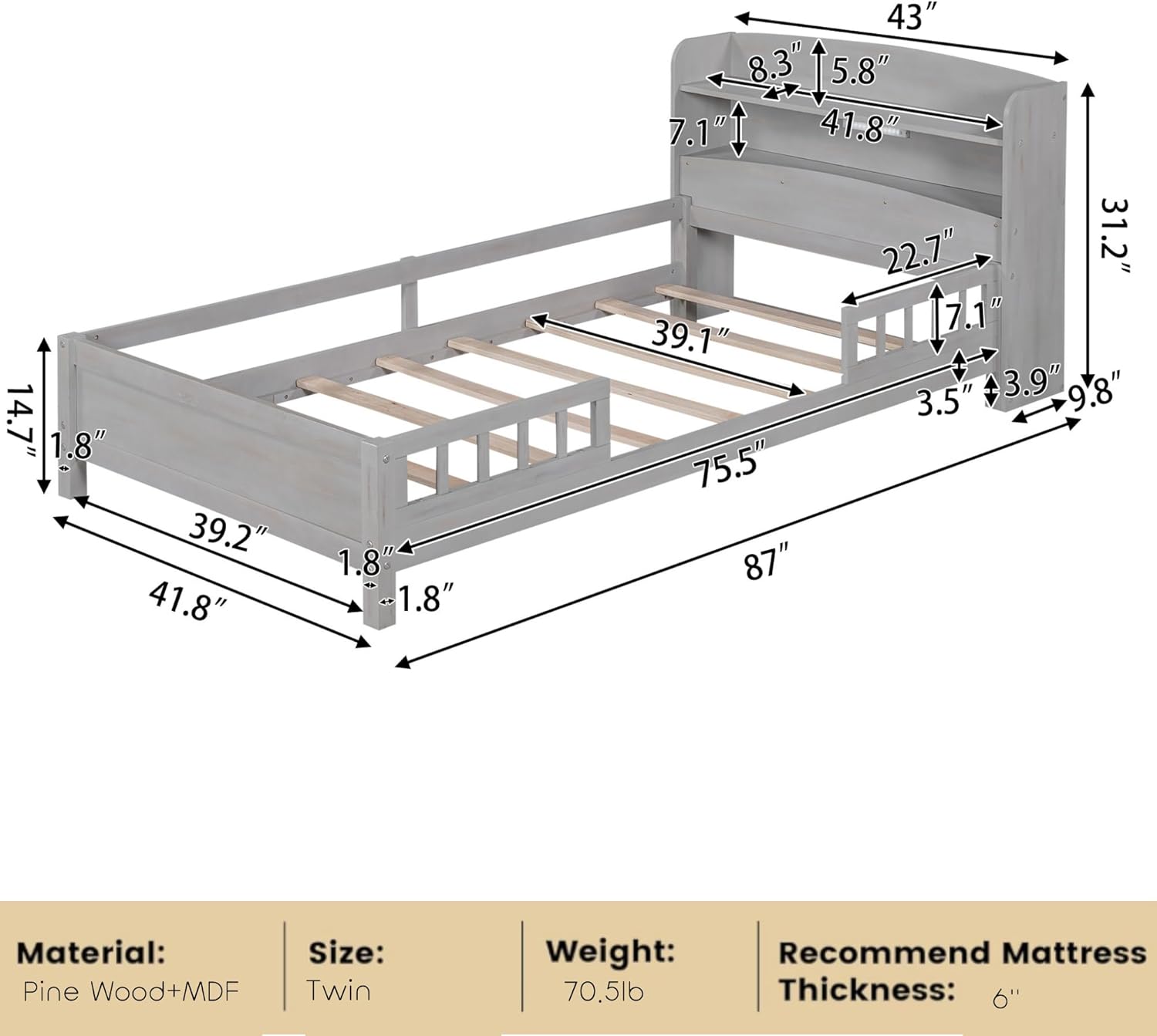
Image: A detailed diagram illustrating the dimensions of the Bellemave Twin Bed Frame.
Important Safety Information
- Always supervise children around the bed.
- Ensure the bed is properly assembled and all fasteners are tightened to prevent instability.
- Do not exceed the maximum weight capacity of 220 lbs (approximately 100 kg).
- Keep small parts away from children during assembly to prevent choking hazards.
- Regularly inspect the bed frame for any signs of wear or damage. Discontinue use if damage is found and contact support.
- The low height design is intended for easy access; however, ensure the mattress height does not negate the effectiveness of the guardrails.
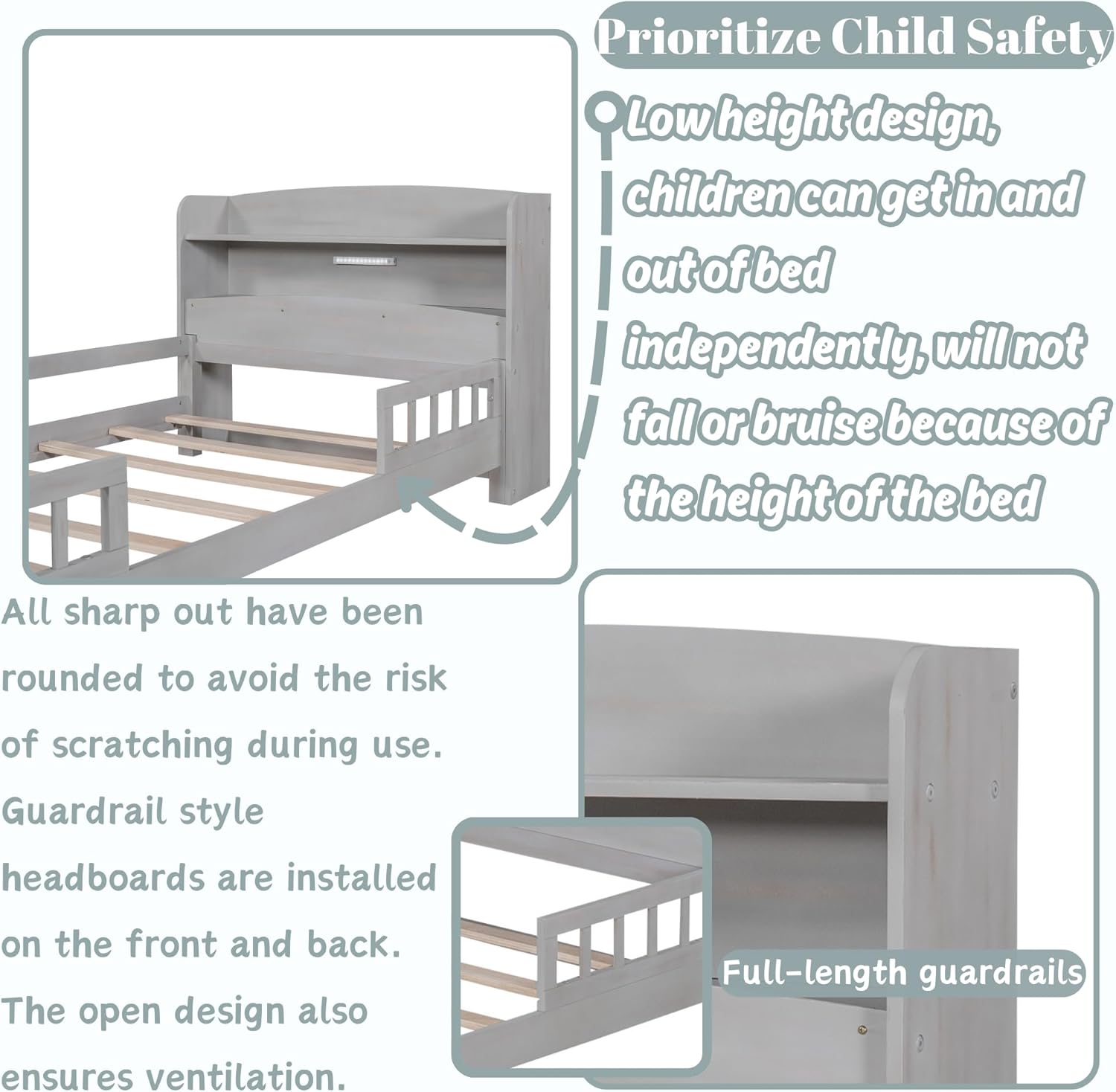
Image: An illustration emphasizing the low height design for child safety, rounded edges, and full-length guardrails.
Warranty and Customer Support
For any questions, missing parts, or issues encountered during assembly or use, please contact Bellemave customer support. Refer to your purchase documentation for specific warranty details.
You can typically find contact information on the Bellemave official website or through the retailer where the product was purchased. Please have your model number (B0CJ33F5SJ) and purchase date ready when contacting support.
Ask a question about this manual
Ask about setup, troubleshooting, compatibility, parts, safety, or missing instructions. Manuals+ will review the question and use this page’s manual context to help answer it.