
1. Introduction
Thank you for choosing the NUX Metal Core Deluxe MKII. This high-gain preamp pedal is designed to deliver powerful and versatile metal tones, featuring three distinctive high-gain amplifier models. This manual provides essential information for the proper setup, operation, and maintenance of your pedal, ensuring optimal performance and longevity.
2. Features
- Three Distinctive High-Gain Amp Models: Select between Duo Rect, Fireman, and VH4 via a 3-way toggle switch.
- Duo Rect Model: Based on the classic Mesa Boogie Dual Rectifier amplifier.
- IR Out: Features an Impulse Response (IR) output for direct connection to an audio interface or mixer, enabling amp-less applications with 512 samples resolution.
- Compact Enclosure: Durable and pedalboard-friendly design.
- Intuitive Controls: Dedicated knobs for Bass, Middle, Treble, Gain, and Master volume.
3. Controls and Connections
Familiarize yourself with the controls and connection points of your Metal Core Deluxe MKII pedal.
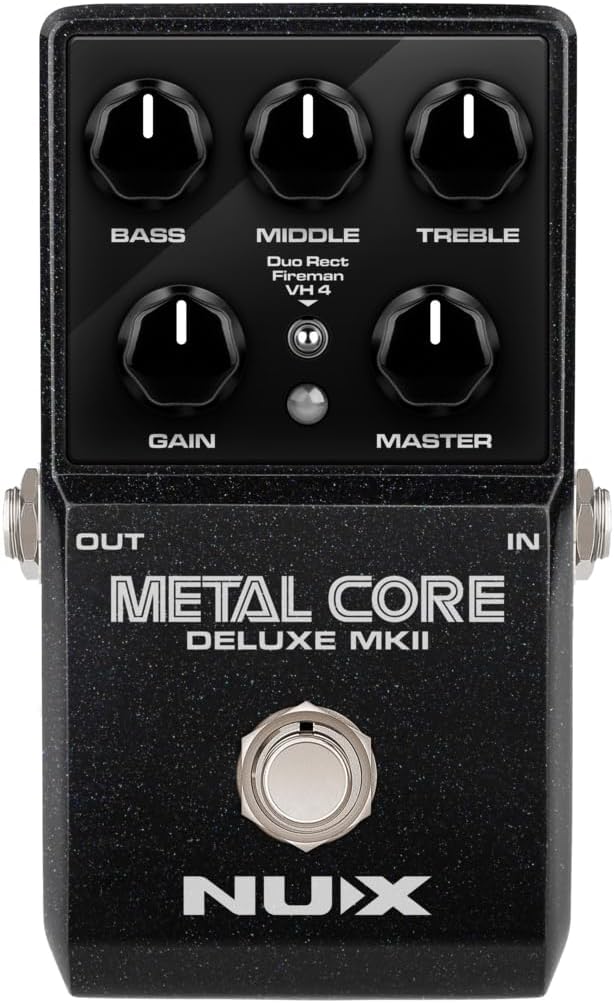
Image 3.1: Top view of the NUX Metal Core Deluxe MKII pedal, highlighting the control layout.
3.1. Control Knobs
- BASS: Adjusts the low-frequency response of your tone.
- MIDDLE: Adjusts the mid-frequency response, crucial for shaping the pedal's character.
- TREBLE: Adjusts the high-frequency response, adding clarity or brightness.
- GAIN: Controls the amount of distortion and saturation.
- MASTER: Sets the overall output volume of the pedal.
3.2. Amp Model Toggle Switch
This 3-way toggle switch allows you to select between the three distinct high-gain amp models:
- Duo Rect: Emulates the sound of a Mesa Boogie Dual Rectifier.
- Fireman: Provides a distinct high-gain tone.
- VH4: Offers another unique high-gain amplifier character.
3.3. Input/Output Jacks and Power

Image 3.2: Angled view of the NUX Metal Core Deluxe MKII pedal, illustrating the input, output, power, and USB connections.
- IN (Input): Connect your guitar or other instrument to this 1/4-inch (6.35mm) jack.
- OUT (Output): Connect this 1/4-inch (6.35mm) jack to your amplifier, other effects pedals, or an audio interface.
- DC 9V (Power Input): Connect a 9V DC power adapter (center negative, 300mA minimum) to this DC5521 power jack.
- USB Port: Used for firmware updates and potentially for IR loading or software control (refer to NUX website for specific software/firmware details).
4. Setup
Follow these steps to set up your NUX Metal Core Deluxe MKII pedal:
- Power Connection: Connect a compatible 9V DC power adapter (center negative, 300mA minimum) to the DC 9V input jack on the pedal. Ensure the power source is stable and meets the pedal's requirements.
- Instrument Connection: Connect your guitar or other instrument to the IN jack of the pedal using a standard 1/4-inch instrument cable.
- Amplifier Connection: Connect the OUT jack of the pedal to the input of your guitar amplifier or other audio device using a standard 1/4-inch instrument cable.
- IR Out Connection (Optional): If using the IR out feature for amp-less recording or direct connection to a PA system, connect the IR out (likely via the USB port or a dedicated 3.5mm/6.35mm audio jack, depending on specific model features) to your audio interface or mixer.
- Initial Settings: Before turning on your amplifier, set all control knobs (BASS, MIDDLE, TREBLE, GAIN, MASTER) to their middle positions (12 o'clock) to start with a neutral tone.
5. Operating Instructions
Once set up, you can begin exploring the tones of your Metal Core Deluxe MKII.
- Power On: Ensure all connections are secure, then turn on your amplifier. The pedal will power on automatically when connected to a power supply.
- Engage the Pedal: Press the footswitch to engage or bypass the effect. The LED indicator will illuminate when the effect is active.
- Select Amp Model: Use the 3-way toggle switch to select your desired amp model: Duo Rect, Fireman, or VH4. Experiment with each to find the sound that best suits your style.
- Adjust Gain: Turn the GAIN knob clockwise for more distortion and sustain, or counter-clockwise for less.
- Shape Your Tone: Use the BASS, MIDDLE, and TREBLE knobs to fine-tune the EQ. Adjusting the MIDDLE knob significantly impacts the pedal's character.
- Set Master Volume: Use the MASTER knob to control the overall output level of the pedal. Adjust this to balance the volume with your bypassed signal or other effects.
- Using IR Out: When using the IR out, ensure your receiving device (audio interface, mixer) is properly configured to accept the signal. The IR out provides a cabinet-simulated signal suitable for direct recording or PA systems.
6. Maintenance
Proper care will ensure your NUX Metal Core Deluxe MKII remains in excellent condition.
- Cleaning: Use a soft, dry cloth to clean the pedal's surface. Avoid abrasive cleaners or solvents, which can damage the finish.
- Storage: Store the pedal in a cool, dry place away from direct sunlight and extreme temperatures.
- Power Supply: Always use a regulated 9V DC, center-negative power supply with a minimum of 300mA. Using an incorrect power supply can damage the unit and void the warranty.
- Connections: Periodically check all cables and connections for wear and tear. Replace damaged cables to prevent signal loss or noise.
7. Troubleshooting
If you encounter issues with your pedal, refer to the following common troubleshooting steps:
- No Sound:
- Check all cable connections (guitar to IN, OUT to amp).
- Ensure the power supply is correctly connected and functioning.
- Verify that your guitar and amplifier are working correctly.
- Check the MASTER volume knob on the pedal and the volume on your amplifier.
- Unwanted Noise/Hum:
- Ensure you are using a high-quality, regulated power supply.
- Check for faulty cables.
- Try isolating the pedal from other electronic devices that might cause interference.
- Effect Not Engaging:
- Ensure the pedal is receiving power (LED should light up when engaged).
- Press the footswitch firmly.
If problems persist, contact NUX customer support or your local dealer for assistance.
8. Specifications
| Specification | Detail |
|---|---|
| Brand | NUX |
| Model Name | Metal Core Deluxe MKII |
| Style | Compact |
| Item Weight | 11.2 ounces (approx. 317g) |
| Voltage | 9 Volts DC (center negative) |
| Amperage | 300 Milliamps (minimum) |
| Audio Output Effects | IR out (512 samples resolution) |
| Controls Type | Physical Knobs and Toggle Switch |
| Power Source | Corded Electric |
| Hardware Interface | HP-HSC |
| Signal Format | Analog |
| Item Dimensions (L x W x H) | 6 x 3.95 x 2.25 inches (approx. 15.24 x 10.03 x 5.72 cm) |
| Connector Type | DC5521 power jack, 1/4-inch (6.35mm) audio jacks |
| Manufacturer | Cherub Technology Co.,Ltd |
9. Warranty and Support
9.1. Warranty Information
The NUX Metal Core Deluxe MKII comes with a one-year manufacturer warranty. This warranty covers defects in materials and workmanship under normal use. Please retain your proof of purchase for warranty claims. The warranty does not cover damage caused by misuse, unauthorized modifications, accidents, or improper power supply usage.
9.2. Customer Support
For technical support, service, or warranty inquiries, please visit the official NUX website or contact your authorized NUX dealer. You can often find FAQs, firmware updates, and additional resources on the manufacturer's support pages.