
Introduction
This manual provides essential instructions for the safe operation, setup, and maintenance of your Majestic FLAME 2 PRO Portable Party Speaker. Please read this manual thoroughly before using the product and retain it for future reference. Proper use ensures optimal performance and longevity of your device.
Safety Information
- Do not expose the speaker to water or excessive moisture.
- Avoid placing the speaker near heat sources or in direct sunlight.
- Do not attempt to disassemble or modify the speaker.
- Use only the provided charging cable for recharging the battery.
- Keep out of reach of children.
Package Contents
Ensure all items listed below are present in your package:
- Majestic FLAME 2 PRO Speaker Unit
- Remote Control
- Wired Microphone
- USB Charging Cable (USB-C)
- User Manual
Product Overview
Familiarize yourself with the speaker's components and controls.
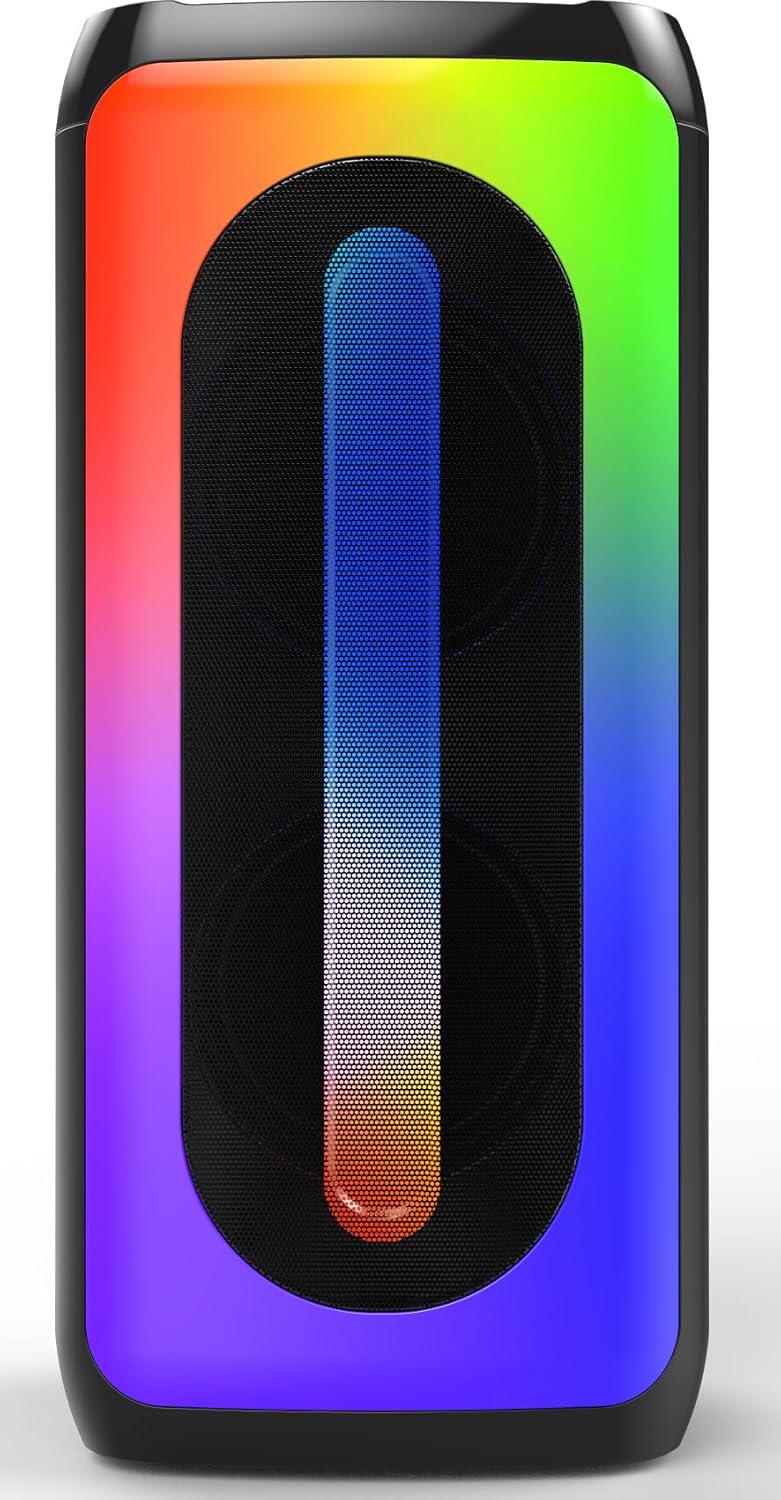
Figure 1: Front view of the Majestic FLAME 2 PRO speaker, showcasing its LED light effects and dual speaker grilles.
Control Panel

Figure 2: Top-down view of the control panel, showing various buttons and input ports.
The control panel typically includes buttons for power, volume, mode selection, play/pause, track navigation, and inputs for USB, MicroSD, and microphone.
Wired Microphone
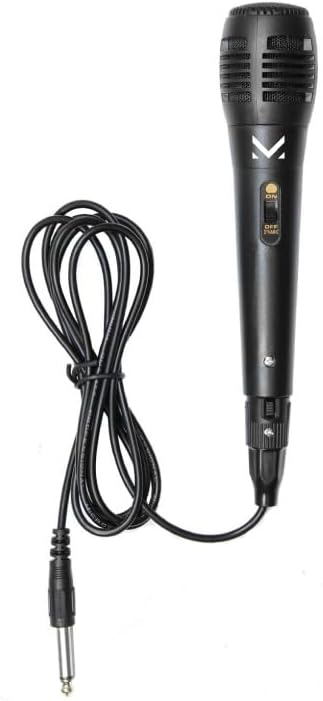
Figure 3: The wired microphone provided with the speaker, featuring an on/off switch and a 6.35mm jack.
Setup
1. Charging the Speaker
- Locate the USB-C charging port on the speaker.
- Connect the provided USB charging cable to the speaker's USB-C port.
- Connect the other end of the USB cable to a compatible USB power adapter (not included) or a computer's USB port.
- The charging indicator light will illuminate, typically red, during charging.
- Once fully charged, the indicator light will change or turn off (refer to specific LED behavior on your unit). A full charge takes approximately 3-4 hours.
The speaker is equipped with a 3.7V (2400 mAh) rechargeable lithium battery.
2. Powering On/Off
- To power on, press and hold the Power button on the control panel until the LED lights illuminate and you hear an audible prompt.
- To power off, press and hold the Power button again until the LED lights turn off and you hear an audible prompt.
Operating Instructions
Bluetooth Pairing
- Power on the speaker. It will automatically enter Bluetooth pairing mode, indicated by a flashing LED light and an audible prompt.
- On your mobile device (smartphone, tablet, laptop), enable Bluetooth and search for available devices.
- Select "FLAME 2 PRO" from the list of discovered devices.
- Once paired, the speaker will emit an audible confirmation, and the LED light will stop flashing.
- You can now play audio from your device through the speaker.
USB/MicroSD Playback
- Insert a USB flash drive or a MicroSD card (pre-loaded with MP3 audio files) into the respective port on the speaker.
- The speaker will automatically detect the storage device and begin playing audio files. If not, press the "Mode" button to switch to USB or MicroSD mode.
- Use the Play/Pause, Next Track, and Previous Track buttons on the speaker or remote control to manage playback.
Microphone Usage
- Connect the wired microphone's 6.35mm jack into the MIC input port on the speaker.
- Ensure the microphone's ON/OFF switch is in the "ON" position.
- Adjust the microphone volume using the dedicated knob or button on the speaker (if available) or the main volume control.
LED Light Effects
The speaker features 9 different multi-color LED light effects. Press the dedicated "Light" or "LED" button (refer to control panel diagram) to cycle through the available effects or to turn them off.
True Wireless Stereo (TWS) Function
The TWS function allows you to pair two FLAME 2 PRO speakers together for a stereo sound experience. (Requires two FLAME 2 PRO units).
- Ensure both speakers are powered on and not connected to any Bluetooth device.
- On one speaker (this will be the primary speaker), press and hold the TWS button (if available) or a specific mode button until you hear a pairing tone.
- The primary speaker will search for the secondary speaker. Once connected, you will hear a confirmation tone.
- Now, connect your mobile device to the primary speaker via Bluetooth as described above. Audio will play in stereo through both speakers.
Bass Boost Function
Activate the Bass Boost function by pressing the dedicated "Bass Boost" button on the speaker or remote control to enhance low-frequency audio output.
Remote Control
The included remote control provides convenient access to various functions such as power, volume, mode selection, track control, and LED light effects from a distance. Ensure the remote control has working batteries and is pointed towards the speaker's IR receiver.
Maintenance
Cleaning
- Wipe the speaker's exterior with a soft, dry cloth.
- Do not use abrasive cleaners, waxes, or solvents.
- Avoid getting moisture into any openings.
Battery Care
- To prolong battery life, avoid fully discharging the battery frequently.
- Charge the speaker regularly, even if not in use, to maintain battery health.
- Store the speaker in a cool, dry place when not in use for extended periods.
Troubleshooting
| Problem | Possible Cause | Solution |
|---|---|---|
| Speaker does not power on. | Battery is depleted. | Charge the speaker using the provided USB-C cable. |
| No sound. | Volume is too low; incorrect input mode; device not paired. | Increase volume; press "Mode" button to select correct input (Bluetooth, USB, MicroSD); re-pair Bluetooth device. |
| Bluetooth device cannot connect. | Speaker not in pairing mode; device too far; interference. | Ensure speaker is in pairing mode; move device closer; turn off other Bluetooth devices. |
| Microphone not working. | Microphone switch is off; not fully plugged in. | Ensure microphone switch is ON; firmly insert the 6.35mm jack into the MIC port. |
Specifications
- Model Name: FLAME 2 PRO
- Model Number: 116302 BK
- Brand: Majestic
- Output Power: 160 W (P.M.P.O), 20 W (RMS)
- Speaker Size: Dual 4-inch speakers
- Bluetooth Version: 5.0
- Connectivity: Bluetooth, USB, MicroSD, 6.35mm MIC input
- LED Lights: 9 multi-color effects
- Battery: 3.7V, 2400 mAh Lithium-ion rechargeable
- Charging Port: USB-C
- Dimensions (L x W x H): 16 x 17 x 37 cm (6.3 x 6.7 x 14.6 inches)
- Weight: 1.9 kg (4.2 lbs)
- Material: Plastic
- Control Method: Buttons, Remote Control
- Special Features: TWS (True Wireless Stereo), Bass Boost
- Recommended Use: Parties and entertainment
- Compatible Devices: Laptop, Smartphone
Warranty and Support
This product comes with a limited warranty. For detailed warranty terms and conditions, please refer to the documentation included in your product packaging or contact Majestic customer support.
For technical assistance, troubleshooting, or service inquiries, please visit the official Majestic website or contact their customer service department. Keep your purchase receipt as proof of purchase for warranty claims.