
Synergy Digital PMNN4407 (Replacement)
Synergy Digital 2-Way Radio Battery User Manual
Model: PMNN4407 (Replacement)
Introduction
This manual provides essential information for the safe and effective use of your Synergy Digital 2-Way Radio Battery. This high-capacity Li-ion battery is designed as a replacement for the Motorola PMNN4407 battery and is compatible with Motorola R7A 2-Way Radios and other models. Please read this manual thoroughly before using the product.
Safety Information
WARNING: Failure to follow these safety instructions could result in fire, electric shock, injury, or damage to the battery or radio.
- Do not attempt to disassemble, open, or service the battery pack. This action will void the warranty and can be dangerous.
- Replace only with the battery pack designated for this product. Using incompatible batteries may cause damage or injury.
- Do not crush, puncture, short external contacts, or dispose of in fire or water. These actions can lead to explosion or leakage.
- Do not store above 60°C (140°F). High temperatures can degrade battery performance and safety.
- New battery pack must be fully charged before use. Refer to the charging instructions.
- Read instructions in operating guide before using the battery. Always consult the radio's manual for specific battery usage guidelines.

Image: Close-up of the battery's warning label, detailing safety precautions and specifications like Part No. PMNN4407, 7.4VDC, 2600mAh, and 19.24Wh. It also states "WARRANTY VOID IF LABEL IS REMOVED" and "Made in China".
Product Overview
The Synergy Digital 2-Way Radio Battery is a high-performance Li-ion battery designed for reliable power to your compatible two-way radio. It features a built-in USB-C direct charge port for convenient charging.

Image: Top-down view of the battery, showing its overall shape and the contact points for the radio.
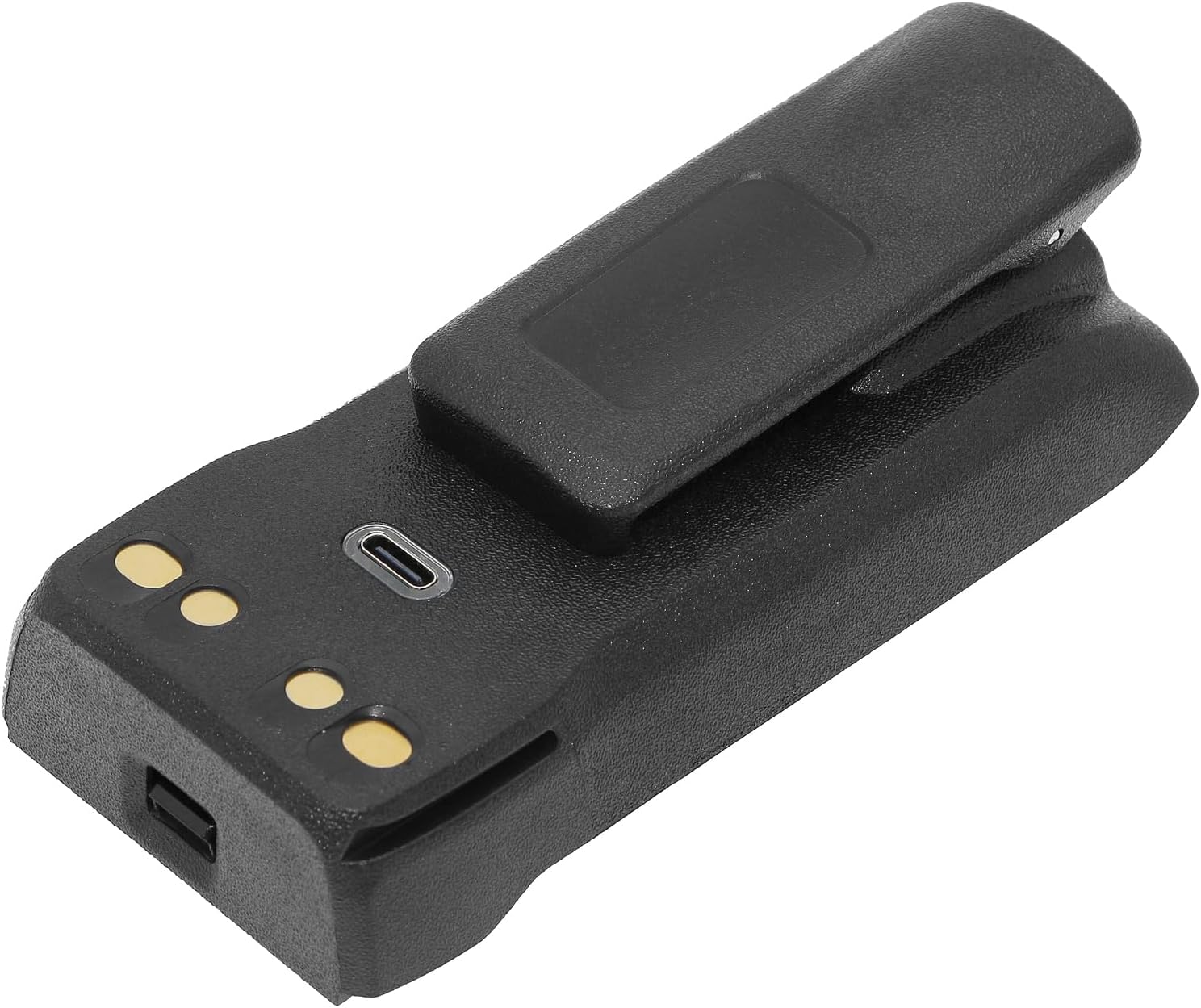
Image: Side view of the battery, highlighting the USB-C charging port and the gold-plated contact pins used for connecting to the radio or a charging cradle.
Setup
Initial Charge
Before first use, the battery must be fully charged. This ensures optimal performance and battery longevity.
- Connect a compatible USB-C charging cable (not included) to the USB-C port on the battery.
- Connect the other end of the USB-C cable to a suitable USB power adapter (e.g., wall charger, computer USB port).
- Allow the battery to charge until the charging indicator (if present on the battery or radio) shows a full charge. This may take several hours for the initial charge.

Image: An angled view of the battery, clearly showing the USB-C port for direct charging and the metallic contact points for traditional radio charging cradles.
Operating
Installing the Battery
- Ensure the radio is powered off before installing or removing the battery.
- Align the battery with the battery compartment on your Motorola R7A 2-Way Radio or compatible model.
- Gently slide the battery into place until it clicks securely. Ensure all latches are engaged.
Charging the Battery
The battery can be charged using two methods:
- Direct USB-C Charging: As described in the "Initial Charge" section, connect a USB-C cable directly to the battery. This is convenient for charging without a radio or dedicated charging cradle.
- Radio Charging Cradle: If your radio comes with a charging cradle, you can insert the radio with the battery attached into the cradle. The battery will charge via the radio's contacts. Refer to your radio's manual for specific instructions on using its charging cradle.
Battery Life and Indicators
Battery life will vary depending on usage patterns, radio model, and environmental conditions. Monitor your radio's battery indicator to determine remaining charge. Recharge the battery when the indicator shows low power to avoid interruption of communication.
Maintenance
Cleaning
Wipe the battery and its contacts with a clean, dry cloth. Do not use harsh chemicals or abrasive cleaners. Ensure contacts are free of dirt and debris for optimal connection.
Storage
If storing the battery for an extended period (more than one month), store it in a cool, dry place, ideally at approximately 50% charge. Avoid extreme temperatures and direct sunlight. Fully charge the battery every 3-6 months during storage to prevent deep discharge.
Disposal
Do not dispose of the battery in household waste. Lithium-ion batteries should be recycled or disposed of according to local regulations. Contact your local waste management authority for information on battery recycling programs.
Troubleshooting
| Problem | Possible Cause | Solution |
|---|---|---|
| Battery not charging. |
|
|
| Radio not powering on with battery. |
|
|
| Short battery life. |
|
|
Specifications
- Battery Chemistry: Li-ion (Lithium Ion)
- Voltage: 7.4V
- Capacity: 2600mAh (Milliamp Hours) / 19.24Wh
- Compatible with: Motorola PMNN4407 Battery
- Works for: Motorola R7A 2-Way Radio and many other models
- Charging: Built-in USB-C Direct Charge, also compatible with radio charging cradles.
- Product Dimensions: 4.05 x 2.02 x 0.63 inches
- Item Weight: 8.6 ounces
- Manufacturer: Synergy Digital
- Country of Origin: China
Warranty and Support
Warranty Information
This Synergy Digital battery comes with a Limited 3-Year Warranty. This warranty covers defects in materials and workmanship under normal use. Please retain your proof of purchase for warranty claims. The warranty is void if the product label is removed or if the battery has been disassembled or serviced by unauthorized personnel.
Customer Support
For technical assistance, warranty claims, or general inquiries, please contact Synergy Digital customer support. Refer to the packaging or the official Synergy Digital website for the most current contact information.
Note: As per the product information, this product is from a small business brand. Your support is appreciated.
Ask a question about this manual
Ask about setup, troubleshooting, compatibility, parts, safety, or missing instructions. Manuals+ will review the question and use this page’s manual context to help answer it.