
Gzzhi 745431155645
Gzzhi Color Screen Metal Detector User Manual
Model: 745431155645
Introduction
This manual provides detailed instructions for the assembly, operation, and maintenance of your Gzzhi Color Screen Metal Detector. Please read this manual thoroughly before using the device to ensure proper function and to maximize your treasure hunting experience.
The Gzzhi Metal Detector is designed for detecting various metals, featuring a color screen for intuitive operation, multiple detection modes, and an 11-inch waterproof search coil. It is suitable for beginners and experienced users alike.

Image: The Gzzhi Color Screen Metal Detector shown with included accessories: a foldable shovel, headphones, carrying bag, armrest, and two 9V batteries.
Package Contents
- Gzzhi Color Screen Metal Detector Unit
- 11-inch Waterproof Search Coil
- Adjustable Stem
- Control Box with Color LCD Display
- Headphones
- Foldable Shovel
- Carrying Bag
- Armrest
- 2 x 9V Batteries
- User Manual
Assembly Instructions
Follow these steps to assemble your metal detector:
- Attach the Search Coil: Connect the 11-inch search coil to the lower stem. Ensure it is securely fastened with the search coil lock knob.
- Connect Lower and Middle Stems: Insert the lower stem into the middle stem.
- Attach Control Box: Slide the control box onto the upper part of the middle stem. Secure it using the stem lock nut.
- Install Armrest: Attach the armrest to the main shaft, ensuring it provides comfortable support for your forearm.
- Adjust Stem Length: Use the cam lock to adjust the stem length to a comfortable height for operation. The adjustable range is approximately 29.1 to 48 inches.
- Connect Cables: Carefully route the search coil cable along the stem and plug it into the control box.
- Insert Batteries: Open the battery compartment on the control box and insert the two 9V batteries, observing correct polarity.

Image: Diagram illustrating the main components of the metal detector, including the search coil, control box, stems, handle grip, and sponge mat handrest.
Operating Instructions
Control Panel Overview
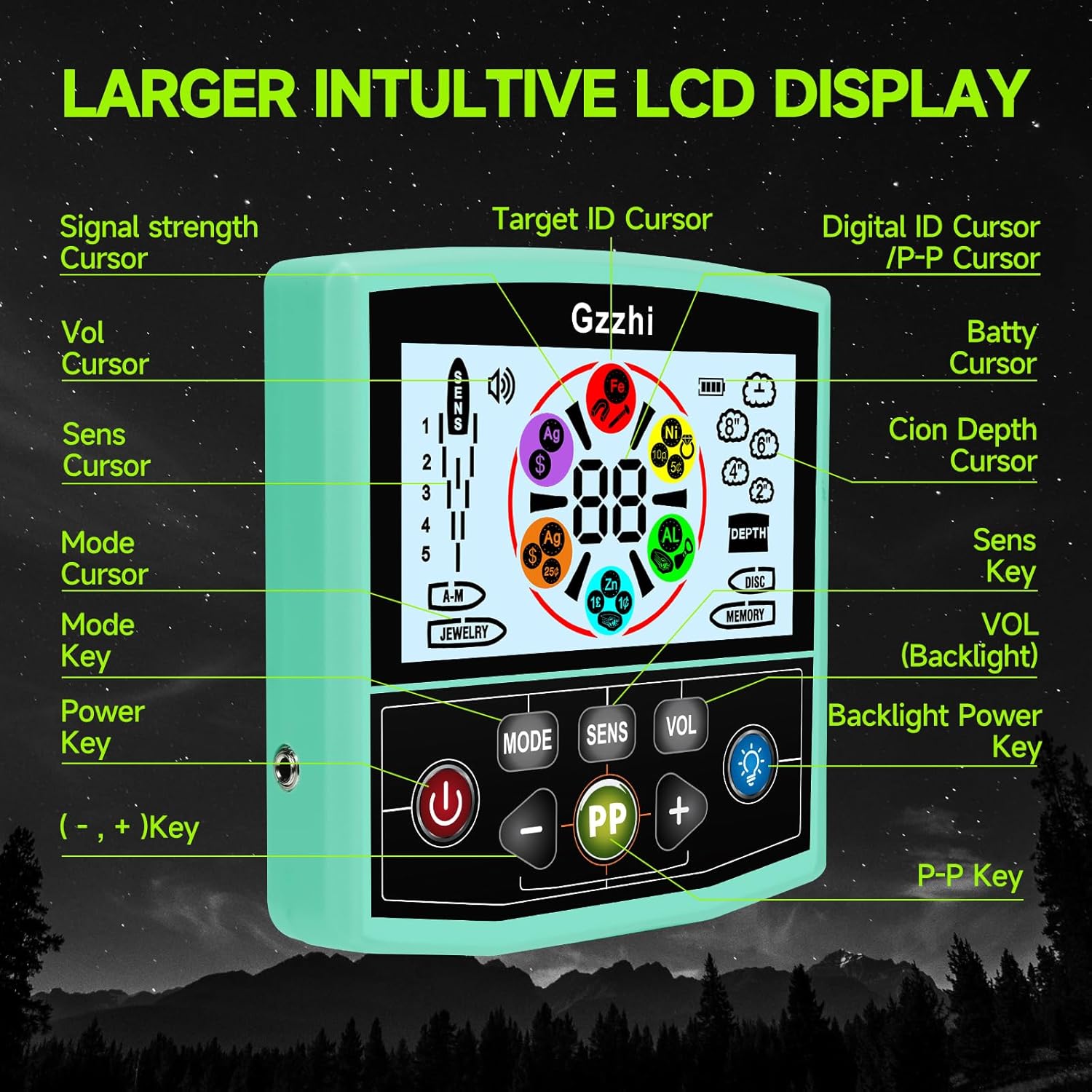
Image: Detailed view of the control panel, highlighting the LCD display and button functions such as Power Key, Mode Key, Sensitivity (SENS) Key, Volume (VOL) Key, Backlight Power Key, and Pinpoint (PP) Key.
- Power Key (⑂): Press to turn the detector ON or OFF.
- Mode Key (MODE): Cycles through the different detection modes.
- Sensitivity Key (SENS): Adjusts the detector's sensitivity. Use '+' and '-' buttons to change levels.
- Volume Key (VOL): Adjusts the audio volume. Use '+' and '-' buttons to change levels.
- Backlight Power Key (💡): Toggles the LCD backlight ON or OFF for visibility in various lighting conditions.
- Pinpoint Key (PP): Activates the pinpoint function to precisely locate a detected target.
- '+' and '-' Keys: Used to adjust sensitivity, volume, and other settings within modes.
Detection Modes
The detector offers five distinct operating modes:
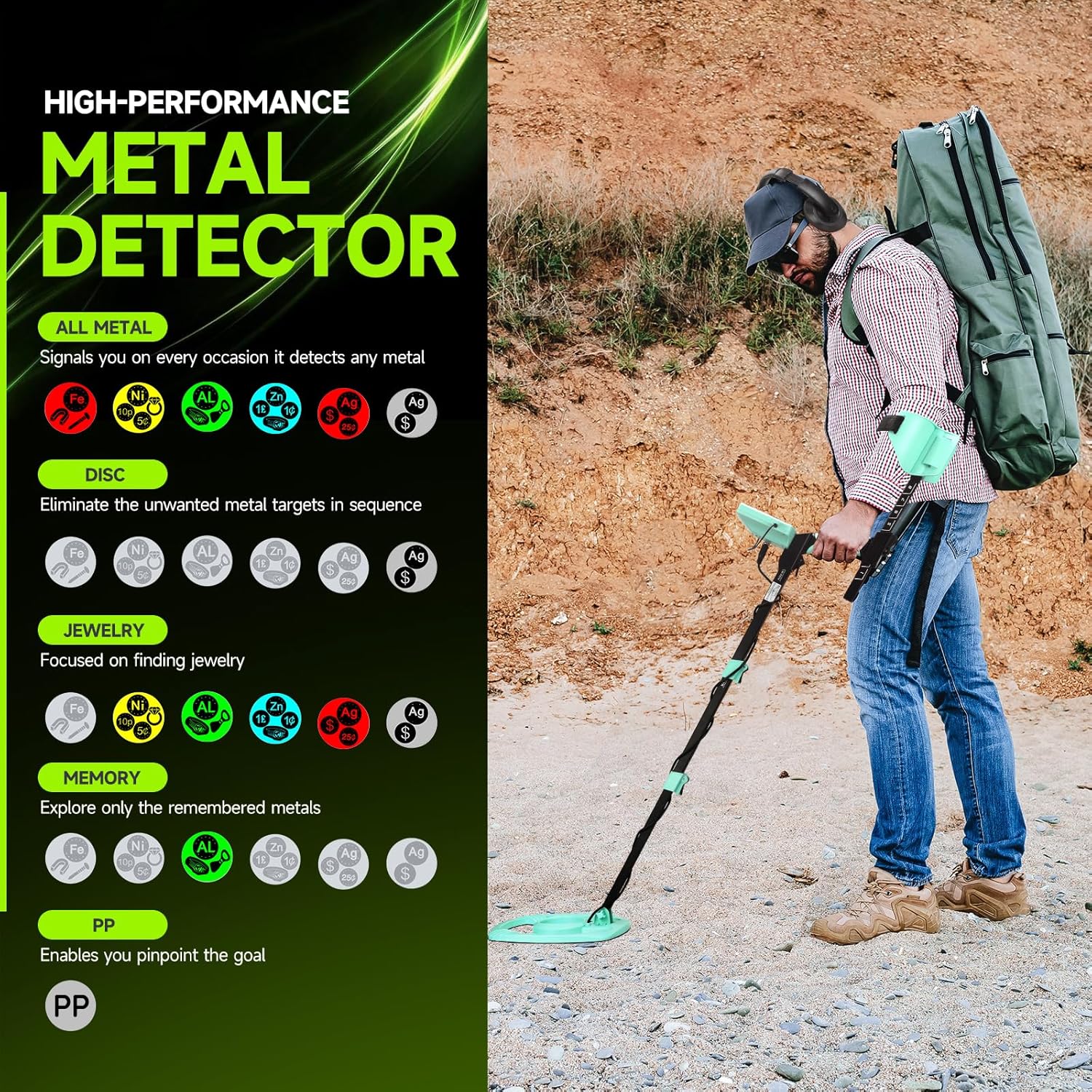
Image: Visual representation of the five detection modes and the types of metals they are designed to detect or ignore.
- ALL METAL Mode: Detects all types of metal without discrimination. This mode is ideal for general searching when you want to find any metallic object.
- DISC (Discrimination) Mode: Allows you to eliminate unwanted metal targets from detection. You can adjust the discrimination level to ignore specific types of metals (e.g., iron) and focus on more valuable targets.
- MEMORY Mode: This mode allows the detector to remember specific metal types you want to search for or ignore, based on previous detections.
- JEWELRY Mode: Optimized for finding jewelry. This mode typically discriminates against iron and other common trash metals.
- PINPOINT (PP) Mode: Once a target is detected, press the PP button to narrow down the exact location of the object. The detector will provide a more precise signal as you move the coil directly over the target.
General Operation Tips
- Sweep Motion: Hold the search coil parallel to the ground, about 1-2 inches above the surface. Sweep the coil slowly from side to side in overlapping arcs.
- Sensitivity Adjustment: Adjust sensitivity based on ground conditions. Lower sensitivity in highly mineralized soil or areas with electrical interference to reduce false signals. Increase sensitivity in clear areas for deeper detection.
- Headphones: Use the included headphones for clearer audio signals, especially in noisy environments, and to conserve battery life.
- Backlight: Activate the backlight in low-light conditions for better screen visibility.
- Outdoor Use Only: This metal detector is designed for outdoor use. Do not use the product indoors as household electronics and metal structures can cause interference and false readings.

Image: Visual guide demonstrating proper sweeping techniques for the metal detector, including maintaining a consistent height and overlapping sweeps, and illustrating incorrect methods.
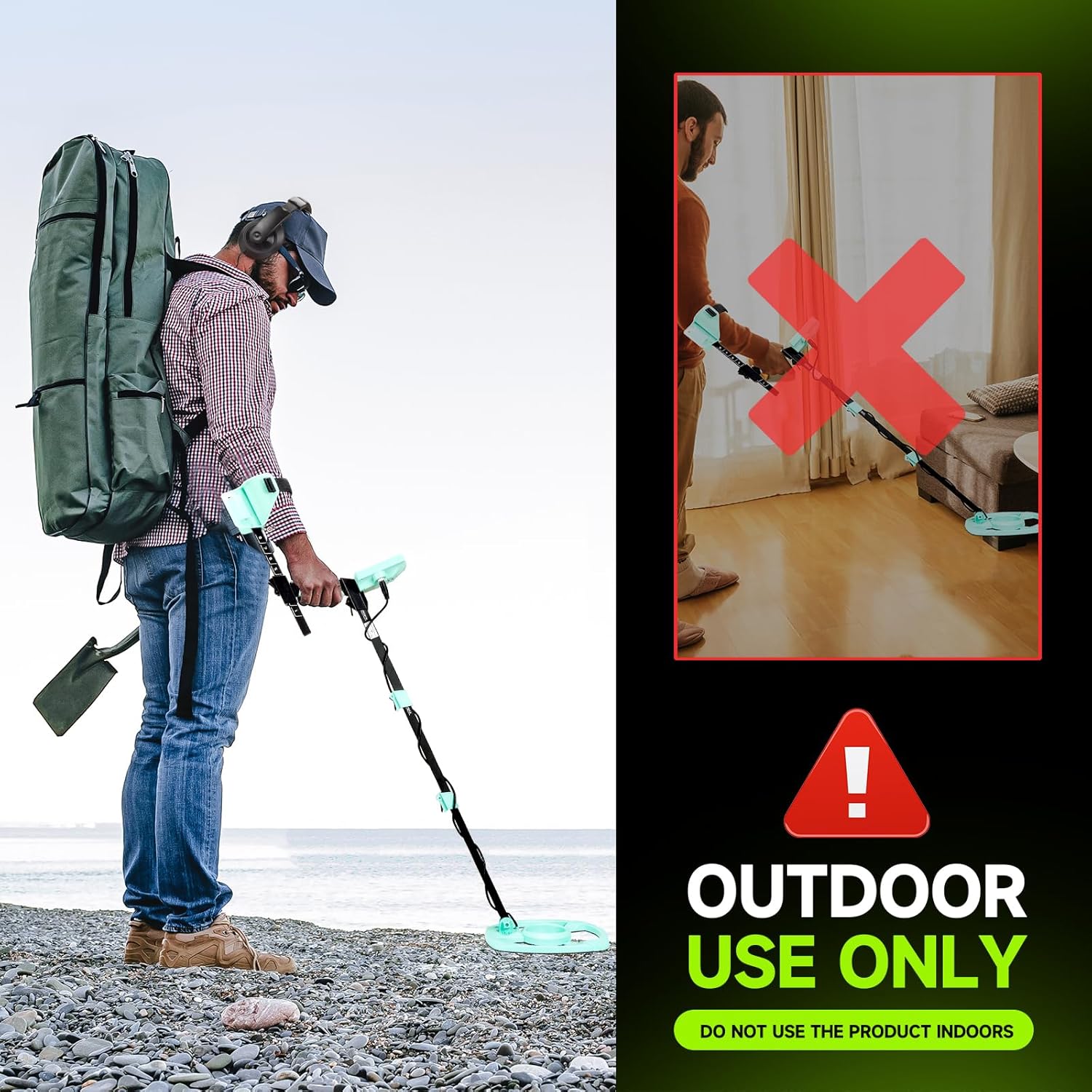
Image: A clear warning indicating that the metal detector is for outdoor use only, with an illustration of incorrect indoor usage.
Maintenance
- Cleaning: After each use, wipe down the detector with a damp cloth. Avoid harsh chemicals.
- Search Coil: The 11-inch search coil is waterproof (IP68 rated) and can be submerged in water. However, the control box is NOT waterproof. Ensure the control box remains dry.
- Storage: Store the detector in a dry, cool place when not in use. Remove batteries if storing for extended periods to prevent leakage.
- Battery Care: Always use fresh, high-quality 9V batteries. Replace batteries when the low battery indicator appears on the screen.
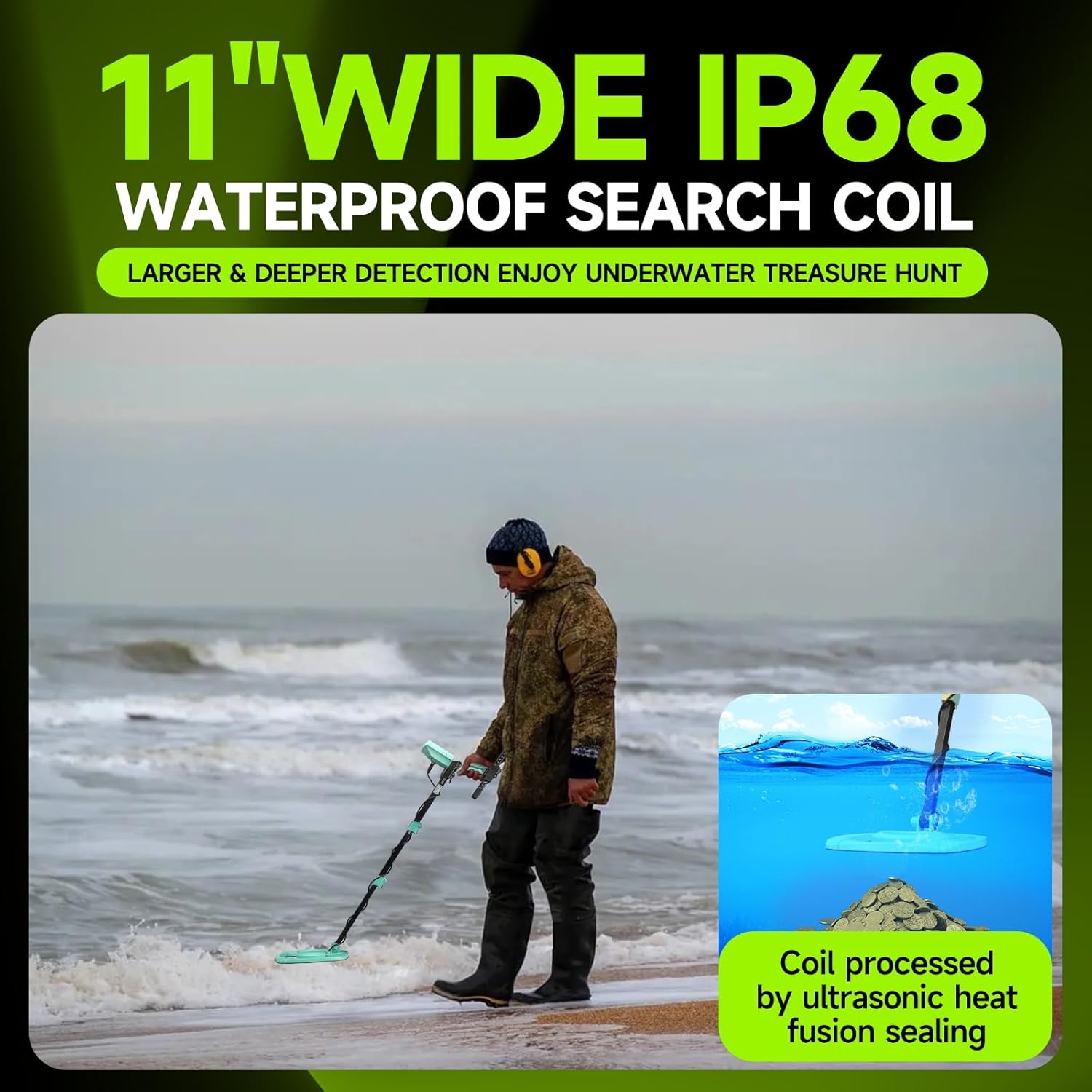
Image: The 11-inch wide IP68 waterproof search coil shown in use near the ocean, emphasizing its capability for underwater detection. A small inset shows the coil processed by ultrasonic heat fusion sealing.
Troubleshooting
| Problem | Possible Cause | Solution |
|---|---|---|
| Detector does not power on. | Dead or incorrectly installed batteries. | Ensure 9V batteries are fresh and inserted with correct polarity. Replace if necessary. |
| False signals or erratic behavior. | High sensitivity in mineralized ground, electrical interference, or nearby metal objects. | Reduce sensitivity. Move away from power lines, cell phones, or other electronic devices. Ensure no metal is on your person (keys, jewelry). |
| No detection or weak signals. | Low sensitivity, deeply buried target, or incorrect mode. | Increase sensitivity. Ensure you are in the correct detection mode (e.g., ALL METAL for general search). Sweep slower and closer to the ground. |
| Detector requires reset after battery change. | This can sometimes occur with new battery installations. | If the unit does not function after new batteries, try turning it off and on again, or briefly removing and reinserting the batteries to reset the system. |
Specifications
- Brand: Gzzhi
- Model Number: 745431155645
- Color: Pseudo color screen
- Material: ABS plastic, circuit board
- Power Source: Battery Powered (2 x 9V batteries, included)
- Battery Life: Approximately 10 Hours
- Operating Frequency: 7 KHz
- Search Coil Size: 11 Inches (Waterproof, IP68 rated)
- Adjustable Length: Yes, up to 51 Inches extended length
- Item Weight: 5.8 Pounds (approximately 2.63 kg)
- Product Dimensions: 51 x 11 x 78 inches (assembled, approximate)
- International Protection Rating: IPzhi (for search coil)
Warranty and Support
Gzzhi provides responsive service and an express warranty for this product. For any questions, technical support, or warranty claims, please contact Gzzhi customer service through the retailer where the product was purchased or refer to the contact information provided in your product packaging.
Important Note: The control box is not waterproof. Damage due to water ingress into the control box is not covered under warranty.
Ask a question about this manual
Ask about setup, troubleshooting, compatibility, parts, safety, or missing instructions. Manuals+ will review the question and use this page’s manual context to help answer it.