
1. Introduction
This manual provides detailed instructions for the installation, maintenance, and replacement of EtliN compatible spare parts for the Xiaomi Dreame Bot L10 Plus and Z10 Pro RLS5D robot vacuum cleaners. Regular replacement and maintenance of these parts ensure optimal performance and extend the lifespan of your robot vacuum.
2. Product Overview
The EtliN replacement parts set includes essential components designed to maintain the cleaning efficiency of your Xiaomi Dreame Bot L10 Plus / Z10 Pro RLS5D robot vacuum. The specific components may vary by set, but typically include main brushes, side brushes, HEPA filters, dust bags, and mop rags.

Image 2.1: Overview of the complete replacement parts set.
2.1 Main Brush
The main brush is a rotating brush located at the bottom of the robot vacuum, responsible for agitating and sweeping debris from floors into the suction inlet. It is crucial for effective deep cleaning.

Image 2.2: Detailed view of the main brush.
2.2 Side Brush
Side brushes are small, rotating brushes located on the sides of the robot vacuum. They sweep dust and debris from edges and corners into the path of the main brush and suction inlet.
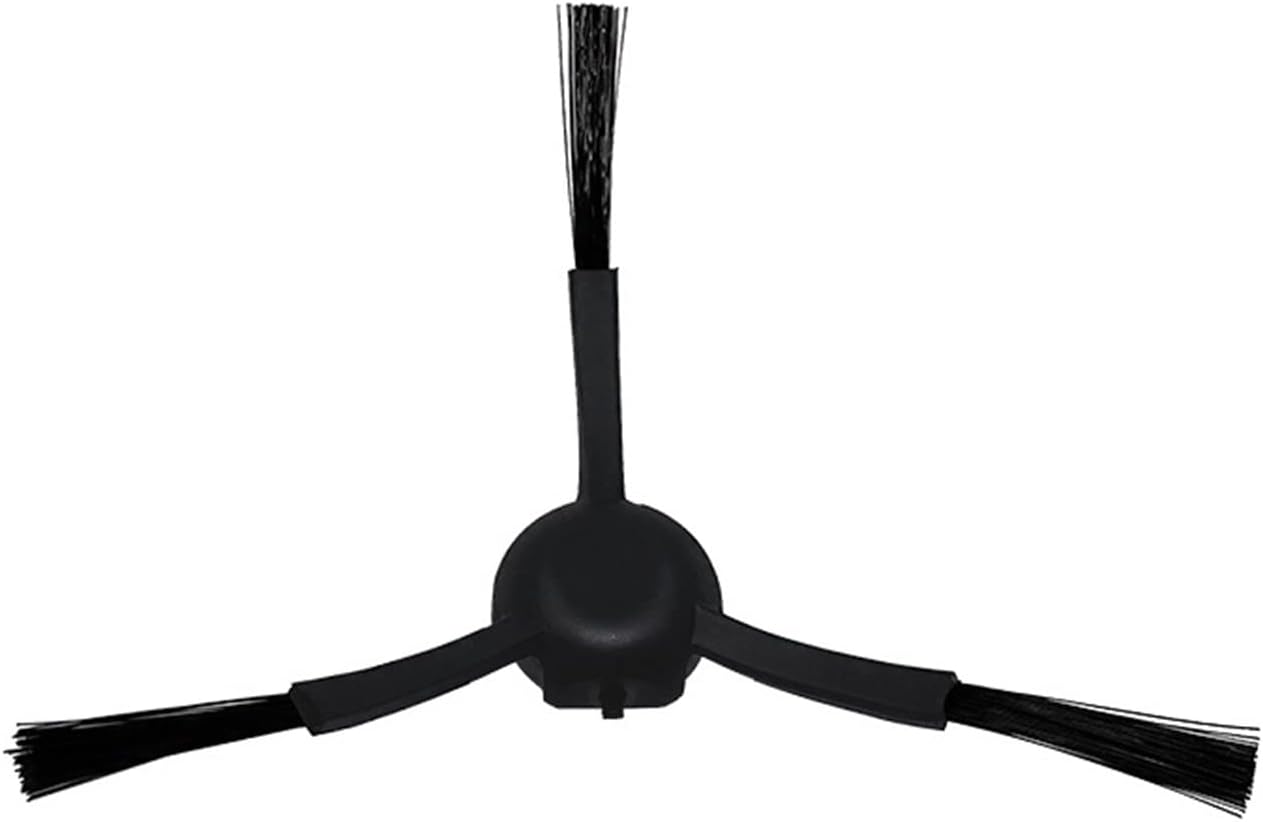
Image 2.3: Detailed view of a side brush.
2.3 HEPA Filter
The HEPA filter captures fine dust particles, allergens, and other microscopic debris from the air exhausted by the vacuum, preventing them from recirculating into your home. A clean filter is essential for maintaining suction power and air quality.

Image 2.4: Detailed view of a HEPA filter.
2.4 Dust Bag
The dust bag collects dirt, dust, and debris vacuumed by the robot. It is designed for easy disposal, ensuring hygienic maintenance of the auto-empty station.
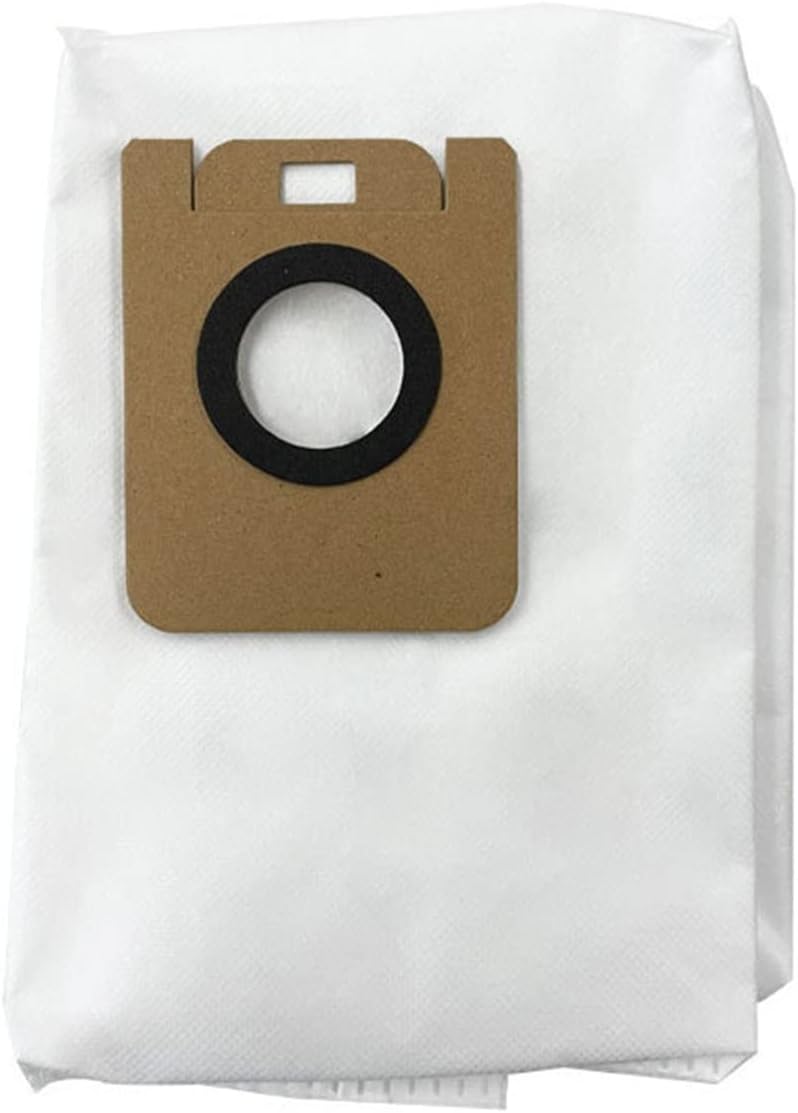
Image 2.5: Detailed view of a dust bag.
2.5 Mop Rag
Mop rags are used for wet cleaning, attaching to the robot's mopping module to wipe floors. They are typically made of microfiber for effective dirt removal and water absorption.

Image 2.6: Detailed view of a mop rag.
3. Installation Instructions
Before performing any installation or replacement, ensure the robot vacuum is powered off and disconnected from its charging dock to prevent accidental activation.
3.1 Replacing the Main Brush
- Turn the robot vacuum upside down.
- Locate the main brush cover, usually secured by two tabs or latches.
- Press the tabs or release the latches to open the main brush cover.
- Lift out the old main brush.
- Clean any hair or debris from the brush compartment and the brush bearings.
- Insert the new main brush, ensuring the square and hexagonal ends align with their respective slots.
- Close the main brush cover until it clicks securely into place.
3.2 Replacing the Side Brush
- Turn the robot vacuum upside down.
- Locate the side brush(es). They are typically held by a single screw.
- Use a screwdriver to remove the screw holding the old side brush.
- Remove the old side brush.
- Align the new side brush with the post and press it down.
- Secure the new side brush with the screw.
3.3 Replacing the HEPA Filter
- Open the top cover of the robot vacuum to access the dustbin.
- Remove the dustbin from the robot.
- Locate the filter compartment on the dustbin.
- Remove the old HEPA filter by pulling it out.
- Insert the new HEPA filter into the slot, ensuring it is seated correctly.
- Close the filter compartment, reinsert the dustbin, and close the robot's top cover.
3.4 Replacing the Dust Bag (for Auto-Empty Station)
- Open the lid of the auto-empty station.
- Carefully pull out the old dust bag from its slot. The opening of the bag usually seals automatically upon removal.
- Dispose of the old dust bag responsibly.
- Insert a new dust bag into the slot, ensuring the cardboard collar is fully seated.
- Close the lid of the auto-empty station.
3.5 Attaching/Replacing the Mop Rag
- Remove the water tank/mopping module from the robot vacuum (refer to your robot's specific manual for this step).
- If replacing, detach the old mop rag from the water tank/mopping module (it's usually attached via Velcro or slides into grooves).
- Attach the new mop rag to the water tank/mopping module, ensuring it is securely fastened and smooth.
- Reinstall the water tank/mopping module onto the robot vacuum.
4. Operating Guidelines
These replacement parts are designed to function identically to the original components. Ensure they are correctly installed before operating your robot vacuum. For specific operational modes (e.g., vacuuming, mopping), refer to your Xiaomi Dreame Bot L10 Plus / Z10 Pro user manual.
5. Maintenance Guidelines
Regular cleaning and timely replacement of these parts are essential for maintaining the robot vacuum's performance and preventing damage.
5.1 Main Brush Maintenance
- Cleaning: Remove the main brush weekly. Use the cleaning tool (often included with the robot or replacement set) to cut and remove tangled hair and debris.
- Replacement: Replace every 6-12 months, or sooner if visibly worn or damaged.
5.2 Side Brush Maintenance
- Cleaning: Check side brushes weekly for tangled hair or debris. Remove and clean as needed.
- Replacement: Replace every 3-6 months, or if bristles are bent, frayed, or missing.
5.3 HEPA Filter Maintenance
- Cleaning: Tap the filter gently over a trash can to remove accumulated dust weekly. Do not wash the HEPA filter with water unless explicitly stated by the robot manufacturer, as this can damage the filter material.
- Replacement: Replace every 3-6 months, or if suction power noticeably decreases despite cleaning.
5.4 Dust Bag Maintenance
- Cleaning: Dust bags are disposable and not designed for cleaning.
- Replacement: Replace when the robot or auto-empty station indicates the bag is full, or approximately every 4-8 weeks depending on usage and household dust levels.
5.5 Mop Rag Maintenance
- Cleaning: Remove the mop rag after each mopping session. Hand wash or machine wash with mild detergent and air dry completely before reuse.
- Replacement: Replace every 1-3 months, or if the rag becomes heavily stained, worn, or loses its cleaning effectiveness.
6. Troubleshooting
If you experience issues with your robot vacuum after replacing parts, consider the following:
- Reduced Suction Power: Check if the HEPA filter is clogged or incorrectly installed. Ensure the dustbin is empty and properly seated.
- Poor Cleaning Performance: Verify that the main brush and side brushes are free of tangles and installed correctly. Check for wear on brushes.
- Abnormal Noise: Ensure all brushes are free of obstructions and correctly installed. Check for any foreign objects in the brush compartments.
- Mopping Ineffectiveness: Ensure the mop rag is clean, properly attached, and the water tank is filled (if applicable to your robot model).
If problems persist, refer to the original user manual for your Xiaomi Dreame Bot L10 Plus / Z10 Pro robot vacuum or contact the robot manufacturer's support.
7. Specifications
| Attribute | Value |
|---|---|
| Brand | EtliN |
| Compatible Models | Xiaomi Dreame Bot L10 Plus / Z10 Pro (RLS5D) |
| Item Weight (approx.) | 50 Grams (for the entire set, varies by specific set content) |
| Number of Pieces | Varies by set (e.g., Set D) |
8. Warranty Information
Warranty information for these EtliN compatible replacement parts is not provided in the product data. Please refer to the seller or product packaging for any applicable warranty details.
9. Customer Support
Customer support contact information for EtliN is not provided in the product data. For assistance with these replacement parts, please contact the retailer or seller from whom you purchased the product.
10. Official Product Videos
No official product videos for these replacement parts were available in the provided product data.