
1. Introduction
The Ltinist BX27 Wireless Earbuds are designed to provide a high-quality audio experience with advanced features for active lifestyles. These Bluetooth 5.4 headphones offer extended playtime, IP7 waterproofing, ENC noise-canceling microphones, and deep bass, making them suitable for sports, workouts, and daily use with both Android and iOS devices.
2. What's Included
Upon unboxing your Ltinist BX27 Wireless Earbuds, please ensure all the following components are present:
- 2x Wireless Earbuds (Left/Right)
- 1x Type-C Charging Cable
- 1x Charging Case
- 3x Eartips (Sizes: S/M/L)
- 1x User Manual

Image: All components included in the Ltinist BX27 package.
3. Setup
3.1 Charging the Earbuds and Case
The Ltinist BX27 earbuds and charging case provide up to 75 hours of total listening time. Each earbud offers up to 15 hours on a single charge. The charging case features a dual LED digital display that shows the remaining power of the case and the charging status of each earbud. Connect the included Type-C cable to the charging port on the case and a power source to charge.


Images: Battery life overview and the dual LED power display on the charging case.
3.2 Pairing with Your Device
The BX27 earbuds utilize advanced Bluetooth 5.4 technology for a fast and stable connection. After the initial pairing, the earbuds will automatically connect to your last paired device when removed from the charging case.
- Ensure your device's Bluetooth is turned on.
- Open the charging case and take out the earbuds. They will automatically enter pairing mode.
- On your device, search for "BX27" in the Bluetooth settings and select it to connect.

Image: One-step auto pairing process with a mobile device.
3.3 Wearing the Earbuds
Designed with flexible and soft ear hooks, the BX27 earbuds provide a secure and comfortable fit, ideal for movement during exercise. Three sizes of ear tips (S/M/L) are included to ensure customized comfort and optimal sound isolation.
- Choose the suitable ear tips and install them on the earbuds.
- Put the earhook over your ear and insert the eartip into your ear canal.
- Adjust the earhook to make it secure and comfortable.

Image: Steps for proper earbud placement and fit.
4. Operating Instructions
4.1 Touch Controls
The Ltinist BX27 earbuds feature sensitive touch areas for easy control of your audio and calls. Refer to the diagram below for specific functions:

Image: Detailed touch control functions for the earbuds.
| Action | Left Earbud (L) | Right Earbud (R) | Both Earbuds (R/L) |
|---|---|---|---|
| Volume Control | Hold for 2s (Volume Down) | Hold for 2s (Volume Up) | N/A |
| Track Control | Once Click (Track Reverse) | Once Click (Track Forward) | N/A |
| Play/Pause | Click Twice | Click Twice | N/A |
| Answer/End Call | Click Once | Click Once | N/A |
| Reject Call | Hold for 2s | Hold for 2s | N/A |
| Activate Voice Assistant | Click Three Times | Click Three Times | N/A |
4.2 Sound Quality
The BX27 earbuds incorporate 14.2mm double-layer diaphragm drivers, delivering sound with strong bass, clear mids, and bright treble for a high-fidelity audio experience. Environmental Noise Canceling (ENC) built-in microphones ensure high-quality call performance by isolating your voice from surrounding noise, providing superior clarity during conversations.
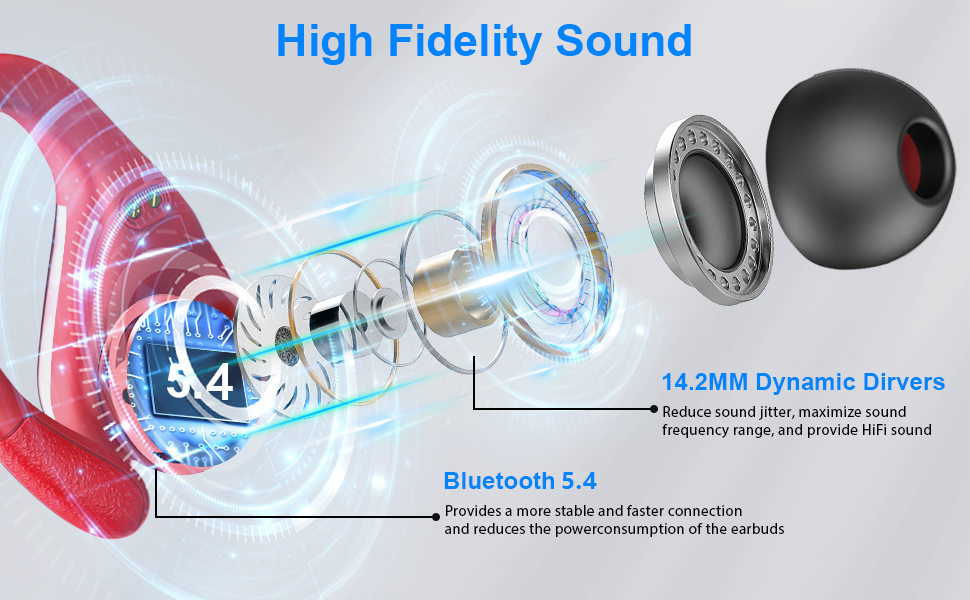
Image: Internal structure and audio technology of the earbuds.
4.3 Usage Modes
The earbuds support both single and two-player modes, allowing for flexible usage depending on your needs. You can use one earbud independently for calls or audio, or both for a stereo listening experience.

Image: Illustration of single and two-player usage modes.
5. Maintenance
5.1 Waterproofing
The Ltinist BX27 earbuds have an IP7 waterproof rating, making them resistant to sweat, rain, and minor water splashes. This makes them suitable for various activities including exercising, sporting, gym, and cycling. However, they are not designed for swimming or submersion.

Image: Earbuds in use during physical activity, demonstrating secure fit and water resistance.
5.2 Cleaning
To ensure optimal charging and longevity, please clean both the charging contacts of the earbuds and the charger case regularly. Remove any sweat, perspiration, or dirt to avoid charging failures. Use a soft, dry cloth for cleaning. Do not use abrasive cleaners or submerge the case in water.
6. Troubleshooting
If you encounter any issues with your Ltinist BX27 Wireless Earbuds, please try the following common troubleshooting steps:
- No Sound/Connection Issues: Ensure earbuds are charged. Turn off and on your device's Bluetooth. Re-pair the earbuds by placing them back in the case, closing it, then reopening and re-connecting.
- One Earbud Not Working: Place both earbuds back in the charging case, close the lid for a few seconds, then open it again. This often re-syncs them.
- Charging Problems: Clean the charging contacts on both the earbuds and the case with a dry cotton swab. Ensure the charging cable is securely connected and the power source is active.
- Poor Sound Quality: Ensure ear tips are correctly sized and sealed in your ear canal. Clean any debris from the earbud speakers.
For persistent issues, refer to the full user manual PDF or contact customer support.
7. Specifications
| Feature | Detail |
|---|---|
| Model Name | BX27 |
| Connectivity Technology | Wireless (Bluetooth 5.4) |
| Ear Placement | Over Ear (with ear hooks) |
| Form Factor | In Ear |
| Water Resistance Level | IP7 Waterproof |
| Noise Control | Active Noise Cancellation (ENC Mics) |
| Battery Life (Earbuds) | Up to 15 hours per charge |
| Total Playtime (with case) | Up to 75 hours |
| Charging Time | 1.5 Hours (for case) |
| Audio Driver Size | 14.2 Millimeters |
| Control Method | Touch |
| Compatible Devices | iOS, Android cellphones, TV, smart watches, PC, tablets, laptops (Not compatible with gaming devices) |
| Item Weight | 3.53 ounces (100 Grams) |
| Material | Plastic |
8. Warranty and Support
Ltinist offers a 2-year warranty on the BX27 Wireless Earbuds, ensuring peace of mind regarding your purchase. For any product-related inquiries, technical support, or warranty claims, please contact Ltinist customer service.


