
Drsaec i52
Drsaec i52 Wireless Earbuds User Manual
Model: i52 | Brand: Drsaec
Introduction
The Drsaec i52 Wireless Earbuds offer an exceptional audio experience with advanced Bluetooth 5.3 technology, ensuring stable connection and high-speed transmission. Designed for comfort and durability, these earbuds feature a 13mm dynamic driver for powerful stereo bass and clear sound. With 4 ENC microphones, they provide enhanced noise cancellation for crystal-clear calls. The IP7 waterproof rating makes them ideal for sports and outdoor activities. The compact charging case provides up to 50 hours of total playtime and features a convenient LED power display. This manual will guide you through the setup, operation, maintenance, and troubleshooting of your Drsaec i52 Wireless Earbuds.
What's in the Box
- Drsaec i52 Wireless Earbuds (Left and Right)
- Wireless Charging Case
- USB-C Charging Cable
- User Manual
Product Overview
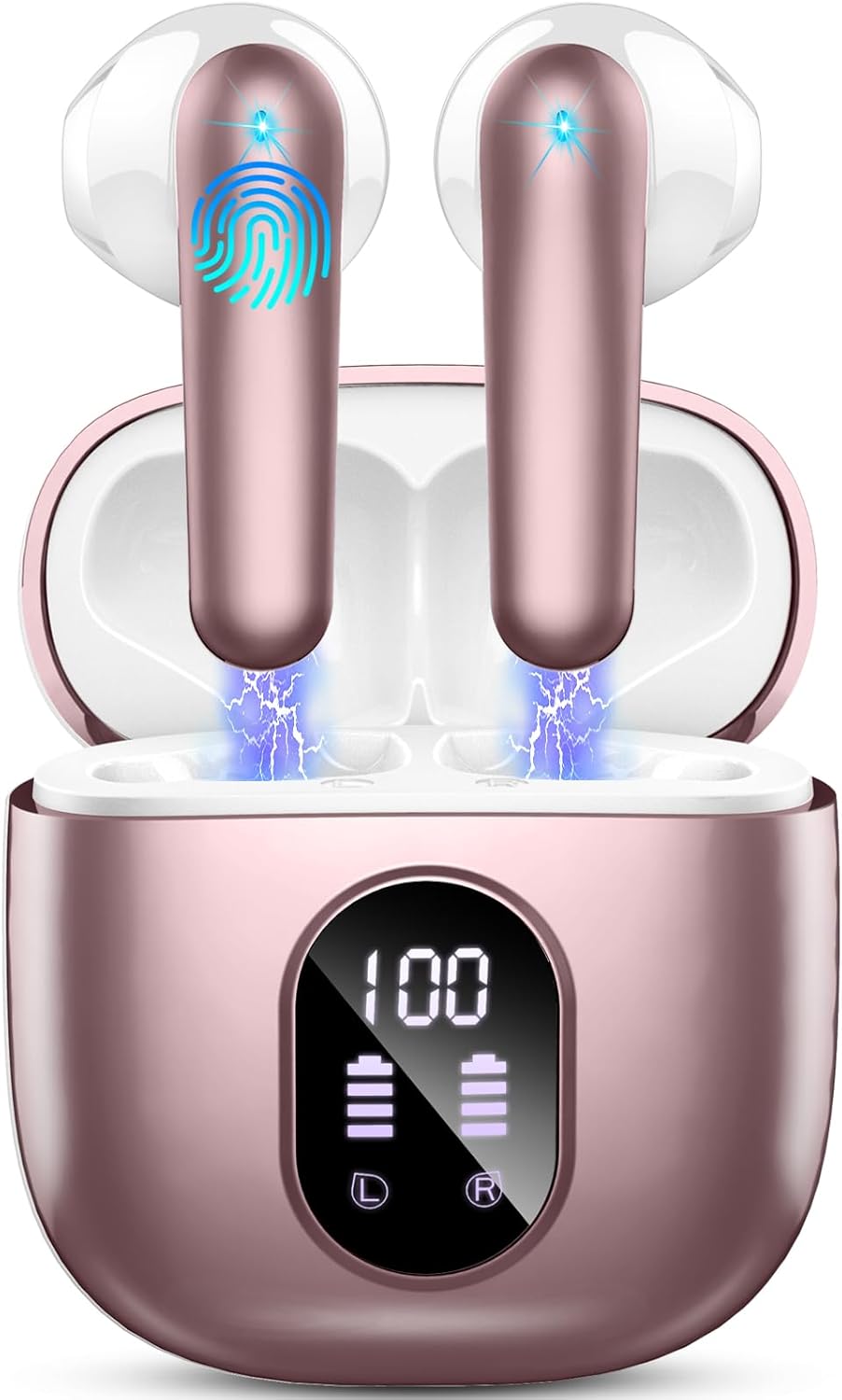
The Drsaec Wireless Earbuds in Rose Gold, showcasing the earbuds within their charging case with an illuminated LED display indicating battery percentage.

Diagram illustrating the advanced Bluetooth 5.3 technology, highlighting faster transmission rate, lossless transmission, and lower power consumption.

Exploded view diagram of the earbud's internal components, emphasizing the 13mm dynamic driver for Hi-Fi superior sound.

Diagram showing the 4-microphone setup for crystal-clear calls and ENC (Environmental Noise Cancellation) technology.

Illustration of the digital power display on the charging case, showing battery status for both the case and individual earbuds, along with USB-C charging and 50-hour playtime.

Visual demonstrating the super light and mini design of the earbuds, highlighting their comfortable fit and IPX7 waterproof rating.

Diagram explaining the one-step pairing process and the smart touch controls for various functions like Siri activation, volume, and playback.

The Drsaec i52 earbuds held in a hand, showcasing their compact size and design.

A top-down view of the Drsaec i52 earbuds securely placed inside their charging case.

An earbud comfortably fitted in an ear, demonstrating its ergonomic design for secure wear.

The charging case with its lid open, revealing the earbuds nestled inside, ready for use or charging.

The Drsaec i52 earbuds displayed alongside their USB-C charging cable, highlighting the charging accessory.

A front view of the Drsaec i52 earbuds and their charging case, emphasizing the overall product design.
Official product video demonstrating key features such as Bluetooth 5.3 connectivity, sound quality, IP7 waterproofing, 4-mic design for clear calls, one-step pairing, smart touch controls, and ultra-light design. It also highlights the 50-hour playtime with the charging case and USB-C fast charging.
Setup
Initial Charging
Before first use, fully charge the earbuds and the charging case. Connect the provided USB-C cable to the charging case and a compatible power source. The LED display will indicate charging progress. A full charge for the earbuds takes approximately 1 hour, and the charging case also takes about 1 hour.
Pairing
- Open the charging case. The earbuds will automatically power on and enter pairing mode.
- On your device (smartphone, tablet, etc.), enable Bluetooth.
- Search for 'i52' in the list of available Bluetooth devices and select it to connect.
- Once paired, the earbuds will automatically connect to your device whenever you open the charging case.
Operating Instructions
Touch Controls
The Drsaec i52 earbuds feature intuitive touch controls. Refer to the diagram in the Product Overview section for a visual guide. Common functions include:
- Single tap (left/right earbud): Volume control (left for volume down, right for volume up).
- Double tap (either earbud): Play/Pause music.
- Hold for 2 seconds (right earbud): Skip to the next song.
- Hold for 2 seconds (left earbud): Go to the previous song.
- Single tap (either earbud): Answer/End calls.
- Hold for 2 seconds (either earbud): Reject incoming calls.
- Triple tap (either earbud): Activate Siri or Google Assistant.
Music Playback
After successful pairing, open your music application and begin playback. Use the touch controls on the earbuds to manage your music: play, pause, skip tracks, and adjust volume.
Call Management
When a call comes in, you can answer or reject it using the touch controls. During a call, use the touch controls to end the call. The 4 built-in microphones with ENC noise cancellation ensure clear communication even in noisy environments.
Maintenance
Cleaning
Regularly clean your earbuds and charging case to maintain optimal performance and hygiene. Use a soft, dry, lint-free cloth to wipe the surfaces. For earbud grilles, use a dry cotton swab to gently remove any debris. Avoid using abrasive materials or harsh chemicals.
Storage
When not in use, store the earbuds in their charging case to protect them from dust, dirt, and physical damage. Store the case in a cool, dry place away from extreme temperatures.
Waterproofing
The earbuds are IP7 waterproof, meaning they are protected against immersion in water up to 1 meter for up to 30 minutes. This makes them suitable for sports and outdoor activities. However, the charging case is not waterproof. Do not expose the charging case to water or excessive moisture. Ensure earbuds are completely dry before placing them back into the charging case to prevent damage.
Troubleshooting
| Problem | Solution |
|---|---|
| Earbuds not pairing | Ensure earbuds are charged. Place them back in the case, close, then open again. Check Bluetooth on your device and forget previous connections. Try pairing again. |
| No sound from one earbud | Ensure both earbuds are charged. Try resetting the earbuds (refer to manufacturer's specific reset instructions if available, otherwise, re-pair). Check audio balance settings on your device. |
| Low volume | Adjust volume on both the earbuds via touch controls and your connected device. Ensure earbuds are properly seated in your ears. |
| Charging issues | Check USB-C cable and power adapter. Ensure charging ports on case and earbuds are clean and free of debris. The LED display on the case should indicate charging. |
Specifications
| Feature | Detail |
|---|---|
| Model Name | J55 |
| Connectivity Technology | Wireless |
| Wireless Communication Technology | Bluetooth |
| Included Components | Wireless Charging Case |
| Age Range (Description) | Adult |
| Charging Time | 1 Hours |
| Compatible Devices | Most Bluetooth-enabled devices |
| Control Type | Media Control |
| Cable Feature | Without Cable |
| Item Weight | 3 Grams |
| Water Resistance Level | Waterproof |
| Frequency Range | 20 Hz - 20,000 Hz |
| Unit Count | 2.0 Count |
| Style | in ear |
| Control Method | Touch |
| Number of Items | 1 |
| Battery Life | 50 Hours |
| Audio Driver Type | Dynamic Driver |
| Bluetooth Range | 15 Meters |
| Bluetooth Version | 5.3 |
| Carrying Case Battery Average Life | 50 Hours |
| Carrying Case Battery Charging Time | 1 Hours |
| Audio Driver Size | 13 Millimeters |
| Earpiece Shape | In Ear |
| Is Autographed | No |
| Series Number | 52 |
| Manufacturer | Drsaec |
| Product Dimensions | 1.57 x 1.57 x 1.18 inches |
| Item Weight (ounces) | 0.106 ounces |
| ASIN | B0CRH2SCCQ |
| Item model number | i52 |
| Batteries | 1 Lithium Polymer batteries required. (included) |
| Date First Available | January 4, 2024 |
| Color | Rose Gold |
| Ear Placement | In Ear |
| Form Factor | In Ear |
| Noise Control | Active Noise Cancellation |
Warranty and Support
Drsaec products come with a standard manufacturer's warranty. For detailed warranty information, product support, or technical assistance, please refer to the official Drsaec website or contact their customer service. Keep your purchase receipt for warranty claims.
Related documentsi52


Ask a question about this manual
Ask about setup, troubleshooting, compatibility, parts, safety, or missing instructions. Manuals+ will review the question and use this page’s manual context to help answer it.