
Introduction

Image: The Lelukee 12-inch Portable Digital TV, showcasing its compact design, screen displaying a sports event, and accompanied by its remote control and portable antenna. The screen indicates "Full HD 1080" and a battery icon.
Thank you for purchasing the Lelukee 12-inch 1080P Portable Digital TV. This manual provides detailed instructions for setting up, operating, and maintaining your new portable television. Please read this manual thoroughly before using the product to ensure proper operation and to maximize its lifespan. Keep this manual for future reference.
Package Contents
Please check the box for the following items:
- 1 x 11.6-inch Portable TV
- 1 x AV Cable
- 1 x Remote Control
- 1 x Antenna
- 1 x Power Adapter (EU Plug)
- 1 x User Manual
Product Overview
Familiarize yourself with the various components and interfaces of your portable digital TV.
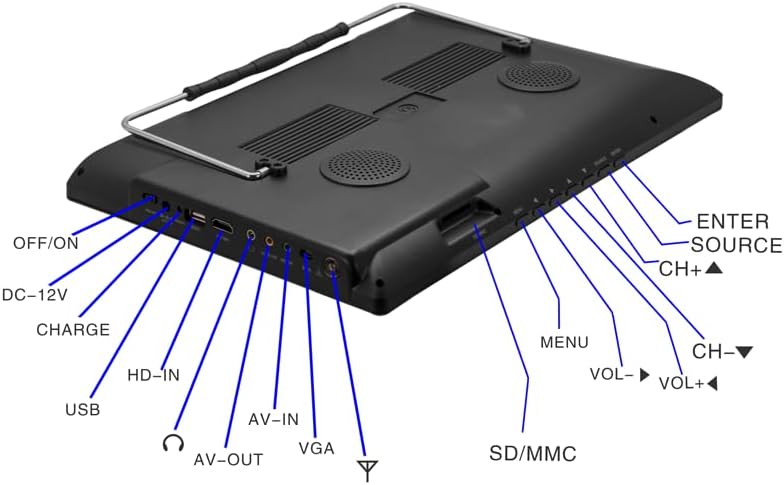
Image: Rear view of the Lelukee Portable Digital TV, highlighting all input and output ports with clear labels. From left to right, the ports include OFF/ON switch, DC-12V power input, CHARGE indicator, USB port, HD-IN (HDMI input), Headphone jack, AV-OUT, AV-IN, VGA input, and Antenna input. On the right side, control buttons for MENU, VOL-, VOL+, CH-, CH+, SOURCE, ENTER, and POWER are visible, along with an SD/MMC card slot.
Key Interfaces and Controls:
- OFF/ON Switch: Main power switch for the device.
- DC-12V Input: Connect the provided 12V power adapter or car charger.
- CHARGE Indicator: Light indicating battery charging status.
- USB Port: For connecting USB storage devices to play media.
- HD-IN (HDMI Input): Connect external devices like gaming consoles or set-top boxes for high-definition video input.
- Headphone Jack: For private listening.
- AV-OUT: Audio/Video output to connect to another display or recording device.
- AV-IN: Audio/Video input for connecting external analog devices.
- VGA Input: Connect to a computer or other VGA-compatible device.
- Antenna Input: Connect the included antenna for receiving digital TV signals.
- SD/MMC Card Slot: For playing media from SD or MMC memory cards.
- Control Buttons (MENU, VOL-, VOL+, CH-, CH+, SOURCE, ENTER, POWER): On-device controls for navigation and basic functions.
- Rear Dual Speakers: Integrated speakers for audio output.
- Built-in 1500 mAh Lithium Battery: Provides portable power for extended use.
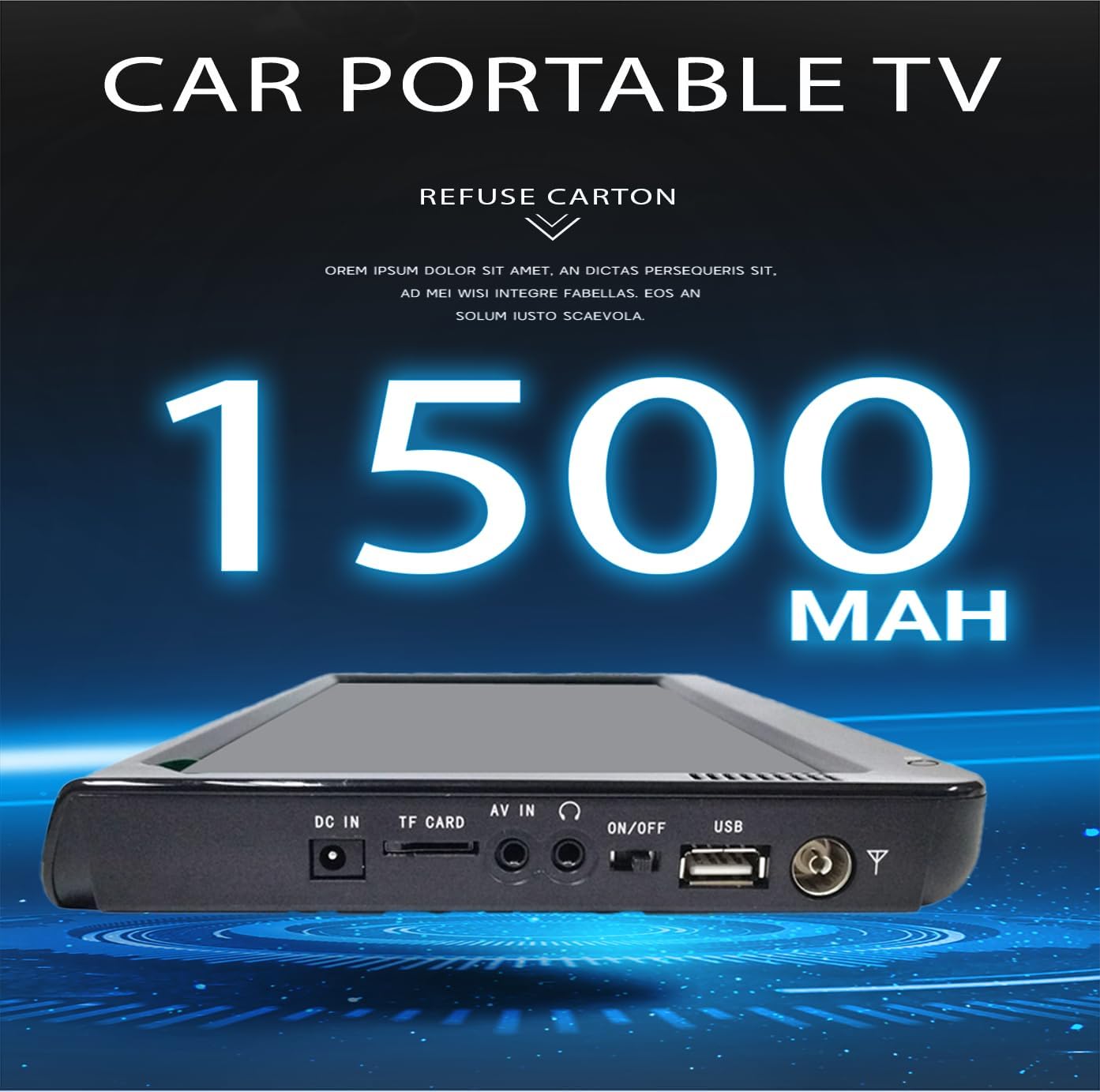
Image: The back of the portable TV, emphasizing its rear dual speakers and indicating support for 1080P HD video, a 12V car charger, and a 1500 mAh battery.
Setup
1. Powering On
- Charging the Battery: Before first use, fully charge the built-in 1500 mAh battery. Connect the provided power adapter to the DC-12V input on the TV and plug it into a wall outlet. The CHARGE indicator will illuminate.
- Connecting to Power: You can operate the TV directly from the power adapter or the 12V car charger. Ensure the power switch is in the "OFF" position before connecting power.
- Turning On: Flip the OFF/ON switch to the "ON" position. Press the POWER button on the TV or remote control to turn on the display.
2. Antenna Connection
- Locate the Antenna Input port on the TV.
- Connect the included portable antenna to this port. For best reception, position the antenna in an open area, away from obstructions.

Image: The portable TV displaying a sports program, with text indicating "DVB-T DVB-T2 Built-in DVB-T2 Tuner for Free Digital TV in European". This highlights the integrated digital TV tuner.
3. First Time Setup and Channel Scan
- Upon first power-on, the TV may prompt you to select your language and country. Follow the on-screen instructions.
- Navigate to the "Channel Scan" or "Auto Scan" option in the TV's menu. This process will automatically search for available digital (DVB-T/T2) and analog (ATV) channels in your region.
- Press "ENTER" or "OK" to start the scan. This may take several minutes.
- Once the scan is complete, the TV will save the found channels, and you can begin watching.
Operating Instructions
1. Basic Controls
You can control the TV using the on-device buttons or the included remote control.
- POWER: Turns the TV on or off (standby mode).
- MENU: Accesses the main menu for settings and options.
- SOURCE: Switches between input sources (DTV, ATV, HDMI, AV, USB, SD/MMC).
- VOL+/-: Adjusts the volume level.
- CH+/-: Changes the channel up or down.
- ENTER/OK: Confirms selections in the menu or on-screen prompts.
- Navigation Buttons (Up/Down/Left/Right): Used to navigate through menu options.
2. Switching Input Sources
Press the SOURCE button on the remote or TV to cycle through available input sources:
- DTV: Digital Television (Freeview channels).
- ATV: Analog Television.
- HDMI: For external devices connected via HDMI cable.
- AV: For external devices connected via AV cable.
- USB: For media playback from a USB drive.
- SD/MMC: For media playback from an SD or MMC card.
- VGA: For connecting to a computer.
3. Media Playback (USB/SD/MMC)
Insert your USB drive or SD/MMC card into the respective slot. Switch the source to "USB" or "SD/MMC". The TV will display a file browser. Navigate to your desired media file and press ENTER/OK to play.
Supported Formats:
- Video: MKV, MOV, AVI, WMV, MP4, FLV, MPEG1-4, RMVB
- Audio: MP3
Maintenance
1. Cleaning
- Always unplug the TV before cleaning.
- Use a soft, dry cloth to wipe the screen and exterior. For stubborn marks, slightly dampen the cloth with water or a mild, non-abrasive screen cleaner.
- Do not use alcohol, benzene, thinners, or other chemical cleaners, as they may damage the surface.
2. Battery Care
- To prolong battery life, avoid fully discharging the battery frequently.
- If storing the TV for an extended period, charge the battery to about 50% and store it in a cool, dry place. Recharge every 3-6 months.
- Do not expose the battery to extreme temperatures or direct sunlight.
3. Storage
- Store the TV in a dry, dust-free environment.
- Keep it away from direct sunlight, heat sources, and moisture.
- Use the original packaging or a protective case when transporting the TV.
Troubleshooting
If you encounter issues with your Lelukee Portable Digital TV, please refer to the following common problems and solutions:
| Problem | Possible Cause | Solution |
|---|---|---|
| No power / TV does not turn on. | Battery is depleted; Power adapter not connected or faulty; Power switch is OFF. | Charge the battery; Ensure power adapter is securely connected and working; Flip the OFF/ON switch to "ON" and press the POWER button. |
| No signal / Poor picture quality. | Antenna not connected properly; Weak signal strength; Incorrect input source selected. | Ensure antenna is securely connected; Reposition antenna for better reception; Perform a channel scan; Select the correct input source (DTV/ATV). |
| No sound. | Volume is too low or muted; External speakers/headphones connected. | Increase volume; Check mute status; Disconnect external audio devices if using built-in speakers. |
| Remote control not working. | Batteries are dead or inserted incorrectly; Obstruction between remote and TV; Remote sensor blocked. | Replace remote batteries; Ensure correct battery polarity; Remove any obstructions; Clean remote sensor on TV. |
| Cannot play media from USB/SD. | Unsupported file format; USB drive/SD card is corrupted or not formatted correctly; Incorrect input source. | Check if the file format is supported (MKV, MOV, AVI, WMV, MP4, FLV, MPEG1-4, RMVB for video; MP3 for audio); Ensure USB/SD card is properly inserted; Select "USB" or "SD/MMC" source. |
If the problem persists after trying these solutions, please contact customer support.
Specifications
Detailed technical specifications for the Lelukee Portable Digital TV:
| Feature | Detail |
|---|---|
| Model | Televisore Portatile Digitale |
| Screen Size | 12.5 inches (diagonal), 11.6 inches (screen length) |
| Display Type | TFT-LED Color Display |
| Resolution | 1280 x 800 (1080p supported) |
| Aspect Ratio | 16:9 |
| Tuner | DVB-T/T2 Digital Tuner, ATV Tuner |
| Frequency Range (ATV) | 48.25 MHz ~ 863.25 MHz |
| Frequency Range (Digital TV VHF) | 50 MHz ~ 230 MHz |
| Frequency Range (Digital TV UHF) | 474 MHz ~ 862 MHz |
| Inputs | Antenna, VGA, AV-IN, HDMI, USB, SD/MMC |
| Outputs | AV-OUT, Headphone Jack |
| Speakers | Two 32mm Round Speakers |
| Audio Output | 2W (max) |
| Power Supply | DC 12V |
| Power Consumption | 18W |
| Battery | Built-in 1500 mAh Lithium-ion (1-1.5 hours runtime) |
| Dimensions (L x W x H) | 30.7 x 19.8 x 2.5 cm (12.09 x 7.79 x 0.98 inches) |
| Recommended Usage | Travel, outdoor activities, in-vehicle use |
| Supported Countries (DVB-T/T2) | Finland, Sweden, Norway, Iceland, Denmark, Faroe Islands (Denmark), Estonia, Latvia, Lithuania, Belarus, Russia, Ukraine, Moldova, Poland, Czech Republic, Slovakia, Hungary, Germany, Austria, Switzerland, Liechtenstein, Netherlands, Belgium, Luxembourg, France, Monaco, Romania, Bulgaria, Serbia, Macedonia, Albania, Greece, Slovenia, Croatia, Montenegro, Malta, Bosnia and Herzegovina (BiH), Italy, Vatican, San Marino, Spain, Portugal, Andorra, Gibraltar. |
Warranty and Support
This product comes with a standard manufacturer's warranty. Please refer to the warranty card included in your package for specific terms and conditions. For technical support, troubleshooting assistance beyond this manual, or warranty claims, please contact Lelukee customer service through your purchase platform or the contact information provided with the product.
Please retain your proof of purchase for warranty purposes.