
FITUEYES Zen Series, 55"-88" TV stand White
FITUEYES Zen Series Wood TV Stand Swivel Mount Instruction Manual
Model: 55"-88" TV stand White
Brand: FITUEYES
1. Introduction
This manual provides detailed instructions for the assembly, operation, and maintenance of your FITUEYES Zen Series Wood TV Stand Swivel Mount. Please read this manual thoroughly before assembly and use to ensure proper installation and safe operation.

Image 1.1: Front view of the assembled FITUEYES Zen Series Wood TV Stand with a television.
Key Features:
- Natural Aesthetic: Constructed from beech wood, providing a calm and elegant appearance.
- Robust Construction: Features a reinforced steel base and durable beech wood for enhanced stability, supporting up to 132 lbs.
- Integrated Cable Management: Hidden back storage compartment designed to conceal cables and TV boxes for a tidy setup.
- Adjustable Viewing: Offers a ±30° swivel function and 6-level height adjustment (ranging from 45.2 to 55 inches) for optimal viewing angles.
- Broad Compatibility: Suitable for most OLED, LCD, and LED flat or curved TV screens from 55 to 88 inches, supporting VESA standards from 200x100mm to 600x400mm.
2. Safety Information
Please adhere to the following safety guidelines to prevent injury or damage to the product:
- Do not exceed the maximum weight capacity of 132 lbs (60 kg).
- Ensure the TV stand is placed on a stable, level surface to prevent tipping.
- Verify that your television's VESA pattern and weight are compatible with the stand before assembly. Refer to the "Specifications" section for VESA compatibility.
- Keep children and pets away from the assembly area. Small parts can be a choking hazard.
- Tighten all screws firmly, but do not overtighten to avoid stripping threads or damaging components.
- Regularly check all connections and fasteners to ensure they remain secure.
- Do not attempt to modify the product. Any modifications may compromise safety and void the warranty.
- Use caution when swiveling the TV to avoid pinching fingers or damaging cables.
3. Package Contents
Before beginning assembly, ensure all parts listed below are present and undamaged. If any parts are missing or damaged, contact customer support immediately.

Image 3.1: All components included in the package for assembly.
Typical components include:
- Main Base Plate
- Vertical Support Column (Beech Wood and Metal)
- TV Mounting Bracket
- VESA Adapter Plates (if applicable)
- Hardware Kit (screws, washers, spacers, Allen wrench)
- Cable Management Clips/Ties
- Adjustable Foot Pads
Note: Optional accessories such as casters or additional shelves are sold separately and may not be included in the standard package.
4. Setup and Assembly
Follow these steps carefully for proper assembly. It is recommended to have two people for certain steps, especially when mounting the TV.
Step 4.1: Assemble the Base
Attach the vertical support column to the main base plate using the provided screws. Ensure the column is oriented correctly for cable management access.

Image 4.1: Detail of the base and vertical column connection.
Step 4.2: Attach TV Mounting Bracket
Secure the TV mounting bracket to the top of the vertical support column. Ensure all fasteners are tightened securely.
Step 4.3: Prepare Your Television
Identify the VESA mounting holes on the back of your TV. Select the appropriate screws, washers, and spacers from the hardware kit that fit your TV's VESA pattern. Attach the TV mounting arms to the back of your television.

Image 4.3: VESA compatibility and stand dimensions diagram.
Step 4.4: Mount the Television
With assistance, carefully lift your television and hook the mounting arms onto the TV mounting bracket on the stand. Secure the TV to the bracket using the safety screws or locking mechanism provided.

Image 4.4: Example of the TV stand with a television in a living room.
5. Operating Instructions
5.1: Swivel Function
The TV stand allows for a ±30° swivel rotation. Gently push the television from either side to adjust the viewing angle. Ensure no cables are snagged during rotation.
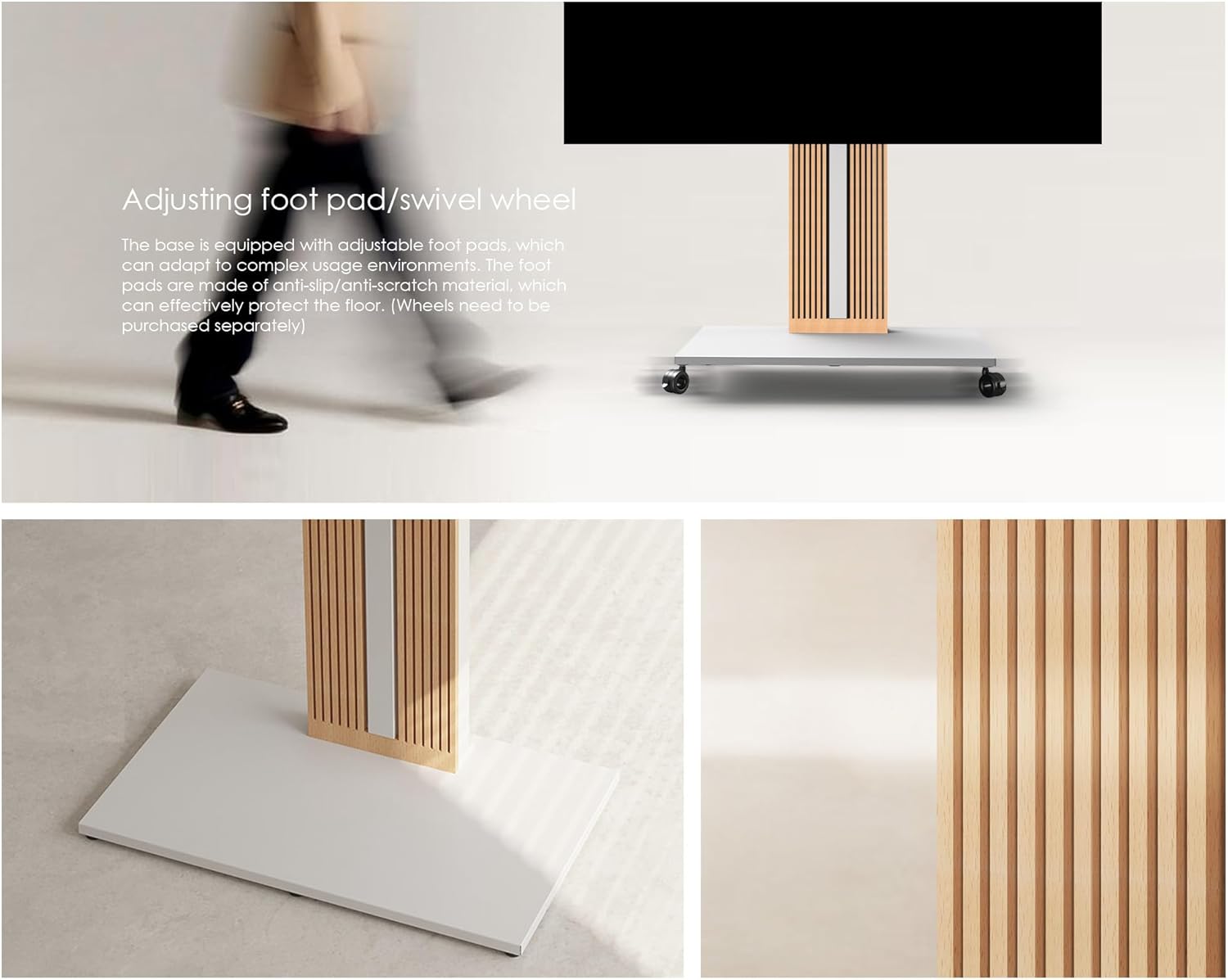
Image 5.1: Illustrating the swivel feature and adjustable foot pads.
5.2: Height Adjustment
The TV stand offers 6 levels of height adjustment, allowing the TV to be positioned between 45.2 inches and 55 inches from the floor. To adjust the height, carefully lift the TV slightly (with assistance if necessary) and reposition the mounting arms to the desired height setting on the vertical column. Secure the arms in place.

Image 5.2: Visual representation of the TV height adjustment feature.
6. Cable Management
The FITUEYES Zen Series TV stand features a hidden back storage compartment designed to keep your cables and TV boxes neat and out of sight.
- Route all necessary cables (power, HDMI, etc.) through the designated openings in the vertical support column.
- Utilize the internal space to secure power strips or small media devices.
- Close the back panel of the column to conceal the cables, providing a clean and aesthetically pleasing setup.

Image 6.1: Demonstration of the integrated cable management system.
7. Maintenance
Regular maintenance will help prolong the life and appearance of your TV stand.
- Cleaning: Wipe surfaces with a soft, damp cloth. Avoid abrasive cleaners or harsh chemicals that may damage the wood or metal finish.
- Inspections: Periodically check all screws and fasteners to ensure they are tight. Retighten if necessary.
- Wood Care: For the beech wood components, avoid prolonged exposure to direct sunlight or extreme temperature changes to prevent warping or fading.
- Dusting: Regularly dust the stand to prevent buildup, especially in the cable management area.
8. Troubleshooting
If you encounter any issues with your TV stand, refer to the following common problems and solutions:
| Problem | Possible Cause | Solution |
|---|---|---|
| Stand is wobbly or unstable. | Loose fasteners; uneven floor; incorrect assembly. | Ensure all screws are tightened. Adjust the foot pads to level the stand on uneven surfaces. Review assembly steps. |
| TV does not swivel smoothly. | Obstruction; excessive weight; mechanism issue. | Check for cables or objects obstructing the swivel path. Ensure TV weight is within limits. Contact support if mechanism feels stiff. |
| Cables are visible despite management system. | Improper routing; too many cables. | Re-route cables carefully through the designated channels. Use cable ties to bundle excess length. |
| TV cannot be mounted. | Incorrect VESA pattern; TV too large/heavy. | Verify your TV's VESA pattern matches the stand's compatibility. Check TV size and weight against specifications. |
If the problem persists, please contact FITUEYES customer support for further assistance.
9. Specifications
| Feature | Detail |
|---|---|
| Product Dimensions | 31.5 x 18.9 x 55 inches (80 x 48 x 140 cm) |
| Item Weight | 60.6 pounds (27.5 kg) |
| Compatible TV Sizes | 55 to 88 inches |
| Maximum Load Capacity | 132 lbs (60 kg) |
| VESA Compatibility | 200x100mm, 200x200mm, 300x100mm, 300x200mm, 300x300mm, 400x100mm, 400x200mm, 400x300mm, 400x400mm, 500x100mm, 500x200mm, 500x300mm, 500x400mm, 600x100mm, 600x200mm, 600x300mm, 600x400mm |
| Swivel Angle | ±30 Degrees |
| Height Adjustment | 6 levels, from 45.2 to 55 inches (114.8 cm to 139.8 cm) |
| Material | Beech Wood, Metal |
| Color | White |
| Mounting Type | Floor Mount |
10. Warranty and Support
FITUEYES products are designed for durability and performance. For specific warranty details, please refer to the warranty card included with your product or visit the official FITUEYES website.
Customer Support:
If you have any questions, require assistance with assembly, or need to report missing/damaged parts, please contact FITUEYES customer support:
- Website: Visit the FITUEYES Store on Amazon
- Refer to your product packaging for direct contact information (email/phone).
Please have your model number (Zen Series, 55"-88" TV stand White) and purchase date ready when contacting support.
Ask a question about this manual
Ask about setup, troubleshooting, compatibility, parts, safety, or missing instructions. Manuals+ will review the question and use this page’s manual context to help answer it.