
ZOSI C296
ZOSI C296 4K 8MP Wired WiFi PT Security Camera Instruction Manual
Model: C296
Brand: ZOSI
1. Introduction
The ZOSI C296 is a high-performance 4K 8MP wired WiFi Pan/Tilt security camera designed for outdoor surveillance. It features advanced AI detection capabilities, color night vision, two-way audio, and flexible storage options to enhance your security monitoring.
1.1 Key Features
- 4K 8MP Super HD Resolution: Delivers superior image quality with high-sensitivity sensors for exceptional low-light performance.
- Intelligent AI Detection: Accurately identifies people, vehicles, pets, and packages, reducing false alarms.
- Pan & Tilt Functionality: Offers a wide 355-degree horizontal and 140-degree vertical rotation for comprehensive coverage and auto-tracking.
- Color Night Vision: Provides clear, full-color video even in low-light conditions using warm lights, alongside traditional infrared night vision.
- Two-Way Audio: Built-in speaker and microphone allow for real-time communication or pre-recorded voice alerts.
- Flexible Storage: Supports Micro SD card (up to 128GB, not included) and optional cloud storage.
- Weatherproof Design: IP66 rated for reliable outdoor use in various weather conditions.
1.2 Package Contents
Please check the package for the following items:
- 1 x ZOSI C296 WiFi Camera
- 1 x Power Adapter
- 1 x Quick Start Guide
- 1 x Waterproof Lid
- 1 x Mounting Screw Bag
- 1 x Mounting Hole Template
- 1 x Warning Sticker

Image: ZOSI C296 Package Contents. This image displays all items included in the product box, such as the camera, power adapter, quick start guide, mounting accessories, and warning sticker.
2. Setup
2.1 Physical Installation
Before mounting, ensure the camera is within range of your 2.4GHz Wi-Fi network and has a smooth connection. Use the provided mounting hole template to mark drill points on your desired installation surface (wall or ceiling).
- Attach the installation sticker to the desired mounting location.
- Drill holes as indicated on the sticker and insert the rubber plugs.
- Fix the camera to the mounting sticker using the provided screws. Adjust the camera to the desired angle.

Image: ZOSI C296 Product Diagram. This diagram labels key components of the camera, including antennas, lens, IR-LEDs, warm lights, microphone, speaker, RJ45 port, power port, reset button, and Micro SD card slot.
2.2 Initial Power-Up
Connect the camera to the power adapter. The camera will initiate its startup sequence. Ensure the indicator light turns blue, signifying it is ready for connection.
2.3 App Connection (ZOSI Smart App)
The ZOSI C296 camera is managed via the 'ZOSI Smart' mobile application. Download the app from your device's app store.
- Open the ZOSI Smart app and register/log in.
- Tap the '+' icon in the upper right corner to add a device.
- Scan the QR code located on the camera body.
- Follow the on-screen prompts to connect the camera to your 2.4GHz Wi-Fi network and complete the setup.
Video: ZOSI C296 8MP 4K WiFi Pan & Tilt Camera. This video provides a visual overview of the ZOSI C296 camera's features and capabilities.
Video: How to use C296 Pan&Tilt WiFi Security Camera. This instructional video demonstrates the process of setting up and using the pan and tilt functions of the C296 camera via the mobile app.
3. Operating the Camera
3.1 Live View and Playback
Access the live stream of your camera anytime, anywhere through the ZOSI Smart app. You can also review recorded footage stored on your Micro SD card or cloud storage.
3.2 Pan & Tilt Control
Use the directional controls within the app to remotely pan (355 degrees horizontally) and tilt (140 degrees vertically) the camera lens, eliminating blind spots. The camera also supports 5X digital zoom.

Image: ZOSI C296 Pan and Tilt with Human Tracking. This image illustrates the camera's 355-degree pan and 140-degree tilt capabilities, along with its human tracking feature, showing green boxes around detected individuals.
3.3 AI Detection and Alerts
The camera's intelligent AI detection can differentiate between people, vehicles, pets, and packages. Customize motion detection zones to receive relevant notifications. Upon detection, sound and light alarms can activate automatically, and you will receive email and push notifications to your mobile device.

Image: ZOSI C296 AI-Powered Human Detection. This image shows the camera's interface highlighting human detection, with a person walking in a garden area outlined by a green box.

Image: ZOSI C296 AI-Powered Vehicle Detection. This image demonstrates the camera's vehicle detection capability, with a car in a driveway outlined by a green box.
3.4 Night Vision Modes
The C296 offers three night vision modes:
- Default Infrared Black & White Night Vision: Standard black and white view in darkness.
- Full-Color Night Vision: Utilizes 4 warm lights to provide full-color images at night.
- Auto (Smart) Night Vision: Automatically switches between infrared and color night vision based on detected motion.
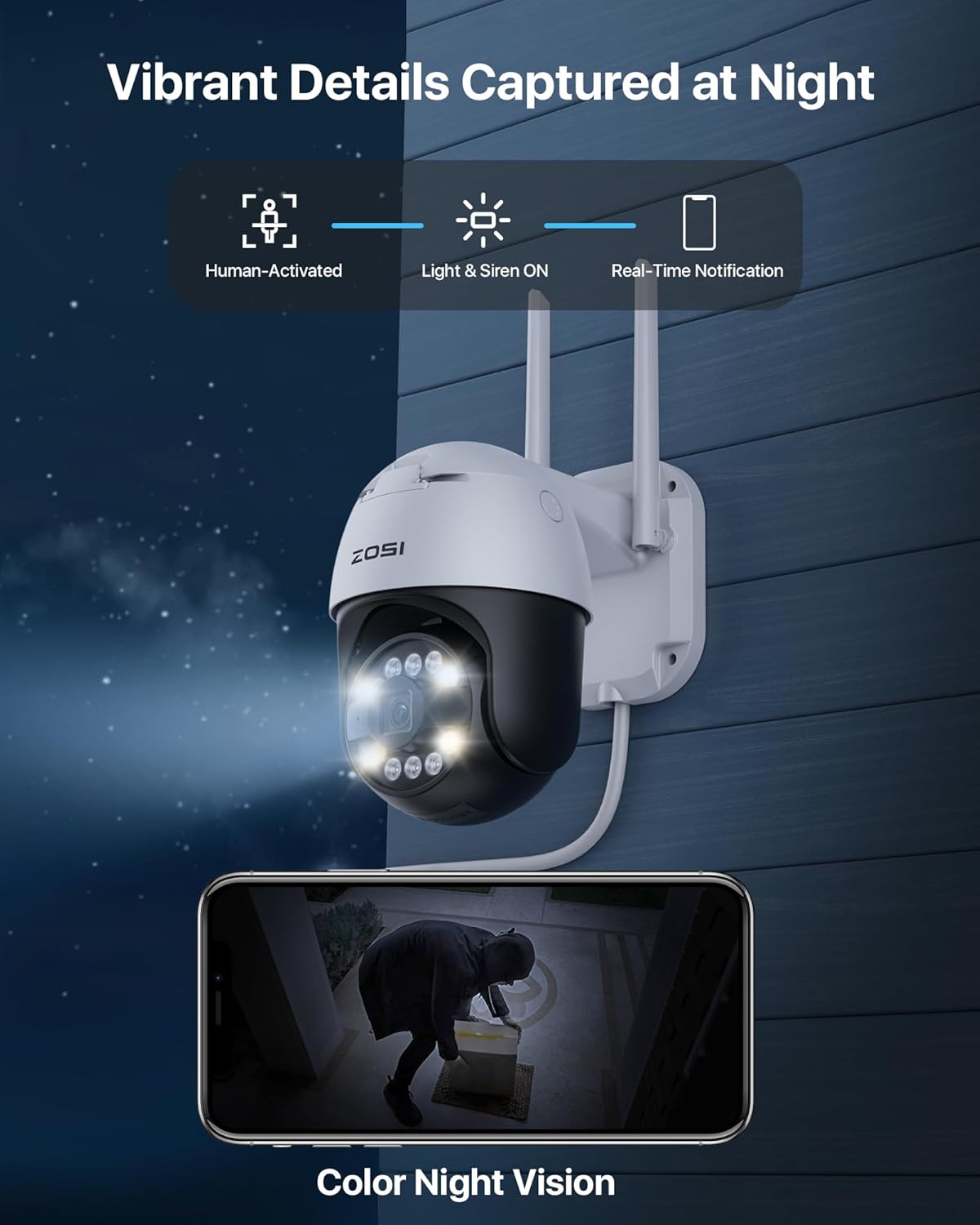
Image: ZOSI C296 Color Night Vision. This image shows a night scene captured by the camera, demonstrating its ability to provide clear, full-color video in low-light conditions, with a person highlighted by the camera's spotlight.
3.5 Two-Way Talk
Engage in real-time conversations with visitors or deter intruders using the built-in speaker and microphone. You can also use preset or personalized voice messages.

Image: ZOSI C296 Two-Way Audio Interaction. This image depicts a delivery person at a door and a user interacting via the ZOSI Smart app, demonstrating the two-way audio feature.
3.6 Storage Options
Record videos to a Micro SD Card (up to 128GB, not included) for local storage, or opt for cloud storage for remote access and backup.

Image: ZOSI C296 Local and Cloud Storage. This image highlights the camera's support for Micro SD card storage (up to 128GB) and a 30-day free trial for encrypted cloud storage.
4. Maintenance
4.1 Cleaning
Regularly clean the camera lens with a soft, dry cloth to ensure clear image quality. Avoid using harsh chemicals or abrasive materials that could damage the lens or casing.
4.2 Firmware Updates
Periodically check the ZOSI Smart app for available firmware updates. Keeping your camera's firmware up-to-date ensures optimal performance, security, and access to new features.
4.3 Weather Protection
The camera is IP66 weatherproof, designed to withstand rain and snow. However, ensure all cable connections are properly sealed using the provided waterproof lid to prevent water ingress.

Image: ZOSI C296 Weatherproof Design. This image shows the camera mounted outdoors, with rain falling, illustrating its IP66 weatherproof rating.
5. Troubleshooting
- Camera not connecting to Wi-Fi: Ensure your Wi-Fi is 2.4GHz (5GHz is not supported). Check Wi-Fi signal strength at the camera's location. Reboot the camera and your router.
- No image/poor image quality: Verify power connection. Clean the camera lens. Check network connection stability. Ensure the camera is set to 4K resolution in the app settings.
- False motion alerts: Adjust motion detection sensitivity and customize detection zones in the app to focus on critical areas and minimize triggers from environmental factors.
- Two-way audio issues: Check microphone and speaker settings in the app. Ensure there is no obstruction around the microphone or speaker.
- SD card not recording: Ensure the SD card is correctly inserted and formatted within the app. Check recording settings (e.g., continuous, motion-triggered).
6. Specifications
| Feature | Detail |
|---|---|
| Model Number | C296 |
| Indoor/Outdoor Usage | Outdoor |
| Video Capture Resolution | 4K (8MP) |
| Connectivity Technology | Wireless (Wi-Fi 2.4GHz) |
| Connectivity Protocol | Wi-Fi |
| Power Source | Corded Electric |
| Special Feature | 2-Way Audio, AI Detection (Person, Vehicle, Face) |
| Viewing Angle | 355 Degrees (Pan), 140 Degrees (Tilt) |
| International Protection Rating | IP66 |
| Item Weight | 1.92 pounds |
| Product Dimensions | 9 x 8 x 5 inches |
7. Warranty and Support
For warranty information, technical support, or any inquiries regarding your ZOSI C296 camera, please refer to the official ZOSI website or contact ZOSI customer service directly. Contact details are typically found in the Quick Start Guide or on the product packaging.
Ask a question about this manual
Ask about setup, troubleshooting, compatibility, parts, safety, or missing instructions. Manuals+ will review the question and use this page’s manual context to help answer it.