Introduction
Thank you for choosing the Pewkim Smart Bark Collar. This device is designed to help train your dog to reduce excessive barking through humane and effective methods. It features adjustable sensitivity and multiple training modes, including beep, vibration, and static correction, suitable for various dog sizes and temperaments. Please read this manual carefully before use to ensure proper operation and the safety of your pet.

Image: The Pewkim Smart Bark Collar, featuring a white main unit with a colorful display attached to a black and white patterned adjustable strap.
Setup and Preparation
Package Contents
Before beginning, please ensure all components are present in the package:

Image: A visual representation of the items included in the product box, such as the collar device, charging cable, test board, and silicone covers.
- 1 x Bark Collar Device & Adjustable Strap
- 2 x Electric Shock Terminals (if applicable to model)
- 1 x Test Board
- 2 x Silicone Protective Covers
- 1 x USB Charging Cable
- 1 x User Manual (this document)
Charging the Device
The collar features a long-lasting battery. Before first use, fully charge the device. A full charge typically takes approximately 1.5 hours and provides up to 20 days of working time, depending on usage.

Image: The bark collar connected to a USB charging cable, illustrating the charging process and highlighting its long battery life.
- Connect the USB charging cable to the charging port on the collar.
- Plug the other end of the cable into a standard USB power adapter (not included) or a computer USB port.
- The indicator light on the collar will show charging status (refer to the device's display for specific indicators).
- Once fully charged, disconnect the cable.
Fitting the Collar
Proper fit is crucial for the collar's effectiveness and your dog's comfort. The adjustable nylon strap is suitable for dogs weighing 8-120 lbs with neck sizes ranging from 9 to 26 inches.

Image: The bark collar shown with various dog breeds, demonstrating its adjustable nature and suitability for different sizes, along with measurements for the strap.
- Place the collar around your dog's neck, ensuring the main unit is positioned centrally on the underside of the neck.
- Adjust the strap so that it is snug but not too tight. You should be able to fit one or two fingers comfortably between the collar and your dog's neck.
- Ensure the contact points (if using static correction) are touching your dog's skin. If your dog has long fur, you may need to trim the fur slightly or use longer contact points (if provided) to ensure proper contact.
- Check the fit regularly, especially for growing puppies.
Operating Instructions
Powering On/Off
Refer to the device's specific buttons for power control. Typically, a long press of the power button will turn the device on or off.
Understanding Training Modes
The Pewkim Smart Bark Collar offers 5 safe training modes to address different barking behaviors. These modes can be cycled through using the mode button on the device.
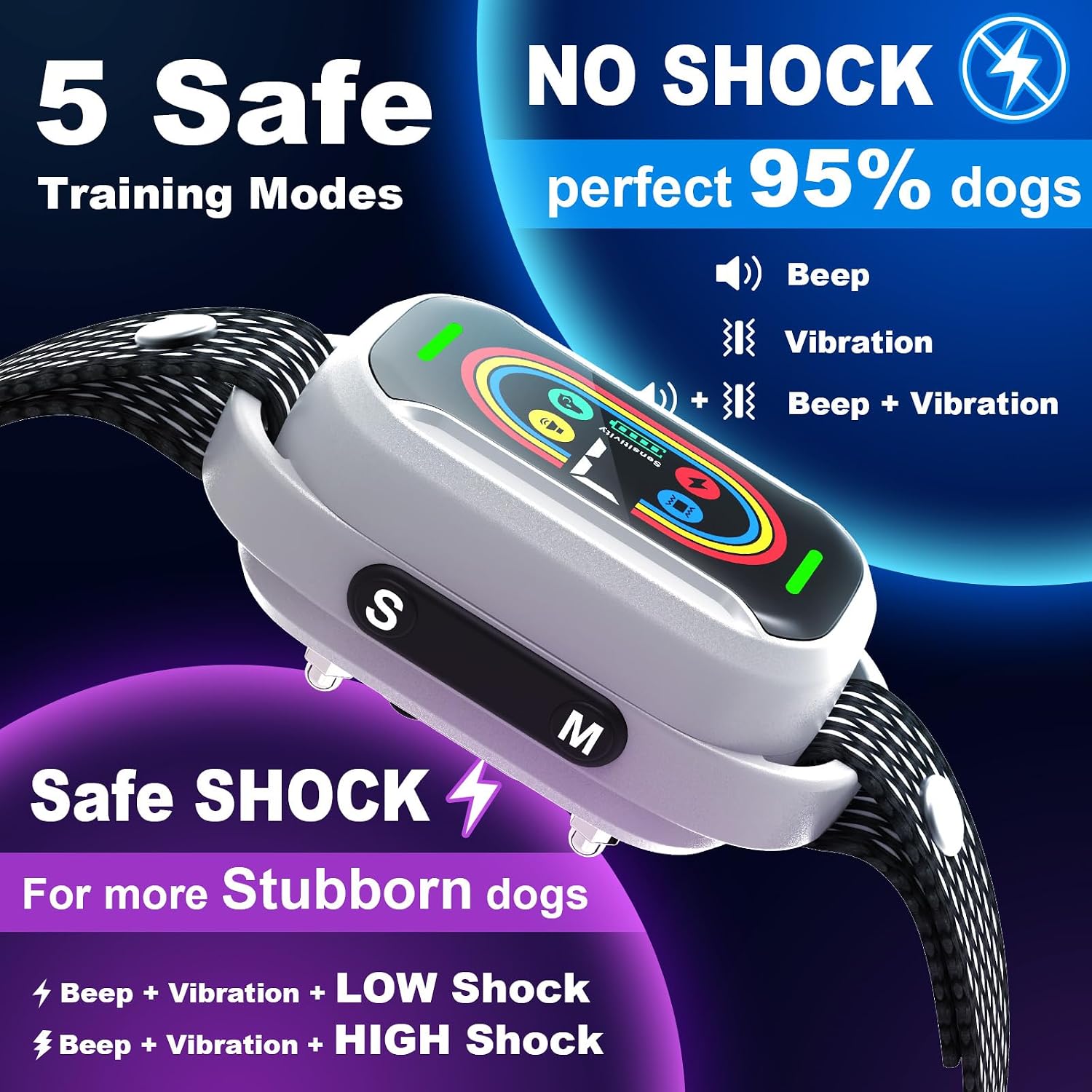
Image: The bark collar displaying icons for its five training modes: Beep, Vibration, Beep + Vibration, Beep + Vibration + LOW Shock, and Beep + Vibration + HIGH Shock.
- Beep Only: Emits an audible tone when barking is detected.
- Vibration Only: Delivers a gentle vibration when barking is detected.
- Beep + Vibration: Combines an audible tone with vibration.
- Beep + Vibration + LOW Static Correction: Combines beep, vibration, and a low level of static correction.
- Beep + Vibration + HIGH Static Correction: Combines beep, vibration, and a higher level of static correction.
It is recommended to start with the lowest intensity mode (Beep Only) and gradually increase if necessary, observing your dog's reaction.
Adjusting Sensitivity Levels
The collar features 7 adjustable sensitivity levels, allowing you to fine-tune how easily the collar detects your dog's bark. A higher sensitivity level means the collar will react to softer barks, while a lower level requires louder barks to trigger a response.

Image: A close-up of the bark collar's display showing the sensitivity level indicator, ranging from 1 to 7.
Adjust the sensitivity using the dedicated buttons on the device until it accurately responds to your dog's barks without false triggers from other noises.
Smart Anti-Interference Technology
The collar is equipped with smart anti-interference technology that automatically filters out external noises and other dogs' barking, ensuring that the collar only activates in response to your dog's specific barks. This minimizes false triggers and provides more effective training.

Image: A dog wearing the bark collar, with graphics illustrating how the smart anti-interference feature filters out head shaking, other dogs' barking, and general noise.
Maintenance and Care
To ensure the longevity and proper functioning of your Pewkim Smart Bark Collar, follow these maintenance guidelines:
- Cleaning: The collar is IPX7 waterproof, meaning it can withstand splashes and brief immersion. You can wipe the device clean with a damp cloth. Do not use harsh chemicals or abrasive cleaners.
- Contact Points: Regularly check the contact points for dirt or debris. Clean them as needed to ensure good contact with your dog's skin.
- Strap: Inspect the collar strap for any signs of wear and tear. Replace if damaged.
- Storage: When not in use for extended periods, store the collar in a cool, dry place. Ensure it is fully charged before storing to preserve battery health.

Image: A dog playing in water while wearing the bark collar, demonstrating its IPX7 waterproof rating for activities like swimming, bathing, and rain.
Troubleshooting
If you encounter issues with your bark collar, please refer to the following common problems and solutions:
| Problem | Possible Cause | Solution |
|---|---|---|
| Collar not activating when dog barks. | Low battery; Sensitivity too low; Improper fit; Contact points not touching skin. | Charge the collar; Increase sensitivity level; Adjust collar fit; Ensure contact points are making good contact. |
| Collar activating without dog barking (false triggers). | Sensitivity too high; External noise interference. | Decrease sensitivity level; Ensure the collar is snug and not moving excessively. The smart anti-interference feature should minimize this. |
| Collar not holding a charge. | Faulty charging cable or adapter; Battery degradation. | Try a different USB charging cable and adapter; If the issue persists, contact customer support. |
| Dog shows discomfort or irritation. | Collar too tight; Static correction level too high; Prolonged wear. | Loosen the collar slightly; Reduce the static correction level or switch to beep/vibration only; Do not leave the collar on for more than 12 hours a day. |
Product Specifications
| Feature | Detail |
|---|---|
| Brand | Pewkim |
| Model Number | B0CHRV75Z9 |
| Item Weight | 5.6 ounces |
| Product Dimensions | 3.5 x 1.5 x 0.04 inches (collar unit) |
| Package Dimensions | 3.98 x 3.7 x 1.81 inches |
| Battery Type | Built-in Rechargeable Battery |
| Charging Time | Approx. 1.5 hours |
| Working Time | Up to 20 days (depending on usage) |
| Waterproof Rating | IPX7 |
| Sensitivity Levels | 7 Adjustable Levels |
| Training Modes | 5 (Beep, Vibration, Beep+Vibration, Beep+Vibration+Low Shock, Beep+Vibration+High Shock) |
| Recommended Dog Weight | 8-120 lbs |
| Collar Length | Adjustable, 9-26 inches |
| Color | White (collar unit) |
| Closure Type | Buckle |
| Date First Available | September 11, 2023 |
Warranty and Support
Pewkim stands behind the quality of its products. Specific warranty information is typically provided with your purchase documentation or can be found on the official Pewkim website. For any questions, technical support, or warranty claims, please refer to the contact information provided on the product packaging or visit the official Pewkim brand store on Amazon:
You can also find the official User Guide (PDF) for this product here: Pewkim Smart Bark Collar User Guide PDF