
Syxtidy NEU180,NEU181,NEU182a,NEU188a,E0202
Syxtidy Vacuum Filters for Eureka PowerSpeed NEU180 Series - Instruction Manual
Comprehensive instruction manual for Syxtidy E0202 foam filters, compatible with Eureka PowerSpeed NEU180, NEU182A, NEU180B, NEU181, NEU188, NEU202, NEU280, and other specified bagless upright vacuum cleaners. Includes installation, maintenance, and compatibility details.
1. Product Overview
The Syxtidy E0202 foam filters are designed as replacement parts for various Eureka PowerSpeed upright vacuum cleaner models. These filters play a critical role in capturing dust, debris, and allergens, ensuring your vacuum maintains optimal suction power and contributes to a cleaner home environment. This package includes 4 premium quality foam filters.

Image: A stack of four round black and white foam filters, representing the product package.
Video: Demonstrating the features and dimensions of the pre-motor filters.
2. Compatibility
These Syxtidy E0202 foam filters are compatible with the following Eureka PowerSpeed upright vacuum cleaner models and replace part # E0202:
- Eureka PowerSpeed NEU180, NEU180B, NEU180C
- Eureka PowerSpeed NEU181, NEU182A, NEU182B, NEU182
- Eureka PowerSpeed NEU186, NEU188, NEU188A, NEU190, NEU192A, NEU1982
- Eureka PowerSpeed NEU202, NEU280, NEU250, NEU610, NEU610DISP
- Other compatible models: NEU12CT, BDFSE201, BDLCR200, HDUE2CR, KAE2CP

Image: Visual representation of compatible Eureka PowerSpeed vacuum cleaner models.
3. Key Features
- Premium Quality Material: Constructed from durable foam for effective filtration.
- Washable and Reusable: Designed for repeated use after proper cleaning and drying.
- Easy Installation: Can be installed and replaced without the need for special tools.
- Optimal Filtration: Helps maintain strong suction and captures fine particles.
4. Installation Guide
Follow these steps to install or replace your vacuum filter:
- Safety First: Always ensure your vacuum cleaner is unplugged from the power outlet before performing any maintenance or installation.
- Access Dust Cup: Locate and remove the dust cup assembly from your Eureka PowerSpeed vacuum cleaner.
- Remove Old Filter: Open the dust cup and carefully remove the existing foam filter. Dispose of the old filter if it is no longer usable.
- Insert New Filter: Place the new Syxtidy E0202 foam filter into the designated slot within the dust cup. Ensure the side marked "Inside first" is facing inwards towards the vacuum's motor for correct airflow and filtration.
- Reassemble: Close the dust cup securely and reattach it to the vacuum cleaner until it clicks into place.

Image: A filter showing the "Inside first" label and its diameter for proper orientation and fit.
Video: Step-by-step demonstration of replacing the pre-motor foam filters.
5. Maintenance and Care
Proper maintenance of your filters ensures prolonged life and consistent vacuum performance:
- Regular Cleaning: It is recommended to clean the foam filter every 1-2 months, or more frequently if the vacuum is used heavily or in dusty environments.
- Washing Instructions: Hand wash the foam filter thoroughly with clean water. Gently squeeze out excess water.
- Drying: Allow the filter to completely air dry for at least 24 hours before reinstallation. Ensure it is fully dry to prevent mold growth and damage to the vacuum. Do not use a dryer or any heat source.
- Replacement Schedule: For optimal vacuum suction and air quality, replace the filter every 2-3 months. Having multiple filters allows for continuous use while one is drying.
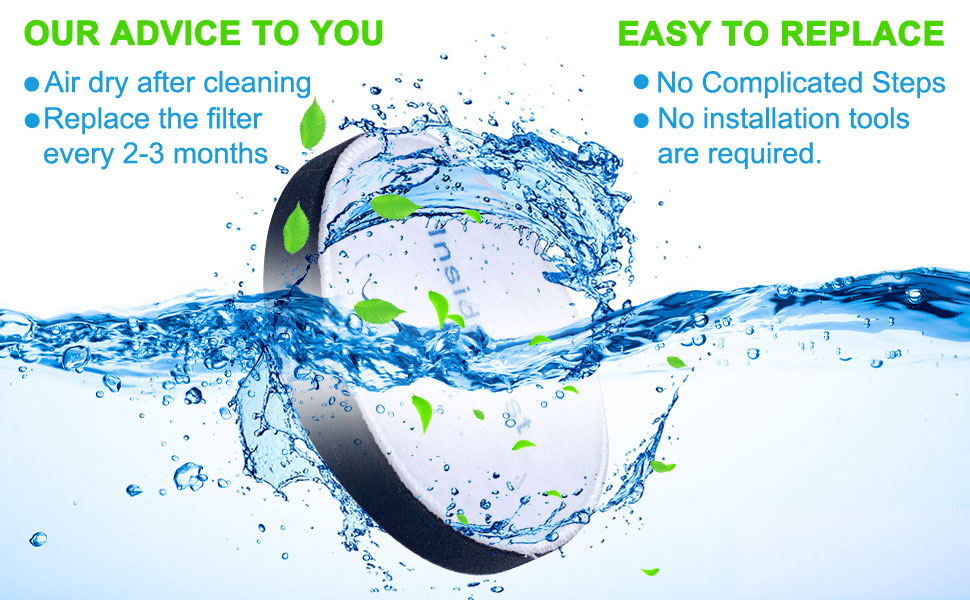
Image: A foam filter being washed under running water, illustrating the cleaning process.
Video: Demonstration of washing and cleaning the foam filter.
6. Troubleshooting
If you encounter any issues with your vacuum cleaner after installing the new filters, consider the following:
- Reduced Suction: Check if the filter is properly seated in the dust cup. If the filter is new, ensure it is not wet. If the filter is old, it may be clogged and require cleaning or replacement.
- Unusual Odors: A dirty or damp filter can cause unpleasant odors. Clean and thoroughly dry the filter, or replace it with a new one.
- Dust Escaping: Verify that the filter is correctly installed and not damaged. A damaged filter will not provide effective filtration and should be replaced.
- Vacuum Not Turning On: Ensure the vacuum is properly plugged in and the power switch is on. This issue is typically not related to the filter.
7. Specifications
| Attribute | Detail |
|---|---|
| Brand | Syxtidy |
| Model Info | NEU180, NEU181, NEU182A, NEU188A, E0202 |
| Item Weight | 0.32 ounces |
| Product Dimensions | 5.2 x 5.2 x 0.7 inches |
| Material Type | Foam |
| Reusability | Reusable |

Image: The black foam side of the filter showing its diameter.
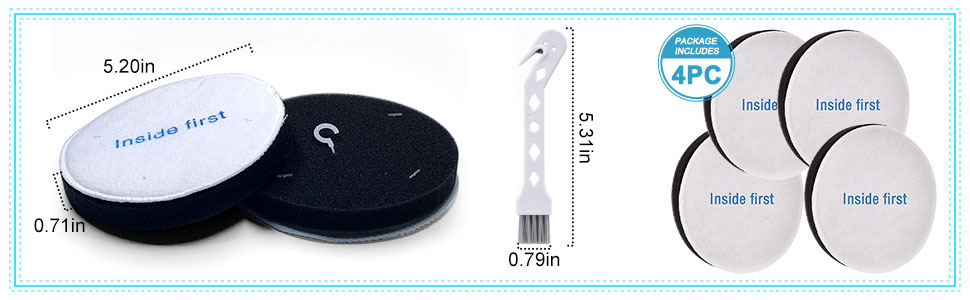
Image: Detailed dimensions of the filter and an included cleaning brush.
8. What's in the Box
- 4-Pack Pre Motor Foam Filters Replacement for Eureka Neu180
9. Support and Warranty
For any questions, concerns, or support regarding your Syxtidy filters, please do not hesitate to contact our customer service team. We are committed to providing assistance and aim to reply to all inquiries within 12 hours.
Please refer to your original Eureka vacuum cleaner manual for specific warranty information related to the vacuum unit itself. This instruction manual pertains specifically to the Syxtidy replacement filters.
Ask a question about this manual
Ask about setup, troubleshooting, compatibility, parts, safety, or missing instructions. Manuals+ will review the question and use this page’s manual context to help answer it.