1. Introduction
This manual provides detailed instructions for the assembly, operation, and maintenance of your new TIQLAB 40-Inch L-Shaped Computer Desk. Please read this manual thoroughly before beginning assembly or use to ensure proper function and safety. Keep this manual for future reference.
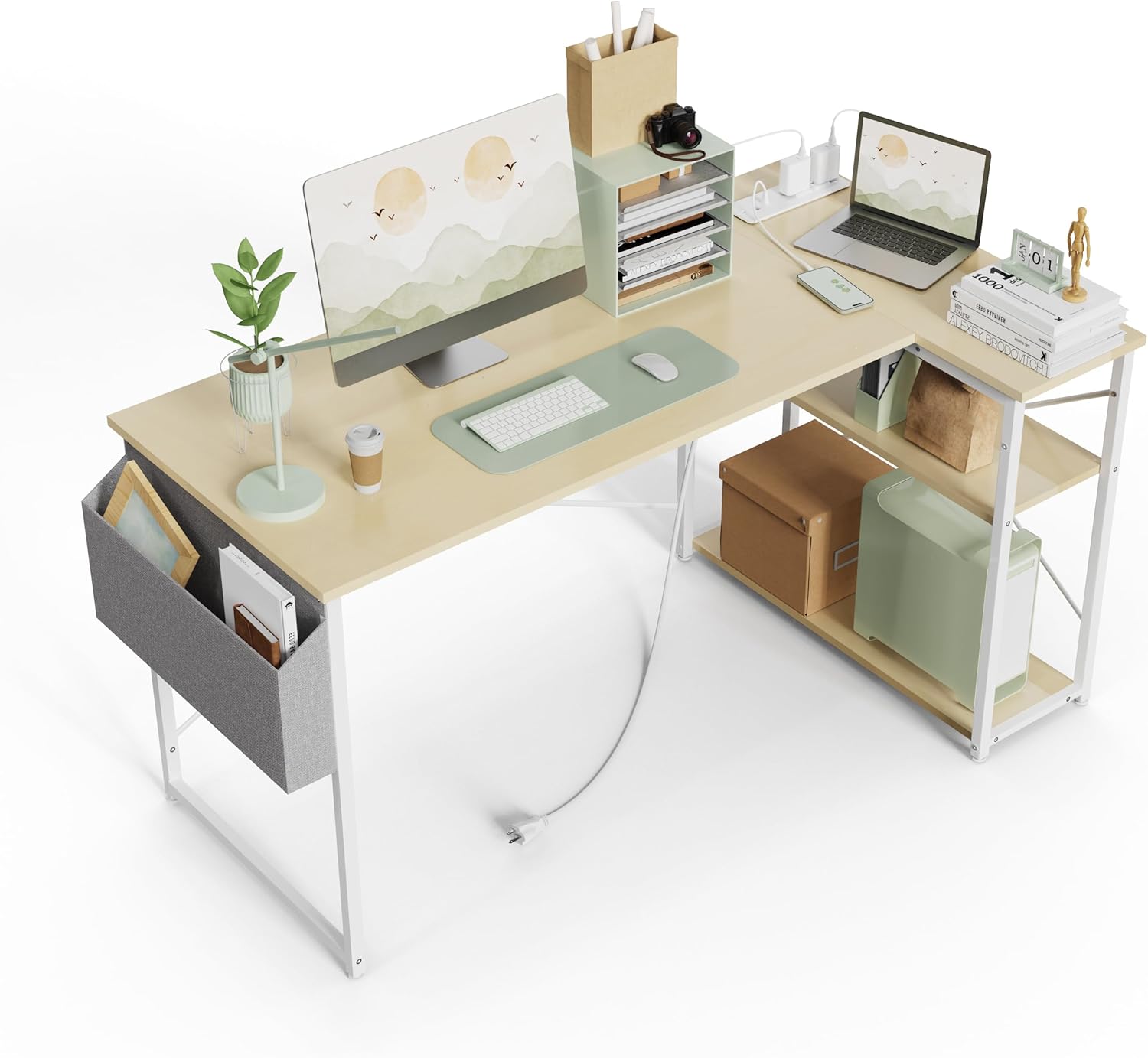
Image 1.1: TIQLAB 40-Inch L-Shaped Computer Desk
2. Safety Information
To prevent injury or damage to the product, adhere to the following safety guidelines:
- Anchor the desk to the wall to prevent tipping. This is crucial for stability, especially in households with children or pets.
- Do not exceed the weight limit of 50 lbs (22.6 kg) on the desktop.
- Ensure all screws and fasteners are securely tightened during assembly and periodically check for looseness.
- Keep liquids away from the integrated power outlets to prevent electrical hazards.
- Do not stand or sit on the desk.
3. Product Features
- Integrated Power Outlets: Features two AC outlets, one USB port, and one Type-C port for convenient device charging.
- Reversible L-Shape Design: The smaller desktop section with shelves can be installed on either the left or right side to suit your space.
- Two-Tier Storage Shelves: Provides organized storage for books, files, and other office essentials.
- Side Storage Bag: An additional fabric bag for quick access storage of notebooks, headphones, or other items.
- Sturdy Construction: Made with a solid MDF board desktop and a stable metal frame, enhanced with an X-frame structure for stability.
- Adjustable Feet Pads: Ensures stability on uneven floors and protects your flooring.

Image 3.1: Key Features of the TIQLAB Desk
4. Package Contents
Before assembly, verify that all components are present and undamaged. Refer to the packing list included with your product for a complete inventory. Typically, the package includes:
- Desktop panels (main and L-shaped extension)
- Metal frame components
- Storage shelves
- Side storage bag
- Integrated power outlet unit
- Assembly hardware (screws, bolts, specialized L-shaped Allen wrench)
- Instruction manual
5. Setup and Assembly
Assembly is designed to be straightforward with clear, step-by-step instructions and labeled parts. A specialized L-shaped Allen wrench is included. For optimal results, follow the pictorial instructions provided in your package.
5.1 Reversible Design
The L-shaped section with the shelves can be configured on either the left or right side of the main desktop. Decide your preferred orientation before starting assembly.

Image 5.1: Reversible Design Options
5.2 Assembly Video
For a visual guide to assembly and features, please watch the official product video below:
Video 5.1: Official TIQLAB L Shaped Computer Desk Overview and Assembly Guide. This video demonstrates the desk's features and provides a visual walkthrough of the assembly process.
6. Operating Instructions
6.1 Integrated Power Outlets
The desk includes a built-in power strip with two 125V/12A AC outlets, one 5V/3A USB port, and one 5V/3A Type-C port. Connect the desk's main power cord to a wall outlet. You can then plug in your devices directly into the desk's integrated outlets for convenient power access.

Image 6.1: Integrated Power Outlets in Use
6.2 Storage Utilization
Utilize the two-tier open shelves for organizing books, binders, or small electronic devices. The detachable side storage bag can hold magazines, headphones, or other personal items, helping to keep your workspace tidy.
7. Maintenance
- Cleaning: Wipe the desktop and metal frame with a soft, damp cloth. Avoid harsh chemicals or abrasive cleaners that could damage the finish.
- Regular Checks: Periodically inspect all fasteners to ensure they remain tight. Re-tighten if necessary to maintain stability.
- Power Outlets: Ensure the power outlets are free from dust and debris. Do not attempt to disassemble the power unit.
8. Troubleshooting
- Wobbling Desk: Check that all assembly screws are tightened. Adjust the leveling feet at the bottom of the desk legs to stabilize it on uneven surfaces.
- Power Outlets Not Working: Ensure the desk's main power cord is securely plugged into a functional wall outlet. Check for any tripped circuit breakers in your home.
- Missing Parts: If any parts are missing or damaged upon arrival, contact TIQLAB customer support for assistance.
9. Specifications
The following table outlines the key specifications for the TIQLAB 40-Inch L-Shaped Computer Desk:
| Feature | Specification |
|---|---|
| Brand | TIQLAB |
| Model | 40 Inch L Shaped Desk |
| Product Dimensions (D x W x H) | 27.5"D x 40"W x 29.5"H |
| Item Weight | 13.52 Kilograms |
| Color | Beige |
| Top Material Type | Engineered Wood |
| Base Material | Metal |
| Maximum Desktop Weight Capacity | 50 lbs (22.6 kg) |
| Power Outlets | 2 AC (125V/12A), 1 USB (5V/3A), 1 Type-C (5V/3A) |
| Number of Shelves | 2 |
| Special Features | Built-In USB Outlet, Reversible Shelves, Adjustable Feet Pads |
| Required Assembly | Yes |
| Warranty Type | Limited |

Image 9.1: Desk Dimensions and Weight Capacities
10. Warranty and Support
This TIQLAB product comes with a limited warranty. For specific details regarding warranty coverage, duration, and terms, please refer to the warranty information included in your product packaging or contact TIQLAB customer support directly. For any questions, technical assistance, or to report missing/damaged parts, please reach out to TIQLAB customer service through their official channels.


