Introduction
Thank you for choosing the Auromie Corner Desk. This manual provides detailed instructions for assembly, operation, maintenance, and troubleshooting to ensure safe and efficient use of your new desk. This desk is designed to optimize corner spaces, featuring a monitor stand, keyboard tray, storage shelves, a built-in charging station, and LED lighting.

Image: The Auromie Corner Desk, showcasing its design and features in a home office setting.
Important Safety Information
Please read and understand all safety instructions before assembly and use. Failure to follow these instructions may result in injury or damage to the product.
- Always ensure the desk is properly assembled and anchored to the floor to prevent tipping.
- Do not overload the desk. The maximum weight recommendation is 82.62 pounds (37.48 kg).
- Exercise caution when using the charging station to prevent electrical hazards. Ensure all devices are compatible with the power output.
- Always follow the manufacturer's instructions for assembly, use, and maintenance.
- Keep small parts and packaging materials away from children to prevent choking hazards.
Package Contents
Before beginning assembly, verify that all components listed below are present and undamaged. If any parts are missing or damaged, please contact customer support.

Image: Exploded view diagram of the desk components, including metal frames, wooden panels, and hardware.
Components:
- Wooden Panels (various sizes for desktop, monitor stand, shelves, keyboard tray)
- Metal Frame Supports (legs, crossbars, brackets)
- Charging Station Unit (2 AC outlets, 2 USB ports)
- LED Light Strip with Controller
- Assembly Hardware (screws, bolts, Allen wrench)
- Adjustable Foot Pads
Assembly Instructions
Follow these steps carefully to assemble your Auromie Corner Desk. It is recommended to assemble the desk on a soft, clean surface to prevent scratches.
Assembly Video Guide:
Video: Detailed installation guide for the Auromie Corner Desk, demonstrating each step of the assembly process.
Step-by-Step Assembly:
- Assemble the Side Frames: Attach the adjustable foot pads to the bottom of the metal leg frames. Secure the horizontal support bars between the vertical leg frames using the provided screws.
- Attach Side Shelves: Fasten the wooden side shelves to the assembled side frames. Ensure they are oriented correctly and securely tightened.
- Connect the Corner Base: Place the triangular base panel on the floor. Attach the two assembled side shelf units to the base panel using the appropriate screws.
- Install Keyboard Tray Rails: Secure the metal rails for the keyboard tray to the underside of the main desktop panel.
- Attach Main Desktop: Carefully place the main desktop panel onto the assembled frame, aligning the screw holes. Secure it with screws.
- Install Monitor Stand: Attach the metal brackets to the monitor stand panels, then secure the monitor stand to the main desktop using the designated screws.
- Mount Charging Station: Insert the charging station unit into the pre-cut opening on the desktop. Secure it with screws.
- Apply LED Light Strip: Clean the underside of the monitor stand. Peel the adhesive backing from the LED light strip and firmly press it into place along the edge. Connect the LED strip to its controller and power source.
Operating Instructions
Using the Charging Station:
The desk includes a built-in charging station with 2 AC outlets and 2 USB ports. To use, simply plug the desk's power cord into a wall outlet. You can then plug your devices directly into the outlets or USB ports for charging.

Image: The integrated charging station with AC and USB ports.
Controlling the LED Light Strip:
The LED light strip can be controlled via a button controller or a mobile application. Refer to the separate LED light strip manual for detailed instructions on app pairing and advanced features.
- Button Control: Use the inline button controller to cycle through colors, adjust brightness, and select dynamic modes.
- App Control: Download the recommended app (details in LED strip manual) to access over 60,000 colors, music sync mode, timing functions, and hundreds of dynamic modes.
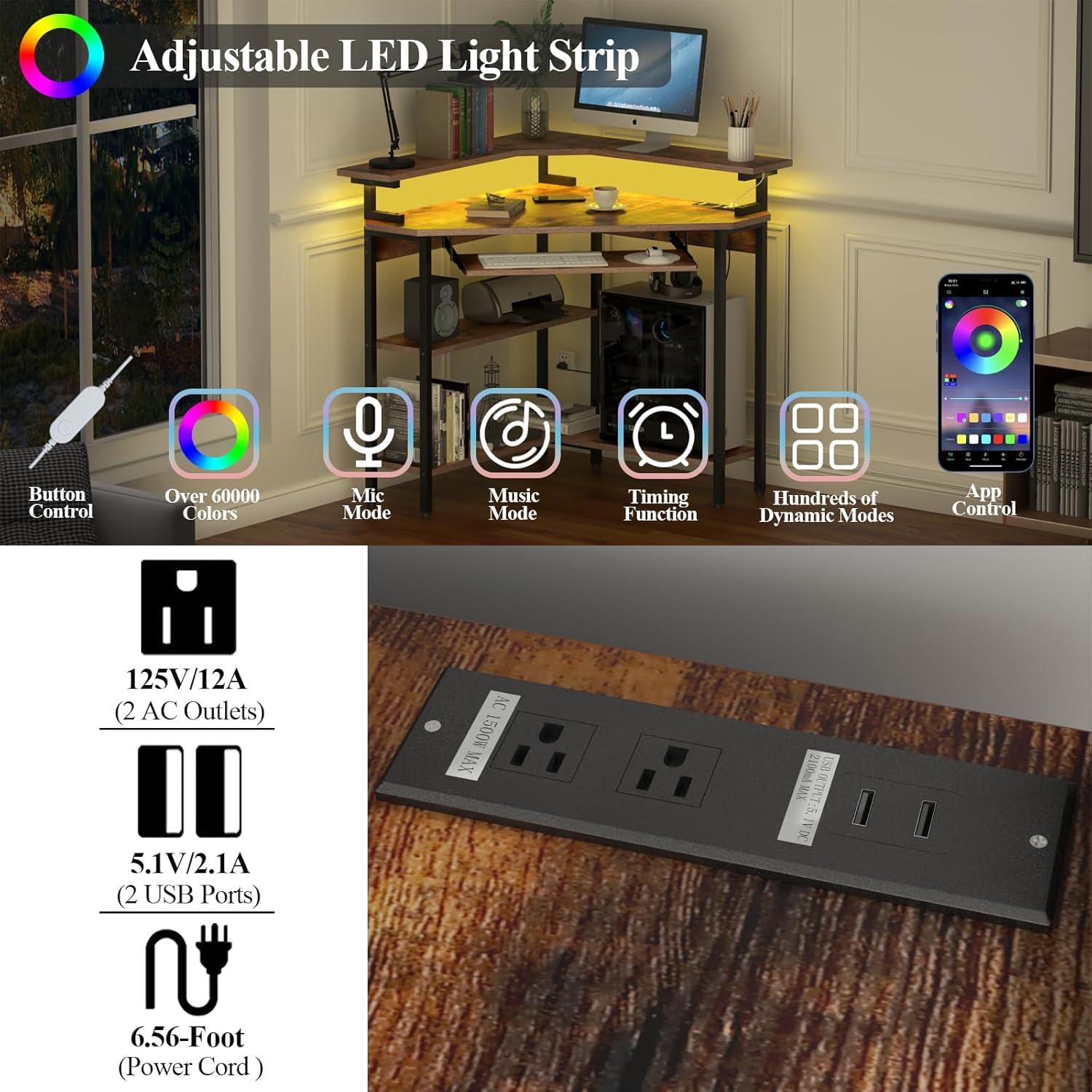
Image: Features of the adjustable LED light strip, including control options and color variety.
Maintenance
Regular maintenance will help prolong the life and appearance of your desk.
- Cleaning: Wipe surfaces with a soft, damp cloth. Avoid harsh chemicals or abrasive cleaners.
- Spills: Promptly wipe up any spills to prevent water damage to the engineered wood. The desk surface offers some water resistance.
- Hardware: Periodically check all screws and bolts to ensure they are tight. Retighten as necessary.
- Adjustable Feet: Use the adjustable foot pads to level the desk on uneven floors and prevent wobbling.

Image: Water droplets on the desk surface, illustrating its water-resistant finish.

Image: Adjustable foot pad for leveling the desk.
Troubleshooting
If you encounter any issues with your desk, refer to the following common solutions:
- Desk Wobbles: Ensure all screws are securely tightened. Adjust the foot pads on each leg to stabilize the desk on uneven surfaces.
- LED Lights Not Working: Check if the LED strip is properly connected to its controller and power source. Ensure the desk's main power cord is plugged into a functional outlet. Refer to the LED light strip's specific manual for further troubleshooting.
- Charging Station Not Functioning: Verify the desk's power cord is securely plugged in. Test the outlet with another device. Ensure your devices are properly connected to the charging station's ports.
- Keyboard Tray Sticks: Check for any obstructions in the tray's sliding mechanism. Ensure the rails are clean and free of debris.
Specifications
| Feature | Detail |
|---|---|
| Brand | Auromie |
| Model Number | G000808A2 |
| Shape | Triangular |
| Product Dimensions (D x W x H) | 33.86"D x 33.86"W x 35.43"H (86cm x 86cm x 90cm) |
| Item Weight | 41.3 Pounds (18.73 kg) |
| Maximum Weight Recommendation | 82.62 Pounds (37.48 kg) |
| Material | Engineered Wood (Top), Metal (Frame) |
| Color | Rustic Brown |
| Special Features | Built-in Charging Station (2 AC, 2 USB), LED Light Strip, Monitor Stand, Keyboard Tray, 3-Tier Storage Shelves |
| Power Cord Length | 6.56 Feet (2 meters) |
| Assembly Required | Yes (Tools included) |
Warranty and Support
The Auromie Corner Desk comes with a limited warranty. For specific warranty details, please refer to the documentation included with your purchase or contact Auromie customer service.
If you have any questions, require assistance with assembly, or need to report missing/damaged parts, please contact Auromie customer support. Contact information can typically be found on the product packaging or the official Auromie website.