
Nitori OC503
Nitori OC503 Office Chair with Footrest Instruction Manual
Model: OC503
Introduction
This manual provides detailed instructions for the assembly, operation, and maintenance of your Nitori OC503 Office Chair with Footrest. Please read this manual thoroughly before use to ensure proper function and longevity of your product.
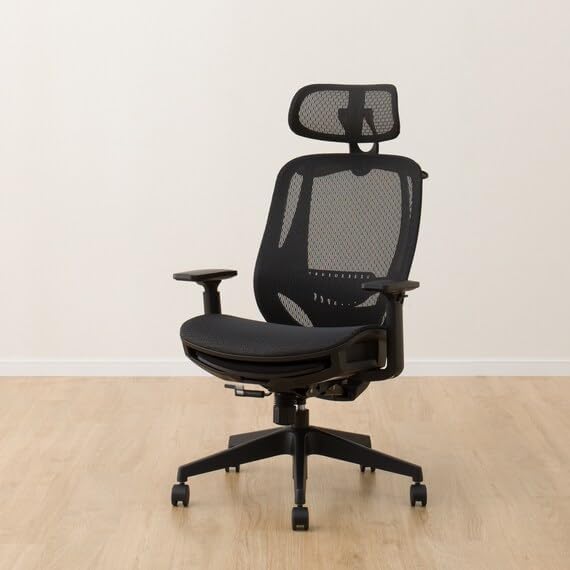
Image: Nitori OC503 Office Chair in its standard configuration.
Safety Information
- Ensure all components are securely fastened before use.
- Do not exceed the maximum recommended load of 149.69 kg (330 lbs).
- This product is designed for general household use only. It is not intended for commercial or industrial applications.
- Keep hands and fingers clear of moving parts during adjustments.
- Avoid standing on the chair or using it as a step stool.
Setup and Assembly
Assembly is required for this chair. The estimated assembly time is approximately 30 minutes. Please ensure all included components are present before beginning assembly.
Included Components:
- Assembly hardware
- Footrest
- Recliner mechanism
- Chair base with casters
- Gas lift cylinder
- Seat cushion
- Backrest
- Armrests
- Headrest
Assembly Steps:
- Unpack all components and verify against the included parts list.
- Attach the casters to the chair base.
- Insert the gas lift cylinder into the center hole of the chair base.
- Secure the armrests to the seat cushion using the provided hardware.
- Attach the backrest to the seat cushion and armrests.
- Mount the assembled seat and backrest onto the gas lift cylinder.
- Install the headrest onto the top of the backrest.
- Attach the footrest mechanism to the underside of the seat, ensuring it operates smoothly.
- Test all functions to ensure proper assembly and stability.
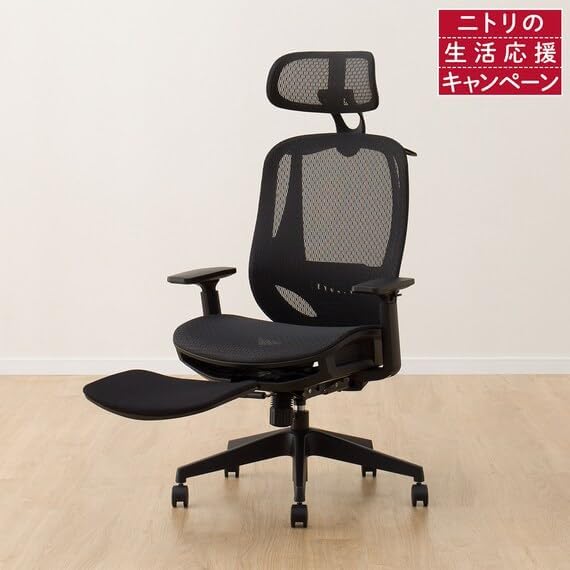
Image: Fully assembled Nitori OC503 Office Chair with footrest extended.
Operating Instructions
Your Nitori OC503 Office Chair offers several adjustable features for personalized comfort.
1. Seat Height Adjustment
To adjust the seat height, locate the lever on the right side under the seat. While seated, pull the lever up to lower the seat. To raise the seat, stand up slightly and pull the lever up. Release the lever at your desired height. The seat height adjusts from approximately 47 cm to 55 cm.
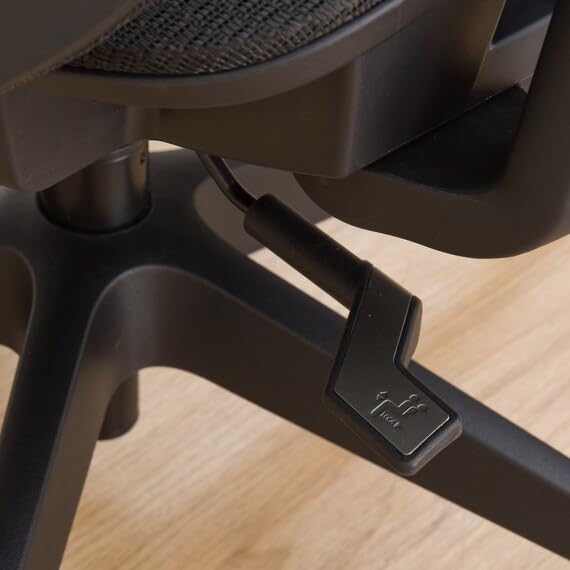
Image: Control lever located under the seat for adjustments.
2. Reclining Function
The chair features a reclining function for enhanced comfort. Use the same lever as the seat height adjustment. Push the lever inwards to unlock the recline. Lean back to your desired angle and pull the lever outwards to lock the recline in place. To return to an upright position, lean forward slightly and push the lever inwards to unlock, then allow the backrest to return to its original position before locking.
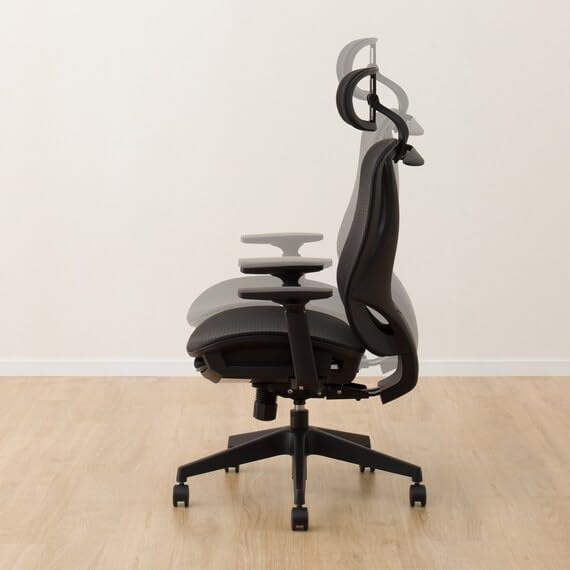
Image: Illustration of the chair's reclining capability.
3. Footrest Operation
To deploy the footrest, pull it out from underneath the seat. Extend it to your desired length. To retract, push it back under the seat until it is fully stored.
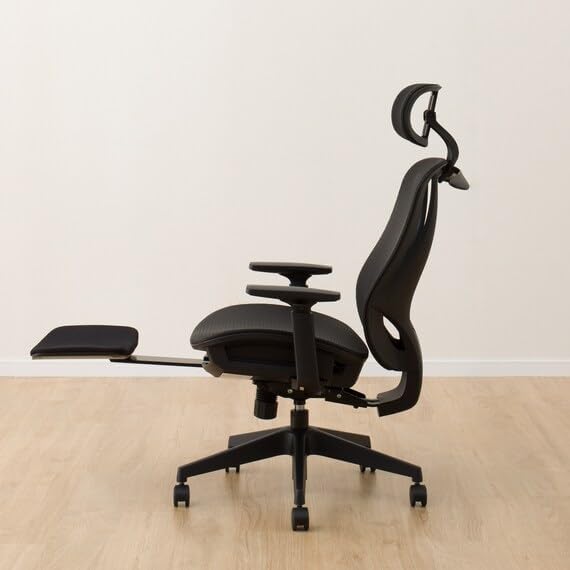
Image: Side view of the chair with the footrest extended.
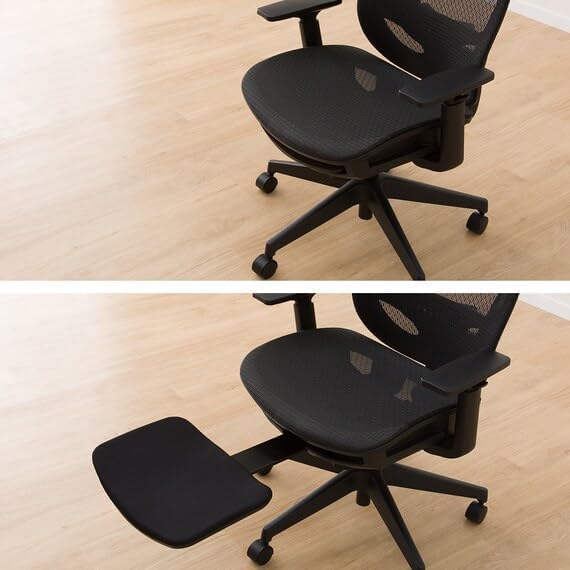
Image: Top-down view comparing the footrest in retracted and extended positions.
4. Lumbar Support Adjustment
The chair includes movable lumbar support to reduce strain on your lower back. Adjust the lumbar support by sliding it up or down on the backrest to find the most comfortable position for your spine.

Image: Close-up of the chair's backrest highlighting the lumbar support area.
5. Headrest Adjustment
The headrest can be adjusted to suit your desired angle and height. Gently push or pull the headrest to adjust its position. It can also be tilted to provide optimal neck support.

Image: Illustration showing the adjustable angle of the headrest.
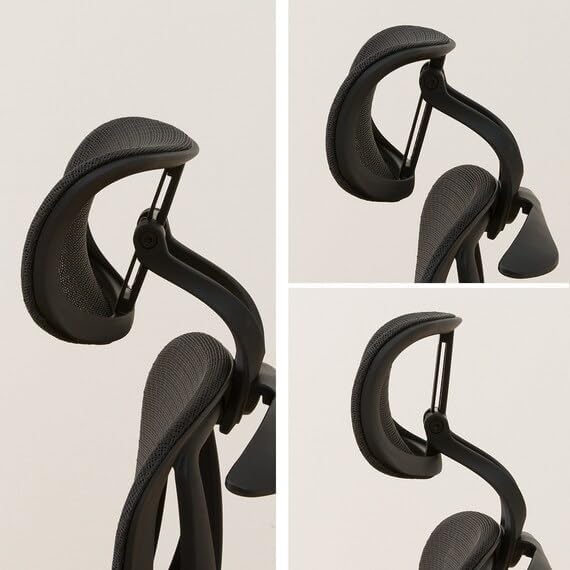
Image: Various adjustable positions of the headrest for personalized comfort.
6. Armrest Adjustment
The armrests are height-adjustable. Locate the button or lever on the side of each armrest. Press it and move the armrest up or down to your preferred height. Release the button/lever to lock it in place.
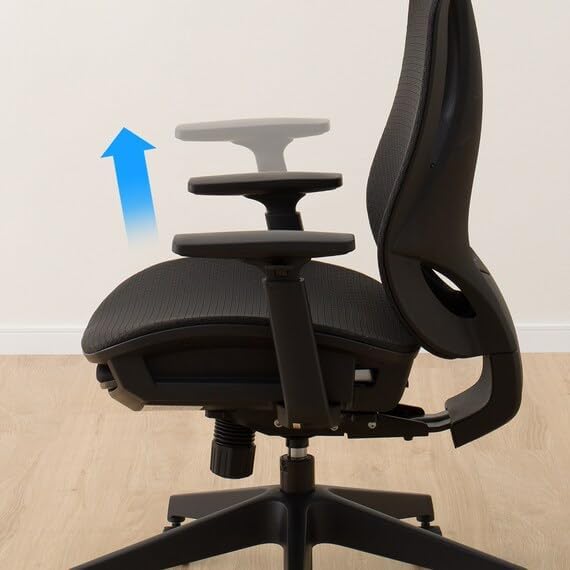
Image: Illustration indicating the upward adjustment of the armrest.
7. Backrest Hanger
The chair is equipped with a convenient hanger on the backrest, suitable for hanging light garments such as jackets or coats.

Image: Close-up of the chair's backrest showing the integrated hanger.
Maintenance and Care
To ensure the longevity and appearance of your Nitori OC503 Office Chair, follow these simple care instructions:
- Cleaning: Wipe clean with a damp cloth. Avoid harsh chemicals or abrasive cleaners, as these may damage the polyester fabric or powder-coated finish.
- Inspection: Periodically check all screws and bolts to ensure they are tight. Re-tighten if necessary.
- Moving: When moving the chair, lift it rather than dragging it to prevent damage to the casters or floor.

Image: Close-up view of the polyester fabric on the seat cushion.
Troubleshooting
If you encounter any issues with your Nitori OC503 Office Chair, please refer to the following common solutions:
- Chair Sinks or Does Not Stay Up: Ensure the gas lift lever is fully engaged. If the issue persists, the gas lift cylinder may need replacement.
- Chair Wobbles: Check all assembly hardware to ensure screws are tightened securely. Ensure the chair is on a flat, even surface.
- Casters Not Rolling Smoothly: Clean any debris (hair, dust) from the caster wheels. If casters are damaged, they may need replacement.
- Recline Not Locking: Verify that the recline lever is fully engaged in the locked position.
Specifications
| Feature | Detail |
|---|---|
| Model Number | OC503 |
| Color | Black |
| Material | Polyester (Refill: Fabric), Alloy Steel (Frame) |
| Product Dimensions (D x W x H) | 66D x 66W x 112H centimetres |
| Item Weight | 19 Kilograms |
| Maximum Recommended Load | 149.69 kg |
| Seat Height Range | Approx. 47 - 55 cm |
| Assembly Required | Yes (Approx. 30 minutes) |
| Special Features | Adjustable Lumbar, Breathable Mesh, Recliner, Footrest |
| Care Instructions | Wipe Clean |

Image: Diagram showing the dimensions of the Nitori OC503 Office Chair.
Warranty Information
This Nitori OC503 Office Chair comes with a 5-year warranty from the date of purchase. This warranty covers manufacturing defects under normal household use. Please retain your proof of purchase for warranty claims. The warranty does not cover damage resulting from misuse, accidents, unauthorized repairs, or normal wear and tear.
Customer Support
For further assistance, parts replacement, or warranty inquiries, please contact Nitori customer support through their official website or the retailer where the product was purchased. Please have your model number (OC503) and proof of purchase ready when contacting support.
Nitori Official Website: www.nitori-net.jp
Ask a question about this manual
Ask about setup, troubleshooting, compatibility, parts, safety, or missing instructions. Manuals+ will review the question and use this page’s manual context to help answer it.